User.js: Being notified about FF updates without turning on auto-update
When testing section 0300, FF is not auto-updating, which is good. But it is also not displaying any notification when a new version is available.
Going to Help -> About Firefox will indicate if a new version is available, but I'd prefer the user to be notified.
I think the best compromise between safety and privacy is for the user to be notified that a new version is available but for FF to not update until instructed by the user. How can this be accomplished?
 Gitoffthelawn
All 18 comments
Works for me. Always has. Don't forget that FF updates aren't instant worldwide, they are rolled out region by region over a day or two.
e.g right now I can look at Help>About and it tells me to update to 65.0.1. But there is no doorhanger prompt for me. I bet it turns up within 24-48 hrs
How can this be accomplished?
By using the user.js as instructed and don't play with other settings (such as app.update.interval which is default 12 hrs if I read it correctly)
 Thorin-Oakenpants
on 13 Feb 2019
Thorin-Oakenpants
on 13 Feb 2019
@Gitoffthelawn BTW, I have a test bed of portable FF versions, and they are all set to not auto-update (because that would defeat the purpose of me checking shit in that version). 63 and 64 always nag me - usually seconds after opening (it depends on when it was last nagging) .. here's 63 (which I'm not in often) = instant update prompt
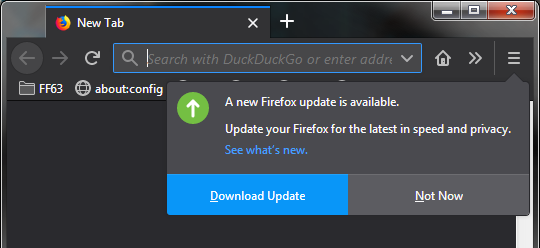
Are you saying you NEVER get update prompts, at all? EVER? What is you testing method and what steps does it entail for you to draw the conclusion that this is the case?
Thorin-Oakenpants
on 13 Feb 2019
@Thorin-Oakenpants Thanks for your quick replies. :+1:
I wasn't aware of the staggered rollouts for updates that have security fixes like 65.0.1. I've never seen a doorhanger for updates, but I typically update via Help -> About Firefox the moment I learn about an update.
As a test, I'll update an in-use browser, but leave a couple portable test browsers non-updated and see if they get doorhangers soon.
Thanks for mentioning that your About Firefox sees the update, but you have no doorhanger yet. That's the same thing I get. Did you have auto-updates disabled on that browser before Mozilla removed the prefs from the about:preferences GUI?
It's interesting that, even without going to About Firefox, FF knows about the update to 65.0.1. You can tell because it is listed in about:preferences#general even if you haven't gone to About Firefox. Yet, there is no doorhanger. I would love a way to display the doorhanger the moment FF learns about the update. Is there a way to do that?
BTW, section 0302a mentions that app.update.auto is now stored in a file and the pref was removed from prefs.js (at least for Windows).
/* 0302a: disable auto update installing for Firefox [NON-WINDOWS FF65+]
 * [NOTE] In FF65+ on Windows this SETTING (below) is now stored in a file and the pref was removed
 * [SETTING] General>Firefox Updates>Check for updates but let you choose... ***/
user_pref("app.update.auto", false);
What file is that pref now stored in?
Gitoffthelawn
on 13 Feb 2019
the moment I learn about an update.
Well, there's your problem. You update before you ever get prompted.
but leave a couple portable test browsers non-updated
No need, I just showed you my portable 63, and I can tell you the same happens in 64 and 65 and 66 - because I see it.
I would love a way to display the doorhanger the moment FF learns about the update. Is there a way to do that?
Well, it seems you don't need it - because you always find out before that by going to help>about - otherwise, there's no hurry, really .. calm the fuck down and chill out :)
I don't think you can make FF prompt immediately, that's up to the backend and regions or whatever metrics they use (could be by language - e.g. check about:support and go to the bottom to see your regional preferences - not saying this is what they use, just speculating - and that's your OS, not FF providing that region info)
Otherwise, you know, the release dates are announced well in advance: https://wiki.mozilla.org/RapidRelease/Calendar
Did you have auto-updates disabled on that browser before Mozilla removed the prefs
They're portable. They have that option disabled by default.
Thorin-Oakenpants
on 13 Feb 2019
I think, but never tested trough... so, please, correct me if I am wrong... that you can speed-up with:
user_pref("app.update.checkInstallTime.days", 0);
Please Pants, don't spank me too much, :smile: :heart:
 crssi
on 13 Feb 2019
crssi
on 13 Feb 2019
app.update.checkInstallTime.days - mine says 63 ..
crssi: I didn't want you to encourage people who can't report properly, and waste time speculating. That's why I removed your post - in hindsight I should have just closed the topic and said nothing. Not giving the URL, not stating what exactly was going wrong, expecting someone to do their problem solving for them despite not having an account, and so on.
In future that's what I will do: close them and mark them as invalid: no STR etc
Thorin-Oakenpants
on 13 Feb 2019
What file is that pref now stored in?
IDK
Thorin-Oakenpants
on 13 Feb 2019
That might work, IDK. It seems if you search DXR that nightly and dev have a value of 2 - https://dxr.mozilla.org/mozilla-central/search?q=checkInstallTime&redirect=false
https://dxr.mozilla.org/mozilla-central/source/browser/components/nsBrowserGlue.js#1108
IDK, and IDwannaFK because I'm happy that update notifications are when I need them. And NFI why 63 vs 2. It's not like you can speed up the start of the prompt for your region, but you might catch the notification earlier - you're checking every 12 hrs anyway - and in fact I believe its a lot earlier than that - I seem to get notified all the time for the week or so I lag before updating - it depends on when you open the browser as well I believe.
Personally, I wouldn't mess with anything
Thorin-Oakenpants
on 13 Feb 2019
@Thorin-Oakenpants wrote:
Well, it seems you don't need it - because you always find out before that by going to help>about - otherwise, there's no hurry, really .. calm the fuck down and chill out :)
:smile: You made me smile and laugh because, ironically, that's why I'm trying to do (chill the fuck out). I don't want to check About Firefox every day (or at all), but I still want to get notified right away if FF knows there is an update.
I'm less than :100: about FF knowing there is an update, but not telling us (which is the current behavior). I mean, FF knows there is an update (which often includes security patches), and the only 3 choices seem to be:
- to allow behind-the-scenes auto-install operations... yuck, for obvious reasons
- check
About Firefoxreligiously... PITA - wait patiently for a doorhanger to appear some random time hopefully within a few days... not good for security reasons
I'm hoping for a 4th option. ;)
Gitoffthelawn
on 13 Feb 2019
What file is that pref now stored in?
C:\ProgramData\Mozilla\updates\<randomnumber>\update-config.json
 earthlng
on 13 Feb 2019
earthlng
on 13 Feb 2019
not good for security reasons
Nah. It's all good. I mean, they don't disclose the security info for quite a few days after release, and some of those bugzillas remain access denied, and even if they open them, it can be quite a while after. Note: I can sometimes see what they're doing thru commits even if the ticket number is access denied. However, the chances you get bitten are zero to none, IMO.
Do you want to close this, or fiddle with getting notifications quicker (I mean if you got firefox to check every minute, you could theoretically save 12 hrs .. that's HALF A DAY MAN!!!! :)
Thorin-Oakenpants
on 13 Feb 2019
It's interesting .. these are nilla portable Firefoxes (which have updates at check only by default), that my FF63 tells me about an update as soon as I open it, but FF64 doesn't. So I wonder if something changed in 64+
Thorin-Oakenpants
on 13 Feb 2019
I'm digging a little deeper - I got a test FF65 profile (3 of them actually!) to all auto-update to 65.0.1. BUT my main FF65 refuses to notify me (and it's clearly due, but the extra delay might be a timer thing) - and see above for the FF64 version as well, it also is not notifying me (and the update is weeks old)
Thorin-Oakenpants
on 13 Feb 2019
OK .. so I was nosing around the folders in C:\ProgramData\Mozilla\updates\<randomnumber>\ where I have one folder per test portable FF and noticed that FF64 had an last-update.log, just like the FF65 test versions that updated. And I had FF64 open for around 10 minutes, looking at a few things, and loaded a web site to return the version (because of something in the log file) to make sure it really was FF64, and I got a notification.
I closed 64, opened it and nothing. I guess I need to have it open a little longer. They must have changed something from 63->64 so as to be not so naggy (e.g on open). And since I've been opening and closing FF's all day/night long doing various tests, I haven't really had FF64 or FF65 (test or my main FF) open long enough, and the upgrade has only just hit me.
I guess I'll find out later when I have FF open for an extended period, or some time has lapsed, if I get a notification. I should have had one by now IMO.
Thorin-Oakenpants
on 13 Feb 2019
Aww man ...I'm taking a break. The change was to 65+ re the pref being removed, and IDK WTF is going on with my 64 vs 63 difference, which didn't help - and that I had numerous folders including since deleted test versions. For some reason, in my head, I thought this was all FF63+ (which is probably the version, from memory, that they removed the option to disable update checks) - so I've been confusing myself .. well done .. time for :beers:
And I wiped all the folders in ProgramData\Mozilla\updates and unfortunately, as soon as I open my main FF65, I went straight to options and disabled auto-updates, but by then it had flagged me for update and on a restart it downloaded it and applied it. So now I can't get a notification for 65.0.1
Thorin-Oakenpants
on 13 Feb 2019
I had a little time to mess around with it some more.
It seems that FF will check for updates, but will not notify the user right away when it knows an update is available. I hope to fix that.
I tried adjusting app.update.badgeWaitTime and app.update.promptWaitTime, but neither gave the desired result.
What did work is setting app.update.interval to a ridiculously low value, like 5 (seconds). The problem with doing that, obviously, is that FF then checks for updates every 5 seconds. I doubt that's good for browser performance, and I doubt Mozilla wants a bunch of people doing that. But it did achieve the desired result.
I set those three settings back to defaults, and I'm definitely interested in a better solution.
Gitoffthelawn
on 17 Feb 2019
What did work is setting
app.update.interval...
So the default value is 43200 (seconds) = 12 hrs. That pretty much covers it. There's no super urgent need to rush like a madman to get an update. You will get notified in time. You could do a days work and not get an update, but you would when you wake up the next day - that's the worse case scenario. 1 day delay due to timing and sleeping (but while you were sleeping, you weren't using the browser anyway).
At twice a day, that's 84 checks between major releases (over 6 weeks). If you made it every 4 hrs, then you're now checking 252 times (and also when you open help>about, and when you open about:preferences I think as well). Or make it every 6 hrs - but all that does is let you know always 6 hrs earlier - i.e:
- scenario1: FF auto checks = no update available. 1 minute later FF allows updates for your region, 6 hrs later FF auto checks = update available (so you got it 6 hrs early)
- scenario2: FF auto checks = no update available. 5hrs 59mins later FF allows updates for your region, 1 minute later FF auto checks = update available (so you got it 6 hrs early)
i.e it doesn't matter what you set it to, your auto-checks points are fixed, so it doesn't matter when Firefox allows updates for your region, the only difference is how often you check. So if default is 12 hrs, but you check every 2, then you will always get it 10 hrs quicker.
to a ridiculously low value, like 5 (seconds). The problem with doing that, obviously, is that FF then checks for updates every 5 seconds
I only have one question. Does it display the update badge and prompt? I mean, I could go to help>about and it would say there was an update, but there was no badge or prompt.
Thorin-Oakenpants
on 19 Feb 2019
I'm closing this. I kept it open because I was intrigued as to what happened in 63->64. I have been setting up multiple FF's and test profiles in VM's on various linux platforms, win10 etc. And doing testing. 63 prompts for an update immediately - in fact I've seen to prompt me twice in succession when I click out of the VM (to write something down), and back in. But 64 doesn't do jack shit (prompting) most of the time. But, and I have done a lot of testing on other things - 64 does prompt from time to time. I'm typically only have a FF release open in testing for less than 5 minutes.
All I can say to that, is that they modified the behavior of the prompt in 64+ so it wasn't so annoying / frequent - but it definitely prompts, and I will say that it does so in a timely manner (i.e within 12 hours of the last check).
I also confused myself earlier with 65 in my test FF's with new profiles - because it was in 65+ that the update pref was removed in windows - this actually caused my 65 test profiles to auto-update - each new profile is a new random folder - C:\ProgramData\Mozilla\updates\<randomnumber>\, and you need to start it via profile manager and check offline before opening it to make sure it doesn't instantly fucking update - at the moment this is OK, because 65 can only update to 65.0.1, but that will change once 66 hits stable.
So note to self in future re nilla profiles when using older FF releases that are 65+, not to trigger fucking updating my test FF on windows. Fun.
Thorin-Oakenpants
on 21 Feb 2019
Related issues
earthlng
·
81Comments
Thorin-Oakenpants
·
115Comments
earthlng
·
78Comments
 RoxKilly
·
60Comments
Thorin-Oakenpants
·
108Comments
RoxKilly
·
60Comments
Thorin-Oakenpants
·
108Comments
Most helpful comment
So the default value is
43200(seconds) = 12 hrs. That pretty much covers it. There's no super urgent need to rush like a madman to get an update. You will get notified in time. You could do a days work and not get an update, but you would when you wake up the next day - that's the worse case scenario. 1 day delay due to timing and sleeping (but while you were sleeping, you weren't using the browser anyway).At twice a day, that's 84 checks between major releases (over 6 weeks). If you made it every 4 hrs, then you're now checking 252 times (and also when you open help>about, and when you open about:preferences I think as well). Or make it every 6 hrs - but all that does is let you know always 6 hrs earlier - i.e:
i.e it doesn't matter what you set it to, your auto-checks points are fixed, so it doesn't matter when Firefox allows updates for your region, the only difference is how often you check. So if default is 12 hrs, but you check every 2, then you will always get it 10 hrs quicker.
I only have one question. Does it display the update badge and prompt? I mean, I could go to help>about and it would say there was an update, but there was no badge or prompt.