Uppy: Uppy Image Editor shows 2 editable images instead of one
I'm using @uppy/image-editor and seeing two images that are both editable (only changes to the image on the right actually seem to be saved). This is regardless of file type.
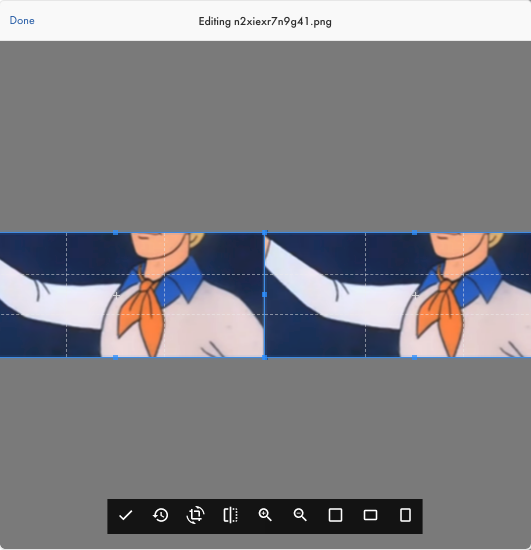
Configuration looks like this:
          <Dashboard
            uppy={uppy}
            metaFields={[
              { id: 'name', name: 'Name', placeholder: 'File name' },
            ]}
            plugins={['ImageEditor']}
            locale={{
              strings: {
                // Text to show on the droppable area.
                // `%{browse}` is replaced with a link that opens the system file selection dialog.
                dropHereOr: 'Drop here or %{browse}',
                // Used as the label for the link that opens the system file selection dialog.
                browse: 'browse',
              },
            }}
          />
Versions:
    "@uppy/core": "1.13.2",
    "@uppy/image-editor": "0.1.6",
    "@uppy/react": "1.10.8",
 mcabrams
All 6 comments
Hi! Could you please specify what browser / OS you are using? Need steps to reproduce. Thanks!
 arturi
on 2 Nov 2020
arturi
on 2 Nov 2020
Hi! Could you please specify what browser / OS you are using? Need steps to reproduce. Thanks!
Hi! I am using macOS Catalina version 10.15.7 and Google Chrome Version 86.0.4240.111 (Official Build) (x86_64)
I'm not aware of any live examples of the image editor, so I'm not sure if there are more variables at play leading to this - if you know of any examples of the image editor in the wild I'd be happy to check them out and see if I have the same issue, otherwise I'll try to create a reproduction on codesandbox in the future.
mcabrams
on 2 Nov 2020
Thanks! Yes we do have a live example right here: https://uppy.io/examples/dashboard/ (tick the “Image Editor” checkbox).
arturi
on 3 Nov 2020
@arturi Thanks for sharing that - it looks ok there so I'll take another look at my implementation and see if anything comes to mind.
mcabrams
on 4 Nov 2020
@arturi Here is a codesandbox reproduction where I am seeing the double image issue:
https://codesandbox.io/s/gifted-feather-5lvks?file=/src/App.js
mcabrams
on 4 Nov 2020
Ok, I got it working by removing the target option when setting up the ImageEditor, following the guidance here: https://uppy.io/docs/react/dashboard/#Props.
The
cannot be passed to a target: option of a remote provider or plugins such as @uppy/webcam. To use other plugins like @uppy/webcam with the component, first add them to the Uppy instance, and then specify their id in the plugins prop.
https://codesandbox.io/s/romantic-ride-lsw4f?file=/src/App.js
We probably should double-mention this in the docs 🤔
arturi
on 6 Nov 2020
Related issues
 mokutsu-coursera
·
3Comments
mokutsu-coursera
·
3Comments
 quetzyg
·
3Comments
quetzyg
·
3Comments
 risonsimon
·
4Comments
risonsimon
·
4Comments
 agreene-coursera
·
4Comments
agreene-coursera
·
4Comments
 ghost
·
4Comments
ghost
·
4Comments
Most helpful comment
Ok, I got it working by removing the
targetoption when setting up the ImageEditor, following the guidance here: https://uppy.io/docs/react/dashboard/#Props.https://codesandbox.io/s/romantic-ride-lsw4f?file=/src/App.js
We probably should double-mention this in the docs 🤔