Uppy: AWS S3 Multipart Upload - Performance Issues when uploading several files at once.
Hello,
I noticed that when uploading several files at once, uppy-io seems to not call the completion end point immediately after a file's parts have been completely uploaded. It is giving precedence to uploading more parts than essentially marking the files done by calling the completion end point. The issue becomes more pronounced when uploading more than 100 files at once.
I uploaded 100 files about 5.5MB each as a test. The Dashboard completion status showed Uploading 100%, yet the # of files completed only showed 30 of 100 completed. That's because the completion calls seem to have low priority or are being executed after nearly all the parts in the entire batch upload have completed.
This is confusing because the user sees that Uploading is 100% done - when it isn't from a user's stand point. Also depending on how large the files are it can take a very long time before a single file has actually had it's completion end point called. This is a problem because additional backend processing can not occur on completed files until nearly the entire batch upload has completed. ie, I also did a batch run of 465 files (3GB+ total) that took over 30 minutes to upload all the files. Uploading percentage increased during the time of upload, but 0 of 465 files were completed until near the very end of the upload process.
I also watch the network tab in my browser while these files are being processed. And I can see that a slew of calls to the complete (/{upload-id}/complete?key={file-key}) end point occur after nearly all the file parts from every file in the batch upload finishes.
I'm requesting that after each file has had all of it's parts uploaded, the completion end point for the file should be called before the next file's parts start processing/uploading.
My simple set up:
uppy-io v1.0.0 (from CDN - https://transloadit.edgly.net/releases/uppy/v1.0.0/uppy.min.js)
Using the Core, Dashboard, & AWS S3 Multipart plug ins. I use my own back end (not companion) that is compatible with the companion multi part upload end points.
index.html:
<!doctype html>
<html>
<head>
    <meta charset="utf-8">
    <title>Uppy</title>
    <link href="https://transloadit.edgly.net/releases/uppy/v1.0.0/uppy.min.css" rel="stylesheet">
</head>
<body>
<div id="drag-drop-area"></div>

<script src="https://transloadit.edgly.net/releases/uppy/v1.0.0/uppy.min.js"></script>
<script src="index.js"></script>
</body>
</html>
index.js:
const AwsS3 = Uppy.AwsS3,
    AwsS3Multipart = Uppy.AwsS3Multipart;

const uppy = Uppy.Core()
    .use(Uppy.Dashboard, {
        height: 600,
        width: "100%",
        inline: true,
        disableThumbnailGenerator: true,
        showLinkToFileUploadResult: false,
        showProgressDetails: true,
        target: "#drag-drop-area"
    })
    .use(AwsS3Multipart, {
        limit: 4,
        companionUrl: "http://localhost:3001/api/storage-request/"
    })
    .on("complete", (result) => {
        console.log(result);
        console.log("Upload complete! We’ve uploaded these files:", result.successful);
    });
 humblepie
All 11 comments
It may be the same bug, but I feel that the calculation of chunk size of multipart upload is wrong.
Uploading a 50GB file fails but the error message at that time is this
{"error": "s3: the part number must be a number between 1 and 10000."}
When look at this source, it appears that the chunk size is calculated dynamically from the file size, but when the above message is issued, the file size being uploaded in S3 is only 56.6 GB

sample file
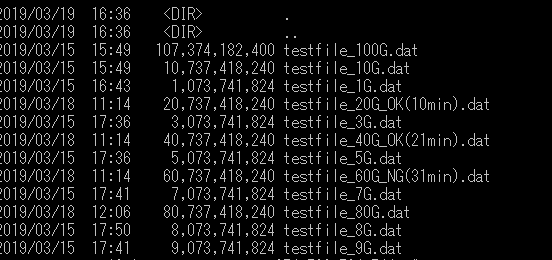
S3 file

 Zaki-XL
on 10 May 2019
Zaki-XL
on 10 May 2019
https://docs.aws.amazon.com/AmazonS3/latest/dev/qfacts.html
The restriction that the maximum chunk size is 5GB is also uncoded.
Zaki-XL
on 10 May 2019
@Zaki-XL I do not believe your issue is related to the performance issue I originally stated. And if you got an error during your upload, the completion end point would not have been called. Meaning your parts would've been left individually and not composed into the complete file your image shows in S3.
Your image showing your S3 upload looks like it completed successfully. And S3 is showing the correct file size for your upload.
1 gibibyte = 1024 * 1024 * 1024
So your file size divided by 1GiB:
60737418240 / 1024 * 1024 * 1024 = 56.57GiB
It appears that the uppy-dashboard component is using 1GB = 1000 * 1000 * 1000 when showing file sizes in the UI. That's why you think you have a discrepancy.
When dealing with file sizes I believe it is more appropriate to use GiB (Amazon S3) & not GB (uppy dashboard). Even though historically that confused end users who thought they were getting less size when buying hard drives that were advertised using GB.
humblepie
on 10 May 2019
Upon looking through the source code for the AWS S3 Multipart uploader, it appears that the implementation sets up a promise for every file that is being uploaded and executes every single promise at the same time instead of setting up a batch where a file completes and then the next one starts. For real world use where users can queue up several hundred files at once, this would essentially pummel the server starting the requests for every file at the same time. It also appears that the limit option is a per file setting. It does not restrict the total number of chunks being uploaded at once across ALL files. This causes severe performance issues.
This implementation is not suitable if you need to allow users to select & upload several hundred files.
humblepie
on 11 May 2019
Thanks for the detailed writeups, I'll look into this stuff ASAP
(half the team is on vacay and i'm moving apartments so things have been a bit slow on our end, sorry!)
 goto-bus-stop
on 13 May 2019
goto-bus-stop
on 13 May 2019
@goto-bus-stop
In the logic, I think the problem is to raise the decimal point(Math.ceil)
The total chunk size must match the file size. The decimal point raised, so an error will occur in the total value
Chunk size is decided by integer value(MB) and it is more correct to adjust by the last surplus(byte)
Zaki-XL
on 16 May 2019
@Zaki-XL There is nothing wrong w/ the chunk size calculation. The calculation ensures there will be no more than 10,000 chunks - which is the limit imposed by AWS.
Run the following code that mimics what the _initChunks method is doing to determine how many chunks to split the file into. It's basically the same, but modified so you can easily run it in your browser's javascript console:
function _initChunks(fileSize) {
    var MB = 1024 * 1024
    var chunks = []
    var chunkSize = Math.max(Math.ceil(fileSize / 10000), 5 * MB)

    for (var i = 0; i < fileSize; i += chunkSize) {
      var end = Math.min(fileSize, i + chunkSize)
      chunks.push({start: i, end})
    }

    console.log({ fileSize, numChunks: chunks.length, chunks})
}

console.clear()
// Test various file sizes
_initChunks(1073741824)
_initChunks(60737418240)
_initChunks(80737418240)
_initChunks(107374182400)
Possibly related to https://github.com/transloadit/uppy/issues/1428
 kvz
on 29 May 2019
kvz
on 29 May 2019
The issue seems to be, that any uploads will complete only after all uploads have finished the createMultipartUpload stage.
I set up some good old _console.logging_ to see how the flow goes with 150 large files (~5Mb each)
Flow currently
- Uppy will call
createMultipartUploadfor each file - Uppy will start uploading files as soon as the
createMultipartUpload-calls return - Uppy will not however call
completeMultipartUploadon any files, until all files have succesfully return theircreateMultipartUploadcalls.
Better flow would be
- Uppy will throttle uploads to the limited amount of simultaneous uploads, having (for example) 2-4 uploads at any given moment
- Only once an upload is actually going to be started, will the
createMultipartUploadget called - Uploads will call
completeMultipartUploadas soon as they finish
@goto-bus-stop any thoughts on the suggested flow or ideas how to tackle this best? I'd love to get this fixed, as it's causing
a) our servers getting swamped with possibly hundreds or thousands of upload requests, way ahead of time before the uploads even begin. If a user decides to close the browser before uploads finish, we end up with lots of unnecessary documents in our database.
b) it's very confusing for the user that the files don't get completed in the user interface, even when they have apparently been 100% loaded
c) having the uploads not completed until after all uploads have returned their createMultipartUpload calls increases the risk of the uploads never being completed, even while they have been 100% uploaded (_let's say the user's network dies just before the last call createMultipartUpload returns: user has already uploaded 10-50 files, but none of them have been assembled by calling completeMultipartUpload_)
 arggh
on 22 Jul 2019
arggh
on 22 Jul 2019
@arggh thanks for diving into that! This makes sense, the current limiting implementation does kick off a ton of createMultipartUpload requests first. I'm reworking the limiting implementation in #1736 for various reasons, will make sure that this is addressed as well. We likely have a similar problem with non-multipart uploads too.
goto-bus-stop
on 23 Jul 2019
Great! I'll follow the progress closely in #1736. Let me know if I can provide any assistance (we have to fix this one way or the other very soon, so I'm eager to help)
arggh
on 23 Jul 2019
Related issues
 ghost
·
4Comments
ghost
·
4Comments
 enneid
·
4Comments
enneid
·
4Comments
 matthewhartstonge
·
3Comments
matthewhartstonge
·
3Comments
 hikurangi
·
4Comments
hikurangi
·
4Comments
 quetzyg
·
3Comments
quetzyg
·
3Comments