Uppy: 0.25.1 > Cannot read property 'icon' of null

 ghost
ghost
All 16 comments
Hi, thanks for reporting! Could you paste your Uppy code, how are you initializing it? Mostly interested in what plugin is causing this.
 arturi
on 6 Jun 2018
arturi
on 6 Jun 2018
I'm using:
const Uppy = require("uppy/lib/core");
const Dashboard = require("uppy/lib/react/Dashboard");
const AwsS3 = require("uppy/lib/plugins/AwsS3");
const Webcam = require("uppy/lib/plugins/Webcam");
Ok, thanks! I see React wrapper in there. Could you provide the full code too, please?
arturi
on 6 Jun 2018
Looking at the code, this may happen if uppy.getPlugin(id) returned null, which happens if the plugins={[]} list includes an ID that doesn't exist. Could you double check your plugin IDs?
(We should def throw a more obvious error in that situation.)
 goto-bus-stop
on 7 Jun 2018
goto-bus-stop
on 7 Jun 2018
I think this is worse than you think.
I have this code:
import React, { PureComponent } from "react";
import Modal from "reactstrap/lib/Modal";

const Uppy = require("uppy/lib/core");
const Dashboard = require("uppy/lib/react/Dashboard");
const AwsS3 = require("uppy/lib/plugins/AwsS3");
const Webcam = require("uppy/lib/plugins/Webcam");

const uppy = new Uppy({ autoProceed: true });

class DashUpload extends PureComponent {
  constructor(props) {
    super(props);

    uppy
      .use(AwsS3, {
        getUploadParameters(file) {
          return (file) // some code
        },
        timeout: 1000
      })
      .use(Webcam, {
        locale: {
          strings: {
            smile: "Gülümseyin!"
          }
        }
      })
      .on("file-removed", fileId => {
        console.log("file-removed!", fileId)
      })
      .on("upload-success", function(fileId) {
        console.log("upload-success!", fileId)
      })
      .on("complete", function(result) {
        console.log("complete!", fileId)
      })
      .run();
  }

  componentWillUnmount() {
    uppy.close();
  }

  render() {
    const { modalOpen, modalOnClose } = this.props;
    return (
      <Modal
          isOpen={modalOpen}
          toggle={modalOnClose}
      >
        <Dashboard
            plugins={["Webcam"]}
            uppy={uppy}
        />
      </Modal>
    );
  }
}

export default DashUpload;
The problem is when I close the modal:
Uncaught (in promise) TypeError: Cannot read property 'icon' of null
    at attachRenderFunctionToTarget (index.js:468)
    at Array.map (<anonymous>)
    at Dashboard.render (index.js:488)
    at rerender (Plugin.js:112)
    at Plugin.js:35
attachRenderFunctionToTarget @ index.js:468
render @ index.js:488
rerender @ Plugin.js:112
(anonymous) @ Plugin.js:35
Promise.then (async)
(anonymous) @ Plugin.js:29
update @ Plugin.js:86
(anonymous) @ Core.js:179
(anonymous) @ Core.js:941
iteratePlugins @ Core.js:940
updateAll @ Core.js:178
(anonymous) @ Core.js:147
(anonymous) @ DefaultStore.js:44
_publish @ DefaultStore.js:43
setState @ DefaultStore.js:25
setState @ Core.js:191
cancelAll @ Core.js:646
reset @ Core.js:668
close @ Core.js:971
componentWillUnmount @ DashUpload.js:79
callComponentWillUnmountWithTimer @ react-dom.development.js:14167
callCallback @ react-dom.development.js:100
invokeGuardedCallbackDev @ react-dom.development.js:138
invokeGuardedCallback @ react-dom.development.js:187
safelyCallComponentWillUnmount @ react-dom.development.js:14174
commitUnmount @ react-dom.development.js:14381
unmountHostComponents @ react-dom.development.js:14683
commitDeletion @ react-dom.development.js:14714
commitAllHostEffects @ react-dom.development.js:15296
callCallback @ react-dom.development.js:100
invokeGuardedCallbackDev @ react-dom.development.js:138
invokeGuardedCallback @ react-dom.development.js:187
commitRoot @ react-dom.development.js:15446
completeRoot @ react-dom.development.js:16496
performWorkOnRoot @ react-dom.development.js:16440
performWork @ react-dom.development.js:16358
performSyncWork @ react-dom.development.js:16330
interactiveUpdates$1 @ react-dom.development.js:16597
interactiveUpdates @ react-dom.development.js:2150
dispatchInteractiveEvent @ react-dom.development.js:4528
When I try to reopen the modal it says:
Core.js:901 Uncaught Error: Already found a plugin named 'AwsS3'. Tried to use: 'AwsS3'.
Uppy plugins must have unique 'id' options. See https://uppy.io/docs/plugins/#id.
    at Uppy.use (Core.js:901)
    at new DashUpload (DashUpload.js:20)
    at constructClassInstance (react-dom.development.js:11333)
    at updateClassComponent (react-dom.development.js:13036)
    at beginWork (react-dom.development.js:13715)
    at performUnitOfWork (react-dom.development.js:15741)
    at workLoop (react-dom.development.js:15780)
    at HTMLUnknownElement.callCallback (react-dom.development.js:100)
    at Object.invokeGuardedCallbackDev (react-dom.development.js:138)
    at invokeGuardedCallback (react-dom.development.js:187)
    at replayUnitOfWork (react-dom.development.js:15194)
    at renderRoot (react-dom.development.js:15840)
    at performWorkOnRoot (react-dom.development.js:16437)
    at performWork (react-dom.development.js:16358)
    at performSyncWork (react-dom.development.js:16330)
    at interactiveUpdates$1 (react-dom.development.js:16597)
    at interactiveUpdates (react-dom.development.js:2150)
    at dispatchInteractiveEvent (react-dom.development.js:4528)
use @ Core.js:901
DashUpload @ DashUpload.js:20
constructClassInstance @ react-dom.development.js:11333
updateClassComponent @ react-dom.development.js:13036
beginWork @ react-dom.development.js:13715
performUnitOfWork @ react-dom.development.js:15741
workLoop @ react-dom.development.js:15780
callCallback @ react-dom.development.js:100
invokeGuardedCallbackDev @ react-dom.development.js:138
invokeGuardedCallback @ react-dom.development.js:187
replayUnitOfWork @ react-dom.development.js:15194
renderRoot @ react-dom.development.js:15840
performWorkOnRoot @ react-dom.development.js:16437
performWork @ react-dom.development.js:16358
performSyncWork @ react-dom.development.js:16330
interactiveUpdates$1 @ react-dom.development.js:16597
interactiveUpdates @ react-dom.development.js:2150
dispatchInteractiveEvent @ react-dom.development.js:4528
index.js:2178 The above error occurred in the <DashUpload> component:
    in DashUpload.js
Why this error: Already found a plugin named 'AwsS3'. Tried to use: 'AwsS3'. ???
ghost
on 7 Jun 2018
That second error is because the constructor of a react component runs multiple times. If you use a global instance you should also initialise plugins globally. If you want to initialise uppy in a component constructor, the uppy instance needs to be created inside the constructor.
On 7 June 2018 22:10:50 CEST, johnunclesam notifications@github.com wrote:
I think this is worse than you think.
I have this code:
import React, { PureComponent } from "react";
import Modal from "reactstrap/lib/Modal";

const Uppy = require("uppy/lib/core");
const Dashboard = require("uppy/lib/react/Dashboard");
const AwsS3 = require("uppy/lib/plugins/AwsS3");
const Webcam = require("uppy/lib/plugins/Webcam");

const uppy = new Uppy({ autoProceed: true });

class DashUpload extends PureComponent {
 constructor(props) {
   super(props);

   uppy
     .use(AwsS3, {
       getUploadParameters(file) {
         return (file) // some code
       },
       timeout: 1000
     })
     .use(Webcam, {
       locale: {
         strings: {
           smile: "Gülümseyin!"
         }
       }
     })
     .on("file-removed", fileId => {
       console.log("file-removed!", fileId)
     })
     .on("upload-success", function(fileId) {
       console.log("upload-success!", fileId)
     })
     .on("complete", function(result) {
       console.log("complete!", fileId)
     })
     .run();
 }

 componentWillUnmount() {
   uppy.close();
 }

 render() {
   const { modalOpen, modalOnClose } = this.props;
   return (
     <Modal
         isOpen={modalOpen}
         toggle={modalOnClose}
     >
       <Dashboard
           plugins={["Webcam"]}
           uppy={uppy}
       />
     </Modal>
   );
 }
}

export default DashUpload;
The problem is when I close the modal:
Uncaught (in promise) TypeError: Cannot read property 'icon' of null
   at attachRenderFunctionToTarget (index.js:468)
   at Array.map (<anonymous>)
   at Dashboard.render (index.js:488)
   at rerender (Plugin.js:112)
   at Plugin.js:35
attachRenderFunctionToTarget @ index.js:468
render @ index.js:488
rerender @ Plugin.js:112
(anonymous) @ Plugin.js:35
Promise.then (async)
(anonymous) @ Plugin.js:29
update @ Plugin.js:86
(anonymous) @ Core.js:179
(anonymous) @ Core.js:941
iteratePlugins @ Core.js:940
updateAll @ Core.js:178
(anonymous) @ Core.js:147
(anonymous) @ DefaultStore.js:44
_publish @ DefaultStore.js:43
setState @ DefaultStore.js:25
setState @ Core.js:191
cancelAll @ Core.js:646
reset @ Core.js:668
close @ Core.js:971
componentWillUnmount @ DashUpload.js:79
callComponentWillUnmountWithTimer @ react-dom.development.js:14167
callCallback @ react-dom.development.js:100
invokeGuardedCallbackDev @ react-dom.development.js:138
invokeGuardedCallback @ react-dom.development.js:187
safelyCallComponentWillUnmount @ react-dom.development.js:14174
commitUnmount @ react-dom.development.js:14381
unmountHostComponents @ react-dom.development.js:14683
commitDeletion @ react-dom.development.js:14714
commitAllHostEffects @ react-dom.development.js:15296
callCallback @ react-dom.development.js:100
invokeGuardedCallbackDev @ react-dom.development.js:138
invokeGuardedCallback @ react-dom.development.js:187
commitRoot @ react-dom.development.js:15446
completeRoot @ react-dom.development.js:16496
performWorkOnRoot @ react-dom.development.js:16440
performWork @ react-dom.development.js:16358
performSyncWork @ react-dom.development.js:16330
interactiveUpdates$1 @ react-dom.development.js:16597
interactiveUpdates @ react-dom.development.js:2150
dispatchInteractiveEvent @ react-dom.development.js:4528
When I try to reopen modal with uppy instance it says:
Core.js:901 Uncaught Error: Already found a plugin named 'AwsS3'. Tried
to use: 'AwsS3'.
Uppy plugins must have unique 'id' options. See
https://uppy.io/docs/plugins/#id.
   at Uppy.use (Core.js:901)
   at new DashUpload (DashUpload.js:20)
   at constructClassInstance (react-dom.development.js:11333)
   at updateClassComponent (react-dom.development.js:13036)
   at beginWork (react-dom.development.js:13715)
   at performUnitOfWork (react-dom.development.js:15741)
   at workLoop (react-dom.development.js:15780)
   at HTMLUnknownElement.callCallback (react-dom.development.js:100)
   at Object.invokeGuardedCallbackDev (react-dom.development.js:138)
   at invokeGuardedCallback (react-dom.development.js:187)
   at replayUnitOfWork (react-dom.development.js:15194)
   at renderRoot (react-dom.development.js:15840)
   at performWorkOnRoot (react-dom.development.js:16437)
   at performWork (react-dom.development.js:16358)
   at performSyncWork (react-dom.development.js:16330)
   at interactiveUpdates$1 (react-dom.development.js:16597)
   at interactiveUpdates (react-dom.development.js:2150)
   at dispatchInteractiveEvent (react-dom.development.js:4528)
use @ Core.js:901
DashUpload @ DashUpload.js:20
constructClassInstance @ react-dom.development.js:11333
updateClassComponent @ react-dom.development.js:13036
beginWork @ react-dom.development.js:13715
performUnitOfWork @ react-dom.development.js:15741
workLoop @ react-dom.development.js:15780
callCallback @ react-dom.development.js:100
invokeGuardedCallbackDev @ react-dom.development.js:138
invokeGuardedCallback @ react-dom.development.js:187
replayUnitOfWork @ react-dom.development.js:15194
renderRoot @ react-dom.development.js:15840
performWorkOnRoot @ react-dom.development.js:16437
performWork @ react-dom.development.js:16358
performSyncWork @ react-dom.development.js:16330
interactiveUpdates$1 @ react-dom.development.js:16597
interactiveUpdates @ react-dom.development.js:2150
dispatchInteractiveEvent @ react-dom.development.js:4528
index.js:2178 The above error occurred in the <DashUpload> component:
   in DashUpload.js
Why this error:
Already found a plugin named 'AwsS3'. Tried to use: 'AwsS3'.???--
You are receiving this because you commented.
Reply to this email directly or view it on GitHub:
https://github.com/transloadit/uppy/issues/890#issuecomment-395549234
--
Sent from mobile. Please excuse my brevity.
goto-bus-stop
on 7 Jun 2018
@goto-bus-stop ok. makes sense. In fact I change it like this just now. Before (with 0.25.0) this line:
const uppy = new Uppy({ autoProceed: true });
was in constructor, beforse every .use.
So just the other problem?
Uncaught (in promise) TypeError: Cannot read property 'icon' of null
    at attachRenderFunctionToTarget (index.js:468)
I dont know about that yet. That it happens on close is very useful information! The earliest ill be able to look at it closer is Monday, maybe @arturi has some time before then, not sure
On 7 June 2018 22:21:52 CEST, johnunclesam notifications@github.com wrote:
@goto-bus-stop ok. makes sense. In fact I change it like this just now.
Before (with 0.25.0) this line:
const uppy = new Uppy({ autoProceed: true });was in constructor, beforse every
.use.So just the other problem?
Uncaught (in promise) TypeError: Cannot read property 'icon' of null
   at attachRenderFunctionToTarget (index.js:468)
--
You are receiving this because you were mentioned.
Reply to this email directly or view it on GitHub:
https://github.com/transloadit/uppy/issues/890#issuecomment-395552213
--
Sent from mobile. Please excuse my brevity.
goto-bus-stop
on 7 Jun 2018
i'm having a similar issue and can't seem to crack it. Mine occurs during the opening of the Dashboard modal in React. It appears to be related, in my case, to uppy.getPlugin(target.id) where target.id = "react:DashboardModal:StatusBar". Keep us posted and i'll let you know if i find a solution too.
 jimyaghi
on 9 Jun 2018
jimyaghi
on 9 Jun 2018
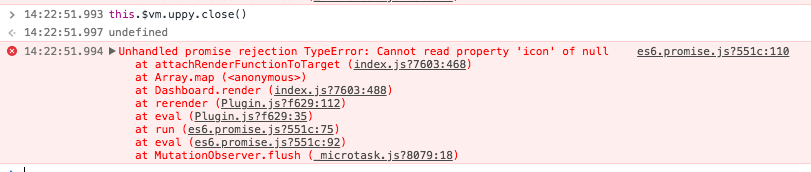
I'm having a similar issue when calling uppy.close:
Unhandled promise rejection TypeError: Cannot read property 'icon' of null
Not happening with 0.24.2.
Code:
mounted() {
  var self = this;
  this.uppy.use(Dashboard, {
    target: "body",
    metaFields: [],
    thumbnailWidth: 280,
    showProgressDetails: true,
    hideUploadButton: false,
    hideProgressAfterFinish: false,
    closeModalOnClickOutside: true,
    disablePageScrollWhenModalOpen: true,
    proudlyDisplayPoweredByUppy: true
  }).use(S3MultipartUpload, {
    s3MultipartBaseURL: this.$store.state.plugins.config.s3.multiPartBaseURL,
    get authToken() {
      return self.$store.state.app.session.token;
    },
    get prefix() {
      return self.subPath;
    },
    get projectId() {
      return self.projectId;
    }
  }).run();
  this.uppy.on("complete", result => {
    console.log("Upload result", result);
    this.handleRefresh();
  });
},
beforeDestroy() {
  this.uppy.close();
}
 SteffenDE
on 10 Jun 2018
SteffenDE
on 10 Jun 2018
Hi everyone affected, thanks for reporting! Should be fixed in #898, will try to do a patch release on NPM today or tomorrow 👌
arturi
on 11 Jun 2018
@arturi please, today. I will say immediately if it works.
ghost
on 11 Jun 2018
Hi @johnunclesam while we're not able to do a release any moment, if you want to use the latest uppy code ahead of a release (and if you're using your own bundling) you might be able to point your package.json to a particular commit hash, for instance:
...
"uppy": "https://github.com/transloadit/uppy#6307187914594788ca85cdda51eb5def79b79ecb",
...
And that should work! I think we'll release today but I just wanted to share in case it's helpful already while it's not out the door just yet.
 kvz
on 12 Jun 2018
kvz
on 12 Jun 2018
0.25.3 released with the patch for this issue! (cc @johnunclesam)
arturi
on 12 Jun 2018
@arturi everything works good!
😁
ghost
on 13 Jun 2018
Great, I’m very happy! Thanks for checking! 👍
arturi
on 13 Jun 2018
Related issues
 yaegor
·
3Comments
yaegor
·
3Comments
 evanoberholster
·
3Comments
evanoberholster
·
3Comments
 hikurangi
·
4Comments
ghost
·
3Comments
hikurangi
·
4Comments
ghost
·
3Comments
 enneid
·
4Comments
enneid
·
4Comments
Most helpful comment
@arturi everything works good!
😁