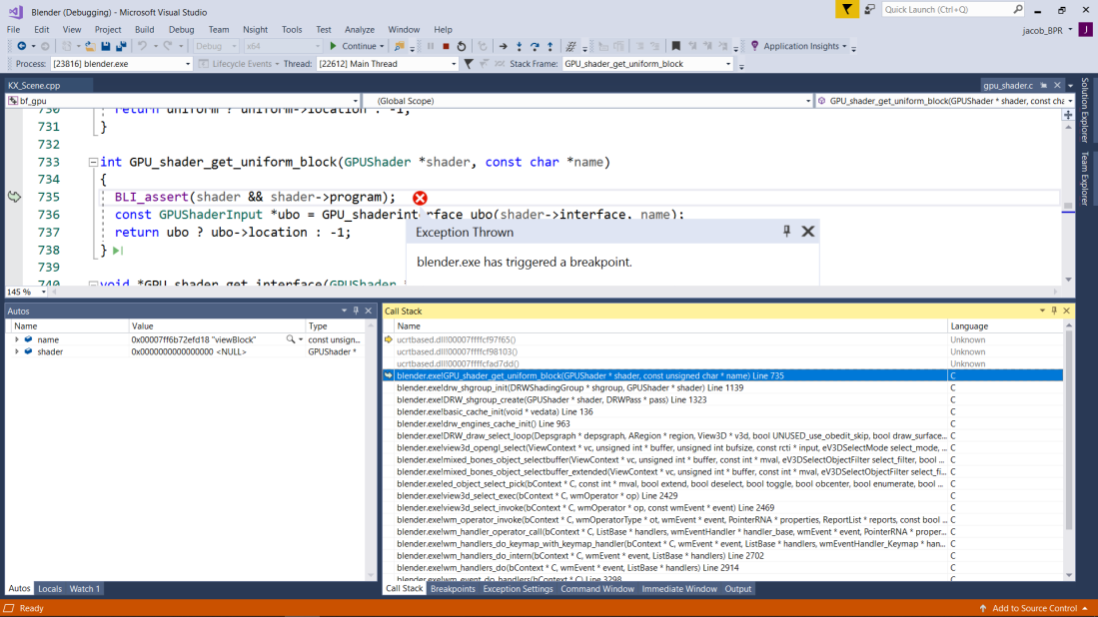
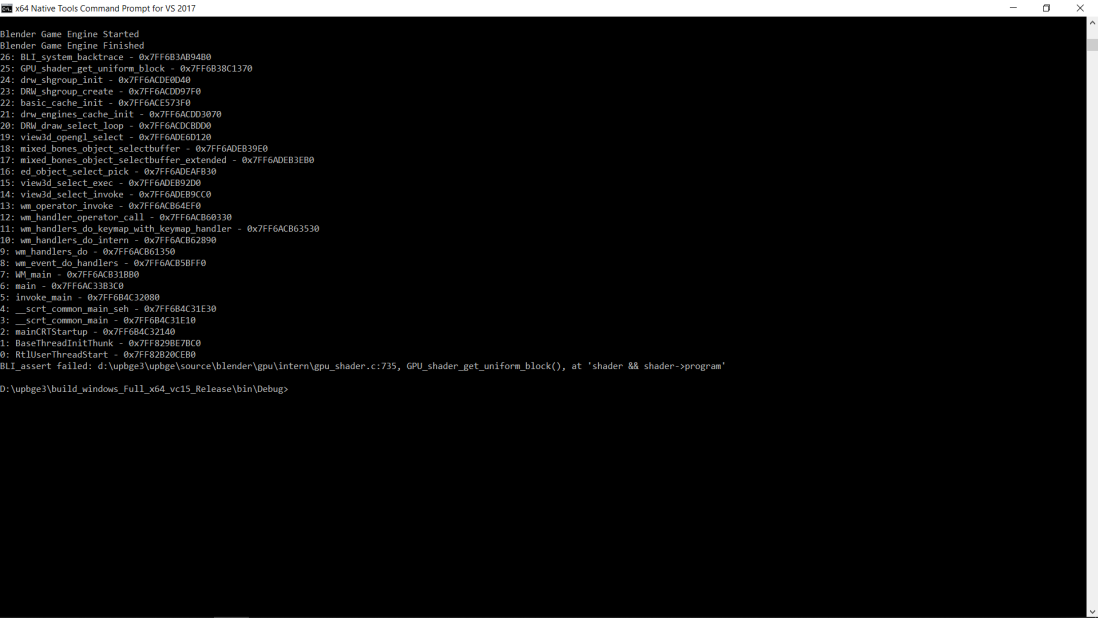
now since 1 week latest UPBGE eevee keeps crashing if i open it and first click somewhere in 3D viewport or crashed if i run BGE and then esc
latest blender 2.83 alpha doesnt crash
 mushroomeo
All 9 comments
I can't reproduce this crash.
Without more informations, we can do nothing.
What you can do on your side is to download all old builds (from ~1 week ago) of lordloki here: https://mega.nz/#F!k9MW1KiZ!UOKzjh3IQ0GEgjQ6GUc7ug!YsshHCha
and tell us exactly since what build you have a crash (we could have a look at if we see a merge mistake or something in the commit log).
You can also try to clean your environment (remove all what is in C:\UsersyourNameAppData\Roaming\upbge (it will remove all your preferences/addons)) and retry to load upbge.
 youle31
on 29 Mar 2020
youle31
on 29 Mar 2020
I get the same crash,
I play / stop, play / stop, click the viewport and I get a crash
 BluePrintRandom
on 29 Mar 2020
BluePrintRandom
on 29 Mar 2020
I manage to reproduce the crash clicking everywhere and pressing P then escape very fast..., i'm downloading lordloki builds from 10 days ago...
youle31
on 29 Mar 2020
I think this happens between 13 and 17 march. I'll take a look at commit log.
Maybe something related to interface? I remember some conflicts in interface_handlers.c... we'll see
- seems good on 14/03 b998fa706066b702decfbecf22d977a13ab26c23
- crash on restart_hacks (I guess this is the guilty commit) Maybe DRW_engines_free in DRW_game_render_loop_end() instead of drw_engine_eevee_type.free() + drw_engine_gpencil_type.free() 08ec25eb955093998eaa90591fa8ea3d070e73a5
youle31
on 29 Mar 2020
youle31
on 29 Mar 2020
thank you youle!
BluePrintRandom
on 29 Mar 2020
thanks much it fixed but not fully. if i open UPBGE and click on viewport it still crashes but only sometimes now. figured out that the faster after blender loads i click the more chance is to crash.
if i load file and immediatly click somewhere in viewport then it crashes almost everytime
also i see if i run BGE the objects in outliner flicker like it would repeatedly reselecting all the time. but sometimes too only
mushroomeo
on 30 Mar 2020
I can't reproduce this (the crash)... Are you sure this doesn't happen in last 2.83 alpha too?
About flickering, yes, this is known and i didn't find a proper fix for that but i added a button in render tab named "UI anti flicker" to avoid the scissor test which generates the bug.
youle31
on 30 Mar 2020
well just tryed latest 2.83 and i cant get this crash. but maybe its not so bad since it happens very rare now so i can live with that. and i cant reproduce it always dont know why
mushroomeo
on 30 Mar 2020
Related issues
 IzaZed
·
6Comments
IzaZed
·
6Comments
 UnidayStudio
·
6Comments
UnidayStudio
·
6Comments
 NatGazer
·
7Comments
NatGazer
·
7Comments
 BlenderDoc
·
4Comments
BlenderDoc
·
4Comments
 RomStef
·
7Comments
RomStef
·
7Comments
Most helpful comment
Fixed here: https://github.com/UPBGE/upbge/commit/02e1a04042cfbebb93e93ef9c4b7c63498ae5c8a