Upbge: Joystick sensor not working on exported runtime build (bug)
Since Blender version 2.63 the joystick sensors logic bricks for xinput controllers stop working when exporting project as game engine run time build, this makes impossible to publish games made with logic bricks that make use of joystick.
 HickySnow
All 8 comments
have you tried setting up the joystick in upbge without Xinput?
I think SDL that @lordloki updated supports this out of the box (xbox controllers)
 BluePrintRandom
on 5 Jan 2019
BluePrintRandom
on 5 Jan 2019
Not yet. Will try doing the SDL2 for my project soon, but It doesn't change the fact that there is a problem with joystick sensor. Hope they have good solutions for gamepads implemented soon.
HickySnow
on 5 Jan 2019
I just test in windows with 0.2.4 and it is working perfectly.
Tested with viewport, blenderplayer and exported as runtime. Xinput controller (XBox360 for PC).
Which is your system? Upbge build? joystick?
What are the messages in the console?
 lordloki
on 6 Jan 2019
lordloki
on 6 Jan 2019
I'm using the gamepad PG-9021, it works fine in the embedded and stand alone player, but not when exporting as runtime.
System is Windows 10 32x.
This is the error message:
https://drive.google.com/file/d/1PTgRg6q_CjeKqwDfWufP_n5DDRGbgJsx/view?usp=sharing
HickySnow
on 6 Jan 2019
I think a quick solution would be copy gamecontrollerdb.txt where you have the .exe
lordloki
on 6 Jan 2019
Coping the gamecontrollerdb.txt to the .exe folder din't work.
But coping it's directory did: "2.79/datafiles/gamecontroller".
Changing the addon code to include this directory should solve it.
Also this makes me assume that any assets you're using from "datafiles" and "scripts" folder won't be exported too.
HickySnow
on 6 Jan 2019
Yes, i saw that the datafiles and scripts folders are not copied. I will see how to fix it.
Thanks for testing.
lordloki
on 6 Jan 2019
Commited fix in UPBGE-Addons.
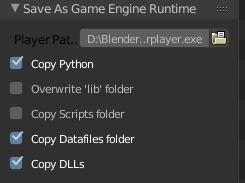
Thanks for reporting. Closing.
lordloki
on 7 Jan 2019
Related issues
 maconbot
·
5Comments
maconbot
·
5Comments
 NatGazer
·
7Comments
NatGazer
·
7Comments
 marechal-p
·
6Comments
marechal-p
·
6Comments
 BlenderDoc
·
4Comments
BlenderDoc
·
4Comments
 UnidayStudio
·
4Comments
UnidayStudio
·
4Comments