Unofficialcrusaderpatch: UCP UI Bug - Double AIC files
Just trying the new patch out and discovered a minor but annoying bug.
If you export the already available AIC files UCP-Bugfix.aic and vanilla.aic the patch will create the aic folder with the two files.
If you then reload the AICs with the button, you get the files multiple times:
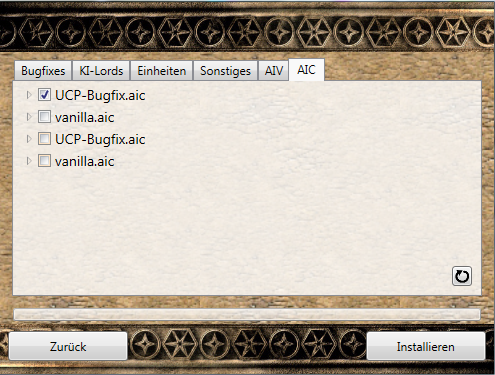
Even after restarting the patch program it stays the same.
 DarkThief-Darek
All 6 comments
They are differently coloured, though barely noticeable. The two below are the exported versions on disk, the two above are builtin into the patch tool. The bug here is bad visualisation.
 Evrey
on 8 Apr 2019
Evrey
on 8 Apr 2019
Hmm yeah, it should definitely be possible to easily differentiate between the built in versions and the versions on the hard disk.
But now I have a question: You can check all .aic files in this window. But I guess only one file can be installed at the time, or did I miss something?
DarkThief-Darek
on 8 Apr 2019
Evrey is correct, those are the local files. The coloring is much more distinct for me though. I guess I should change it.
But now I have a question: You can check all .aic files in this window. But I guess only one file can be installed at the time, or did I miss something?
You can check as many as you want, but the ones further down in the list will be overridden by the ones further up. I had done that with aics for single additional characters in mind, but that's future talk, so ignore it and just check one atm.
 Sh0wdown
on 8 Apr 2019
Sh0wdown
on 8 Apr 2019
Reopen to remind me to change the color...
Sh0wdown
on 8 Apr 2019
Or to add an icon. Better than some arbitrary palette pick that changes across Windows versions and WINE.
Evrey
on 9 Apr 2019
the color still needs to be changed right?
 Krarilotus
on 15 Feb 2020
Krarilotus
on 15 Feb 2020
Related issues
 Mozarz
·
3Comments
Mozarz
·
3Comments
 ByBurton
·
3Comments
ByBurton
·
3Comments
 Monsterfisch
·
3Comments
Monsterfisch
·
3Comments
 Lolasik011
·
4Comments
Krarilotus
·
3Comments
Lolasik011
·
4Comments
Krarilotus
·
3Comments