Uno: [Wasm] HTTP Error 502.3 - Bad Gateway
Current behavior
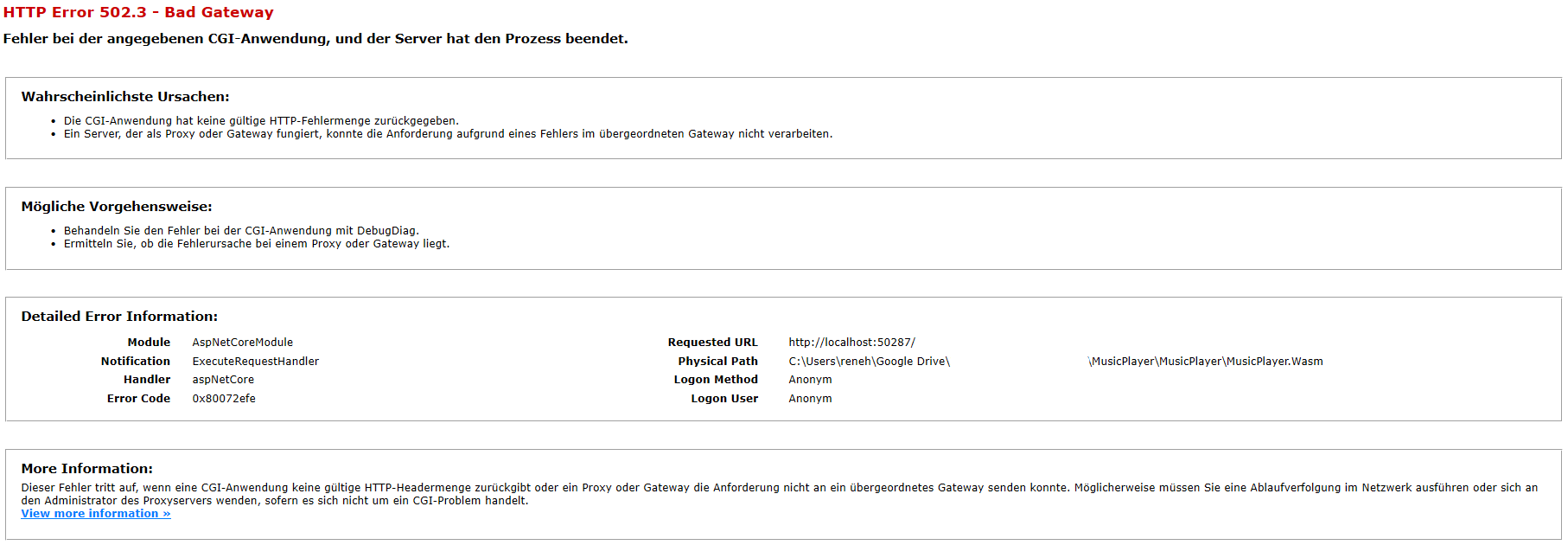
When I start a newly created Uno project (with the stable or pre-release Visual Studio extension) with Ctrl + F5, I get the following error page (I've also tried it with Pre-Release & Stable NuGet packages)
Expected behavior
The project should start without problems.
How to reproduce it (as minimally and precisely as possible)
- Install the prerelease templates extension through the Using the Uno Platform XAML Hot Reload Guide
- Create a new Uno Cross Platform App
- Set the wasm as startup project and start it with or without the debugger
- The browser opens and the error page is displayed
Environment
Nuget Packages and versions:
- Microsoft.Extensions.Logging.Console (1.1.1)
- Microsoft.Extensions.Logging.Filter (1.1.1)
- Microsoft.NETCore.UniversalWindowsPlatform (6.2.2)
- NETStandard.Library (2.0.3)
- Newtonsoft.Json (12.0.3)
- Uno.Core (1.29.0-dev.103)
- Uno.UI (2.0.512-dev.4053)
- Uno.UniversalImageLoader (1.9.32)
- Uno.Wasm.Bootstrap (1.0.0)
- Uno.Wasm.WebSockets (1.0.0-dev.32)
Affected platform(s):
- [ ] iOS
- [ ] Android
- [x] WebAssembly
- [ ] WebAssembly renderers for Xamarin.Forms
- [ ] Windows
- [ ] Build tasks
- [ ] Solution Templates
Visual Studio:
- [ ] 2017 (version: )
- [x] 2019 (version: 16.3.10)
- [ ] for Mac (version: )
Relevant plugins:
- [ ] Resharper (version: )
 hampoelz
All 20 comments
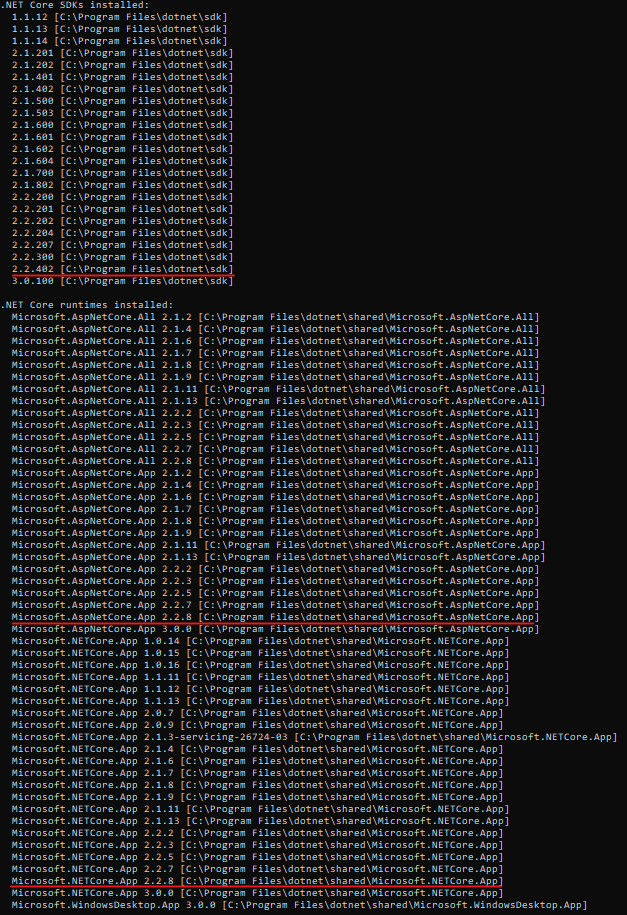
Hi @hampoelz, this is generally a sign of .NET Core not being installed. Make sure you have .NET Core 2.2 installed.
 jeromelaban
on 21 Nov 2019
jeromelaban
on 21 Nov 2019
Hey, thanks for the quick reply @jeromelaban
I think I've .NET Core 2.2 installed:
hampoelz
on 21 Nov 2019
Thanks. We've been chasing that issue for a while, and it seems to be depending on the first version of visual studio being installed on the system. Do you have Visual Studio Preview installed ?
jeromelaban
on 21 Nov 2019
Before Visual Studio 2019 Community was released, I used Visual Studio 2019 Preview, but then switched to the non-preview version
hampoelz
on 21 Nov 2019
In Visual Studio, there's a ASP.NET Core Web Server output in the output window, does it say something ?
jeromelaban
on 22 Nov 2019
ASP.NET Core Web Server output:
Hosting environment: Development
Content root path: C:\Users\reneh\Google Drive\...\MusicPlayer\MusicPlayer\MusicPlayer.Wasm
Now listening on: http://127.0.0.1:24831
Application started. Press Ctrl+C to shut down.
info: Microsoft.AspNetCore.Hosting.Internal.WebHost[1]
      Request starting HTTP/1.1 GET http://localhost:50287/
info: Microsoft.AspNetCore.Hosting.Internal.WebHost[1]
      Request starting HTTP/1.1 DEBUG http://localhost:50287/  0
fail: Microsoft.AspNetCore.Diagnostics.DeveloperExceptionPageMiddleware[1]
      An unhandled exception has occurred while executing the request.
System.InvalidOperationException: The SPA default page middleware could not return the default page '/index.html' because it was not found, and no other middleware handled the request.
   at Microsoft.AspNetCore.SpaServices.SpaDefaultPageMiddleware.<>c__DisplayClass0_0.<Attach>b__1(HttpContext context, Func`1 next)
   at Microsoft.AspNetCore.StaticFiles.StaticFileMiddleware.Invoke(HttpContext context)
   at Microsoft.AspNetCore.Builder.Extensions.MapWhenMiddleware.Invoke(HttpContext context)
   at Microsoft.AspNetCore.StaticFiles.StaticFileMiddleware.Invoke(HttpContext context)
   at Microsoft.AspNetCore.Diagnostics.DeveloperExceptionPageMiddleware.Invoke(HttpContext context)
fail: Microsoft.AspNetCore.Diagnostics.DeveloperExceptionPageMiddleware[1]
      An unhandled exception has occurred while executing the request.
System.InvalidOperationException: The SPA default page middleware could not return the default page '/index.html' because it was not found, and no other middleware handled the request.
   at Microsoft.AspNetCore.SpaServices.SpaDefaultPageMiddleware.<>c__DisplayClass0_0.<Attach>b__1(HttpContext context, Func`1 next)
   at Microsoft.AspNetCore.StaticFiles.StaticFileMiddleware.Invoke(HttpContext context)
   at Microsoft.AspNetCore.Builder.Extensions.MapWhenMiddleware.Invoke(HttpContext context)
   at Microsoft.AspNetCore.StaticFiles.StaticFileMiddleware.Invoke(HttpContext context)
   at Microsoft.AspNetCore.Diagnostics.DeveloperExceptionPageMiddleware.Invoke(HttpContext context)
Process is terminating due to StackOverflowException.
This explains a bit. Can you try upgrading the Uno.BootStrap.Wasm package to 1.0.3 ? (You may need to delete the <Content Include="wwwroot/web.config" /> line in the csproj file, this is an issue that is being fixed.
jeromelaban
on 22 Nov 2019
I've upgrade Uno.BootStrap.Wasm to 1.0.3 and 1.0.5 and deleted the <Content Include = "wwwroot / web.config" /> line in the csproj file, but I get the same error and output.
hampoelz
on 23 Nov 2019
@jeromelaban Is it normal that this error comes when starting the project?

hampoelz
on 25 Nov 2019
I have the same problem as @hampoelz (just a side note: I use the german VS as well).
I've installed VS 15, VS17 and VS19, never a Preview version.
I've added a index.html in the root of the WASM project and although the error persists, Edge does not show a bad gateway error anymore but a loader instead. So I tried opening localhost:PORT/index.html and it works. Well, partly, it currently doesn't show the FlipView, but some other controls.
 chris-makaio
on 13 Dec 2019
chris-makaio
on 13 Dec 2019
@hampoelz this error generally happens when the mono-wasm folder has been partially cleaned up by windows. Deleting it completely should help.
I've made some aditional fixes in the bootstrapper, (1.0.10 as of today). Could you both try again ?
Also, when the site fails to be served, there generally an error prior to this. A detailed build log would help diagnosing this.
jeromelaban
on 16 Dec 2019
@jeromelaban sorry, I'm new to Uno so I don't know how to test it again. I checked the Uno.Wasm.Bootstrap package required by the .Wasm project in my solution but it still shows version 1.0.10 as of 12/8/2019
chris-makaio
on 18 Dec 2019
@chris-makaio the most important part of the troubleshooting at this point is knowing if the build succeeds or now. If you right-click "rebuild" on the project, are there any errors ?
If it does, there`s probably another error somewhere. In that case, in theVS toolbar, instead of "IIS Express", try selecting "YouApp.Wasm" and click run. A window will open and will show you additional information.
jeromelaban
on 18 Dec 2019
if selecting MyApp(Uno3).Wasm target, build runs fine, console opens and outputs:
Now listening on: http://localhost:5000
Application started. Press Ctrl+C to shut down.Process is terminating due to StackOverflowException.
while "Uno Platform" output in VS shows:
[INFO] Uno Remote Control initialized (1.46.220-feature.hot-reload.27+Branch.feature/hot-reload.Sha.608a68bdefd6755f1b15a2079a1f1717fa113cf8)
[INFO] Loaded the Uno.UI Remote Control service (1.46.220-feature.hot-reload.27).
[DEBUG] Failed to find project D:\Development_Testfeld\Uno3\Uno3\Uno3.Shared\Uno3.Shared.shproj, cannot provide listen port to the app.
[DEBUG] Hosting environment: Production
[DEBUG] Content root path: C:\Users\chris.nugetpackages\uno.ui\1.46.220-feature.hot-reload.27\tools\rc\host
[DEBUG] Now listening on: http://[::]:1691
[DEBUG] Application started. Press Ctrl+C to shut down.
[DEBUG] Failed to find project D:\Development_Testfeld\Uno3\Uno3\Uno3.Shared\Uno3.Shared.shproj, cannot provide listen port to the app.
Selecting target IIS Express shows Wasm output:
Request starting HTTP/1.1 DEBUG http://localhost:1874/ 0fail: Microsoft.AspNetCore.Diagnostics.DeveloperExceptionPageMiddleware[1]
An unhandled exception has occurred while executing the request.
System.InvalidOperationException: The SPA default page middleware could not return the default page '/index.html' because it was not found, and no other middleware handled the request.
at Microsoft.AspNetCore.SpaServices.SpaDefaultPageMiddleware.<>c__DisplayClass0_0.b__1(HttpContext context, Func`1 next)
at Microsoft.AspNetCore.StaticFiles.StaticFileMiddleware.Invoke(HttpContext context)
at Microsoft.AspNetCore.Builder.Extensions.MapWhenMiddleware.Invoke(HttpContext context)
at Microsoft.AspNetCore.StaticFiles.StaticFileMiddleware.Invoke(HttpContext context)
at Microsoft.AspNetCore.Diagnostics.DeveloperExceptionPageMiddleware.Invoke(HttpContext context)
info: Microsoft.AspNetCore.StaticFiles.StaticFileMiddleware[2]
Sending file. Request path: '/index.html'. Physical path: 'D:\Development_Testfeld\Uno3\Uno3\Uno3.Wasm\bin\Debug\netstandard2.0\distindex.html'
info: Microsoft.AspNetCore.Hosting.Internal.WebHost[2]
Request finished in 534.7483ms 200 text/html
Process is terminating due to StackOverflowException.
FWI, here are the references from csproj:
    <PackageReference Include="Microsoft.Extensions.Logging.Console" Version="1.1.1" />
    <PackageReference Include="Microsoft.Extensions.Logging.Filter" Version="1.1.1" />
    <PackageReference Include="Uno.UI" Version="1.46.220-feature.hot-reload.27" />
    <PackageReference Include="Uno.Wasm.Bootstrap" Version="2.0.1-test.4" />
    <DotNetCliToolReference Include="Uno.Wasm.Bootstrap.Cli" Version="1.0.8" />
Interestingly, Uno.QuickStart works, although it gives the same error output:
Hosting environment: Development
Content root path: D:\Development_Testfeld\Uno.QuickStart-master\src\MyApp.Wasm
Now listening on: http://127.0.0.1:40302
Application started. Press Ctrl+C to shut down.
info: Microsoft.AspNetCore.Hosting.Internal.WebHost[1]
Request starting HTTP/1.1 GET http://localhost:49420/
info: Microsoft.AspNetCore.Hosting.Internal.WebHost[1]
Request starting HTTP/1.1 DEBUG http://localhost:49420/ 0
fail: Microsoft.AspNetCore.Diagnostics.DeveloperExceptionPageMiddleware[1]
An unhandled exception has occurred while executing the request.
System.InvalidOperationException: The SPA default page middleware could not return the default page '/index.html' because it was not found, and no other middleware handled the request.
at Microsoft.AspNetCore.SpaServices.SpaDefaultPageMiddleware.<>c__DisplayClass0_0.b__1(HttpContext context, Func`1 next)
at Microsoft.AspNetCore.StaticFiles.StaticFileMiddleware.Invoke(HttpContext context)
at Microsoft.AspNetCore.Builder.Extensions.MapWhenMiddleware.Invoke(HttpContext context)
at Microsoft.AspNetCore.StaticFiles.StaticFileMiddleware.Invoke(HttpContext context)
at Microsoft.AspNetCore.Diagnostics.DeveloperExceptionPageMiddleware.Invoke(HttpContext context)
info: Microsoft.AspNetCore.StaticFiles.StaticFileMiddleware[2]
Sending file. Request path: '/index.html'. Physical path: 'D:\Development_Testfeld\Uno.QuickStart-master\src\MyApp.Wasm\bin\Debug\netstandard2.0\distindex.html'
info: Microsoft.AspNetCore.Hosting.Internal.WebHost[1]
Request starting HTTP/1.1 GET http://localhost:49420/require.js
info: Microsoft.AspNetCore.Hosting.Internal.WebHost[1]
Request starting HTTP/1.1 GET http://localhost:49420/uno-config.js
info: Microsoft.AspNetCore.Hosting.Internal.WebHost[1]
Request starting HTTP/1.1 GET http://localhost:49420/uno-bootstrap.js
info: Microsoft.AspNetCore.Hosting.Internal.WebHost[1]
Request starting HTTP/1.1 GET http://localhost:49420/normalize.css
info: Microsoft.AspNetCore.Hosting.Internal.WebHost[2]
Request finished in 973.0172ms 200 text/html
info: Microsoft.AspNetCore.Hosting.Internal.WebHost[1]
Request starting HTTP/1.1 GET http://localhost:49420/Fonts.css
info: Microsoft.AspNetCore.Hosting.Internal.WebHost[1]
Request starting HTTP/1.1 GET http://localhost:49420/mono-config.js
info: Microsoft.AspNetCore.StaticFiles.StaticFileMiddleware[2]
Sending file. Request path: '/uno-config.js'. Physical path: 'D:\Development_Testfeld\Uno.QuickStart-master\src\MyApp.Wasm\bin\Debug\netstandard2.0\dist\uno-config.js'
info: Microsoft.AspNetCore.Hosting.Internal.WebHost[2]
Request finished in 61.4425ms 200 application/javascript
info: Microsoft.AspNetCore.StaticFiles.StaticFileMiddleware[2]
Sending file. Request path: '/normalize.css'. Physical path: 'D:\Development_Testfeld\Uno.QuickStart-master\src\MyApp.Wasm\bin\Debug\netstandard2.0\dist\normalize.css'
info: Microsoft.AspNetCore.Hosting.Internal.WebHost[2]
Request finished in 39.9513ms 200 text/css
Browser opens, Visual Studio Debug session keeps running and the application is loading in Edge
Edit: Copying the debug config group from QuickStart's csprj helps:
    <PropertyGroup Condition="'$(Configuration)'=='Debug'">
    <MonoRuntimeDebuggerEnabled>true</MonoRuntimeDebuggerEnabled>
    <DefineConstants>$(DefineConstants);TRACE;DEBUG</DefineConstants>
    <DebugType>portable</DebugType>
    <DebugSymbols>true</DebugSymbols>
  </PropertyGroup>
Thanks for the details.
I see that your configuration is using the hot-reload preview bits.
We'll be updating today the whole chain so that hot reload works properly for you, but in the meantime, can you update your project to the following:
    <PackageReference Include="Microsoft.Extensions.Logging.Console" Version="1.1.1" />
    <PackageReference Include="Microsoft.Extensions.Logging.Filter" Version="1.1.1" />
    <PackageReference Include="Uno.UI" Version="2.0.527" />
    <PackageReference Include="Uno.Wasm.Bootstrap" Version="1.0.10" />
    <DotNetCliToolReference Include="Uno.Wasm.Bootstrap.Cli" Version="1.0.10" />
And try again ?
jeromelaban
on 18 Dec 2019
First of all: thanks for the awesomely quick support!
yes, it works now w/o the debug section. But I can't get hot reload working
chris-makaio
on 18 Dec 2019
@chris-makaio Yes, hot reload supports needs an updated version of the visual studio addin, we're working with microsoft to get this updated very soon. Check bacl for the release section for the Uno 2.0 anouncement.
jeromelaban
on 18 Dec 2019
Note: After I set up my computer again and installed VS, everything worked fine
hampoelz
on 19 Feb 2020
Thanks for the update!
jeromelaban
on 19 Feb 2020
Related issues
 SuperJMN
·
3Comments
SuperJMN
·
3Comments
 MelbourneDeveloper
·
3Comments
MelbourneDeveloper
·
3Comments
 MartinZikmund
·
3Comments
MartinZikmund
·
3Comments
 paulovila
·
3Comments
jeromelaban
·
3Comments
paulovila
·
3Comments
jeromelaban
·
3Comments