Uno: Uno.UI regression: Buttons work erratically
Problem
Given a simple calculator app. The calculator buttons do nothing most of times when they're clicked.
Details
There seems to be a regression in Uno.UI, since there's a version in which things work perfectly and a newer version breaks the correct behavior.
Repro steps
- Clone the repo at https://github.com/SuperJMN/UnoSimpleCalc/
- Checkout this commit to be sure the problem is there: ab759ce435683b29ed7882d90e06e5d9544df116 (last commit as 11-06-2019)
- Run the Web Assembly app. The buttons will work:
- Update the Uno.UI package to any version between 2.0.512-dev.3446 and 2.0.512-dev.3728
- Run the Web Assembly app. The buttons will not work or will work erratically.
I did some research to isolate the regression. This is the table of results I have:
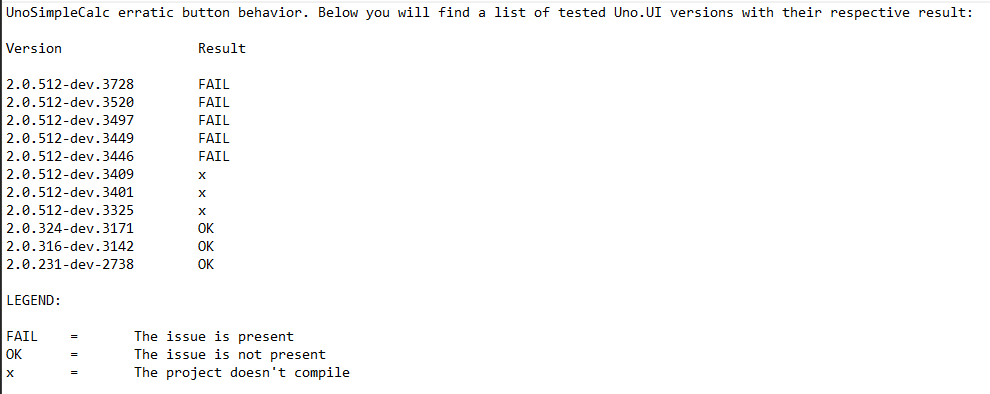
As you can see, the last version that worked is 2.0.324-dev.3171 and the first version that doesn't work is 2.0.512-dev.3446. In the middle, the are some version in which the build is broken (denoated by x).
Affected platform(s):
- [ ] iOS
- [ ] Android
- [x] WebAssembly
- [ ] WebAssembly renderers for Xamarin.Forms
- [ ] Windows
- [ ] Build tasks
- [ ] Solution Templates
 SuperJMN
All 12 comments
Version 512 correspond to the merge of #1256 which is "kind-of" related to buttons clicks 😜 I'll try to have a look, but in the meantime, do you have anything in the logs?
 dr1rrb
on 6 Nov 2019
dr1rrb
on 6 Nov 2019
Hey @dr1rrb thanks for the quick response! I don't have logs, but maybe @paulovila has more info!
SuperJMN
on 6 Nov 2019
This is the Chrome Console log I gathered.
Please, ignore the "Pressed X" entries. It's a `Console.WriteLine' we added to log when a command executes.
SuperJMN
on 6 Nov 2019
Actually I don't even get the "Pressed X" 😕 (even if I remove the #if __WASM__).
I can see that the "pointerdown" and "pointerup" events are dispatched to the managed code, and we get back the pointer capture / release sequence ... but nothing happen.
dr1rrb
on 6 Nov 2019
Ok so I looked a bit deeper, this is due to the ViewBox : coordinates of the pointer events are "scaled" accordingly, but when in ButtonBase we validate if the pointer was released over the button, the location.<X|Y> might be greater than the Actual<Width|Height> (which are not "scaled").
(BTW: it means that if you always press the top left corner of buttons, it works properly)
dr1rrb
on 8 Nov 2019
That's a good start, the area of the button is clickable and the hovering is consistent, but the command is not being triggered
 paulovila
on 13 Nov 2019
paulovila
on 13 Nov 2019
Hi @paulovila, on my side I don't have any issue with the command not being triggered, at least on WASM. If you have to opportunity to test with this fix https://github.com/unoplatform/uno/pull/2091 and let me know if it works also for you.
dr1rrb
on 15 Nov 2019
Hi @dr1rrb thanks, still no joy, I checked out dev/dr/TouchTrans and overwrote Uno.UI package , still the command doesn't get fired
paulovila
on 15 Nov 2019
Hi @dr1rrb thanks, still no joy, I checked out dev/dr/TouchTrans and overwrote Uno.UI package , still the command doesn't get fired
Hi @paulovila , I just tried:
ps git checkout master git pull git clean -fdx- Open the "unoSimpleCalc.sln" in VS 2019
- Manage nuget packages, and install latest dev version of Uno.UI (2.0.512-dev.4021)
- Run "UnoSimpleCalc.Wasm", and I'm not able to reproduce the issue neither on Firefox, Edge nor Chrome
Are you able to give me more info on how you reproduce it?
Note: I also checked that my nuget update was successful by decompiling bin/debug/netstandard2.0/Uno.UI.dll with _ILSpy_ and validating that the assembly AssemblyInformationalVersion attribute is _2.0.512-dev.4021+Branch.master.Sha.869282ee6c94cfca7e6d25c01f5501bb86bd6ad0.869282ee6c94cfca7e6d25c01f5501bb86bd6ad0_
dr1rrb
on 19 Nov 2019
It's working fine , I've tried in Chrome, and Edge, great job!
paulovila
on 19 Nov 2019
Great news, then I close this issue 😀
dr1rrb
on 19 Nov 2019
Great work! Thanks!
SuperJMN
on 19 Nov 2019
Related issues
SuperJMN
·
3Comments
 MartinZikmund
·
3Comments
MartinZikmund
·
3Comments
 jeromelaban
·
3Comments
paulovila
·
3Comments
jeromelaban
·
3Comments
paulovila
·
3Comments
 PylotLight
·
3Comments
PylotLight
·
3Comments
Most helpful comment
It's working fine , I've tried in Chrome, and Edge, great job!