Universalmediaserver: Cannot play wav on PS3
I have wav (44KHz, 16bit) on my Windows 7 PC running the latest version of UMS.
My PS3 is connected to the network via ethernet, as is my pc. It plays stereo from the analogue out, to a standard stereo amplifier.
When I click to play a wav audio all I get is white noise, mp3 plays fine
If I navigate to the transcode folder and play from FFMPeg it plays fine, however I have FFMPeg set as my default audio transcoder so when I click it why won't it just play, why do I get white noise.
In previous versions of UMS it used to just work, why doesn't it now?
 Lincoln-G
All 71 comments
Hi @Lincoln-G could you please provide full TRACE mode debug files by going to Logs and clicking create TRACE logs then packing them and uploading here both for the version you are currently on, and for a previous version that works correctly, so that we can compare and investigate? If you don't still have a current version you can download any older version at https://sourceforge.net/projects/unimediaserver/files/Official%20Releases/Windows/
 polygirl
on 10 Feb 2020
polygirl
on 10 Feb 2020
I've just installed Windows 10 x64 and re-installed UMS.
If I try to play the .wav from my PS3, clicking directly on the track I get wobblyHiss
When I enter the transcode folder clicking the track wobblyHiss, clicking "no transcoding" the same, however if I click FFMPeg LCPM it plays properly.
I NOW have max channels set to 2 (stereo), I have Use LCPM for audio selected. same result.
Lincoln-G
on 10 Feb 2020
I cannot get the TraceLogs when it worked, because I can't remember which version and then I had Windows 7. However, I do remember that from blank install it didn't work, I just had to Promote FFMPeg to the top of the audio Transcoders and it worked.
Lincoln-G
on 10 Feb 2020
Please provide info from MediaInfo.
Static sound is in most cases result of DTS audio encapsulating to stereo channels in WAV file.
As UMS tries to pass original DTS audio track to PS3 which doesn't support DTS via DLNA, it encapsulates it to stereo signal which only receiver is capable to decode it. If anything in the transmission route touch on the audio signal, you will get static noise. In your case (if WAV is DTS) it can be PS3 audio volume not set to 0, PS3 audio "enhancements" enabled, incorrect cabling between PS3 and receiver (hdmi and spdif supported only) etc...
Without Mediainfo or ffmpeg info for such file we can't help (or upload it somewhere to test it by someone else)
 ExSport
on 10 Feb 2020
ExSport
on 10 Feb 2020
ExSport, Your message makes no sense, you obviously haven't read the original post. The files are pure .wav the PS3 is connected as analogue, directly with audio cables. Their is no HDMI, no DTS nothing to be converted. No audio enhancments are enabled. Just a PS3 connected to an amplifier playing pure 44.1KHz 16bit wav (CD Audio). The problem is simple, when you click the track it isn't being played as LPCM, which it should as standard. When I force it to do so, by going into the Transcode folder (FFMPEG LPCM) it plays properly.
Lincoln-G
on 10 Feb 2020
Sorry, I read so many posts like you wrote, that people thinks WAV is pure stereo etc. but MediaInfo shows something different 😇
If it is not your case, sorry for my part of my post. Anyway my post is still valid. If you will not send further info like audio sample, MediaInfo analysis, etc... Then it is hard to help.
Edit: I read it on mobile so I missed posted link with the log 😎 Will check later if something can be seen there...
ExSport
on 11 Feb 2020
ExSport : Using logic and a simple power of deduction it seems to me that this is simple. The "use LPCM for audio" isn't working. My reasoning is simple; When the wav is clicked, the WabblyHiss produced is the same as when I click the "no transcoding" from the transcode folder. So I need to know HOW to get this device to play .wav with FFMPEG LPCM as standard - as when I click that in the transcode folder it works perfectly.
If you really need a recording of the WobbyHiss, I shall get it for you. Do you need it directly recorded or from the phone will do. However, my guess is that when you do hear it, you'll be hearing the sound of 44.1KHz 16bit wav that hasn't been transcoded ; )
Lincoln-G
on 11 Feb 2020
You don't understand my point. I don't ask for WAV with your hiss sound but for detailed info about your WAV file (which e.g. MediaInfo produces) or a sample (partial file) or whole WAV file which doesn't work for you (and can be shared) so we can test it on different configurations and settings.
In most cases it is irrelevant that transcoded file works but not non-transcoded one as you describe. During conversion there is so many codec/encoder manipulations that it is hard to say what exactly is the problem in original file but not in transcoded one as there are lot of factors in play (different mime type, 44/48kHz, 16/24bit, content-length, chunked transfer,DLNA.ORG_PN, DLNA.ORG_FLAGS,...). As transcoding tries to use very safe settings to be accepted by most renderers, I understand you can play transcoded file in higher rate than non-transcoded ones.
I will try to find some detailed info about your WAV from your log (hopefully there will not be hundreds of them) and post back.
ExSport
on 11 Feb 2020
I don't see any metadata for your WAV file and your log is spammed with lot of them.
Please share problematic file only, with disabled Media Library so MediaInfo metadata will be visible.
Then try streaming it and transcoding it so we can compare it.
Thank you.
Edit: In log I spotted that streamed file is mimetype audio/L16 but transcoded file from ffmpeg is:
44100 Hz, 2 channels, s16, 1411 kb/s
(pcm_s16le (native) -> pcm_s16be (native))
It seems original file is Little Endian but transcoded file is Big Endian. Not sure if PS3 has issues with Little Endian but only mentioning such spotted difference...
ExSport
on 11 Feb 2020
I have no idea how to disable the media library.
I do not have "one" file that doesn't play, I have 10,000 hours of files that don't play. For all the meta data is the same. 44100 Hz, 2 channels, 16 bit 1411 kb/s native CD audio saved at Microsoft .Wav
I mentioned before that it used to work without doing anything!!
What do I have to do to get it to transcode LPCM as standard ?
Where do I find the MediaInfo metadata that you are asking for? Or do you want a short snippet of a file?
Lincoln-G
on 11 Feb 2020
Is this what you want?
Audio
Format : | PCM
Format settings : | Little / Signed
Codec ID : | 1
Duration : | 6 min 39 s
Bit rate mode : | Constant
Bit rate : | 1 411.2 kb/s
Channel(s) : | 2 channels
Sampling rate : | 44.1 kHz
Bit depth : | 16 bits
Stream size : | 67.2 MiB (100%)
All the files are the same format
Lincoln-G
on 11 Feb 2020
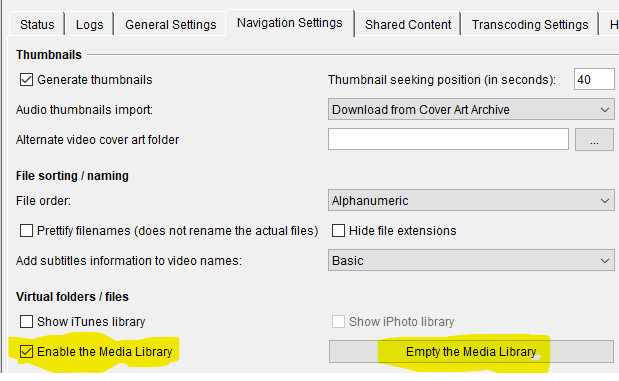
Untick it and empty your library + UMS restart = DISABLED (media properties are read per access and not taken from DB) :)
HEADER:
  HTTP/1.1 206 Partial Content (non-chunked)
  TransferMode.DLNA.ORG: Streaming
  Content-Type: audio/L16
  Content-Range: bytes 0-66888107/66888108
  Accept-Ranges: bytes
  Connection: keep-alive
  Server: Windows_10-amd64-10.0, UPnP/1.0 DLNADOC/1.50, UMS/6.7.4
  Content-Length: 66888108
------------------------------------------------------
HEADER:
  HTTP/1.1 206 Partial Content (non-chunked)
  TransferMode.DLNA.ORG: Streaming
  Content-Type: audio/L16;rate=44100;channels=2
  Content-Range: bytes 0-9223372034707292158/9223372034707292159
  Accept-Ranges: bytes
  Connection: keep-alive
  Server: Windows_10-amd64-10.0, UPnP/1.0 DLNADOC/1.50, UMS/6.7.4
As shown above, when file is streamed, there is missing rate and channels info in ProtocolInfo.
It is present when file is streamed. Maybe without such info PS3 don't know how to play it so it generates static sound (can't test it myself so only my guess).
Please try to do this:
replace line:
MimeTypesChanges = video/avi=video/x-divx
in UMS_install_folder\renderers\Sony-PlayStation3.conf with:
MimeTypesChanges = audio/L16=audio/wav
It will change mimetype of WAV file. Maybe such mimetype will be more compatible with PS3 when "rate" & "channels" is missing (WAV file is mostly 44100/2channels so maybe PS3 will "guess" them automatically).
Please change it, save file, restart UMS and make new log if anything change.
Btw. if you want to make your WAV files incompatible, remove line below from your PS3conf file (# Supported audio formats category):
Supported = f:wav a:lpcm n:6 s:48000 m:audio/L16
It should tell UMS that your WAV files are not supported so they should be transcoded automatically but please test it outside changes I asked above.
Thanks
ExSport
on 12 Feb 2020
MimeTypesChanges = audio/L16=audio/wav made no difference.
But removing the lines (as suggested) has seemed to work.
Thank you for your help, perhaps in future builds the PS3.Config should be changed.
Lincoln-G
on 12 Feb 2020
Dont' agree. The root cause should be found without making any workarounds (instead of native streaming file must be transcoded).
Please, can you make logs as I asked for? I mean "MimeTypesChanges" change only so you need to place back line below so your file will be streamed as is:
Supported = f:wav a:lpcm n:6 s:48000 m:audio/L16
I need logs to be sure mimetype was changed (MimeTypesChanges line still works in recent UMS versions) so fixing MimeType only is not sufficient.
Thanks
ExSport
on 12 Feb 2020
Ok man, don't have a cow! I hope this is right
ums_dbg.zip
Lincoln-G
on 12 Feb 2020
I'm calm, don't worry. 😉
I checked logs and it seems this configuration item doesn't work anymore (or I missed its functionality and also lost track with recent code changes. Recent=years already 😎)
Content-Type: audio/L16
Log still shows L16 instead of WAV so no change was applied.
Maybe @SubJunk or @Nadahar will make light to this, if it is ok to pass ProtocolInfo without "rate" and "channels" info for general renderers...
Btw. what sound do you hear on tv if you connect it with hdmi without passing it to the receiver? Is it correct or not? If it will be broken as well, I will try to simulate it on another renderer with your UMS version as I don't have access to PS3 right now.
Thanks
Edit:
I found in LOG that MimeType probably changed to audio/wav (don't have older logs if it was audio/l16 before the change) but it is not relevant to the final content-type(?) sent to the renderer...
  Format: "Wave"                Duration: 0:04:58.530         Overall Bitrate Mode: CBR     Overall Bitrate: 1411202
  Cover: No
  - Audio track ID:
    Format: "PCM"                 CodecID: "1"                  Duration: 0:04:58.530         BitRate Mode: CBR
    Bitrate: 1411200              Channel(s): 2                 Samplerate: 44100             Bit Depth: 16
TRACE 2020-02-12 16:26:18.637 [HTTPv2 Request Worker 4] net.pms.formats.Format Parsing results for file "Alex Kenji....wav": Container: WAV, Size: 52660780, Bitrate: 1411202, Duration: 0:04:58.530, Audio Tracks: 1 [Audio Codec: LPCM, Bitrate: 1411200, Channels: 2, Sample Frequency: 44100 Hz], Mime Type: audio/wav
Btw. Serviio sends something like:
audio/l16;rate=44100;channels=2:DLNA.ORG_PN=LPCM
So maybe only adding "rate=44100;channels=2:DLNA.ORG_PN=LPCM" to the UMS response will fix it, who knows :)
ExSport
on 12 Feb 2020
@ExSport I haven't paid attention to the changes being made to UMS since 7.x. That said, I don't quite understand how this "cheat" can ever have worked. The thing is that, even though WAVE usually contains LPCM as a "codec", they aren't the same thing.
A WAVE file has a header with essential metadata like channels and sample frequency, so all that is needed to "decode" the file content is within the file. LPCM (L16) on the other hand, is a raw stream of Linear PCM data with no metadata whatsoever. So, to be able to decode it, channels and sample frequency must be specified as part of the MIME type. If it works without this, it's only because the renderer will fall back to a default (48 or 44.1KHz and 2 channels probably) and that the content happens to match the default.
Unless I'm mistaken, "raw" LPCM and LPCM wrapped in WAVE files also have different endianness, which means that reading one as the other will fail even more spectacularly.
WAVE isn't supported by DLNA as far as I remember, at the very least it's not one of the mandatory profiles (but might be some rare, optional profile). As such, transcoding is needed "by default".
Most renderers that support WAV (and many do), do that via UPnP AV using some mime type (audio/wav, audio/x-wav, audio/wave, audio/x-pn-wav etc). I don't think there's an official, "proper" MIME/Internet type for WAVE files. However, since Sony is one of, if not the, founder(s) of DLNA, they usually stick to DLNA. Put in a different way, all profiles that Sony have wanted to support can be found in DLNA.
That makes me question if the PS3 supports WAVE, and I find it strange if just misrepresenting it as LPCM/L16 would make it play. The PS3 must then be programmed to expect such a "hack" and parse the header, deal with the different endianness etc. If Sony wanted to do this, I can't see why they wouldn't just have included it in the DLNA standard instead.
So, I really don't know what's going on here. I'm not surprised that it doesn't work using this hack, what does surprise me is if this has ever worked.
 Nadahar
on 12 Feb 2020
Nadahar
on 12 Feb 2020
@ExSport
audio/l16;rate=44100;channels=2:DLNA.ORG_PN=LPCM
This is the specification for LPCM, not WAVE. Are you sure that Serviio sends this for WAVE files without first transcoding them to LPCM?
Nadahar
on 12 Feb 2020
It was quick search only. Not sure with anything as I can't test it 😇
Anyway thanks for useful info and I agree with you this hack never worked as I internally was afraid of 😎
I have PS3 at home of my parents but unfortunately testing it is question of months then weeks...
Btw. @Lincoln-G wrote it worked in past with older version but hard to say if file was really streamed and not transcoded...
ExSport
on 12 Feb 2020
Although I said "on an earlier version" it is completly possible that the firmware on the PS3 has also changed, so it may not be a UMS issue at all.
Is it possible that a .wav Transcoded would sound different than if it were Streamed? Is there any loss of quality that you know of?
Lincoln-G
on 12 Feb 2020
@Nadahar @ExSport It is possible that PS3 does not support wav streams . For example, if you use the PS3 to rip a CD it is converted ATRAC within the machine at whichever bit rate you have assigned. I believe this is a remnant of MiniDisc, possibly ATRAC is a SONY product, CD I believe belongs to Philips and WAV belongs to Microsoft. However, it can play wav from a USB, I do it all the time.
To answer the question about the TV, no it does the same thing. I have tried configuring the PS3 as dual output. My TV is a recent SONY Bravia connected over HDMI. If I play a wav on the PS3 through the audio out of a Optical to Analogue connected to the TV I get the same WobblyHiss.
The Bravia TV can also connect to UMS and that plays fine. However, the sound from the PS3 is so much better (when it works).
Lincoln-G
on 12 Feb 2020
I found this:
https://manuals.playstation.net/document/en/ps3/current/music/filetypes.html
By the way, the WobblyHiss is not complete garbage, it is possible to discern some music attributes from it. While most of it is White or Pink noise, you can certainly hear elements of drum beats and voices.
Lincoln-G
on 12 Feb 2020
Is it possible that a .wav Transcoded would sound different than if it were Streamed? Is there any loss of quality that you know of?
No - the "transcoding" in this case should be lossless, in that all that's done is stripping the header and possibly reversing the endinanness (inverting the bit order). Even if the transcoder "isn't smart enough" to see that this can be done that easily, I believe sound is usually decoded to PCM and then encoded to whatever the target format is anyway. The "loss" is in the encoding part, which isn't needed when the output is PCM.
It's very possible that it doesn't support WAVE, but what you found in the manual contradicts it. That said, the fact that something can play a particular file/format from USB doesn't mean it can play the same file via UPnP/DLNA. But, since it is configured as "supported" in the default configuration file, I guess there is some way to get it to work. Since UMS is a fork of PS3 Media Server, it's reason to believe that what is and isn't supported on the PS3 has been thoroughly verified "back in the days".
I don't know what options are needed to make it work though, as there are some "less than logical" PS3-only settings regarding this. If my memory serves me correct, the PS3 can be configured to understand either 44100 Hz or 48000 Hz, but not both. So, somewhere in the PS3's configuration you have to set this, and then you have to make the corresponding setting in UMS. This is an insane system IMO, and I just don't get why they (Sony) did it this way - but regardless. You problems could be as simple as that the files you play and the "configured value" in the PS3 has different sample rates.
I did fire up my old PS3 and did a quick test, and it wouldn't play my WAVE test files. But, it didn't give me static, it simply hid the entries alltogether. But, I didn't try to change the different settings, neither in the server nor the PS3, so it might be that the behavior would have been different with different settings.
Nadahar
on 12 Feb 2020
I used PS3 as a DLNA client a lot in past and if I remember well, I was able to stream both WAV file types (WAVs from Audio CD and DTS-CD). But maybe I am wrong 🙃
Btw. are you able to download streamed version of WAV on PS3 and then play it locally? If it will work, there are two options. One, that by fixing the ProtocolInfo sent by renderer may fix it or that it is really not supported via DLNA protocol but supported when played locally. But I have a feeling I was able to stream them without re-encoding (MEncoder) or "aka-remuxing" (ffmpeg s16le-->s16be conversion) but it is a long time ago and with very ancient UMS/PMS versions 😊
@Lincoln-G Is it possible to upload one sample file somewhere so someone can test it? @Nadahar was so great that connected his well hidden PS3 back to the TV to try to help :+1:
ExSport
on 12 Feb 2020
@Nadahar Thanks for that. And I'll have a good look through the menus tomorrow. However, I did discover some interesting things while trawling the web. For example the PS3 FAT and THIN have fundermentally different support for certain formats. Mine is a FAT and quite an old one, although it has the latest firmware, what I read suggested that some things the THIN can do, mine cannot. Is it noted that there is not a different .conf for the two machines, perhaps there should be?
Anyway, got it working - so thanks for everybodies help
Lincoln-G
on 12 Feb 2020
@ExSport The only problem with uploading a sample is that wav is huge. What's the upload limit here?
Lincoln-G
on 12 Feb 2020
No, there is no difference in this aspect. I have fat PS3 too and only difference is that thin PS3 cannot play PS2 game titles and that it supports HD sound passthrough where fat one is limited with version of hdmi (less bandwidth) so it pass them as LPCM.
ExSport
on 12 Feb 2020
What's the upload limit here?
10 MB I believe, and it won't accept an attachment with a WAV extension. It does accept ZIP though, so you could just zip it. To do it, you'd have to find a program that could "slice" just a few seconds of the start of one, so that it would be less than 10 MB - and then zip it.
I don't know if it's worth the effort though, if there's nothing special about these WAVE files. Samples should be easy to find online for those that don't have any.
Nadahar
on 12 Feb 2020
Yep, just working on that. I also had to find something that wasn't property of somebody else : )
Just uploaded a 44sec zipped wav, it's a sample of the Beat track from our last single, although the single belongs to the record company, the beat is mine.
Lincoln-G
on 12 Feb 2020
I thought some small sample, not 20 minutes track 😉
There are lot of web services like mega.nz or Google drive or OneDrive from Microsoft etc...
But if it is general ripped track from audio CD then NET is full of such small samples. I asked only because you can stream it but for @Nadahar his file was unsupported so question is if your "test" files are not totally different or difference is in UMS/DMS version or configuration🙃
ExSport
on 12 Feb 2020
@Nadahar Slicing WAVs is what I do for a living : )
Lincoln-G
on 12 Feb 2020
You should be able to stream it from here:
Lincoln-G
on 12 Feb 2020
@Lincoln-G
Slicing WAVs is what I do for a living : )
What were the chances of that :laughing:
Nadahar
on 12 Feb 2020
Yeah, been slicing wavs since the 90s, you can find some of our work here:
Lincoln-G
on 13 Feb 2020
@Lincoln-G Now I spotted you are using UMS version 6.7.4 from 2017-10-03.
Did you try more recent versions??? :)
ExSport
on 13 Feb 2020
@ExSport I am using 9.2 now, but the problem is the same
Lincoln-G
on 13 Feb 2020
In my opinion 6.7.4 is one of the most stable versions of UMS, so that's not a bad choice. If I were still running UMS I would probably stick to 6.8.0.
Nadahar
on 13 Feb 2020
Extraction of some relevant parts of the debug log from https://github.com/UniversalMediaServer/UniversalMediaServer/issues/1907#issuecomment-584100269
Format and renderer matching:
net.pms.configuration.FormatConfiguration Format "wav" failed to match supported line f:mpegps     v:mpeg1|mpeg2|mp4|h264   a:ac3|lpcm           m:video/mpeg
net.pms.configuration.FormatConfiguration Format "wav" failed to match supported line f:mpegts     v:mpeg1|mpeg2|mp4|h264   a:ac3|lpcm|mpa       m:video/mpeg
net.pms.configuration.FormatConfiguration Format "wav" failed to match supported line f:avi|divx   v:mp4|divx|mjpeg         a:mp3|lpcm|mpa|ac3   m:video/x-divx     gmc:0
net.pms.configuration.FormatConfiguration Format "wav" failed to match supported line f:mp4        v:mp4|h264               a:ac3                m:video/mp4
net.pms.configuration.FormatConfiguration Format "wav" failed to match supported line f:mp4        v:mp4|h264               a:aac-lc             m:video/mp4                n:2
net.pms.configuration.FormatConfiguration Format "wav" failed to match supported line f:wmv        v:wmv|vc1                a:wma                m:video/x-ms-wmv           n:2
net.pms.configuration.FormatConfiguration Format "wav" failed to match supported line f:atrac                  n:2             m:audio/x-sony-oma
net.pms.configuration.FormatConfiguration Format "wav" failed to match supported line f:lpcm    a:lpcm         n:6   s:48000   m:audio/L16
net.pms.configuration.FormatConfiguration Format "wav" failed to match supported line f:m4a     a:(?!alac).+   n:2             m:audio/x-m4a
net.pms.configuration.FormatConfiguration Format "wav" failed to match supported line f:m4a                    n:2   s:48000   m:audio/x-m4a
net.pms.configuration.FormatConfiguration Format "wav" failed to match supported line f:mp3                    n:2             m:audio/mpeg
net.pms.configuration.FormatConfiguration Audio codec "lpcm" failed to match support line f:wav     a:dts          n:6   s:48000   m:audio/wav
net.pms.configuration.FormatConfiguration Matched support line f:wav     a:lpcm         n:6   s:48000   m:audio/L16
net.pms.dlna.DLNAResource Final verdict: "Angelo Ferreri - Find A Friend [Extended disco Mix].wav" will be streamed
net.pms.configuration.FormatConfiguration Format "wav" failed to match supported line f:mpegps     v:mpeg1|mpeg2|mp4|h264   a:ac3|lpcm           m:video/mpeg
net.pms.configuration.FormatConfiguration Format "wav" failed to match supported line f:mpegts     v:mpeg1|mpeg2|mp4|h264   a:ac3|lpcm|mpa       m:video/mpeg
net.pms.configuration.FormatConfiguration Format "wav" failed to match supported line f:avi|divx   v:mp4|divx|mjpeg         a:mp3|lpcm|mpa|ac3   m:video/x-divx     gmc:0
net.pms.configuration.FormatConfiguration Format "wav" failed to match supported line f:mp4        v:mp4|h264               a:ac3                m:video/mp4
net.pms.configuration.FormatConfiguration Format "wav" failed to match supported line f:mp4        v:mp4|h264               a:aac-lc             m:video/mp4                n:2
net.pms.configuration.FormatConfiguration Format "wav" failed to match supported line f:wmv        v:wmv|vc1                a:wma                m:video/x-ms-wmv           n:2
net.pms.configuration.FormatConfiguration Format "wav" failed to match supported line f:atrac                  n:2             m:audio/x-sony-oma
net.pms.configuration.FormatConfiguration Format "wav" failed to match supported line f:lpcm    a:lpcm         n:6   s:48000   m:audio/L16
net.pms.configuration.FormatConfiguration Format "wav" failed to match supported line f:m4a     a:(?!alac).+   n:2             m:audio/x-m4a
net.pms.configuration.FormatConfiguration Format "wav" failed to match supported line f:m4a                    n:2   s:48000   m:audio/x-m4a
net.pms.configuration.FormatConfiguration Format "wav" failed to match supported line f:mp3                    n:2             m:audio/mpeg
net.pms.configuration.FormatConfiguration Audio codec "lpcm" failed to match support line f:wav     a:dts          n:6   s:48000   m:audio/wav
net.pms.configuration.FormatConfiguration Matched support line f:wav     a:lpcm         n:6   s:48000   m:audio/L16
net.pms.dlna.DLNAResource File "Angelo Ferreri - Find A Friend [Extended disco Mix].wav" will be sent with MIME type "audio/L16"
The one that failed playing:
http-get:*:audio/L16:DLNA.ORG_OP=01 duration=0:06:19.000 size=66888108 http://192.168.10.178:5001/get/103/Angelo+Ferreri+-+Find+A+Friend+%5BExtended+disco+Mix%5D.wav
The one that succeeded playing:
http-get:*:audio/L16;rate=44100;channels=2:DLNA.ORG_OP=01 duration=0:06:19.000 size=66855600 http://192.168.10.178:5001/get/246/Angelo+Ferreri+-+Find+A+Friend+%5BExtended+disco+Mix%5D.wav_transcoded_to.pcm
The list that was sent to the renderer for the transcode folder entry:
  <item id="101" parentID="102" restricted="1">
    <dc:title>Angelo Ferreri - Find A Friend [Extended disco Mix]</dc:title>
    <res xmlns:dlna="urn:schemas-dlna-org:metadata-1-0/" bitrate="1411201" duration="0:06:19.000" nrAudioChannels="2" protocolInfo="http-get:*:audio/L16:DLNA.ORG_OP=01" sampleFrequency="44100" size="66888108">http://192.168.10.178:5001/get/101/Angelo+Ferreri+-+Find+A+Friend+%5BExtended+disco+Mix%5D.wav</res>
    <res xmlns:dlna="urn:schemas-dlna-org:metadata-1-0/" protocolInfo="http-get:*:image/jpeg:DLNA.ORG_PN=JPEG_SM;DLNA.ORG_FLAGS=00900000000000000000000000000000">http://192.168.10.178:5001/get/101/thumbnail0000JPEG_SM_Angelo+Ferreri+-+Find+A+Friend+%5BExtended+disco+Mix%5D.wav.jpg</res>
    <res xmlns:dlna="urn:schemas-dlna-org:metadata-1-0/" protocolInfo="http-get:*:image/jpeg:DLNA.ORG_PN=JPEG_TN;DLNA.ORG_FLAGS=00900000000000000000000000000000">http://192.168.10.178:5001/get/101/thumbnail0000JPEG_TN_Angelo+Ferreri+-+Find+A+Friend+%5BExtended+disco+Mix%5D.wav.jpg</res>
    <res xmlns:dlna="urn:schemas-dlna-org:metadata-1-0/" protocolInfo="http-get:*:image/png:DLNA.ORG_PN=PNG_LRG;DLNA.ORG_FLAGS=00900000000000000000000000000000">http://192.168.10.178:5001/get/101/thumbnail0000PNG_LRG_Angelo+Ferreri+-+Find+A+Friend+%5BExtended+disco+Mix%5D.wav.png</res>
    <res xmlns:dlna="urn:schemas-dlna-org:metadata-1-0/" protocolInfo="http-get:*:image/png:DLNA.ORG_PN=PNG_TN;DLNA.ORG_FLAGS=00900000000000000000000000000000">http://192.168.10.178:5001/get/101/thumbnail0000PNG_TN_Angelo+Ferreri+-+Find+A+Friend+%5BExtended+disco+Mix%5D.wav.png</res>
    <upnp:albumArtURI xmlns:dlna="urn:schemas-dlna-org:metadata-1-0/" dlna:profileID="JPEG_SM">http://192.168.10.178:5001/get/101/thumbnail0000JPEG_SM_Angelo+Ferreri+-+Find+A+Friend+%5BExtended+disco+Mix%5D.wav.jpg</upnp:albumArtURI>
    <upnp:albumArtURI xmlns:dlna="urn:schemas-dlna-org:metadata-1-0/" dlna:profileID="JPEG_TN">http://192.168.10.178:5001/get/101/thumbnail0000JPEG_TN_Angelo+Ferreri+-+Find+A+Friend+%5BExtended+disco+Mix%5D.wav.jpg</upnp:albumArtURI>
    <upnp:albumArtURI xmlns:dlna="urn:schemas-dlna-org:metadata-1-0/" dlna:profileID="PNG_LRG">http://192.168.10.178:5001/get/101/thumbnail0000PNG_LRG_Angelo+Ferreri+-+Find+A+Friend+%5BExtended+disco+Mix%5D.wav.png</upnp:albumArtURI>
    <upnp:albumArtURI xmlns:dlna="urn:schemas-dlna-org:metadata-1-0/" dlna:profileID="PNG_TN">http://192.168.10.178:5001/get/101/thumbnail0000PNG_TN_Angelo+Ferreri+-+Find+A+Friend+%5BExtended+disco+Mix%5D.wav.png</upnp:albumArtURI>
    <dc:date>2019-05-13T15:45:59</dc:date>
    <upnp:class>object.item.audioItem.musicTrack</upnp:class>
  </item>
  <item id="243" parentID="102" restricted="1">
    <dc:title>[No transcoding]</dc:title>
    <res xmlns:dlna="urn:schemas-dlna-org:metadata-1-0/" bitrate="1411201" duration="0:06:19.000" nrAudioChannels="2" protocolInfo="http-get:*:audio/L16:DLNA.ORG_OP=01" sampleFrequency="44100" size="66888108">http://192.168.10.178:5001/get/243/Angelo+Ferreri+-+Find+A+Friend+%5BExtended+disco+Mix%5D.wav</res>
    <res xmlns:dlna="urn:schemas-dlna-org:metadata-1-0/" protocolInfo="http-get:*:image/jpeg:DLNA.ORG_PN=JPEG_SM;DLNA.ORG_FLAGS=00900000000000000000000000000000">http://192.168.10.178:5001/get/243/thumbnail0000JPEG_SM_Angelo+Ferreri+-+Find+A+Friend+%5BExtended+disco+Mix%5D.wav.jpg</res>
    <res xmlns:dlna="urn:schemas-dlna-org:metadata-1-0/" protocolInfo="http-get:*:image/jpeg:DLNA.ORG_PN=JPEG_TN;DLNA.ORG_FLAGS=00900000000000000000000000000000">http://192.168.10.178:5001/get/243/thumbnail0000JPEG_TN_Angelo+Ferreri+-+Find+A+Friend+%5BExtended+disco+Mix%5D.wav.jpg</res>
    <res xmlns:dlna="urn:schemas-dlna-org:metadata-1-0/" protocolInfo="http-get:*:image/png:DLNA.ORG_PN=PNG_LRG;DLNA.ORG_FLAGS=00900000000000000000000000000000">http://192.168.10.178:5001/get/243/thumbnail0000PNG_LRG_Angelo+Ferreri+-+Find+A+Friend+%5BExtended+disco+Mix%5D.wav.png</res>
    <res xmlns:dlna="urn:schemas-dlna-org:metadata-1-0/" protocolInfo="http-get:*:image/png:DLNA.ORG_PN=PNG_TN;DLNA.ORG_FLAGS=00900000000000000000000000000000">http://192.168.10.178:5001/get/243/thumbnail0000PNG_TN_Angelo+Ferreri+-+Find+A+Friend+%5BExtended+disco+Mix%5D.wav.png</res>
    <upnp:albumArtURI xmlns:dlna="urn:schemas-dlna-org:metadata-1-0/" dlna:profileID="JPEG_SM">http://192.168.10.178:5001/get/243/thumbnail0000JPEG_SM_Angelo+Ferreri+-+Find+A+Friend+%5BExtended+disco+Mix%5D.wav.jpg</upnp:albumArtURI>
    <upnp:albumArtURI xmlns:dlna="urn:schemas-dlna-org:metadata-1-0/" dlna:profileID="JPEG_TN">http://192.168.10.178:5001/get/243/thumbnail0000JPEG_TN_Angelo+Ferreri+-+Find+A+Friend+%5BExtended+disco+Mix%5D.wav.jpg</upnp:albumArtURI>
    <upnp:albumArtURI xmlns:dlna="urn:schemas-dlna-org:metadata-1-0/" dlna:profileID="PNG_LRG">http://192.168.10.178:5001/get/243/thumbnail0000PNG_LRG_Angelo+Ferreri+-+Find+A+Friend+%5BExtended+disco+Mix%5D.wav.png</upnp:albumArtURI>
    <upnp:albumArtURI xmlns:dlna="urn:schemas-dlna-org:metadata-1-0/" dlna:profileID="PNG_TN">http://192.168.10.178:5001/get/243/thumbnail0000PNG_TN_Angelo+Ferreri+-+Find+A+Friend+%5BExtended+disco+Mix%5D.wav.png</upnp:albumArtURI>
    <dc:date>2019-05-13T15:45:59</dc:date>
    <upnp:class>object.item.audioItem.musicTrack</upnp:class>
  </item>
  <item id="246" parentID="102" restricted="1">
    <dc:title>[FFmpeg Audio] {Audio: LPCM}</dc:title>
    <res xmlns:dlna="urn:schemas-dlna-org:metadata-1-0/" bitrate="1411201" duration="0:06:19.000" nrAudioChannels="2" protocolInfo="http-get:*:audio/L16;rate=44100;channels=2:DLNA.ORG_OP=01" sampleFrequency="44100" size="66855600">http://192.168.10.178:5001/get/246/Angelo+Ferreri+-+Find+A+Friend+%5BExtended+disco+Mix%5D.wav_transcoded_to.pcm</res>
    <res xmlns:dlna="urn:schemas-dlna-org:metadata-1-0/" protocolInfo="http-get:*:image/jpeg:DLNA.ORG_PN=JPEG_SM;DLNA.ORG_FLAGS=00900000000000000000000000000000">http://192.168.10.178:5001/get/246/thumbnail0000JPEG_SM_Angelo+Ferreri+-+Find+A+Friend+%5BExtended+disco+Mix%5D.wav.jpg</res>
    <res xmlns:dlna="urn:schemas-dlna-org:metadata-1-0/" protocolInfo="http-get:*:image/jpeg:DLNA.ORG_PN=JPEG_TN;DLNA.ORG_FLAGS=00900000000000000000000000000000">http://192.168.10.178:5001/get/246/thumbnail0000JPEG_TN_Angelo+Ferreri+-+Find+A+Friend+%5BExtended+disco+Mix%5D.wav.jpg</res>
    <res xmlns:dlna="urn:schemas-dlna-org:metadata-1-0/" protocolInfo="http-get:*:image/png:DLNA.ORG_PN=PNG_LRG;DLNA.ORG_FLAGS=00900000000000000000000000000000">http://192.168.10.178:5001/get/246/thumbnail0000PNG_LRG_Angelo+Ferreri+-+Find+A+Friend+%5BExtended+disco+Mix%5D.wav.png</res>
    <res xmlns:dlna="urn:schemas-dlna-org:metadata-1-0/" protocolInfo="http-get:*:image/png:DLNA.ORG_PN=PNG_TN;DLNA.ORG_FLAGS=00900000000000000000000000000000">http://192.168.10.178:5001/get/246/thumbnail0000PNG_TN_Angelo+Ferreri+-+Find+A+Friend+%5BExtended+disco+Mix%5D.wav.png</res>
    <upnp:albumArtURI xmlns:dlna="urn:schemas-dlna-org:metadata-1-0/" dlna:profileID="JPEG_SM">http://192.168.10.178:5001/get/246/thumbnail0000JPEG_SM_Angelo+Ferreri+-+Find+A+Friend+%5BExtended+disco+Mix%5D.wav.jpg</upnp:albumArtURI>
    <upnp:albumArtURI xmlns:dlna="urn:schemas-dlna-org:metadata-1-0/" dlna:profileID="JPEG_TN">http://192.168.10.178:5001/get/246/thumbnail0000JPEG_TN_Angelo+Ferreri+-+Find+A+Friend+%5BExtended+disco+Mix%5D.wav.jpg</upnp:albumArtURI>
    <upnp:albumArtURI xmlns:dlna="urn:schemas-dlna-org:metadata-1-0/" dlna:profileID="PNG_LRG">http://192.168.10.178:5001/get/246/thumbnail0000PNG_LRG_Angelo+Ferreri+-+Find+A+Friend+%5BExtended+disco+Mix%5D.wav.png</upnp:albumArtURI>
    <upnp:albumArtURI xmlns:dlna="urn:schemas-dlna-org:metadata-1-0/" dlna:profileID="PNG_TN">http://192.168.10.178:5001/get/246/thumbnail0000PNG_TN_Angelo+Ferreri+-+Find+A+Friend+%5BExtended+disco+Mix%5D.wav.png</upnp:albumArtURI>
    <dc:date>2019-05-13T15:45:59</dc:date>
    <upnp:class>object.item.audioItem.musicTrack</upnp:class>
  </item>
 SubJunk
on 14 Feb 2020
SubJunk
on 14 Feb 2020
@Lincoln-G please try https://www.universalmediaserver.com/uploads/UMS/UMS-1907-1.exe
If it still doesn't work please provide logs from this version.
SubJunk
on 14 Feb 2020
@SubJunk Thanks for spending time on this, I'll try your suggestion over the weekend and come back to you.
Lincoln-G
on 14 Feb 2020
Any news @Lincoln-G with test version from @SubJunk which adds rate and channel info?
Thank you.
ExSport
on 24 Feb 2020
I have been so busy with work and other stuff that I haven't had the chance to do anything. Sorry
Lincoln-G
on 24 Feb 2020
By the way, the potential fix went out in 9.3.0, since it seemed like a good change to make regardless of whether it fixes this particular problem - so you can test it on version 9.3.0
SubJunk
on 25 Feb 2020
That's great news, I'll try it out ASAP
Lincoln-G
on 25 Feb 2020
@SubJunk I have just downloaded 9.3, done a clean install and the problem still exists. As before after removing the line, It plays properly.
Supported = f:wav a:lpcm n:6 s:48000 m:audio/L16
Lincoln-G
on 25 Feb 2020
@Lincoln-G can you provide the log with the "Beats.waw" file you provided trying to play?
EDIT: did you try to change the line to Supported = f:wav a:lpcm n:6 s:48000 m:audio/wav?
 valib
on 25 Feb 2020
valib
on 25 Feb 2020
@SubJunk @valib I'm not sure I understand what your "fix" is supposed to do, but the quick look I took at the commit seemed to me to just make things worse. LPCM and WAVE isn't the same, WAVE is a file format, with a header and some metadata, LPCM is a stream of raw sound data. The only correlation is that WAVE can (and often does) contain LPCM as the payload/track/stream. It can however also carry other types.
Applying the "special MIME-type parameters" for WAVE files is just plain wrong, these are meant for LPCM exactly because LPCM doesn't contain any metadata because it's a raw string.
As far as I can tell, #1915 breaks transcoding to anything other than LPCM (WAVE or MP3) doesn't do squat to address the "problem" here, and probably also breaks streaming of supported audio formats (depending on how picky the renderer is about the MIME-type).
I try to stay out of things, but this just looks like madness to me, so I had to say something. Was the "fix" tested in any way? I have a hard time believing that you can find a single "problem" that it fixes, but I'm sure that it adds a lot of new ones.
Nadahar
on 26 Feb 2020
@valib I will try whatever you like. However, the files I'm playing are 16bit 44.1Khz .wav files as per standard orange book, so I really don't understand these values. Yes f=wav a:lpcm, well sometimes, n:6 never, because this is stereo, s:48000, nope 4100, the other bit no idea.
These are standard .wav recordings, nothing gets simpler than this; I honestly don't understand where the huge problem is.
If you want to test it, take any audio CD and rip it or download any tune from the web in lossless .wav
Lincoln-G
on 26 Feb 2020
@Lincoln-G I am not able to test it because I don't have the PS3. It is up to you to provide what I asked for. On my Samsung TV the sample file you provided is working without any problems but it is not relevant in this case.
EDIT: how the orange book is implemented in the PS3 nobody knows. That was the thing what the original PMS was trying to solve. This is try and try to fix case.
valib
on 26 Feb 2020
@Lincoln-G thanks for continuing to test, we just need logs from 9.3.0 to keep working on this :)
SubJunk
on 26 Feb 2020
I don't think @SubJunk @valib understood my point. Are any of the parameters relevant ? Can a wav even be directly streamed (It certainly wasn't designed to be). I know that the PS3 is very happy playing .wav (Orange book) from a memory stick - but that isn't streaming.
It seems to me that this line: Supported = f:wav a:lpcm n:6 s:48000 m:audio/L16 may itself be in error. A wav file as used for the creation of a CD (Red Book) or ripped from a CD to comply to Orange Book only has 2 audio channels (stereo) and certainly doesn't have a sample frequency of 48 KHz. Does this line have errors, or is itself "in error".
This is from wikipedia: Audio CDs do not use the WAV file format, using instead Red Book audio. The commonality is that audio CDs are encoded as uncompressed PCM, which is one of the formats supported by WAV. WAV is a file format for a computer to use that cannot be understood by most CD players directly. To record WAV files to an Audio CD the file headers must be stripped, the contents must be transcoded if not already stored as PCM, and the PCM data written directly to the disc as individual tracks with zero-padding added to match the CD's sector size.
In order for PCM audio to be able to be burned to a CD, it should be in the 44100 Hz, 16-bit stereo format.
Lincoln-G
on 26 Feb 2020
If I am not wrong this line means support "up to":
Supported = f:wav a:lpcm n:6 s:48000 m:audio/L16
It means support for up to 6 channels (including stereo) and 48000 (including lower ones)
So removing this line will force transcoding.
@Lincoln-G Did you try to save this WAV file from PS3 DLNA to disk and play directly?
You must save [No Transcode/Streamed] version.
It will show us that file is compatible but not metadata sent via DLNA or that such file is not supported when streamed via PS3 DLNA interface. But if I remember well I was able to stream WAV files in past on PS3...I hope it is supported and can be fixed without required transcoding...
ExSport
on 26 Feb 2020
@ExSport I have changed the config to Supported = f:wav a:lpcm n:6 s:48000 m:audio/wav
I'll test that DLNA idea too
Another idea would be to enable iis (or install apache) and see if it is possible to directly stream a wav
But is it really such a problem for the files to be transcoded instead of streamed ?
Lincoln-G
on 26 Feb 2020
Maybe not in this case where transcoding is something like container change (big/little endian change, packet reordering, anything...). But generally when you stream file as is, you have support of FF/RW, renderer reaction is almost instantaneous and there is no loss in quality or higher demand on CPU/Memory/Network. It is not case when file must be transcoded (true, PS3 has the best response for transcoded files from any renderers I tested but not so many renderers are so great like PS3).
About IIS, if file is played from web directly or by local player, it doesn't help as DLNA player on PS3 has limited compatibility vs. local player (playing file from PS3 gui, stored locally).
I understand, it is enough to force transcoding for your WAV files and you will be happy but from general point of UMS, it is best to stream files as is and if not possible, transcode them. So thanks for your effort, logs, testing,... helping to make UMS better :+1:
ExSport
on 26 Feb 2020
Now this is going to upset the apple cart !!!
On 9.3, with the line Supported = f:wav a:lpcm n:6 s:48000 m:audio/wav
It works
Lincoln-G
on 26 Feb 2020
Please provide log (set logging to trace and play your wav file) when you changed this mimetype to see what happened. I suppose file was played because it was transcoded. What about playing file from transcode folder and choosing [no transcode] file option?
Thank you for logs :+1:
ExSport
on 26 Feb 2020
I will do later. However, I don't think that it was transcoded. Now I am able to see the properties of the file and it give an option to copy it (this wasn't happening before). And it sounds very different, to when I remove the line, just like if I play a CD in the machine. I will see what happens from the transcode folder too and come back to you later.
Lincoln-G
on 26 Feb 2020
Now this is going to upset the apple cart !!!
On 9.3, with the line Supported = f:wav a:lpcm n:6 s:48000 m:audio/wav
The big question is: Did you ever try this with 9.2.0? To me this makes sense if the PS3 supports WAVE. I still can't quite believe that the "fix" has contributed to anything positive..
This is the current supported lines specified for the PS3 in master (and in the attached debug files):
Supported = f:wav     a:dts          n:6   s:48000   m:audio/wav
Supported = f:wav     a:lpcm         n:6   s:48000   m:audio/L16
Supported = f:wav                    n:2   s:48000   m:audio/wav
It really smells funny to me, how could this possibly be correct? Matching will occur in the order they are listed, so I can't see how the last line can be in use at all unless the payload is something "exotic" like MP3, FLAC etc. I don't know about the rest of you, but I rarely pack those in WAVE containers.
What also looks a bit suspect to me is the use of the different MIME types. Since audio/wav is used, I assume that means that the PS3 actually supports that. According to the manual, it's only supported with LPCM inside, but since DTS is used, it indicates that this can be used as some kind of "hack" to "pass DTS through" the "DLNA module" and on to the "decoding module" which will actually decode DTS. It sounds a bit strange to me, but stranger things have happened before, and it wouldn't be the first time Sony made something not work on purpose. They might have had some idea that this is unlikely to be a "legal" source or something like that, I don't know. I just assume that it wasn't put there completely out of thin air.
The question is then, if audio/wav is supported, why use audio/L16 which definitely isn't correct. I see that I've shown doubt about the same thing in #1039, and pointed out some problems with the whole approach. As far as I can tell, this all stems from https://github.com/ps3mediaserver/ps3mediaserver/commit/50b75f014da892157a36aa83ac6b3a5a8a48ac49#commitcomment-4102063
I can't find any explanation as to why audio/L16 was introduced for WAVE in the commit or the discussion around it, but since the PS3MS forum is no longer available this information/discussion might be lost for eternity.
Since it specifies 6 channels, I can only assume it's some kind of hack to "fool" the PS3 to let the data throught the "DLNA module" and then let the decoder handle it. As layed out in this stack-overflow answer, WAVE files can use either endianness. My guess is that audio/L16 can't (because there's no header, it has to be "pre-defined"). This could mean that this hack might enable playback of multichannel WAVE files, as long as the endianness matches that defined for audio/L16. If not, you will get "white noise", but you might be able to recognize some patterns like the rhythm.
I don't know this, but it is the most likely scenario in my mind. It could explain the original issue experienced here, and it would show why doing such hacks which makes some corner case work even though it's not supposed to, will often have negative side-effects for other situations.
Nadahar
on 26 Feb 2020
@Nadahar As I have said before, my files are uncompressed .wav which as far as I'm aware only supports 2 channels as per the specifications of Orange book. The paramiters I now have set are: @valib Thank you
Supported audio formats:
Supported = f:atrac n:2 m:audio/x-sony-oma
Supported = f:lpcm a:lpcm n:6 s:48000 m:audio/L16
Supported = f:m4a a:(?!alac).+ n:2 m:audio/x-m4a
Supported = f:m4a n:2 s:48000 m:audio/x-m4a
Supported = f:mp3 n:2 m:audio/mpeg
Supported = f:wav a:dts n:6 s:48000 m:audio/wav
Supported = f:wav a:lpcm n:6 s:48000 m:audio/wav
Supported = f:wav n:2 s:48000 m:audio/wav
Supported = f:wma n:2 m:audio/x-ms-wma
The difference is notable n:2 , this says to me Orange Book wav (as converted from a Red Book CD)
With this setting the Δ button now displays audio properties and offers a "copy" option, none of this showed before.
The sound is VERY different and as requested by @ExSport I tried playing from the transcode folder and now when I select #no transcoding# it plays correctly.
I'll try to get some photos and debug files up later or tomorrow.
Lincoln-G
on 26 Feb 2020
@Nadahar no I didn't ever try it on 9.2, but as I have said in the past on earlier versions of UMS it used to just work.
@Nadahar as far as I'm aware uncompressed wav is purely stereo. However, addition information can be encoded for DTS. A conventional CD is an uncompressed wav minus the header.
In the olden days (probably before most of you were born) we used a third channel from stereo (the difference between L and R) to produce the sound for the rear speakers. Novel recording artists such as Queen often setup the music to make best use of this early surround sound by panning apposing sounds to hard left and hard right.
Later Dolby added a digital Centre channel in addition.
It mustn't be forgotten that wav was adopted (by Microsoft) from the much earlier of LPCM (Red Book) produced by Phillips in the 1970s. Even wav and CD are separated by nearly 20 years in development.
Probably it is the last on the list, because it is digital sound in its most basic form. Apart from in the music and broadcast industry uncompressed wav is largely unused, because the file sizes are huge - even silence occupies the same amount of data as maximum noise. However for music Master Recordings it is the Industry Standard, so Professional DJs and music producers use it a lot.
Lincoln-G
on 26 Feb 2020
@Lincoln-G I'm not sure I understand everything in your post, but I'll try to address some points:
As I have said before, my files are uncompressed .wav which as far as I'm aware only supports 2 channels as per the specifications of Orange book.
I think there's a misconception here - WAVE and audio CD (which I inter from the references to the rainbow books) has very little to do with each other, except that they both often contain LPCM audio data. An audio CD does not contain WAVE files, but many programs puts the LPCM data from an audio CD track into a WAVE file when "ripping" it. The reason for this is obvious, no real conversion of the data is needed, all it takes is to add a header with some basic information and voila: You have a WAVE file. One could extract tracks as "raw" LPCM, but it wouldn't be very practical because LPCM can't contain the necessary metadata needed to actually play it. An audio CD solves this by having a separate system for metadata (subdata stream, including a TOC) and that some parameters are fixed. Reference
The difference is notable n:2 , this says to me Orange Book wav (as converted from a Red Book CD)
I tried to address this in my previous comment. Since the "supported lines" are matched in the other which they appear, an "Orange Book WAVE" will match the second entry f:wav a:lpcm n:6 s:48000 m:audio/wav, simply because it appears before f:wav n:2 s:48000 m:audio/wav and will match. n:6 means "6 or fewer channels", so 2 channels will fit - and so will a:lpcm and s:48000 (48000 Hz or less). The only thing that will match the last entry, as far as I can understand, is WAVE files containing data that is neither DTS nor LPCM (MP3 for example).
With this setting the Δ button now displays audio properties and offers a "copy" option, none of this showed before.
This sounds to me like an indication that the file is streamed directly, not transcoded. Transcoded media lacks some properties that are "by definition" unknown, like bitrate and size. One could argue that in the case of uncompressed transcoding it would be possible to calculate this, but since most transcodes are lossy, this isn't done. The reason for this is the fundamental logic of UPnP AV/DLNA, where the metadata must be presented before playback starts (actually it must be presented when the "folder" is browsed). This means that any media that must be transcoded will lack any such information, since it's generally not known at that stage and will depend on the transcoder engine and the parameters passed to it (like the output format). I think the same would have happened in 9.2.0 when changing the MIME type, since the PS3 would know that it was getting a WAVE file, not LPCM.
The sound is VERY different
This I don't understand at all. Are you saying that transcoding a WAVE file to LPCM will reduce the sound quality? It should normally be the exact same data, unless of course "resample audio" is enabled and it's resampled from 44100 Hz to 48000 Hz.
Nadahar
on 26 Feb 2020
I'm also interested to know whether changing it to audio/wav fixes it in 9.2.0 :)
SubJunk
on 26 Feb 2020
as far as I'm aware uncompressed wav is purely stereo. However, addition information can be encoded for DTS. A conventional CD is an uncompressed wav minus the header.
Herein lies the confusion. WAVE is a tagged file format containing chunks of data, not a specific encoding/codec:
- https://www.loc.gov/preservation/digital/formats/fdd/fdd000001.shtml
- https://en.wikipedia.org/wiki/WAV
The sampling rate of a WAV file can vary from 1 Hz to 4.3 GHz, and the number of channels can be as high as 65535...
In short, no assumptions can be made about the payload of a WAVE file, other than that it is supposed to be audio data (although it is sometimes used to store other kind of information like for example electronic circuit simulation data). This is why it is fundamentally wrong to assume that WAVE means LPCM, and in particular that it is LPCM of a specific bit depth, sampling rate, number of channels etc. Doing so will work "when you're lucky" and everything turns out to match the assumptions, and will fail in all other situation.
Nadahar
on 26 Feb 2020
@SubJunk I suppose it will work.
https://github.com/UniversalMediaServer/UniversalMediaServer/issues/1907#issuecomment-585134245 (MimeTypesChanges)
Check my first advice to @Lincoln-G to change mimetype. Unfortunately this approach is not supported anymore but changing it via supported line seems to work :+1:
I adviced such change because I was almost sure WAV files worked in past on PS3 and something was telling me that mimetype was audio/wav or audio/x-wav in past (years ago). So I suppose it will work also with older versions.
I expect when mimetype is audio/wav, PS3 is ok whenever rate or channel is present or not as I tried to describe in my older posts and it seems it is true :)
But I am also interested if adding channel/rate makes compatibility better or worse as pointed out @Nadahar
ExSport
on 26 Feb 2020
But I am also interested if adding channel/rate makes compatibility better or worse as pointed out
As far as I know, adding channel/rate to the MIME type is only valid for "raw" LPCM streams which is defined specifically by DLNA:
- LPCM - audio/L16 - 2ch - A profile used for creating recordings of Radio Broadcasts and User Created Audio Content. This profile is supported by CD players, audio systems, and PCs.
- LPCM_low - audio/L16 - 2ch - A profile used for creating recordings of Radio Broadcasts and User Created Audio Content. This profile is supported by Cellular phones, CD players, audio systems, and PCs.
- LPCM_MPS - audio - multi - A profile utilized to create recordings of Personal Content. This profile is supported by TVs, Home Theatre Systems, and PCs.
As shown in guideline 8.4.4.2, the use of MIME type audio/L16 requires additional parameters.
As far as I remember, LPCM_low and LPCM_MPS have been removed from later versions of DLNA. It also states that if channels is omitted from the MIME type, one channel is to be assumed. It doesn't say what is assumed if the rate isn't specified. It also states that the LPCM profile only supports 44.1 or 48 KHz, 1 or 2 channels and 16 bit. LPCM_low covers 8-32 KHz. LPCM_MPS must be encoded according to MPEG-D Part 1 (MPEG Surround) MPS Baseline Profile level 1 to 4, 48 KHz, can have from 1 to 8 channels, must not exceed 1 536 kbit/s bitrate and must be 16 bit.
This is much more complicated than what it is being treated as here, and just mixing things from different definitions randomly certainly won't make compatibility better.
Nadahar
on 26 Feb 2020
@Nadahar Are you saying that transcoding a WAVE file to LPCM will reduce the sound quality?
I'm saying that it sounds different, not so much in quality but in EQ. The transcoded version of the files had much more bass and less top end. Perhaps, they are accustomed to transcoding files like MP3 that have ceratin frequencies reduced.
The whole point of lossless wav is that it always sounds the same. There is no opinion to be considered, it is what it is. This is why the broadcast and music industry like it so much.
Many people, tell me that high rate MP3 and other supposed lossless file types should, therefore must sound the same. I'm telling you that they don't. Just the same that a vinyl record must some how be better than a CD - of course technically this cannot be true. By deffinition a vinyl record requires an EQ filter called RIAA to make it sound right. CD audio also sufferers because of artifact errors caused by the transform of analogue to digital using very old translation techniques. But the EQ is much more faithful. However, today we use software that deal with these problems and honestly for compressed audio such as MP3 nobody really cares (it's only going to be played on a phone or thru cheap headphones anyway. :)
Don't believe me, then get a decent analogue Hi-fi with passable speakers and you'll easily hear the difference.
Lincoln-G
on 26 Feb 2020
Are you saying that transcoding a WAVE file to LPCM will reduce the sound quality?
Certainly not. I just understood you as if that was your observation, and I can't explain that. It would have to mean that FFmpeg for some reason resampled the audio, and I can't quite understand why it would do that unless it was asked to transcode to a different format, or to a different sampling rate. I haven't actually studied the FFmpeg code, but I would assume that as long as they could keep the same channels/rate etc, they would just wrap the LPCM in a WAVE header and be done with it.
Another possibility I guess is that the PS3 treats the two differently, and that one of them is "pass through" with no internal processing while the other is distorted by some kind of "sound improvement algorithm".
Many people, tell me that high rate MP3 and other supposed lossless file types should, therefore must sound the same.
You don't have to tell me about how bad lossy compression can be, I almost exclusively use FLAC. MP3 isn't lossless in any way, but FLAC is. FLAC manages to squeeze a modest bit of compression out of it without loosing any information. That means that when you decode a FLAC file, you end up with the identical PCM stream that you used when encoding it. Only formats with these properties can be called lossless.
I'm so tired of all the hype and the claims "that you can't hear the difference". Here in Norway, they have shut down the analog (FM) radio net and switch to DAB+. It uses HE-AAC at insanely low bitrates (96 kb/s and below), and some stupid "experts" have managed to convince the government that this is better quality than FM. As a result, radio is now useless for music, but you can still use it for listening to the news etc. if you buy an overpriced receiver. All the existing receivers with superior quality are now suddenly only trash, except if you can tolerate listening to Swedish radio :wink:
It might be that people can't tell the difference between 80 kb/s AAC and the original PCM when playing it through the speaker of their mobile phone, but that doesn't mean that it isn't different. Those kind of speakers hardly qualifies as "sound reproducing devices", what they manage to produce of sound is so bad and so sad that I really don't understand why anybody would every bother to use them. The same goes for most of the earplugs out there...
Nadahar
on 26 Feb 2020
@Lincoln-G will you be able to test the MIME type change on 9.2.0 so we know whether the extra info has changed anything? As soon as I know that, I can make sure our next program release has the right fix.
SubJunk
on 27 Feb 2020
I tested it on my PS3 with your Beats sample and it worked with just the MIME type change so I have made a PR to roll back the previous attempt and just correct that MIME type. It will be in the next release. Thanks @Lincoln-G !
SubJunk
on 27 Feb 2020
@Nadahar I hear you about the phone speakers.
However, normal EQ and lossless of two things entirely. After we have finished a new Track, the process of "Mastering" begins. Various sound engineers with different types fight with us over how the master recording must sound and changes are made to make it sound the best with whichever medium is considered to be normal today. When CD came along the "master" had to sound clean, precise and loud. CD had to sound differently from its vinyl counterpart - CD had to sound superior.
Today, we don't put anything above 16KHz but simply boost what is there already, to make the music sound good on MP3. We limit the bass, then push parts of it up the frequency range to make bass sounds that aren't bass. The whole octave around 200-300Hz is ignored, because people don't have full range speakers anymore, opting for 5.1 or 7.1 with silly little speakers and a huge sub-bass that makes the windows expode. Vinyl masters are made really warm to remind you of winter nights with your granny. None of it sounds like the master recording and none of it sounds like the producer actually intended.
Lincoln-G
on 27 Feb 2020
@Lincoln-G I'm talking about lossless encoding. With that I mean that there's no degradation of the signal when the data is encoded/decoded. I'm not referring to "lossless" in the sense that it's the original, "true" sound data. As with everything, shit in equals shit out.
That said, it's interesting that you describe "from the inside" what I've been observing "from the outside" for years. I'm very irritated by the EQ they apply after master, especially how inconsistent it is.
I think the idea that sound should be "styled" to match expected playback equipment and "current trends" is extremely stupid. Everything is extremely dumbed down these days, so I guess I shouldn't be surprised, but it's still annoying. My philosophy is that the recording should only capture the sound as precise as possible with the least amount of noise possible, calibrated in such a way that the storage medium's properties are effectively utilized. By that I mean that for example the volume use most of the available range, to get as good a "resolution" as possible, but still keeping a healthy margin so that no peek goes beyond the available range.
All "styling" should be done during playback IMO. It's during playback that the properties of the sound system, the "taste" of the users, the room properties etc. are known. Thus, applying EQ should be done at this point, and most playback systems have the ability to do so (even though many don't give sufficient control).
Trying to do it the other way, trying to "anticipate" the "most common playback equipment/environment" is just plain stupid, and by design must fail to some degree under almost all circumstances. That said, we live in a world of stupid, so I guess the only thing that "counts" is what people hear when they download some compressed version on their phone and play it. It's still a terrible shame, and things should at least also be available in "unspoiled" versions.
I typically like music across genres and periods, so I tend to mix all kind of stuff when I make a "playlist", burn a CD or fill an USB drive with music. It has really become quite a pain to listen to because they are "mixed" so differently. You can't really expect people to have dozens of different equalizer presets stored and then switch these for each new track they plays. I would have no problem configuring it the way I like it and according to my equipment and environment if the sources would be consistent....
I've noticed that there's often a "hole" in the 200-300 Hz range when trying to adjust filters for splitting the signal between speaker elements. While 100-200 Hz can often be easily distinguishable, I can have a hard time hearing a different when going above that (200-300 range). I've just concluded that the different elements must produce very similar reproduction in this range so that I can't tell, but if the volume in this range is lower, it all makes more sense.
Nadahar
on 27 Feb 2020
Related issues
 Sami32
·
35Comments
Sami32
·
35Comments
 onon765trb
·
45Comments
onon765trb
·
45Comments
 TimSC
·
73Comments
ExSport
·
38Comments
SubJunk
·
41Comments
TimSC
·
73Comments
ExSport
·
38Comments
SubJunk
·
41Comments
Most helpful comment
Yep, just working on that. I also had to find something that wasn't property of somebody else : )
Just uploaded a 44sec zipped wav, it's a sample of the Beat track from our last single, although the single belongs to the record company, the beat is mine.
Beats.zip