Universalmediaserver: Very slow PICTURE presentation
Tried to present parents' holiday pictures on DLNA TV via UMS v7.5.0 but it was totally unusable.
Browsing them seems ok but playing them is very very slow. Clicking on each picture takes about 9 seconds.
Size was about 300KB to 3MB with no visible speed change in loading (what shows picture conversion was used...sorry no logs).
I tried to play it on different brands of TV, on Android mobile, same behavior.
Tried to install Serviio for benchmarking and found two PROs. Picture was loaded in less than one second and picture size was shown on TV.
In attachment you can see what is sent to the android client (BubbleUPnP):
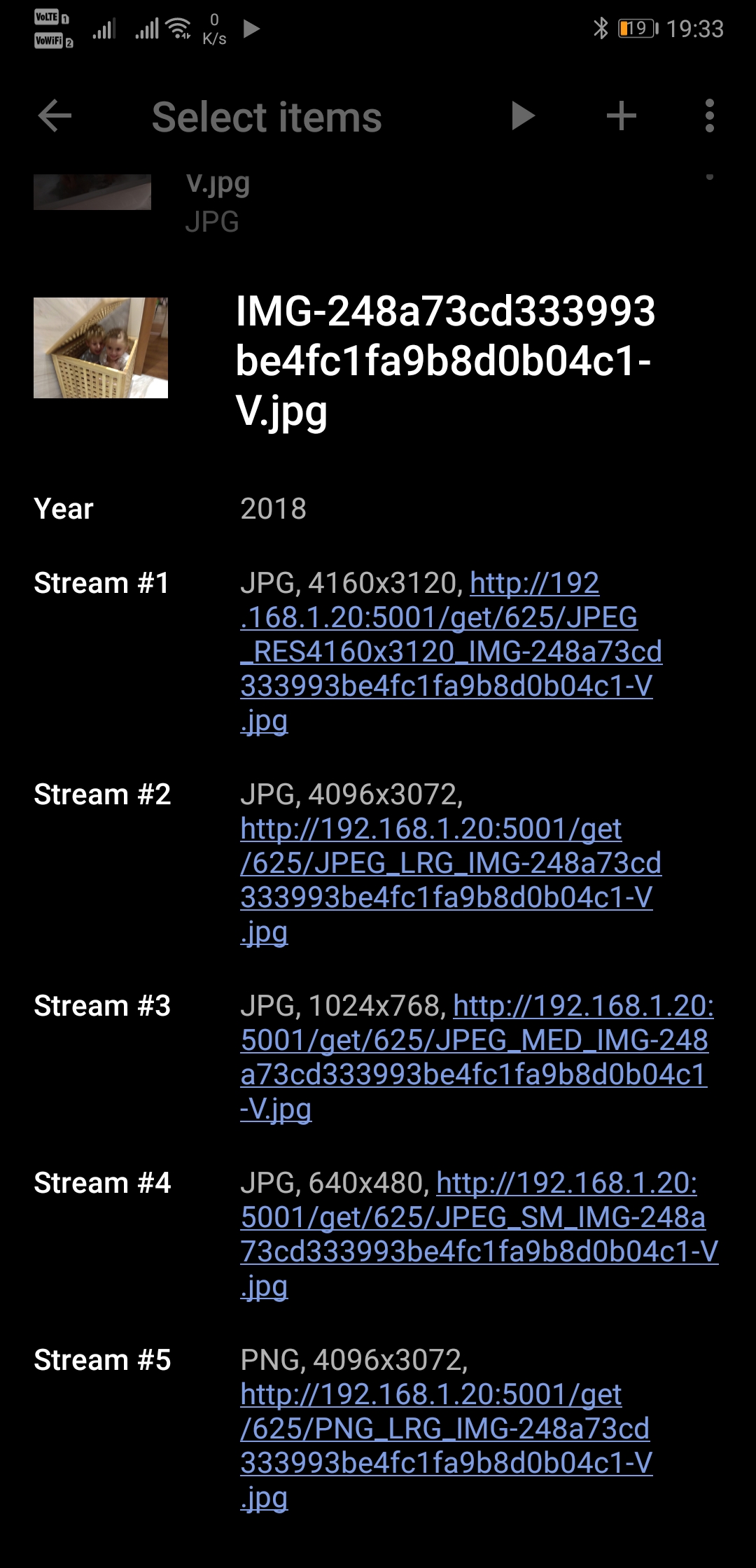
Serviio streams this photo in original resolution 4160x3120 with size of 2.1MB.
UMS streams this photo in lowered resolution 4096x3072 with size 0 (not sure if this info is not sent for all or transcoded files only).
Problem affects more renderers as I tried LG TV, Panasonic TV, Samsung TV, Windows PC, Android mobile - with UMS it was totally unusable.
If you will not be able to reproduce it, I will try to get some logs what is question for weeks as I am at parents home very rarely.
 ExSport
All 38 comments
Although I'm no longer a developer, I'll try to answer this as I made the code that does this.
What Serviio does doesn't comply with DLNA. The maximum allowed resolution is 4096 x 4096 according to DLNA, except if you use a "special profile" which doesn't seem to be implemented in most renderers. The first "stream" listed in the above picture is using this "special profile" and doesn't require reencoding of the image. In that case, the size would also have been available.
All the other entries are converted to comply with the image profiles specified by DLNA. The advantage of doing it the way UMS does is that it will work on more renderers, while what Serviio does won't work on renderers that follows the spec closely.
The biggest problem is probably the time it takes to convert them. It will depend on many things, the speed of your computer is of course essential. But, that's not all. There is a known problem that certain versions of Java is extremely slow with image manipulation. I don't remember the exact details now, but I think that Oracle Java 7 used a proprietary library which is much faster, but that they switched to a much slower open source library in Java 8. I also think they have made improvements to the open source library performance in more recent versions of Java, but they don't work with UMS (yet?).
In addition, if you're really out of luck, the color space needs to be converted to comply with DLNA. Just resizing the image is slow as well, but when you have to convert the color space, Java is really, terribly slow.
It seems that you've been maximum "unlucky", using images that is just above the 4096 x 4096 threshold and probably using the slowest version of Java for image conversion.
To "solve" this, I see two possible routes:
- Don't comply with DLNA and just send the picture as it is, hoping that the renderer can read it.
- Implement an external, native image manipulation library instead of using Java for image conversion.
 Nadahar
on 26 Oct 2018
Nadahar
on 26 Oct 2018
@ExSport there was some reformatting done on our image handling in the last few years, maybe try using an older version and I vaguely remember that made it slower during testing. A quick browse through the changelog identifies 6.7.0 as the version it may have become slower, so I recommend trying a version before that for comparison :)
Please let us know what you find
 SubJunk
on 26 Oct 2018
SubJunk
on 26 Oct 2018
Maybe we should aim for a "best of both worlds" solution where we add renderer options like MaximumImageResolution and RestrictImageColorSpace. That has been how we do it in the past, so that then we are able to offer the best support for each device
SubJunk
on 26 Oct 2018
Hi guys. Tested it on quite fast i7 quad core 😎
As I had no time when tested it on parents UMS, I have no logs. They used some 6.x version where it was very slow so I installed latest one but same problem persisted. So I added jpg to stream extensions as I don't remember other option 😊 It didn't help but I remember that such property was ignored when mediainfo was set to true. Unfortunately I had no more time except installing Serviio for comparison where it was very fast.
Is there property I can use in config file to override dlna compliance for renderer or whole server? 😎
Thx
Btw. mother's photos are from general Android phone so it is quite high probability this problem affects many of us.
ExSport
on 26 Oct 2018
@Nadahar @SubJunk
Hi guys. As I don't have DLNA TV I just tried to findout some simulator and found one for WebOS :) Will try when I will get time:
http://webostv.developer.lge.com/sdk/tools/emulator/introduction-emulator/
ExSport
on 17 Nov 2018
@ExSport Thanks for sharing, that can be useful.
Nadahar
on 17 Nov 2018
Another TV Simulator, Emulator, Web Inspector for Samsung. But not sure if DLNA TV can be emulated:
https://developer.samsung.com/tv/develop/getting-started/using-sdk/tv-simulator
ExSport
on 17 Nov 2018
Another one (probably not DLNA):
https://www.vewd.com/products-services/vewd-tv-emulator/
ExSport
on 17 Nov 2018
Cool links @ExSport
I started to look into an implementation based on my comment https://github.com/UniversalMediaServer/UniversalMediaServer/issues/1642#issuecomment-433550646 and hope to push something for that soon, I will let you know when that is ready for testing if you are interested
SubJunk
on 18 Nov 2018
I did some more work on this this weekend but unfortunately didn't finish yet. I will keep working on it though.
SubJunk
on 9 Mar 2019
@ExSport I have pushed my progress to https://github.com/UniversalMediaServer/UniversalMediaServer/pull/1773
Basically the approach is to define the JPEG_LRG and PNG_LRG maximum resolutions as 100000 by default but let renderers set their own values for it, so renderers that follow the DLNA spec closely would use 4096.
SubJunk
on 9 Mar 2019
Hi @SubJunk. Don't have ntb here (I am just at parents house where I can test it) so may I ask for win build?
Thanks 😉
ExSport
on 9 Mar 2019
@ExSport yes, I can make it in 2 days since I'm away from my build computer too :)
SubJunk
on 11 Mar 2019
Thx. Will test when I will be back again :)
Btw. installed 8.0 RC1 and spotted:
16:51:45 TRACE Converting input stream image source to SOURCE format and type DLNAThumbnail using the following parameters: ScaleType = MAX, Width = 320, Height = 320, PadToSize = False
16:51:45 TRACE Image conversion DLNA compliance check for JPEG_RES_320_180: The source image colors are compliant, format is non-compliant and resolution (4160 x 2336) is non-compliant.
Failures:
  JPEG_RES_320_180 DLNA compliance failed with wrong resolution 4160 x 2336 (limits are 320 x 180)
  JPEG DLNA compliance failed with non-typical Huffman tables
16:51:46 TRACE Finished converting 4160×2336 JPEG image. Output image resolution: 320×180, profile: JPEG_RES_320_180. Flags: Convert colors = False, Re-encode = True
Is it a big deal this "compliance failed with non-typical Huffman tables". I mean if there will not be unnecessary transcoding with the correct huffman tables also in case renderer is ok with original file? Btw. file is converted for all jpeg_res_alternatives what server offers or is there option to set e.g. max thumbnail size so only one thumb size is created without offering many possible variants of thumbs = lot of unnecessary transcodes? Thx
ExSport
on 11 Mar 2019
@ExSport the UMS is offering more resolution alternatives but transcoded is the only one which is choosen and requested by renderer.
 valib
on 11 Mar 2019
valib
on 11 Mar 2019
@ExSport You are correct that this image will be converted regardless of resolution because of the non-standard Huffman tables. It doesn't matter what the renderer supports, the whole idea is that DLNA defines a number of standard properties of a certain media profile. Media announced with the given profile has to comply with the requirements of said profile. All DLNA certified renderers are then required to support the exact properties defined for a specific profile.
What DLNA does, on top of UPnP, is exactly to define such standard behavior, to avoid compatibility problems. There are so many different properties for a given media type/format, that "negotiating" each single property with each renderer would be very complicated and probably time-consuming. Thus, they have chosen this "simplified" model.
UPnP on the other hand doesn't specify any properties for the media files, so under UPnP rules "the laws of the jungle applies" and it's up to the server and the renderer to figure out what is supported and not, independent from the standard. Because of this, UPnP will often fail with incompatibility problems, which is why DLNA has become popular. DLNA guarantees that if both parties adhere to the "rules", it WILL work.
This is the reason that I use to say that UMS isn't DLNA at all, except for images, there aren't a single DLNA profile that is supported and enforced by UMS. UMS claims to support a few DLNA profiles, but doesn't actually make sure that the media files comply, and thus it isn't in compliance, and instead it "lies" to the renderer telling it something about a certain media that isn't true. This is also why so much of what tries to use DLNA profiles in UMS fails to work on renderers.
Nadahar
on 11 Mar 2019
Thanks guys. It was my question. There are some very strict policies which must be met but in most cases renderers support is more wide so e.g. picure resolution is not limited to DLNA specs, more Hufmann tables are supported so user tries to limit transcoding but DLNA server tries to offer the most compatible media what incur unnecessary transcoding and major slowness. In past there where options in renderer files where user can override it (max picture resolution etc.) but it is not supported anymore.
From one side I understand to be strict with DLNA but on other side it is major flawless of UMS as users don't understand the background. They only see results, Serviio is fast but UMS very slow.
I don't like config files in xml but in Serviio way it seems the alternate configuration is more configurable so it is possible to override some options which e.g. transcodes unnecessarily.
In perfect world I can imagine some "Wizard" with samples where user will play few files and define if file was played ok or not to learn renderer limits and extended support so required transcoding will be limited as possible.
But I know it is not ideal way how to make such compatibility test.
Anyway very interested in performance of the new code which doesn't comply with DLNA but probably is supported by majority of renderers (no restrictions on 4096x4096 res) like parents PanTV and LG.
ExSport
on 11 Mar 2019
As I see it it's very simple. If you announce a media as DLNA compatible, it has to comply with the standard. If you don't (and annouce it according to UPnP using mimetype only), it can be whatever. The reason is that it's not only about what the renderer supports, the DLNA spec is supposed to be something the renderer can trust. The renderer isn't even required to analyse the media, but is supposed to be able to accept the announced properties as facts. You can thus risk it failing when using a DLNA profile even if the renderer actually supports the property.
Nadahar
on 11 Mar 2019
Thx Nadahar.
Forgot to ask. UMS offers more thumbs sizes. What thumb resolution is created in db at time of scanning? I suppose some greater one which can be downscaled at time renderer asks for specific one, right? Or is there one size only? Thx
ExSport
on 12 Mar 2019
@ExSport You are correct, thumbnails are only downscaled. The size stored in the database varies somewhat by the type of media, I think I originally limited it to 640 x 640 for audio files and 320 x 320 for everything else, but I don't remember if these limits have since been reduced. The reason is that the thumbnails use a very significant part of the database size, so that decreasing the max size of stored thumbnails can have a drastic effect on the size of the database file.
Regardless, thumbnails are offered in multiple sizes, but never upscale. It's not much of a problem for thumbnails though, since even Java does this reasonably fast for such small images.
Nadahar
on 12 Mar 2019
Great, thanks. It was my point. Storing optimal thumb size for optimal size of db and also possible slowness at time of browsing when UMS must downconvert them. If it is negligible, great and good to know as I already know downscaling of full image is drastically slow with ImageIO and happens unnecessarily in most cases due to a few additional pixels above 4096px limit :)
ExSport
on 12 Mar 2019
@ExSport thanks, I will also make that image compliance check renderer-specific in the same branch :)
SubJunk
on 13 Mar 2019
@ExSport I had 5 mins spare to make you this build with some uncommitted code I'm working on if you want to try it https://www.spirton.com/uploads/UMS/UMS-ExSportTest3.exe
SubJunk
on 15 Mar 2019
Hi @SubJunk
Thanks for build.
What I spotted is that UMS regenerates thumbs (DB) every UMS restart as it is not found in DB:
00:02:19 TRACE Matched format JPG to "C:\!@!\IMG_20181010_070240.jpg"
00:02:19 TRACE Creating thumbnail for "IMG_20181010_070240.jpg"
00:02:19 TRACE Converting input stream image source to SOURCE format and type DLNAThumbnail using the following parameters: ScaleType = MAX, Width = 320, Height = 320, PadToSize = False
00:02:19 TRACE Image conversion DLNA compliance check for JPEG_RES_320_240: The source image colors are compliant, format is non-compliant and resolution (4160 x 3120) is non-compliant.
Failures:
  JPEG_RES_320_240 DLNA compliance failed with wrong resolution 4160 x 3120 (limits are 320 x 240)
  JPEG DLNA compliance failed with non-typical Huffman tables
00:02:19 TRACE Finished converting 4160×3120 JPEG image. Output image resolution: 320×240, profile: JPEG_RES_320_240. Flags: Convert colors = False, Re-encode = True
00:02:19 TRACE Searching for thumbnail in THUMBNAILS with "SELECT * FROM THUMBNAILS WHERE MD5 = 'cab759ca21b9e8a4268344c01bed8b80' LIMIT 1" before update
00:02:19 TRACE File entry "cab759ca21b9e8a4268344c01bed8b80" not found in THUMBNAILS
00:02:19 TRACE Adding new child "IMG_20181010_070240.jpg" with class "RealFile"
00:02:19 TRACE Getting player for resource "IMG_20181010_070240.jpg"
00:02:19 TRACE Player "DCRaw" is incompatible
00:02:19 TRACE No player found for IMG_20181010_070240.jpg
00:02:19 TRACE Final verdict: "IMG_20181010_070240.jpg" will be streamed because no compatible player was found
Other behavior is that TV doesn't show size of the picture/content length (it shows 0KB on TV) as the picture is still transcoded (Serviio ignores HUFFMAN tables and resolution compliance so pictures are sent without transcoding).
Btw. I shared 495 pictures only what generated 83MB UMS database (thumbs generation enabled). When UMS is exited and started again, DB size sometimes stays the same or other times it is reset to about 1 MB on UMS exit. Next UMS start DB grows back to 83MB and this unpredictable behavior repeats again and again. Weird...
00:12:16 TRACE Stripping preceding slash from: /get/104/JPEG_LRG_IMG_20181009_190724.jpg
00:12:16 TRACE Matched media renderer "[TV] Samsung 5 Series (32)" based on address 192.168.1.18
00:12:16 DEBUG Recognized media renderer "[TV] Samsung 5 Series (32)"
00:12:16 TRACE Received a request from [TV] Samsung 5 Series (32) [Samsung C/D Series] (192.168.1.18:57011):

HEAD /get/104/JPEG_LRG_IMG_20181009_190724.jpg HTTP/1.1

HEADER:
  getcontentFeatures.dlna.org: 1
  Host: 192.168.1.23:5001
  Connection: close

00:12:16 TRACE Converting input stream image source to JPEG_LRG format and type DLNAImage using the following parameters: PadToSize = False
00:12:16 TRACE Image conversion DLNA compliance check for JPEG_LRG: The source image colors are compliant, format is non-compliant and resolution (4160 x 3120) is compliant.
Failures:
  JPEG DLNA compliance failed with non-typical Huffman tables
00:12:17 TRACE Finished converting 4160×3120 JPEG image. Output image resolution: 4160×3120, profile: JPEG_LRG. Flags: Convert colors = False, Re-encode = True
00:12:17 TRACE Image: Available Content-Length: 1503421
00:12:17 TRACE HEAD only response sent to [TV] Samsung 5 Series (32) [Samsung C/D Series]:

HEADER:
  HTTP/1.1 200 OK
  Server: Windows_10-amd64-10.0, UPnP/1.0 DLNADOC/1.50, UMS/8.0.0-RC1
  ContentFeatures.DLNA.ORG: DLNA.ORG_PN=JPEG_LRG;DLNA.ORG_CI=1;DLNA.ORG_FLAGS=00900000000000000000000000000000
  Content-Length: 1503421
  Content-Type: image/jpeg
  Accept-Ranges: bytes
  Expires: Sun, 14 Jul 2019 16:58:57 GMT
  Connection: keep-alive

00:12:17 TRACE Stripping preceding slash from: /get/104/JPEG_LRG_IMG_20181009_190724.jpg
00:12:17 TRACE Matched media renderer "[TV] Samsung 5 Series (32)" based on address 192.168.1.18
00:12:17 DEBUG Recognized media renderer "[TV] Samsung 5 Series (32)"
00:12:17 TRACE Received a request from [TV] Samsung 5 Series (32) [Samsung C/D Series] (192.168.1.18:57012):

GET /get/104/JPEG_LRG_IMG_20181009_190724.jpg HTTP/1.1

HEADER:
  getcontentFeatures.dlna.org: 1
  Host: 192.168.1.23:5001
  Connection: close

00:12:17 TRACE Converting input stream image source to JPEG_LRG format and type DLNAImage using the following parameters: PadToSize = False
00:12:17 TRACE Image conversion DLNA compliance check for JPEG_LRG: The source image colors are compliant, format is non-compliant and resolution (4160 x 3120) is compliant.
Failures:
  JPEG DLNA compliance failed with non-typical Huffman tables
00:12:18 TRACE Finished converting 4160×3120 JPEG image. Output image resolution: 4160×3120, profile: JPEG_LRG. Flags: Convert colors = False, Re-encode = True
00:12:18 TRACE Image: Available Content-Length: 1503421
00:12:18 TRACE Transfer response sent to [TV] Samsung 5 Series (32) [Samsung C/D Series]:

HEADER:
  HTTP/1.1 200 OK (non-chunked)
  Server: Windows_10-amd64-10.0, UPnP/1.0 DLNADOC/1.50, UMS/8.0.0-RC1
  ContentFeatures.DLNA.ORG: DLNA.ORG_PN=JPEG_LRG;DLNA.ORG_CI=1;DLNA.ORG_FLAGS=00900000000000000000000000000000
  Content-Length: 1503421
  Content-Type: image/jpeg
  Accept-Ranges: bytes
  Expires: Sun, 14 Jul 2019 16:58:58 GMT
  Connection: keep-alive

00:12:19 TRACE Stripping preceding slash from: /get/104/JPEG_LRG_IMG_20181009_190724.jpg
00:12:19 TRACE Matched media renderer "[TV] Samsung 5 Series (32)" based on address 192.168.1.18
00:12:19 DEBUG Recognized media renderer "[TV] Samsung 5 Series (32)"
00:12:19 TRACE Received a request from [TV] Samsung 5 Series (32) [Samsung C/D Series] (192.168.1.18:57014):

HEAD /get/104/JPEG_LRG_IMG_20181009_190724.jpg HTTP/1.1

HEADER:
  getcontentFeatures.dlna.org: 1
  Host: 192.168.1.23:5001
  Connection: close

00:12:19 TRACE Converting input stream image source to JPEG_LRG format and type DLNAImage using the following parameters: PadToSize = False
00:12:19 TRACE Image conversion DLNA compliance check for JPEG_LRG: The source image colors are compliant, format is non-compliant and resolution (4160 x 3120) is compliant.
Failures:
  JPEG DLNA compliance failed with non-typical Huffman tables
00:12:19 TRACE Finished converting 4160×3120 JPEG image. Output image resolution: 4160×3120, profile: JPEG_LRG. Flags: Convert colors = False, Re-encode = True
00:12:19 TRACE Image: Available Content-Length: 1503421
00:12:19 TRACE HEAD only response sent to [TV] Samsung 5 Series (32) [Samsung C/D Series]:

HEADER:
  HTTP/1.1 200 OK
  Server: Windows_10-amd64-10.0, UPnP/1.0 DLNADOC/1.50, UMS/8.0.0-RC1
  ContentFeatures.DLNA.ORG: DLNA.ORG_PN=JPEG_LRG;DLNA.ORG_CI=1;DLNA.ORG_FLAGS=00900000000000000000000000000000
  Content-Length: 1503421
  Content-Type: image/jpeg
  Accept-Ranges: bytes
  Expires: Sun, 14 Jul 2019 16:58:59 GMT
  Connection: keep-alive

00:12:20 TRACE Stripping preceding slash from: /get/104/JPEG_LRG_IMG_20181009_190724.jpg
00:12:20 TRACE Matched media renderer "[TV] Samsung 5 Series (32)" based on address 192.168.1.18
00:12:20 DEBUG Recognized media renderer "[TV] Samsung 5 Series (32)"
00:12:20 TRACE Received a request from [TV] Samsung 5 Series (32) [Samsung C/D Series] (192.168.1.18:57015):

GET /get/104/JPEG_LRG_IMG_20181009_190724.jpg HTTP/1.1

HEADER:
  getcontentFeatures.dlna.org: 1
  Host: 192.168.1.23:5001
  Connection: close

00:12:20 TRACE Converting input stream image source to JPEG_LRG format and type DLNAImage using the following parameters: PadToSize = False
00:12:20 TRACE Image conversion DLNA compliance check for JPEG_LRG: The source image colors are compliant, format is non-compliant and resolution (4160 x 3120) is compliant.
Failures:
  JPEG DLNA compliance failed with non-typical Huffman tables
00:12:20 TRACE Finished converting 4160×3120 JPEG image. Output image resolution: 4160×3120, profile: JPEG_LRG. Flags: Convert colors = False, Re-encode = True
00:12:20 TRACE Image: Available Content-Length: 1503421
00:12:20 TRACE Transfer response sent to [TV] Samsung 5 Series (32) [Samsung C/D Series]:

HEADER:
  HTTP/1.1 200 OK (non-chunked)
  Server: Windows_10-amd64-10.0, UPnP/1.0 DLNADOC/1.50, UMS/8.0.0-RC1
  ContentFeatures.DLNA.ORG: DLNA.ORG_PN=JPEG_LRG;DLNA.ORG_CI=1;DLNA.ORG_FLAGS=00900000000000000000000000000000
  Content-Length: 1503421
  Content-Type: image/jpeg
  Accept-Ranges: bytes
  Expires: Sun, 14 Jul 2019 16:59:00 GMT
  Connection: keep-alive
Thx for your support and another test build as I am at parents home so I can retest it 👍
ExSport
on 21 Mar 2019
Cool thanks, I can do more work on it tomorrow as I should have a few solid hours (for the first time in weeks)
SubJunk
on 21 Mar 2019
Thanks @SubJunk
Waiting for a new test build from you :)
ExSport
on 22 Mar 2019
@SubJunk Last few hours at parents house and then no chance to test anything for another few weeks...
ExSport
on 25 Mar 2019
@SubJunk are my findings about buggy DB behavior related to H2Database versions you spotted few days ago? What about the rest, picture transciding due to non-standard huffman tables which are ok for renderer but not for UMS? 😊
Thx
ExSport
on 5 Apr 2019
What about the rest, picture transciding due to non-standard huffman tables which are ok for renderer but not for UMS?
I'd just like to add that this is wrong. UMS doesn't care about huffman tables DLNA does. Although your renderer doesn't need the standard huffman tables, other renderers probably do. How do you tell which ones does and doesn't? The whole point with DLNA is to standardize these things, so that as long as you stick to the standard, it works.
That said, I can't express how wrong I think the authors of the DLNA standard were to require the "standard" huffman tables. The motivation for doing so is that it allows a simpler and more effective decoder. I think it's a mistake, as I'd think that decoding JPEGs aren't even close to the most resource intensive tasks renderers do, so I think they made the wrong call. Non-standard huffman tables allow for creating more "optimized" JPEGs where the quality/compression ratio is a bit better, at the cost of a slightly more "complicated" decoding.
But, it's irrelevant what we think about this. As I've said before, as long as resources are announced using a DLNA profile (PN), they must comply - otherwise the use of DLNA is pointless and will lead to errors. Resources can be announces without a DLNA profile without any such restrictions, so that should be the solution if one wish to deviate from the DLNA specs.
Nadahar
on 5 Apr 2019
@Nadahar Sure, I know it is not UMS fault. I know UMS do it for my pleasure, that all pictures will be visible on the renderer so it forces transcoding for sure. I directed my comment to the option to override it. There are some file property checks for DLNA compliance and if it doesn't fit, UMS transcodes it. For the end user, if he tries UMS and Serviio, he completely uninstall UMS after a while as UMS tries to be compliant so every picture is transcoded so browsing is very very slow. Serviio is very fast. For the user perspective it is irrelevant why (until he has renderer which doesn't support such pictures). I suppose adding some configuration option to change default behavior should be very useful.
I tried Serviio with this huffman incompatible pictures and there were no issues to play them without transcoding on all renderers (Android mobile, Android TV, Panasonic TV, LG TV (LGOS), Samsung TV).
What I want to say is in some cases UMS may be too strict so because of one renderer from million it forces transcoding for maximum compatibility which is not always good solution. For such cases it will be great to make option reconfigure it per renderer conf. In my case, all renderers had no problems with such picture so I will set no transcoding as a default for all and enable it only when I will find incompatible renderer 👍
Btw. how UMS detects incompatible files for DLNA/UPnP? I suppose there is no general library used for it which returns SUPPORTED/UNSUPPORTED but it is tested by UMS itself like checkResolution, checkHuffman,checkProgressive, etc... and if any of them returns INCOMPATIBLE, enable transcoding.
In such case I think it is not hard to make it configurable :-)
Ok, now I finished reading last part: Do you want to say there are specific compatibility checks in UMS depending on PN used? If yes, it applies what I said earlier, it can be overriden in renderer file but yes, it degrades the philosophy of DLNA PN compliancy :-)
But we already do DLNA compliance hacks, e.g. by allowing high profile levels for H.264 per renderer config 👍
ExSport
on 5 Apr 2019
UMS doesn't support DLNA for anything else than pictures, despite it being claimed. It's the reason why many things fail to play on many devices, and there's a ton of hacks and specialized settings to get around it. As I see it this is a failed strategy that will only become more and more complicated and broken the more "special cases" you implement workarounds for. It works, in a way, for a limited number of renderers, but it can never achieve "universal" support.
The "DLNA implementation" for audio and video is just a joke. It's simply a collection of hacks, mostly for the PS3 and some for XBox and a few others, that tries to "pretend" to support DLNA enough for the renderers to accept media playback. It fails horribly on many other renderers.
This is why, when I made image support from the scratch, I designed the system for actual DLNA support. Unlike with the previous implementation, I've read very few (if any) complaints that images doesn't work. I believe this is because it properly implements DLNA.
There is no problem to override specific checks based on configuration, it's just wrong to do. What you do then, is to start to break something that is working. As time goes by and more hacks are added, you end up in a state where it's as broken as the old implementation (or the current audio/video implementation). This is why I'm saying that I don't think the DLNA implementation for images should be touched (unless an actual bug is found), but instead "basic UPnP" should be used to achieve faster handling.
With "basic UPnP" there are no requirements for conformance, there is only the MIME code. That means that you only announce that this image is image/jpeg and if the renderer think that's OK will will have to deal with the consequences of all the different actual implementations that are encompassed by the MIME-type. This will of course fail at times, but as long as the DLNA implementation is there as a fall-back, it should be possible to achieve both speed (with capable renderers) and compatibility (with less-capable renderers). That presupposes that the renderer has the "intelligence" to pick the DLNA entry when it fails to play the UPnP entry, which I'm sure that not all renderers are capable of, but I've seen in logs that at least some renderers does this. When it tries to play one "protocolInfo" entry of a given resource, and it doesn't work, it might try another.
Nadahar
on 5 Apr 2019
Thanks for deep insight into the DLNA/UMS behavior and standards.
Now I understand. So then forcing basic upnp behaviour for pictures per renderer config should be ok, without any hacks to DLNA PN compliancy. Sure, it will not help to the general user as UMS may be much slower with specific files compared to e.g. Serviio but "informed" user can make changes to have performance like competition 😊
ExSport
on 5 Apr 2019
@ExSport That would depend on how it was implemented. Using UPnP for images could be the default, it could be determined by GetProtocolInfo or it could be controlled by the renderer configuration. Both could also be offered. There's a flag that indicates if a resource is transcoded or not, so well behaved renderers are supposed to pick the non-transcoded version if it's compatible. Using this, it should be possible to get renderers that support "fully featured" JPGs to pick the non-transcoded one and for the others to pick the (some times transcoded) DLNA version.
The problem is that the implementation rarely behave that well, so I don't know how many renderers would behave that way and how many that would just pick one - which might fail.
Nadahar
on 5 Apr 2019
@ExSport sorry I haven't had any extra time to work on this. The code approach I took initially was wrong so I need to start it a different way. I have found the code pretty hard to understand so it has taken longer than usual for such a simple thing.
The strategy will be the same as I described - by default we will behave like Serviio but renderer profiles can enable more strict settings if they do not support certain image types. I suspect it would be hard to find a renderer that is that picky about JPEGs!
I wanted to work on it more but I have had some family illness and wanted to get v8 out. This is still high on my priorities!
SubJunk
on 6 Apr 2019
Thanks guys
ExSport
on 17 Apr 2019
I spent a long time on this and have had to give up since it was taking up all my time and I wasn't making good progress. I just don't understand that part of the code. Sorry.
SubJunk
on 14 Sep 2019
@SubJunk You shouldn't try to "compromise" the DLNA checks (I assume that's the part of the code that you struggle with). They work and follow the standard. Instead, you could offer a version (in addition) that doesn't comply with DLNA at all, that is a "pure UPnP" (that doesn't specify a DLNA PN, FLAGS or any other DLNA info, but relies solely on the MIME-type) listing that simply dumps the image as it is.
If they should both be listed together, or just one or the other, would need to be tested and/or controlled with configuration.
Nadahar
on 14 Sep 2019
@Nadahar yeah I had thought the same but I wasn't able to achieve that, I'm just not good at understanding the code for some reason and I can make a much bigger and faster impact in areas I find easier to understand.
SubJunk
on 15 Sep 2019
Related issues
 Lincoln-G
·
71Comments
Lincoln-G
·
71Comments
 MediaMania1
·
40Comments
SubJunk
·
41Comments
MediaMania1
·
40Comments
SubJunk
·
41Comments
 DaniGTA
·
79Comments
DaniGTA
·
79Comments
 purevertigo
·
44Comments
purevertigo
·
44Comments
Most helpful comment
@Nadahar @SubJunk
Hi guys. As I don't have DLNA TV I just tried to findout some simulator and found one for WebOS :) Will try when I will get time:
http://webostv.developer.lge.com/sdk/tools/emulator/introduction-emulator/