Universalmediaserver: Incorrect Genre for some music files
Hello,
I have run into the same issue than described here:
https://www.universalmediaserver.com/forum/viewtopic.php?t=9032
=> Genre are shown as "Genre_013" instead of "Pop" , "Genre_017" instead of "Rock"...
This only happens for MP3 files, but it's still PITA.
After investigating, I have realized that UMS sets the parameter "Language" to "raw" when creating and instance of the mediainfo library (file LibMediaInfoParser, line 45). Setting this parameter to "en" fixes the issue and (after 10 seconds of testing :) ) does not seem to break anything else
We have therefore two choices it seem:
- Setting Language to "en"
- Introducing a translator for Genres based on the CSV files distributed with MediaInfo and replacing the correct Genre_XXX by the readable version locally
What do you think? If setting language to "en" is out of question, I can try to provide a pull request with the second option of course.
 maciekberry
All 8 comments
How about a combination of 1 and 2, where we set MediaInfo language to the same language that UMS is configured for? We would just have to make sure that the rest of our code isn't relying on that raw language, but I think we use the keys instead of the values so it should be ok.
 SubJunk
on 15 Nov 2018
SubJunk
on 15 Nov 2018
Sorry for not responding earlier, I needed to investigate more.
It seems the MediaInfoLib is not multilingual. It only handles "raw" and English names. So it does not matter what language you set, you will only get the English names (or the "raw" ones) if you use the library (which is UMS case).
The translations to other languages are part of the MediaInfo executable and not the library. Unless I am totally mistaken of course.
To answer your question: we can of course set the UMS language there. But it does not matter, it will work exactly the same than with the hardcoded "en".
maciekberry
on 26 Nov 2018
Thanks for coming back, nice investigation :) Then maybe we should use en language for MediaInfo, and then add the genres to our translation files so they can be translated on Crowdin, what do you think about that approach?
SubJunk
on 26 Nov 2018
Guys when we set language to en we must refactor the LibMediaInfoParser because we use e.g. Format_Version but in the english it is Format version and so on. Or to keep raw language and add all Genre variation as an enum.
 valib
on 26 Nov 2018
valib
on 26 Nov 2018
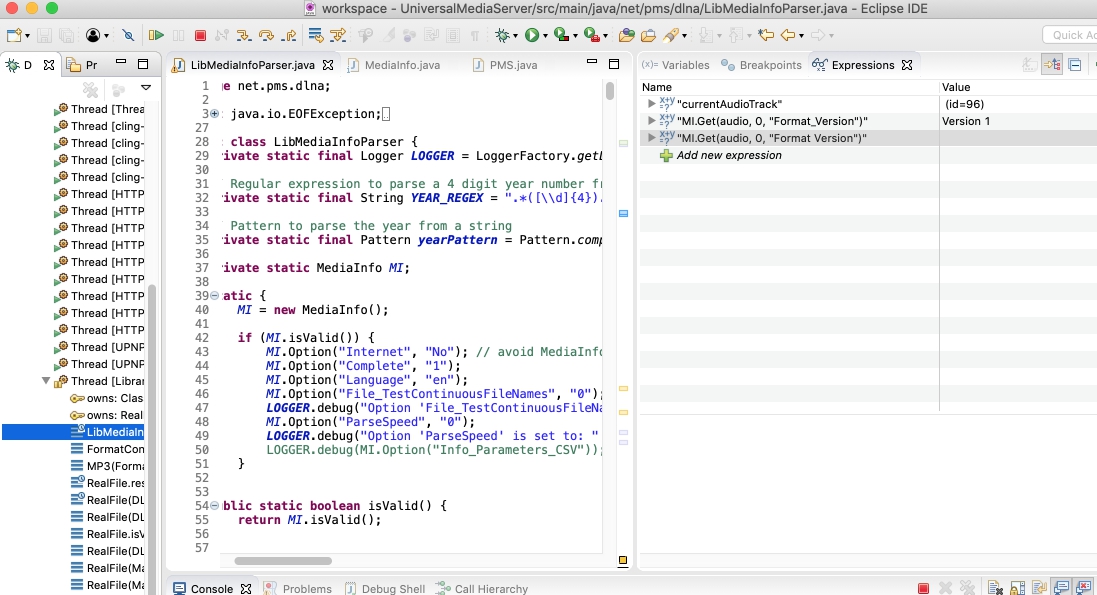
Fortunately, regardless of the language, the mediainfo library always accepts the "raw" key name. So even if the langauge is set to "en", the key name is "Format_Version".
Please see the attached screenshot (it's a breakpoint while reading a file and as you can see, the language parameter is set to "en").
As I said: I will accept any decision from you. I can also make an enum with the genres.
maciekberry
on 27 Nov 2018
@maciekberry nice catch. I didn't check what language is using the MediaInfo as default. If it is correct than your suggestion is acceptable.
valib
on 27 Nov 2018
This can be closed then.
maciekberry
on 11 Dec 2018
ARGH, you were 2 seconds quicker than me!
maciekberry
on 11 Dec 2018
Related issues
 Lincoln-G
·
71Comments
Lincoln-G
·
71Comments
 MediaMania1
·
40Comments
MediaMania1
·
40Comments
 chrismoberly
·
43Comments
chrismoberly
·
43Comments
 Sami32
·
35Comments
Sami32
·
35Comments
 rd1
·
57Comments
rd1
·
57Comments
Most helpful comment
Fortunately, regardless of the language, the mediainfo library always accepts the "raw" key name. So even if the langauge is set to "en", the key name is "Format_Version".
Please see the attached screenshot (it's a breakpoint while reading a file and as you can see, the language parameter is set to "en").
As I said: I will accept any decision from you. I can also make an enum with the genres.