Universalmediaserver: folder.jpg doesn't work anymore as thumbnail cover art
On UMS 6.5, the movie files are showned with the thumbnail cover art given by the file "folder.jpg" that is in the same folder as the movie files.
On UMS 6.7 and UMS 6,8, this behaviour doesn't work anymore.
I hope this behaviour will be come back soon.
 djax666
All 13 comments
@Nadahar could be one for you?
 SubJunk
on 8 Jan 2018
SubJunk
on 8 Jan 2018
I can't look into this until I've finished some code I'm in the middle of. I think we've had this complaint once before though, so I'd just like to make sure that it's really a bug.
We previously had a long standing bug where folder images would override individual thumbnails. This was fixed at a point (probably between 6.5 and 6.7), so that individual thumbnails now how priority over folder images. That means that to see the folder images now, you need to make sure there are no individual thumbnails available for the media files.
Individual thumbnails can either be in the form videofilename.jpg or videofilename.png or can be generated from the video itself. Be sure that no such images exist in the same folder as the video and that generation of video thumbnails is turned off. Is this still a problem then?
 Nadahar
on 12 Jan 2018
Nadahar
on 12 Jan 2018
@SubJunk As I've said before, I think the only solution that would make everybody happy is if the thumbnail source priority was configurable. People have different ideas about what is the ideal behavior, and some users will always be unhappy nomatter how the logic is.
Nadahar
on 12 Jan 2018
To be more precise,I made an example.
Here is the content of a folder:
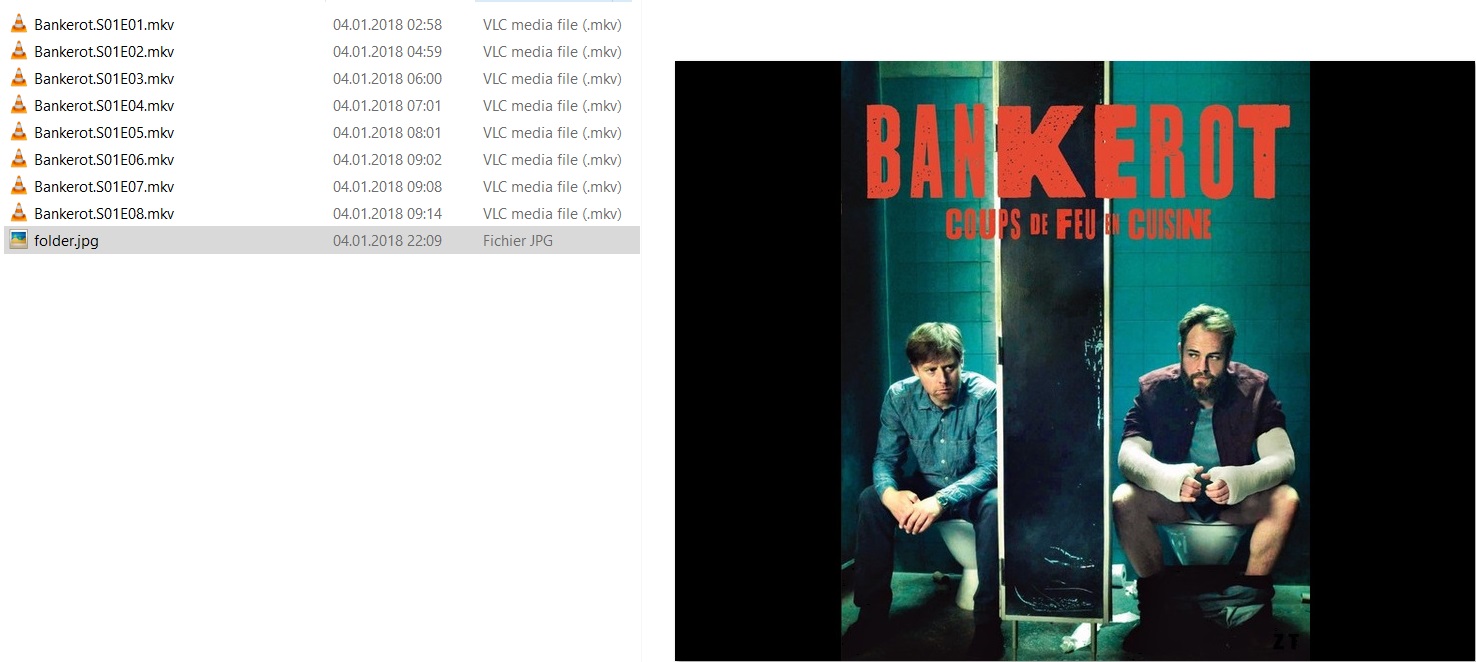
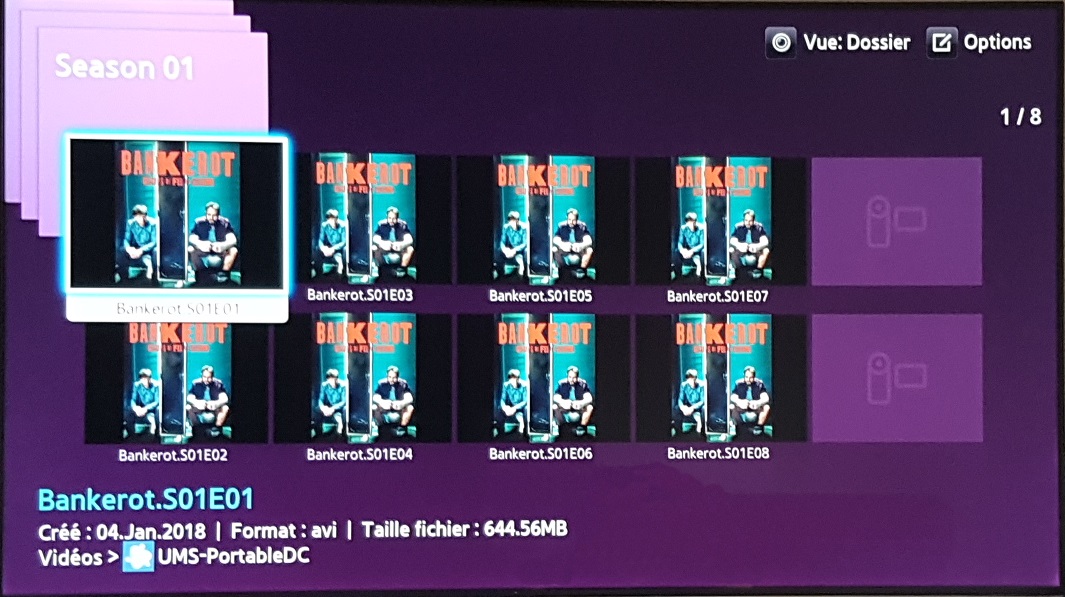
You can see there is only one file "folder.jpg" and videos.
On UMS 6.5.0, the renderer on a Samsung TV is:
On UMS 6.8.0, the renderer is like that:
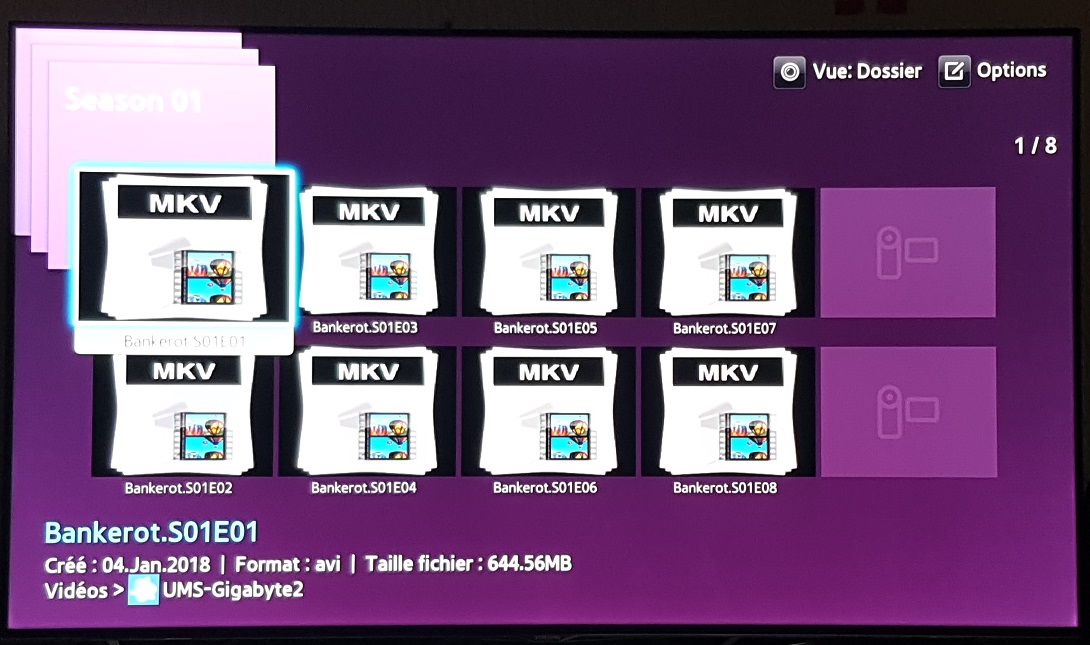
On folders with videofilename.jpg, the videofilename,jpg are shown as thumbnail.
IMHO the logic should be:
if( videofilename.jpg exists){use videofilename.jpg}
else if( videofilename.png exists){use videofilename.png}
else if( folder.jpg exists) {use folder.jpg}
else if( folder.png exists) {use folder.png}
else if( generate thumbnail is checked) {generate it and use it}
else {use the default icon}
Best regards
djax666
on 12 Jan 2018
@djax666 It seems that something isn't working as intended then, because folder.jpg/png should have priority above the default icon.
I can't look into the exact code now, but as far as I remember the current logic is something like:
if (videofilename.jpg/png exists) {use videofilename.jpg/png}
else if (embedded thumbnail exists) {use embedded thumbnail}
else if {other source (for example online) exists) {use other source}
else if (generate thumbnail is checked) {generate it and use it}
else if (folder.jpg/png exists) {use folder.jpg/ong}
else {use the default icon}
This logic applies to both audio and video files, although there's no option to generate for audio and only audio currently has an "other" source (Cover Art Archive). The folder.jpg/png is used as the thumbnail for the folder itself if it exists.
The way you want it is similar to how it was, where folder.jpg/png would override individual thumbnail sources.
The current logic should work for you as long as thumbnail generation is turned off, so there must be a bug involved.
Nadahar
on 12 Jan 2018
@Nadahar In my case, the generation is turned off.
For videos like series, the generated thumbnails will not give any usefull information. It depends too much on which second the thumbnail is generated from and could vary from a serie to another, so I prefer having a cover file I choose myself.
IMHO the logic should be:
1st. videofilename.jpg/png , because the user want this cover for this specific file.
2nd. embeded thumbnail , because the user has put this cover into this specific file.
3rd. folder.jpg/png , because the user want this cover for these folder files.
4.th other source, because the user has choosen this option, but it depends on the avaibility of the media in the external service.
5th. generated thumbnail, these is better than nothing and doesn't override the previous choices that the user could have made. If this choice were before, for the video, it will always override any other options.
6th. default media icon.
djax666
on 13 Jan 2018
I have narrowed down the version that broke this - it is working in 6.6.0 and broken in 6.7.0
Looking at the comparison at https://github.com/UniversalMediaServer/UniversalMediaServer/compare/6.6.0-Java7...6.7.0 there's a daunting list of changes related to images.
I see this old PR https://github.com/UniversalMediaServer/UniversalMediaServer/pull/1384 @Nadahar I'm confused about the comment in there that it is already working like that, since I just reproduced it. I know it was a long time ago but can you please clarify?
SubJunk
on 18 Jun 2020
@SubJunk I obviously don't remember any details, but the way I interpret my comment is that I tested it and found that the folder thumbnail had priority over the generic thumbnail.
Maybe there's a bug somewhere that leads to this behavior depending on some other (to us) unknown factor?
Or are we talking about different things? There are many different things here so I'm not sure we're always talking about the same "issue". It all boils down to what priority the different thumbnail sources are given.
Before #1061 folder thumbnails had priority over pretty much everything else as far as I remember. That lead to complaints as well, naturally, because many media files come with images and users are to lazy to "clean that up". So, I tried to make a more sensible prioritization, but as I pointed out in #1384 I think this should be configurable because it's impossible to make a list of priorities that will make everybody happy. What is "natural" to one is "a big" to another. As long as this isn't made configurable, the only thing that can be done is to try to make the prioritization that the biggest number of users agree with. Since there's no way to actually measure this, it has to be guesstimated.
From my earlier description, it seems like generated thumbnails have priority over folder thumbnails. I can see how that might not be desirable, since the generated thumbnails generally isn't very representative of the media. So, I would consider changing that. Except for that, I don't see what should be done differently.
What exactly is the issue at hand here, what thumbnail is used and what thumbnail is expected in the "test case"?
Nadahar
on 18 Jun 2020
Thanks for your comments. I agree that it would be good to make the priorities customizable.
My testing involved putting folder.jpg into a folder, and observing that in 6.6.0 all files within the folder use that folder.jpg as their thumbnail image, but in 6.7.0 they ignore it.
I think the comment about priorities from @djax666 is good. I would tweak it slightly for the default case but let it be customized. Mine would be the same, except that step 2 would be much lower priority, because in my experience a lot of release groups just add their logo as the cover for a video and that is even less useful than our auto-generated one.
Another consideration is that in v10, many auto-thumbnails will be much better - they will often be the same ones that IMDb has, if the user has that feature enabled. So I would expect those to be more trustworthy than the one within the file itself which is often just advertising for the release group.
So my revised list would be:
- videofilename.jpg/png , because the user want this cover for this specific file.
- folder.jpg/png , because the user want this cover for these folder files.
- other source, because the user has chosen this option, but it depends on the availability of the media in the external service.
- generated thumbnail (including from the API in v10+), these is better than nothing and doesn't override the previous choices that the user could have made. If this choice were before, for the video, it will always override any other options.
- embedded thumbnail , because the user/release group has put this cover into this specific file.
- default media icon.
SubJunk
on 18 Jun 2020
As far as I remember, changing the priority should be relatively easy. I don't understand that folder.jpg is being ignored though, that's not what my tests showed as far as I remember. But, I think it's close to the bottom of the "list", only above the generic thumbnail. I think the reason for this is music, where folder.jpg is often included and wrong or irrelevant. I'm not sure of that though, but there had to be a reason for putting it that "low" on the list.
Nadahar
on 18 Jun 2020
@Nadahar would changing the priority be similar to your PR https://github.com/UniversalMediaServer/UniversalMediaServer/pull/1384#issuecomment-326833284 or would a different approach be better? Any idea what the problem you discovered was?
No problem if you just don't remember anymore, I am just trying to be as informed as I can be before I work on this
SubJunk
on 18 Jun 2020
@SubJunk I really don't remember, but when looking at #1384 it doesn't seem like that does much of anything. I think I discovered while working on it that it already had the behavior I was trying to achieve, so I just aborted it.
The prioritization isn't done there as far as I remember, I think there's a method in DLNAResource that selects the thumbnail source by looping while checking for different sources, but it's just too blurry at the moment.
The folder thumbnail functionality is a slightly different matter if I recall correctly, I think it deals with the thumbnail for the folder itself. I haven't seen any mention of that not working. But, it might be that it's related to the media resource thumbnail as well, I just don't remember.
I don't think the logic should be too hard to find.
Nadahar
on 18 Jun 2020
Thanks for your help, I'll see what I can find
SubJunk
on 18 Jun 2020
Related issues
Nadahar
·
9Comments
Nadahar
·
4Comments
SubJunk
·
5Comments
 SsJVasto
·
4Comments
SubJunk
·
3Comments
SsJVasto
·
4Comments
SubJunk
·
3Comments