Universalmediaserver: Application menu and About dialog still say "PMS" on Mac
UMS is showing it's PS3 Media Server origins on the Mac...
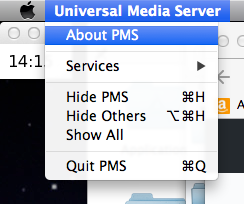
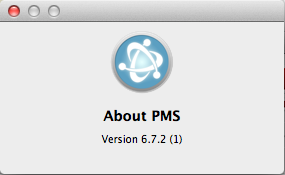
I know this is a trivial thing, compared to fixing various bugs and stuff, but it would be nice to see "PMS" changed to "UMS" at some point. :)
 esabol
All 12 comments
I'm not sure it's possible. I've been wondering where it gets that information from myself, and I suspect that it simply uses the name of the "main" class. That name is PMS, and will probably always be, unless we want to change thousands of refernces in the code and plugins.
 Nadahar
on 2 Aug 2017
Nadahar
on 2 Aug 2017
At least on my version of Mac OS X, it's possible. I just did it. I added <string>-Xdock:name=UMS</string> to the <key>JVMOptions</key> of the Info.plist.
Relevant links:
https://stackoverflow.com/questions/26069315/swing-application-menu-name-not-displaying-correctly-in-java-1-8
http://docs.oracle.com/javase/7/docs/technotes/guides/jweb/packagingAppsForMac.html
https://developer.apple.com/library/content/documentation/Java/Conceptual/Java14Development/03-JavaDeployment/JavaDeployment.html
esabol
on 2 Aug 2017
@esabol Of course it's "possible" to change the name, the problem is if it's possible within the limits of the AppBundler that generates Info.plist. UMS can also be run without using Info.plist, directly by starting Java either from the command line or a script, in which case I don't know if there is anything that can be done.
Nadahar
on 2 Aug 2017
Of course it's "possible" to change the name, the problem is if it's possible within the limits of the AppBundler that generates Info.plist.
I think all you need to do is to add <option value="-Xdock:name=UMS"/> where the other <option value="..."/> tags are in the pom.xml file.
UMS can also be run without using Info.plist, directly by starting Java either from the command line or a script, in which case I don't know if there is anything that can be done.
I don't see how that is relevant to this issue. People who execute Java from the command line can add -Xdock:name=UMS to their command line if they want to (or not). I would recommend using open -a "Universal Media Server" to launch a Mac application anyway from the command line or script in any case.
esabol
on 2 Aug 2017
@esabol I agree that it seems like the best solution, even though it will only work if installed as an "macOS Application". A reason to want to run it from the command line would be if it wasn't "installed".
Nadahar
on 2 Aug 2017
@esabol Done in #1353. Thanks for doing the actual work 😉
Nadahar
on 3 Aug 2017
Thank you, @Nadahar! I would say you did the actual work. :)
esabol
on 3 Aug 2017
Unfortunately, you put quotes around UMS, and that was incorrect. As far as macOS is concerned, the name of the app is now "UMS" instead of UMS. It should be:
<option value="-Xdock:name=UMS"/>
Please reopen the issue and rectify.
esabol
on 14 Aug 2017
@esabol I don't remember exactly why I did like I did now, but I think I tried without the quotes first. My VM server is currently unavailable, so I'll have to check it later when I have my OS X VM available again.
Nadahar
on 14 Aug 2017
I tested it without the "s, and they definitely are not needed for any reason that I can see.
esabol
on 14 Aug 2017
Thanks for the feedback @esabol
 SubJunk
on 15 Aug 2017
SubJunk
on 15 Aug 2017
@esabol I tested this and confirmed that you're right. I've created #1381 to fix it.
Nadahar
on 1 Sep 2017
Related issues
 Sami32
·
35Comments
SubJunk
·
42Comments
Sami32
·
35Comments
SubJunk
·
42Comments
 purevertigo
·
44Comments
Nadahar
·
50Comments
purevertigo
·
44Comments
Nadahar
·
50Comments
 Lincoln-G
·
71Comments
Lincoln-G
·
71Comments
Most helpful comment
I tested it without the
"s, and they definitely are not needed for any reason that I can see.