Universal: After migrating from angular universal 8 to 9, the page is in eternal loading and does not load anything
🐞 bug report
What modules are related to this issue?
- [ ] aspnetcore-engine
- [ ] builders
- [ ] common
- [x] express-engine
- [ ] hapi-engine
- [ ] module-map-ngfactory-loader
Description
after I upgraded from angular 8 to angular 9, Angular SSR stopped working.
it compiles everything right, when I open it in the browser it keeps trying to load and can't, there is no error in the browser console and I have no error in the terminal, I no longer know what to do.
For several weeks I have been trying to solve this, but there is no way to identify what is happening and it is something related to the update..
🔬 Minimal Reproduction
https://github.com/GlauberF/minimal-reproduction
🔥 Exception or Error

🌍 Your Environment
Angular CLI: 9.1.7
Node: 12.16.3
OS: linux x64

Angular: 9.1.4
... animations, common, compiler, core, forms, platform-browser
... platform-browser-dynamic, platform-server, router
... service-worker
Ivy Workspace: Yes

Package                            Version
------------------------------------------------------------
@angular-devkit/architect          0.901.7
@angular-devkit/build-angular      0.901.7
@angular-devkit/build-optimizer    0.901.1
@angular-devkit/build-webpack      0.901.7
@angular-devkit/core               9.1.7
@angular-devkit/schematics         9.1.7
@angular/cdk                       9.2.2
@angular/cli                       9.1.7
@angular/compiler-cli              9.1.9
@angular/flex-layout               9.0.0-beta.29
@angular/language-service          9.1.9
@angular/material                  9.2.2
@angular/material-moment-adapter   9.2.2
@ngtools/webpack                   9.1.7
@nguniversal/builders              9.1.1
@nguniversal/common                9.1.0
@nguniversal/express-engine        9.1.0
@schematics/angular                9.1.7
@schematics/update                 0.901.7
rxjs                               6.5.5
typescript                         3.8.3
webpack                            4.42.0
 GlauberF
All 51 comments
@GlauberF
in my side, it works well.
when i start the project with npm start, login dashboard is opened.
https://gofile.io/d/XhjChN
please check it, let me know.
 dev-assassin
on 8 Jun 2020
dev-assassin
on 8 Jun 2020
@dev-assassin My problem is not with npm start, but with the build and angular universal.
- npm run build:ssr (Works)
- npm run serves: ssr (does not work)
GlauberF
on 8 Jun 2020
@GlauberF as seeing your package.json, npm run serves: ssr command is not existed.
dev-assassin
on 8 Jun 2020
@dev-assassin I wrote it wrong,
- npm run serve:ssr (does not work)
GlauberF
on 8 Jun 2020
@dev-assassin I wrote it wrong,
- npm run serve:ssr (does not work)
dev-assassin
on 8 Jun 2020
@dev-assassin does this link redirect me to the issues?

GlauberF
on 8 Jun 2020
sorry.
dev-assassin
on 8 Jun 2020
@dev-assassin excuse me, add in package.json:
"serve:ssr": "node dist/server/main.js",
"build:ssr": "ng build --prod && ng run vimbo:server:production",
when you run that command, did you get dist folder?
seeing your server.ts file, you made dist folder.
i think there is a problem in your server.ts file.
there is not existed dist/server/main.js. :(
dev-assassin
on 8 Jun 2020
@dev-assassin The correct flow is for you to do the buil first (build:ssr) and then run the server (serve:ssr)
if you run the server before, it will really give an error, because there is no build yet.
This is the basic build flow of an application, universal angular
GlauberF
on 8 Jun 2020
@GlauberF Just jumping in here to confirm that we see the exact same issue. We have narrowed it down to using async pipe with ngIf or ngFor.
If we remove the async pipe from all uses of those structural directives and instead use subscriptions in the ts file, then SSR works and loads the site.
Why that should be, I have no £F?&^!! idea.
 rmcsharry
on 8 Jun 2020
rmcsharry
on 8 Jun 2020
I'm not sure if it's the same problem, I'll check
GlauberF
on 8 Jun 2020
@dev-assassin The correct flow is for you to do the buil first (build:ssr) and then run the server (serve:ssr)
if you run the server before, it will really give an error, because there is no build yet.
This is the basic build flow of an application, universal angular
well. i know the flow. before running npm run serve:ssr, i am sure i built it at first. :)
dev-assassin
on 8 Jun 2020
@dev-assassin I don't have the same error that you mention here
GlauberF
on 8 Jun 2020
@rmcsharry I have almost the same problem, it doesn't load 4000, but if I put /index.html it redirects me to 40o0 and then opens the app.
But I do not work with observable in *ngIf or *ngFor and locastorage also checked and I did not find any place that could give the problem, because in all of them I put a check to see if it is a server that does not execute.
so, I don't know what the error could be.
I believe it is a problem of the library
GlauberF
on 8 Jun 2020
@GlauberF Thanks for checking and reporting back. Let's hope someone with more expertise of the library can help figure this out.
rmcsharry
on 9 Jun 2020
Hi @GlauberF,
I looked at the reproduction briefly, but unfortunately this is far from minimal.
I also noticed that you opted out of Ivy, however you didn't perform all the necessary changes. See: https://angular.io/guide/ivy#using-ssr-without-ivy
 alan-agius4
on 10 Jun 2020
alan-agius4
on 10 Jun 2020
@alan-agius4 sorry, but had mentioned the wrong reproduction link, follow the updated link here https://github.com/GlauberF/minimal-reproduction and also updated in the description of the issue.
Additional Notes:
- I have ivy active (tsconfig.app.json), so I use the standard server.ts.
- If you access 4000/4200 or a normal angular url it is trying to load, but if you put /index.html it will load (I believe it works because it does not enter the SSR)
- I don't get an error on the browser console or on the terminal console.
- This happens in development mode (dev: ssr) and in production mode (serves: ssr)
GlauberF
on 10 Jun 2020
Same happened to me. After upgrade, lazyload modules stopped working with SSR, but eager load modules work
 sadriddin
on 17 Jun 2020
sadriddin
on 17 Jun 2020
Some further information.
All our components were using the OnPush strategy and we would use ChangeDetectorRef to decide when to trigger change detection.
After removing OnPush so that components used the default, SSR mode started working again. We were still able to use the async pipe with ngIf and ngFor.
So either we remove use of async pipe OR we remove OnPush. But using them together (not necessarily in the same component) caused this problem for us.
rmcsharry
on 17 Jun 2020
let's wait for @alan-agius4 or any member of the team, if the problem is in the universal library.
GlauberF
on 18 Jun 2020
I'm not using OnPush or async pipes, but I'm also experiencing this. I successfully get console.logs which are in the APP_INITIALIZER provider factory, but not console.logs which are in my AppComponent constructor. Currently my app has all HTML commented out in an effort to find out where the issue as come from but that hasn't helped.
 tobysmith568
on 23 Jun 2020
tobysmith568
on 23 Jun 2020
i'm in this same fight for several days @tobysmith568 , as i already said i believe it is the library's mistake and i'm waiting for the team behind the angular universal or @alan-agius4 .
And for me what bother me a lot, I don't get an error on the browser console or the terminal
GlauberF
on 25 Jun 2020
@alan-agius4 any progress?
I tried to update to version 10, believing it could solve the problem, but the error of continuous loading continues.
GlauberF
on 1 Jul 2020
@rmcsharry, @sadriddin e @tobysmith568 managed to come up with a solution and what solution did they use?
Why stop using OnPush, ChangeDetectorRef can not.
And I did not receive feedback from the team, I am thinking of closing the issue, since there was no explanation for example of why this happens and why there is no error in the browser and terminal console
GlauberF
on 13 Jul 2020
@GlauberF I did not come up with a solution, just a temporary workaround which is to NOT use OnPush OR to NOT use the Async pipe.
For me that is not an acceptable 'solution'.
Please do not close the issue, let's wait and see what the team says.
rmcsharry
on 14 Jul 2020
@GlauberF I also did not come up with a solution. I cannot use SSR until this is resolved.
tobysmith568
on 14 Jul 2020
@GlauberF I also did not come up with a solution.
sadriddin
on 14 Jul 2020
@alan-agius4 , we need to know from you if this error is really from the library, because like me I have other users facing the same problem, as can be seen here in the issue..
I believe that you @CaerusKaru be part of the core of the team, if you can help us.
GlauberF
on 14 Jul 2020
I had been working with Angular SSR with version 10(.NET CORE)
I just get to know that from Angular 8 onwards,
Angular has introduces a new version of compiler which is Angular IVY see more
and is open by default, so when you work with SSR with Angular 8 version, it perfectly work fine.
but as you upgrade or create project with Angular 9 it stop working.
So you need to add below configuration in tsconfig.base.json
`
"angularCompilerOptions": {
"enableIvy": false
}
`
NOTE: It works perfectly in my case
 SyedUmerHasan
on 18 Aug 2020
SyedUmerHasan
on 18 Aug 2020
I had been working with Angular SSR with version 10(.NET CORE)
I just get to know that from Angular 8 onwards,
Angular has introduces a new version of compiler which is Angular IVY see more
and is open by default, so when you work with SSR with Angular 8 version, it perfectly work fine.
but as you upgrade or create project with Angular 9 it stop working.
So you need to add below configuration in tsconfig.base.json
`"angularCompilerOptions": {
"enableIvy": false
}`
NOTE: It works perfectly in my case
This is also a workaround, you disable the most important feature of Angular. I think there is an issue with Angular and SSR.
I am in the same team of @rmcsharry and after few days of investigation, we disable onPush and the project works ^^, but it is a temporary workaround because like @GlauberF said, we need to know from the universal team if the error is coming from the library or from Angular itself.
 DMZakaria
on 18 Aug 2020
DMZakaria
on 18 Aug 2020
Hi @DMZakaria ,
I've been waiting for a position from the angular team for a long time.
It seems to me that this issue has been overlooked.
GlauberF
on 18 Aug 2020
awaiting position of staff from the core team
GlauberF
on 9 Sep 2020
I appreciate it might not be an option for all, but Angular 10 appears to have fixed this issue for me.
tobysmith568
on 18 Sep 2020
@tobysmith568 I have the same issue, which version 10 do you use ?
 hanstf
on 22 Sep 2020
hanstf
on 22 Sep 2020
@tobysmith568 I have the same issue, which version 10 do you use ?
"dependencies": {
    "@angular/animations": "~10.0.14",
    "@angular/cdk": "^10.1.3",
    "@angular/common": "~10.0.14",
    "@angular/compiler": "~10.0.14",
    "@angular/core": "~10.0.14",
    "@angular/forms": "~10.0.14",
    "@angular/platform-browser": "~10.0.14",
    "@angular/platform-browser-dynamic": "~10.0.14",
    "@angular/platform-server": "~10.0.14",
    "@angular/router": "~10.0.14",
    "@nguniversal/express-engine": "^10.0.2"
},
"devDependencies": {
    "@angular-devkit/build-angular": "~0.1000.8",
    "@angular/cli": "~10.0.8",
    "@angular/compiler-cli": "~10.0.14",
    "@nguniversal/builders": "^10.0.2"
}
I tried to update, a document usage error appeared, I adjusted it.
But the eternal loading continues, and the browser console does not return an error and there is also no error on the terminal console.
Looking more deeply at the documentation, I arrived at this file https://github.com/angular/universal/blob/master/docs/gotchas.md, according to the file, for my case everything indicates that it has some active macrotasks / micro-tasks.
like @CaerusKaru , @alan-agius4 can I debug to see if he got into any macrotask / microtask and know how long it is taking to be solved.
Anyway, I need to know how to debug somehow better, why am I unable to come up with a solution for this and I have been involved with this problem for 4 months, why I don't get an error anywhere so I don't know what to "fix".
Current version
Angular CLI: 10.1.2
Node: 12.18.1
OS: linux x64

Angular: 10.1.2
... animations, cli, common, compiler, compiler-cli, core, forms
... language-service, platform-browser, platform-browser-dynamic
... platform-server, router, service-worker
Ivy Workspace: Yes

Package                            Version
------------------------------------------------------------
@angular-devkit/architect          0.1001.2
@angular-devkit/build-angular      0.1001.2
@angular-devkit/build-optimizer    0.1000.8
@angular-devkit/core               10.1.2
@angular-devkit/schematics         10.1.2
@angular/cdk                       10.2.2
@angular/flex-layout               10.0.0-beta.32
@angular/material                  10.2.2
@angular/material-moment-adapter   10.2.2
@nguniversal/builders              10.1.0
@nguniversal/express-engine        10.1.0
@schematics/angular                10.1.2
@schematics/update                 0.1001.2
rxjs                               6.6.3
typescript                         3.9.7
Hi @GlauberF,
Sorry for the late reply but got side tracked by other tasks.
Unfortunately, we cannot possibly debugging a reproduction this size, we can only look at minimal reproductions. Also, you are likely more familiar with your application architecture and what can cause the "infinite loading" behaviour.
I think the most straight-ward way to debug this is using the good old profiler, inspector and debugger. I'd start by running the server in inspect mode and pause the program from the inspector UI when it seems to be hanging to see where the stack is currently is, from here you can possible narrow the issue down.
why I don't get an error anywhere so I don't know what to "fix".?
Because there is nothing to error on, consider this as an initiate loop of 2 minutes (Unless you are changing the server timeout). https://nodejs.org/dist/latest-v6.x/docs/api/http.html#http_server_timeout
alan-agius4
on 23 Sep 2020
Right @alan-agius4 .
But there are some things that I still don't understand about all this, sorry for my ignorance, because I am no expert.
1 - How can it be an error of my application, if it works normally in a normal build for production without the universal angle.
2 - In the angle 8 I used the angular universal without any problems and this started to cause problems starting with ivy in version 9 or more.
3 - About startup time, which could be what causes "infinite loading", caused by macrotasks/micro-tasks, Why this doesn't happen in a normal build.
4 - Lastly, it is not just me that is facing this problem, here in this issue you can see several similar reports.
I believe that it would be of great help not only for min, but for all the people who reported something similar here, that was investigated.
As much as perhaps the reproduction that I spent is not so small, you may encounter some problem that before in small applications (small reproductions) it will not appear.
GlauberF
on 23 Sep 2020
Hi @GlauberF, in my case, it was solved by updating the server.ts file following this guide https://www.ganatan.com/tutorials/server-side-rendering-with-angular-universal
hanstf
on 23 Sep 2020
@alan-agius4 , after a lot of work, comments and debugging I got to the problem.
See if you can help me, if you can I am grateful.
Today in my main module file (AppModule) I lazily call some folders and inside these folders there are other system modules.
And I have a standard route and one when typing something that doesn't exist.
see the image below
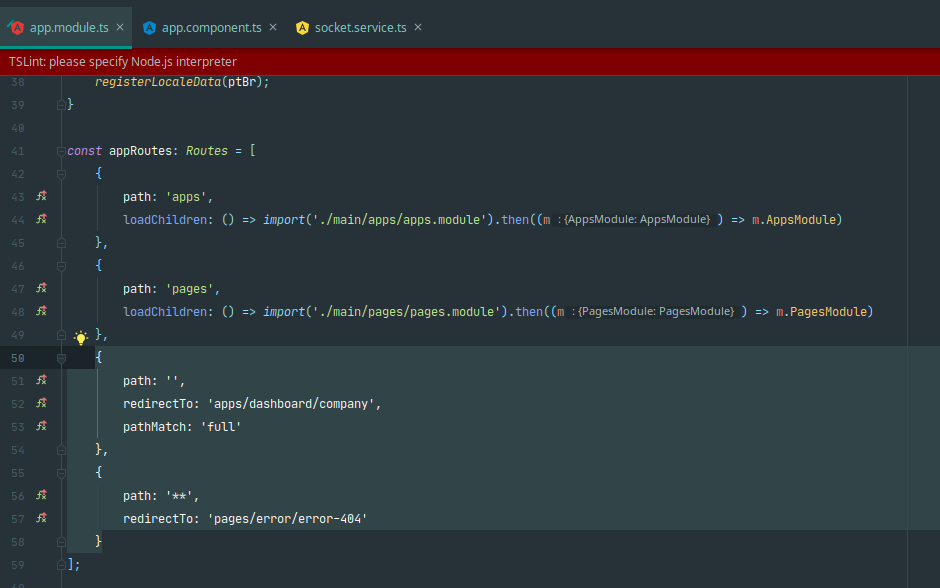
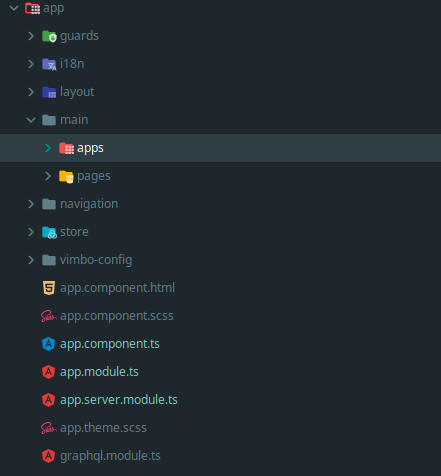
These last two routes selected below are causing "infinite loading", he is not managing to solve.
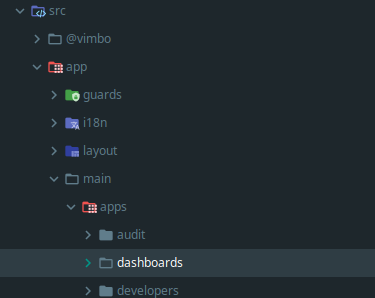
Perhaps because the default route has not yet been loaded, as it is inside the app folder, which is called when you pass the url / app/...
{
        path: '',
        redirectTo: 'apps/dashboard/company',
        pathMatch: 'full'
    }
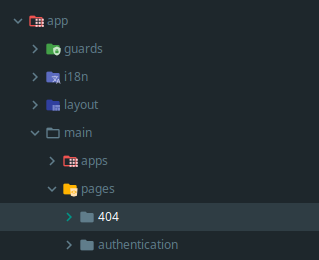
And it happens with the error page too, because it is inside the page/...
{
        path: '**',
        redirectTo: 'pages/error/error-404'
    }
What should be the approach to address this?
GlauberF
on 23 Sep 2020
@GlauberF, I am not quite sure how are you setting up the nested routes. I did try to replicate the issue by configuring nested lazy routing and it worked as expected. At this point, without a minimal reproduction we'll not be able to investigate this issue any further.
A good way to make a minimal repro is to create a new app via ng new repro-app and adding the minimum possible code to show the problem. Then you can push this repository to github and link it here.
This might be related to your directory structure so its really important to get an accurate repro to diagnose this.
alan-agius4
on 24 Sep 2020
@alan-agius4 Here https://github.com/sadriddin/angular-universal-10-loading-issue a minimal repro. It has one protected route with the guard. If you run npm run dev:ssr and navigate to http://localhost:4200/protected it loads infinitely.
It's working in Angular V8. Here is https://github.com/sadriddin/angular-univerasal-v8-example working example in Angular V8
sadriddin
on 29 Oct 2020
you know that now that you commented on @sadriddin, really where I have canActivate, canLoad is loading endlessly and where I don’t have the route to publish example, login, it works and for me it also worked in v8
GlauberF
on 29 Oct 2020
@alan-agius4 Any updates ?
GlauberF
on 12 Nov 2020
This is very strange @GlauberF, I am also facing the same issue, in my case canceling the loading of the page and calling it again solved the problem, funny it happens just the first time after the server runs, after that everything works just fine !
 naouaro
on 16 Nov 2020
naouaro
on 16 Nov 2020
we certainly have a problem with the library or the compiler(ivy) and it has to do with canLoad, canActivate as @sadriddin reported.
For me in version 8 or less, it works perfectly, as reported by @sadriddin .
The complicated that this problem has lasted for several and several months, and applications without making use of the angular universal, why activate the error.
GlauberF
on 17 Nov 2020
@GlauberF I just wonder when you run the app and the page tries to load the page, if you stop the loading, reload it again does it open ? or keeps trying to load ?
naouaro
on 17 Nov 2020
It doesn't solve, problem continues..
GlauberF
on 18 Nov 2020
I ran into a very similar problem (SSR server hangs indefinitely on Angular 11 Ivy). Please take a look at this in case it helps you:
https://stackoverflow.com/questions/65388261/angular-11-firebase-server-side-rendering-infinite-loading-pending
 Judp0m
on 21 Dec 2020
Judp0m
on 21 Dec 2020
It has nothing to do with the problem I face, as already mentioned @sadriddin , created a repository with the problem and the problem only happens where there is canLoad, canActiv.
GlauberF
on 21 Dec 2020
Related issues
 leon
·
4Comments
leon
·
4Comments
 daright
·
6Comments
daright
·
6Comments
 atlmtw
·
4Comments
atlmtw
·
4Comments
 k-schneider
·
4Comments
k-schneider
·
4Comments
 inorganik
·
4Comments
inorganik
·
4Comments
Most helpful comment
@alan-agius4 Here https://github.com/sadriddin/angular-universal-10-loading-issue a minimal repro. It has one protected route with the guard. If you run
npm run dev:ssrand navigate tohttp://localhost:4200/protectedit loads infinitely.It's working in Angular V8. Here is https://github.com/sadriddin/angular-univerasal-v8-example working example in Angular V8