Unigram: All notifications show up twice
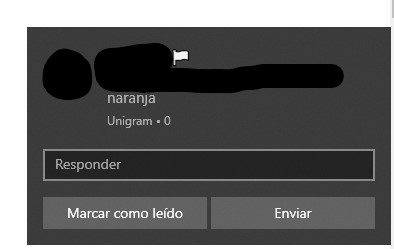
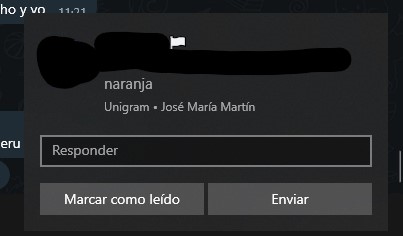
Notifications for all messages show up a second time when I set Unigram as the active app. The first time they appear they have a "0" alongside the app name, the second time, my full name appears there instead.
Unigram 3.3.2146
Windows 10 build 18362.1
 jmml97
All 10 comments
@jmml97 System notifications are different from the app notifications
"0" is sign of system notification
"[your full name]" is sign of the app notification
You can turned off in-app notifications in Unigram Settings
 morenj96
on 28 Mar 2019
morenj96
on 28 Mar 2019
Where exactly? Can't seem to find it. Tried disabling all options in the settings regarding notifications but I still get them twice.
jmml97
on 28 Mar 2019
I won't disable in-app notifications, especially on PC, as normal notifications are much slower to come. I'd rather wait for a fix (that I hope to realize in next update :))
 FrayxRulez
on 28 Mar 2019
FrayxRulez
on 28 Mar 2019
I have the same issue, any eta on it being resolved?
 Sc0tTyXL
on 21 Jun 2019
Sc0tTyXL
on 21 Jun 2019
I have the same issue, any eta on it being resolved?
Soon™
 MarcAnt01
on 21 Jun 2019
MarcAnt01
on 21 Jun 2019
I have no time at the moment to work on Unigram. I hope to be able to get back at it in later August
FrayxRulez
on 21 Jun 2019
I have no time at the moment to work on Unigram. I hope to be able to get back at it in later August
Can you consider removing push notifications before you pause development?
MarcAnt01
on 21 Jun 2019
It's not a planned pause on Unigram
FrayxRulez
on 21 Jun 2019
It's not a planned pause on Unigram
No problem, take your time
MarcAnt01
on 21 Jun 2019
Hello,
I have this issue on Windows 10 Phone. If I need to open a new issue for that please let me know.
I'm seeing this issue has been open for a while. Is there any chance of a fix coming up?
The Unigram app is so much more better than the standard telegram one and with Whatsapp pulling the plug from their windows version it would be nice if we could have Unigram working properly. Getting all messages twice gets annoying really quickly if you use it for your daily chat app.
Additional info: Using a Lumia 950. Notifications show when messages arive. Upon opening the app all notifications show up again. I have 2 friends who also have a Lumia 950 and they have the same issue. Disabling in-app notifications does not solve the issue, not sure if that's a bug too?
 slackerstacker
on 20 Dec 2019
slackerstacker
on 20 Dec 2019
Related issues
 rabiet
·
4Comments
rabiet
·
4Comments
 ipuneetsingh
·
3Comments
ipuneetsingh
·
3Comments
 HimbeersaftLP
·
3Comments
HimbeersaftLP
·
3Comments
 framctr
·
5Comments
framctr
·
5Comments
 ArmeF97
·
4Comments
ArmeF97
·
4Comments