Understrap: Right Sidebar Collapsing Under Main Content?
Issue is about..
- [ ] a Bug Report
- [ ] a Feature Request
- [ ] a Suggestion
- [ ] a Question
- [x] I need help
Please tell us about your environment:
- WordPress Version: 4.9.6
- Browser: all
Issue
On philcata.com I have two custom post types - donors and offers. Each of these uses a customized version of single.php and loop-templatessingle-content.php:
- single-offer.php loop-templatessingle-offer-content.php
- singe-donor.php loop-templatessingle-donor-content.php
I have the search in the right sidebar. On the rest of the site this works fine, but with these customized pages the right sidebar moves under the main content.
Thus far my research indicastes the culprit may be the tables I am using in the main cotent. If anyone has any idea why this is happening, I'd appreciate it...I'll let you know if I find a resolution.
You can see examples of this issue occuring at these pages:
https://philcata.com/donor/knit-picks/
 davidshq
All 3 comments
Hey @davidshq,
There's a mixup somewhere in your template files I think and the .widget-area column is outside of it's wrapper .row.
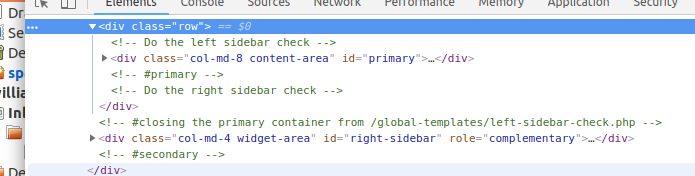
If I rework it with dev tools to pull that div inside the row it works.
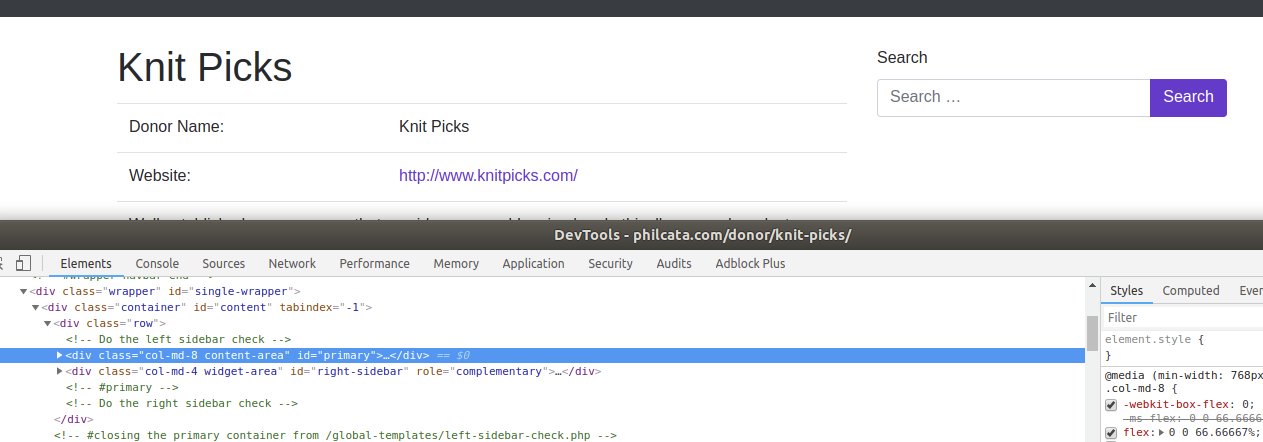
Check through the templates files and see if you can pull the sidebar calls up above a closing </div> tag and I think that will sort it.
 pattonwebz
on 18 Jun 2018
pattonwebz
on 18 Jun 2018
Adding to the above comment.
It is likely that you have an extra </div> in there somewhere that is causing this, as it's less likely that the sidebar call was moved around. Either way, one of those possibilities is the issue.
If you don't find a solution make sure to post the code of one pair of these custom templates.
Edit:
It's also possible that an element is missing a closing tag. When this happens the browser automatically closes elements. It is a possibility, not necessarily a probability. Just including this for some extra information.
 ZacharyElkins
on 18 Jun 2018
ZacharyElkins
on 18 Jun 2018
Thanks everyone! I've actually simplified the site by moving the search form into the header, below the nav menu and removing the right sidebar entirely. I'm not entirely happy with how the main content looks now, it feels a little too wide...not sure if I should increase font size, line spacing, decrease fixed width of content...but search issue is resolved for me. Again, appreciate the assistance!
davidshq
on 21 Jun 2018
Related issues
ZacharyElkins
·
3Comments
 shansmith01
·
5Comments
shansmith01
·
5Comments
 revamperdiaries
·
5Comments
revamperdiaries
·
5Comments
 blachawk
·
5Comments
blachawk
·
5Comments
 Design-Depot
·
4Comments
Design-Depot
·
4Comments
Most helpful comment
Adding to the above comment.
It is likely that you have an extra
</div>in there somewhere that is causing this, as it's less likely that the sidebar call was moved around. Either way, one of those possibilities is the issue.If you don't find a solution make sure to post the code of one pair of these custom templates.
Edit:
It's also possible that an element is missing a closing tag. When this happens the browser automatically closes elements. It is a possibility, not necessarily a probability. Just including this for some extra information.