Understrap: A thinking starting point for Gutenberg integration
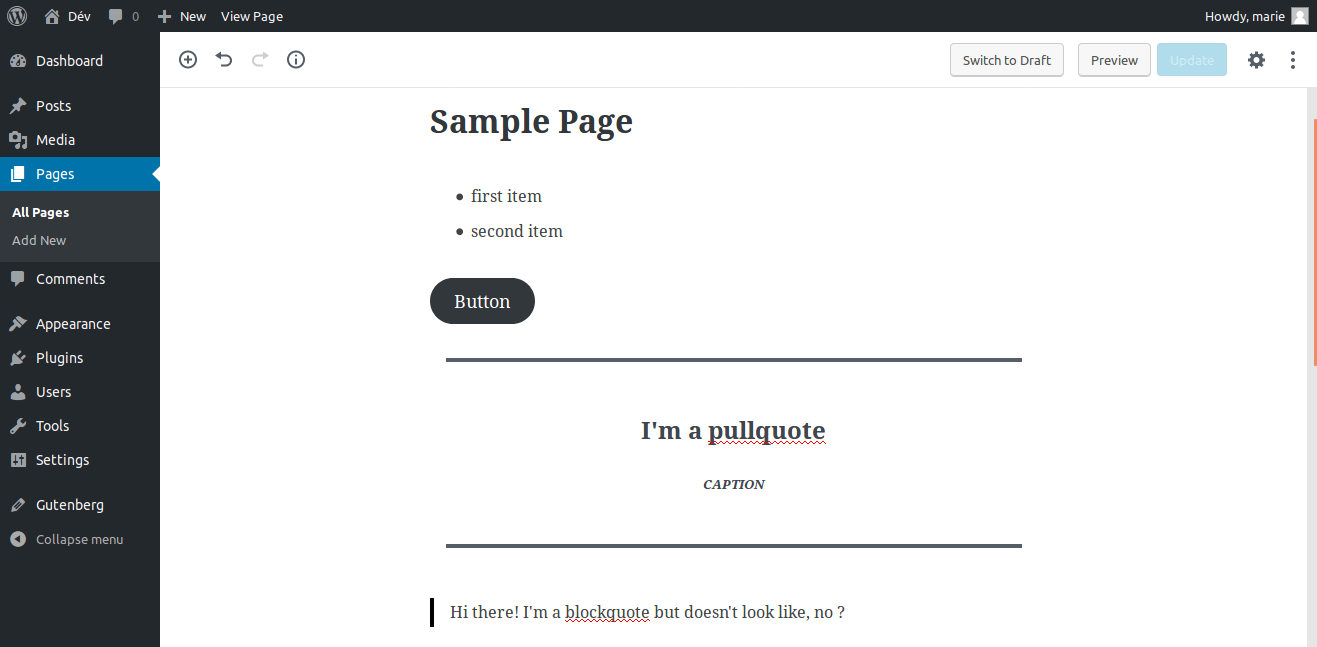
Testing UnderStrap with Gutenberg today :
Edition :
Front-office :

I think we have to ask which an how integrate them together, as Gutenberg will be a part of WordPress very soon.
As you can see in these screenshots, Gutenberg embeds a number of styles, which do not fit with the style of UnderStrap (Bootstrap), and which are different in administration and front office.
From my point of view there are three way:
- Don't worry about it and let developers take care about this, like all other customization style stuff.
- Deregister the Gutenberg styles to apply those of Bootstrap with theme's custom css file (blocks.scss ?)
- Provide a "framework like" to override Gutenberg rendering blocks functions (but maybe it's off topic).
It needs to be discussed.
What do you think ?
 MarieComet
All 27 comments
You can add to your stylesheet the selectors that Gutenberg creates and style them the way you want. It's no brainer. The plugin comes with its own front-tier stylesheet. You'll have hard time with wide and fullwidth content if you are using the Bootstrap grid but, apparently, you can disable this with:
add_theme_support( 'gutenberg', array( 'wide-images' => false ) );
 FutureMedia
on 5 Mar 2018
FutureMedia
on 5 Mar 2018
@FutureMedia ok, thanks for your answer, but my question was to think about what to do with UnderStrap / Gutenberg overall (in general) - if it's relevant and necessary, maybe yes, maybe not :smiley:
So, for you, UnderStrap itself should not worry about Gutenberg style integration ?
MarieComet
on 5 Mar 2018
I tried up to form up some basic rules for UnderStrap here:
https://github.com/orgs/understrap/teams/understrap-playbook
If I apply them to this topic we should care about Gutenberg.
Because Gutenberg will be a core part of WordPress 5.0 we should worry about Gutenberg and a clean styles integration.
I add this issue to the UnderStrap 1.0 Roadmap.
 holger1411
on 6 Mar 2018
holger1411
on 6 Mar 2018
@MarieComet I assign it to you, hope its okay.
The task is to find out whats the best approach here. How other themes and framework providers handle this? Is there a best practice?
How much work is it to replace the Gutenberg styles with Bootstrap4 markup/styles? How much maintanance does it need and is this approche compatible with third party extensions?
I will do some reasearch, too. Maybe we find a simple, clean and maintainable option here.
holger1411
on 6 Mar 2018
@holger1411 it's okay.
I will do research.
Four our reference :
MarieComet
on 6 Mar 2018
@MarieComet I salute you for working on this. I'm keen on learning more + helping, though you have a much bigger head start. Let me know if there's anything I can test or research. Cheers!
 axlright
on 7 Mar 2018
axlright
on 7 Mar 2018
@MarieComet Just spent a tiny bit of time reading and especially watching this State of WordPress 2017 video and especially listening to the comments, I'm struck by a couple things:
1) I don't know what Bootstrap's roll would / could be in Gutenberg.
2) Gutenberg is going to move WordPress towards something like Squarespace where clients / end users are empowered to make a lot of mistakes. Gutenberg is focused on the average user who doesn't know much about building good websites.
3) Gutenberg is likely going to make a developer's job harder by requiring developers to be proficient in Webpack, ESNext etc. while at the same time allowing the developer's client (who the website was built for) to have a lot more power to ... mess things up.
What do you think?
axlright
on 7 Mar 2018
@axlright I'm thinking like you, Gutenberg will completely change editing experience in WordPress, and the aspects you raise are those that have worried all providers (agencies, freelancers, developers, etc) from the first presentations of Gutenberg.
Yes, Gutenberg will make our jobs harder, because until now we only needed to know PHP, not JS.
But, IMO, it's also a good thing, JS take more and more space, and I think we (WP and WP ecosystem) must take this direction to not become an "old-fashioned" tool.
Bootstrap's as a framework will continue to do same things : helping integration. If you are a developer you will create your own "blocks", that's mean you choose HTML markup, CSS, JS. If your'e not a developer, well someone somewhere will do that for you.
Yes, but it's already like that. I mean : Actually there is a lot of tools (page builders etc), which, in inexperienced hands do very bad things. And these tools are often free and availables easily, and if theses tools exists, that's because, seriously, when you start building a website with no professional accompaniment, this WP WYSIWIG is very frustrating. Even more against editor's competitors.
With Gutenberg these very bad things will be the same for everyone (lol), and Gutenberg's team take care of accessibility, web standards, etc. which is not necessarily the case for current page builders.
But IMO, Gutenberg will not replace existing page builders, at least not yet.Yes and no, there's already tools which make possible for developers with no particular skills on these to extend and understand Gutenberg with "the good practices", if you're interested about, I advise you to try this : https://github.com/ahmadawais/create-guten-block
But WP developers should start learning now, because the "blocks" Gutenberg logic will apply shortly (next years) to all WP components (menus, widgets, etc).
Well, it seems like I have a lot to say about it... :rofl:
To come back on UnderStrap, we need to do some researchs on how themes, in general, can deal with it, as Holger said respecting best practices and third party plugins.
For now I did not find a lot of examples or documentation about this, but I think WP will publish more documentation shortly.
Also, we should keep an eye on "big" actors : WooCommerce, among others, they are a good example to follow.
MarieComet
on 7 Mar 2018
Good new for us : https://github.com/WordPress/gutenberg/issues/5360
MarieComet
on 7 Mar 2018
@MarieComet Thanks for all your thoughts. I am excited about the challenge. This is all super cool for the future. Doing the same stuff over and over isn't that much fun.
And maybe we can re-name the project ... GutenStrap?
axlright
on 7 Mar 2018
A list of Gutenberg resources:
https://wplift.com/gutenberg-editor-resources
FutureMedia
on 9 Mar 2018
Thx @all and especially @MarieComet for this starting point and infos!
I test Gutenberg by myself (the first time) to check out how/if we should/can integrate the Bootstrap markup into it.
Basically: Gutenberg will be a a core part of WordPress. Means every UnderStrap user (dev, designer but admins and writer, too) will use it. So a proper integration is important from my point of view
A proper integration means for me: The Bootstrap 4 styles/markup will be used for the most used core blocks of Gutenberg if there is a visual or behavioral different counterpart.
The good news: Most blocks are useing default HTML without additional Gutenberg styling (paragraphs, headlines, blockquotes etc.)
And there are a lot of very specific elements (like the whole embed stuff) where no coresponding Bootstrap 4 component is available. So we can keep the specific Gutenberg markup/styling without conflicts.
So we need to alter Gutenberg elements if:
- There is a visual or behavioral counterpart in Bootstrap which results in a different visual style or behavior
For example:
- The columns don´t use the same sizes than BS and there are no breakpoints
- Buttons use a way other design
Counter example:
Images using the same
max-width: 100%;
height: auto;
styling. So there is no need to replace the classes.
Its just my point of view and we should define the most important Gutenberg elements together and work out an overwrite. Iterative and step-by-step.
Let me know what you think and if there are other GB elements we should "translate" with priority.
@axlright: And yes, we should call this project here "GutenStrap" ;-)
Maybe it becomes an independent project somewhen: Adding BS4 markup to Gutenberg will be a interesting use case for non-understrap users, too!
So maybe a "Bootstrap->Gutenberg" plugin called "GutenStrap" might be an option for the future.
holger1411
on 9 Apr 2018
@MarieComet @holger1411 very very cool - how can others get involved?
axlright
on 9 Apr 2018
Hm, I would say: The first task is to find out how we could overwrite a default block markup.
Is there a best practice already? Is there a tutorial?
I read something about the Blocks API and the extending blocks capabilities here:
https://wordpress.org/gutenberg/handbook/extensibility/extending-blocks/#blocks-getblockdefaultclassname
Sounds like it could be a sarting point...
But it isnt very well documentet and I am not a PHP/JS developer.
holger1411
on 14 Apr 2018
Hi, coming back here...
From my point of view :
- there will be only one thing in UnderStrap to support Gutenberg : theme support.
- All other things, as Holger said, will be in a standalone plugin, and it require : knowledge, and that gutenberg is "finished".
Especially things related to override blocks (markups, css...), as I know, hooks and filters (among others) still in discussions and API may change yet.
MarieComet
on 20 Apr 2018
Hi,
I'm searching how to create partial CSS files which should be loaded in admin, for example, buttons :
in /understrap/sass/theme/_gutenberg.scss
-> @import "../../src/sass/bootstrap4/buttons";
/understrap/css/gutenberg.css
-> css + Bootstrap buttons style
I can't find what to edit in gulpfile.js to add custom task and import Bootstrap partial SCSS styles, I've tried to duplicate 'minifycss' and 'cssnano', without success, _gutenberg.scss isn't reproduced in gutenberg.css
Anyone good with gulp stuff who can help me ?
MarieComet
on 23 Apr 2018
Hey @MarieComet ,
You don't need to make a partial _guttenberg.scss
Just add the file guttenberg.scss to the sass folder sass/guttenberg.scss
It'll be copied over to the css folder automatically when executing watch-bs or styles
If we want to minify it, we need to edit the minifycss task.
Here is an ugly version
gulp.task( 'minifycss', function(callback) {
  gulp.src( paths.css + '/theme.css' )
  .pipe( sourcemaps.init( { loadMaps: true } ) )
    .pipe( cleanCSS( { compatibility: '*' } ) )
    .pipe( plumber( {
            errorHandler: function( err ) {
                console.log( err ) ;
                this.emit( 'end' );
            }
        } ) )
    .pipe( rename( { suffix: '.min' } ) )
     .pipe( sourcemaps.write( './' ) )
    .pipe( gulp.dest( paths.css ) );

    gulp.src( paths.css + '/guttenberg.css' )
  .pipe( sourcemaps.init( { loadMaps: true } ) )
    .pipe( cleanCSS( { compatibility: '*' } ) )
    .pipe( plumber( {
            errorHandler: function( err ) {
                console.log( err ) ;
                this.emit( 'end' );
            }
        } ) )
    .pipe( rename( { suffix: '.min' } ) )
     .pipe( sourcemaps.write( './' ) )
    .pipe( gulp.dest( paths.css ) );

    callback();

});
 0dp
on 23 Apr 2018
0dp
on 23 Apr 2018
Thanks you @0dp ! Its work !
MarieComet
on 24 Apr 2018
Just pushed first idea of an integration for the new editor (Gutenberg) on my fork : https://github.com/MarieComet/understrap/commit/3ab26d42711133df335d1d263be0682b8d54da98
Some explanations :
With the new editor, we will need to load :
- specifics stylesheets in admin (editor)
- specifics stylesheets in front
- stylesheets both in admin and front
My idea is :
- Start to separate scss files instead of a big file (theme/_theme.scss), the point is to make re-usables files (when needed), which could be loaded both in admin and front, or only in front, or only in admin.
These files should be empty, and developers would have a "base" if they want to customize editor stylesheets
In my fork I've added 4 new files :
- sass/theme/_typos.scss, here we can add some typography rules, which will apply both front and admin
- sass/theme/_editor.scss, here we can add rules, which will apply only in the editor (admin)
- sass/theme/_editor-front.scss here we can add rules which will apply on in the editor (blocks), but in front.
- sass/gutenberg.scss, here I import some BS4 variables which will be useful in admin, and also theme variables, and editor.scss + typos.scss
This file is compiled in css/gutenberg.css, who is loaded in admin by a new action in inc/enqueue.php - And because I've created two new files, loaded them in sass/_theme.scss
What do you think about this "idea" ?
MarieComet
on 24 Apr 2018
Is there any progress on Gutenberg integration?
 dillix
on 14 Dec 2018
dillix
on 14 Dec 2018
I've updated to 5.0.1 and things worked fine. I mean, the theme worked fine. Gutenberg sucks / is pointless at least right now. I haven't started playing with building Blocks, though, so I should wait to comment until I've gotten more into the actual meat of it.
axlright
on 14 Dec 2018
@MarieComet Thanks again for your work on this. I'm trying to gear up to get some Gutenberg blocks made and also work on getting editor styling applied so that clients can see their blog posts shown with some of the same basic styles that will show on the front end.
I've checked out your fork MarieComet@3ab26d4 - nice work!
I've been playing around with some tutorials and looking at the twentynineteen theme. In the functions.php of twentynineteen, there are these lines:
// Add support for Block Styles.
add_theme_support( 'wp-block-styles' );

// Add support for full and wide align images.
add_theme_support( 'align-wide' );

// Add support for editor styles.
add_theme_support( 'editor-styles' );

// Enqueue editor styles.
add_editor_style( 'style-editor.css' );
There's some explanation of these add_theme_support in the Gutenberg handbook on Theme Support
I don't see these features in your fork or the current Understrap inc/ files. Have you written any custom blocks or otherwise gotten block styles on the front end and backend (admin) to work without these feature opt-ins?
Thanks!
axlright
on 30 Dec 2018
Hey,
I've written custom blocks, yes, but not specially with UnderStrap theme.
For theme support, see this commit on my fork, it add add_theme_support( 'align-wide' );, but not the three other you mentioned, because they did not exist yet when I worked on UnderStrap Gutenberg support.
I just tested WordPress 5.0.2 with my UnderStrap fork, and it works well, styles imported inside /sass/gutenberg.scss are well applied in front and/or in the editor, using enqueue_block_editor_assets hook. (I've changed SCSS import order, see the last commit on my fork).
So I guess the 3 theme support you mentioned are not essential.
But, that's not okay for now, because Gutenberg use markup (for example for Button block) which not match with BootStrap style (.wp-block-button__link VS .btn)...
MarieComet
on 30 Dec 2018
I'm trying some things, like adding custom classes name to core blocks, for example the Button, which allow us to add btn class, and inherit BootStrap style :
// Our filter function
function setBlockCustomClassName(className, blockName) {
  return blockName === "core/button" ? "btn" : className;
}

// Adding the filter
wp.hooks.addFilter(
  "blocks.getBlockDefaultClassName",
  "my-plugin/set-block-custom-class-name",
  setBlockCustomClassName
);
btn class is added to the Button parent div, but not to the link element (which isn't a link inside the editor, but a div...), so it's not working well.
I don't think it's a good idea to override core CSS classes. Re-writing UnderStrap / BootStrap styles should be a better method, but for now I have no idea how to do that dealing with SASS.
MarieComet
on 30 Dec 2018
@MarieComet Thanks again for the awesome work.
In my own experimentation after reading the Gutenberg Handbook on adding editor styles, the editor styles don't need to be prefixed with .edit-post-visual-editor as you have in your gutenberg.scss
I'm sure it can be done either way, but the documentation says that by adding add_theme_support('editor-styles'); to functions.php, you can keep your body and related selectors in the editor css file and WordPress will re-write it. They recommend against re-writing editor styles to match the backend Gutenberg editor markup elements - maybe in case they change class names in the future.
I've added this in functions.php
/* ADD BACKEND STYLES FOR GUTENBERG EDITOR
================================================== */

add_theme_support('editor-styles');

add_editor_style( 'css/custom-editor-style.css' );
And then I added a stylesheet with regular body selectors and the like and it all works swell:
@font-face {
  font-family: 'proxima-nova';
  font-display: fallback;
  src: url("/wp-content/themes/alex-wright/fonts/proxima-nova-light.woff2") format("woff2"), url("/wp-content/themes/alex-wright/fonts/proxima-nova-light.woff") format("woff");
  font-weight: 300;
  font-style: normal; }

body {
  margin: 0;
  font-family: "proxima-nova", "Helvetica Neue", Helvetica, Arial, sans-serif;
  font-size: 1.125rem;
  font-weight: 300;
  line-height: 1.5;
  color: #222222;
  text-align: left;
}
Thanks @0dp for this...
You don't need to make a partial _guttenberg.scss
Just add the file guttenberg.scss to the sass folder sass/guttenberg.scss
It'll be copied over to the css folder automatically when executing watch-bs or styles
axlright
on 10 Jan 2019
Assume this has been fixed by now. In case it hasn´t, please reopen this topic as I´m closing it due to the time there hasn´t been any update to it.
 Thomas-A-Reinert
on 11 Jul 2019
Thomas-A-Reinert
on 11 Jul 2019
Related issues
 Design-Depot
·
4Comments
holger1411
·
5Comments
Design-Depot
·
4Comments
holger1411
·
5Comments
 typeplus
·
5Comments
typeplus
·
5Comments
 davidshq
·
3Comments
davidshq
·
3Comments
 fahaddsheikh
·
5Comments
fahaddsheikh
·
5Comments
Most helpful comment
Just pushed first idea of an integration for the new editor (Gutenberg) on my fork : https://github.com/MarieComet/understrap/commit/3ab26d42711133df335d1d263be0682b8d54da98
Some explanations :
With the new editor, we will need to load :
My idea is :
These files should be empty, and developers would have a "base" if they want to customize editor stylesheets
In my fork I've added 4 new files :
This file is compiled in css/gutenberg.css, who is loaded in admin by a new action in inc/enqueue.php
What do you think about this "idea" ?