Undecimus: Unc0ver 3.5.1+ gets stuck at step 1 on A7 devices.
Describe the bug
Unc0ver 3.5.1+ gets stuck at step 1 on A7 devices, Can Reproduce on Ipad mini 2 and Iphone 5S
To Reproduce
Steps to reproduce the behavior:
- Go to Unc0ver 3.5.1+
- Click on Jailbreak
Screenshots
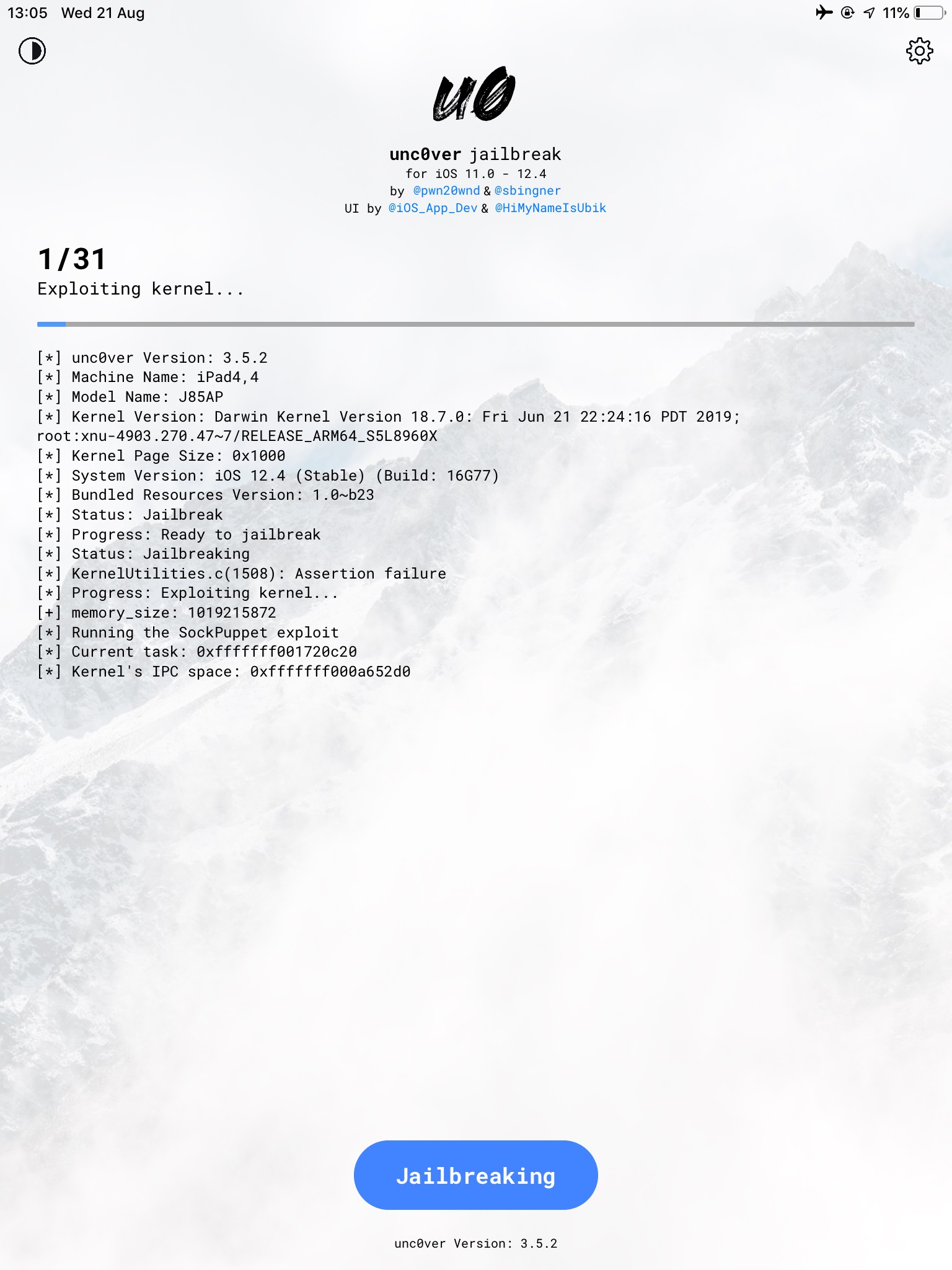
Device (please complete the following information):
- iOS Version: 12.4
- iOS Device: Ipad Mini 2 (A7) / Iphone 5S (A7)
- unc0ver Version: 3.5.1+
Place an "x" between the brackets if true:
- [X] this is a bug others will be able to reproduce
- [x] this issue is present with all tweaks uninstalled(except for default packages) or disabled
- [X] this issue is present after a rootfs restore
- [X] this issue is present on the latest version of unc0ver
 xavkno
All 5 comments
what happens if you wait a couple of minutes? half an hour?
 DrissiReda
on 21 Aug 2019
DrissiReda
on 21 Aug 2019
Is this really A7 specific? My guess is that the exploit is not guaranteed to work every time. It works about 1 in 5 on my iPad mini 2 (iOS 12.4, Cellular)
 Sweepi
on 21 Aug 2019
Sweepi
on 21 Aug 2019
iPad Air Wifi, 12.4: NEVER work, always restart, either after 10 minutes, or 10 secs. 3.5.0-3.5.2 tested.
In idevicesyslog, the last line sometimes is Dumping APTicket. After disable it, sometimes 'Successfully set HSP#4 as TFP0', sometimes "IODTNVRAM obj at 0xfffffff07227ed40"
If verboser log available maybe helpful for identifining.
EDIT: OMG the 23th time partially worked, cydia installed, though in the end it restarted and 24th time it failed as usual.
 palxex
on 21 Aug 2019
palxex
on 21 Aug 2019
try this https://github.com/pwn20wndstuff/Undecimus/issues/1321#issuecomment-523468703
 yangia
on 22 Aug 2019
yangia
on 22 Aug 2019
Using vertical screen will be fine. Don't run unc0ver at horizontal screen.
 qiuyi21
on 25 Aug 2019
qiuyi21
on 25 Aug 2019
Related issues
 shsh2
·
3Comments
shsh2
·
3Comments
 bachle22
·
4Comments
bachle22
·
4Comments
 kalebe2
·
3Comments
kalebe2
·
3Comments
 JBL1503
·
3Comments
JBL1503
·
3Comments
 piaoapiao
·
4Comments
piaoapiao
·
4Comments
Most helpful comment
try this https://github.com/pwn20wndstuff/Undecimus/issues/1321#issuecomment-523468703