Umbraco-cms: V8.5.1: 'Allow Varying by Culture' on a composition is deleting field content
With a fresh installl of umbraco 8.5.1 + Starter kit, when setting Allow Varying by Culture on compositions and then subsequently the document type (composed with said composition) removes the content from the given amended field.
I can confirm that this has occurred in my own development site, so is not just limited to starter kit.
Umbraco version
I am seeing this issue on Umbraco version: 8.5.1
Reproduction
If you're filing a bug, please describe how to reproduce it. Include as much
relevant information as possible, such as:
Bug summary
As above, or view video here...
https://www.loom.com/share/58af6f2c4d9040bda393496d80da451e
Specifics
Using Chrome, i have'nt checked it in other browsers as i would suggest not relevant.
Steps to reproduce
1 - Fresh Umbraco 8.5.1 installed via nuget. Default installation with starter kit.
2 - Check About Us page in Umbraco backend shows a page title field populated with "About Us" and check subnode of About this Starter Kit contains a valid Page Title. - Yes
3 - Goto to the ContentBase Composition choose Permissions > Allow varying by culture
4a - Allow varying by culture on the pageTitle field too and save
5 - Repeat step 2 to confirm that About Us and any of its subnodes still contain a populated Page Title. - Yes
6 - Goto the "Content Page" Document Type (note - composed with ContentBase) choose Permissions > Allow varying by Culture. Save
7 - Repeat step 2 to confirm that About Us and any of its subnodes still contain a populated Page Title. - No Page Title is empty.
8 - Check Blog(root) Page in Umbraco Backend (also composed with ContentBase) to confirm contains a populated Page Title. - Yes
9 - Goto the "Blog" Document Type choose Permissions > Allow varying by Culture.
10 - Repeat step 8 - to confirm that Blog still contain a populated Page Title. - No Page Title is empty.
Expected result
I expected nothing to have changed with regards to the Content in the fields changed via the document type.
Actual result
The content in the field was deleted.
_This item has been added to our backlog AB#4637_
 SouthCentralCode
All 14 comments
On further testing... it appears that this issue only occurs when the Composition (+given Property Field) is set to "Allow Varying..." before a Document Type that uses the composition is set to Allow it.
If this is by design then a validation mechanism should block the Composition from being updated to "Allow Varying" if any of the Document Types where it is used is not set to "Allow".
Although I would expect it would work in any order of configuration.
Hope this helps identify the issue.
SouthCentralCode
on 17 Jan 2020
So this is basically a 'not supported' scenario 😉 There's probably some logic that automatically handles the data migration when the 'Allow varying by culture' changes on a property, but as that's done on the composition and the document type doesn't yet vary by culture, it can't migrate the existing data.
Disabling the 'Allow varying by culture' to be set/enabled on the composition when it's used on document types that don't have this enabled should indeed fix this problem and makes total sense (in pseudocode: WHEN composition = not varying by culture AND used document types = all invariant THEN disable 'Allow varying by culture' checkbox on composition).
 ronaldbarendse
on 20 Jan 2020
ronaldbarendse
on 20 Jan 2020
This used to be supported, but seems to have stopped working in 8.3.0. We'll need to have a look at fixing this.
 nul800sebastiaan
on 21 Jan 2020
nul800sebastiaan
on 21 Jan 2020
We had the same problem in Umbraco 8.5.3. We are working with Umbraco Cloud and after committing our inetpub including the revision files (UDA) we lost our content also because of this.
I have done some research and noticed that the languageId field in the database table umbracoPropertyData stays NULL despite that the option Allow Varying by Culture is true. So the original data is still present, it should be set to the default language or similar.
I assume that this bug also caused the following problem: https://github.com/umbraco/Umbraco.Cloud.Issues/issues/135
Because this issue results in data loss I think this should have a high priority.
 ealse
on 18 Feb 2020
ealse
on 18 Feb 2020
@ealse The umbracoPropertyData.languageId column should not be altered, as that would actually destroy the data: if you would set it to the default language when enabling 'Allow varying by culture', how would you handle reverting this setting without changing all existing culture variant data to invariant (especially when existing data exists and even more so when the default culture has changed)?
ronaldbarendse
on 18 Feb 2020
@nul800sebastiaan I'm not really sure if this is a regression, as it only happens when you set 'Allow varying by culture' on the composition before changing the document type.
ronaldbarendse
on 18 Feb 2020
@ronaldbarendse It seems like Umbraco changes the field languageId either way and does not add a new version row.
For your information and to reproduce:
Pre-defined:
Language: English (default) no fallback and Dutch no fallback.
Documenttype 1 for composition with a textarea.
Documenttype 2 with a textbox, a checkbox and an inheritance from documenttype 1 (Allow as root = true)
All the Allow varying by culture properties are set to false.
The table umbracoPropertyData is empty
- Create Documenttype 2 content.
- Name: Home
- Textarea text: "composition"
- checkbox value: false
- textbox text: "property"
The table umbracoPropertyData looks like this now:
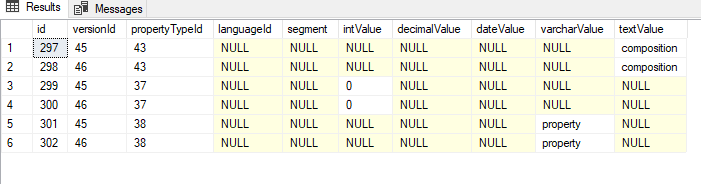
- Set
Allow varying by cultureon true for Documenttype 1
SetAllow varying by cultureon true for all Documenttype 2 properties
The table umbracoPropertyData looks like this now (rows 303 - 306 languageId has been changed to 4):
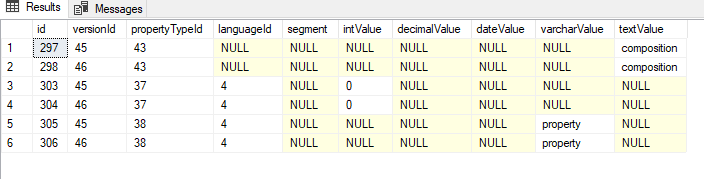
- If I open my content node (in the backoffice) without altering the table my content is gone for the composition property as also mentioned above.
But If I alter languageId for id 298 to 4 (in the database, not through the backoffice) and open my content node I see the text ‘composition’ in the textarea.
TLDR; this means the content is not really lost, the languageId is just never set accordingly. However, for the end user (including the published item) the content is lost. It is only visible for those who have access to the database.
Also a strange is that every save action creates two rows in my test, but tat is, in my opinion, a different issue than this.
ealse
on 19 Feb 2020
Has anyone found a workaround regarding this issue?
 rasmuschr9
on 4 Jun 2020
rasmuschr9
on 4 Jun 2020
In only manual process and that is to set all the doc types to allow varying by, before any compositions are set to allow vary by.
SouthCentralCode
on 4 Jun 2020
You can get your content back by using the query below, but use it on your own risk.
After executing the query you have also to restart de website.
We did use it because we couldn't make it to our client that all their content would be gone.
I think this issue should also be given a higher priority, because the content disappears.
;with defLang as (
    SELECT [id]
    FROM [dbo].[umbracoLanguage]
    Where isDefaultVariantLang = 1
)
update pd set
    languageId = (select id from defLang)
from dbo.[umbracoPropertyData] pd
where pd.languageId is null
  and not exists (
    select *
    from dbo.[umbracoPropertyData]
    where versionId = pd.versionId
      and propertyTypeId = pd.propertyTypeId
      and languageId = (select id from defLang)
      )
and pd.versionId not in (SELECT[id]  FROM [dbo].[umbracoMediaVersion])
    and pd.propertyTypeId not in (SELECT [id] FROM [dbo].[cmsPropertyType] where variations = 0)
When you encounter the content issue again then you have to rerun this query.
ealse
on 18 Jun 2020
We need a fix for this. We have a composition in our baseline containing our main grid editor, which is set to vary by culture. Not all doc types that uses is does at first though. Toggling it on after the composition is added, and content is created, will provoke the bug. I recently discovered this on an ongoing project, but in theory every v8 project we've done with Umbraco 8.3+ is in jeopardy.
Thankfully @ealse 's nifty query saved my client redoing thousands of grids. My plan was to do some content service magic, since I'm not a sql shark, but the query seems to work just fine.
 OlePc
on 10 Jul 2020
OlePc
on 10 Jul 2020
The current 'fix' would to to disable the Allow varying by culture toggle on compositions if any of the used document types aren't culture variant (see my previous comment https://github.com/umbraco/Umbraco-CMS/issues/7471#issuecomment-576268520).
It isn't possible to add culture variant properties to invariant document types, so making a composition culture variant without the used document types being culture variant shouldn't be possible.
ronaldbarendse
on 10 Jul 2020
The current 'fix' would to to disable the
Allow varying by culturetoggle on compositions if any of the used document types aren't culture variant
@ronaldbarendse Would that not be a problem for Umbraco Cloud using the Umbraco Deploy package seeing that, even if you change everything in the correct order on the development environment, when you push it to the subsequent environments, they will be deployed in random order and content might be lost in the process?
They would need a way to make sure all base types are pushed to all environments before allowing compositions to have Allow vary by culture enabled.
In my experience migrating the document types and then running @ealse 's query (in that order) on all environments does the trick, so perhaps we should have an option to run that query in the settings pane or something? Like a panel where you can see and decide what happens to "unmapped" content?
 Jacob87
on 25 Oct 2020
Jacob87
on 25 Oct 2020
This is due in 8.11
 warrenbuckley
on 11 Jan 2021
warrenbuckley
on 11 Jan 2021
Related issues
 lcichanowicz
·
28Comments
lcichanowicz
·
28Comments
 John-Blair
·
109Comments
John-Blair
·
109Comments
 robertjf
·
136Comments
robertjf
·
136Comments
 kjac
·
28Comments
kjac
·
28Comments
 benjaminc
·
35Comments
benjaminc
·
35Comments
Most helpful comment
You can get your content back by using the query below, but use it on your own risk.
After executing the query you have also to restart de website.
We did use it because we couldn't make it to our client that all their content would be gone.
I think this issue should also be given a higher priority, because the content disappears.
When you encounter the content issue again then you have to rerun this query.