Umbraco-cms: V8.4 - Loading or publishing a node that has a base64 image takes a long time
I tried to insert an image inside the RTE which its source is base64 code like the below:
<img src="data:image/jpeg;base64,/9j/4AAQSkZJRgABAQEAYABgAAD/2wB........">
The image immediatly appeared in the RTE, but when I saved & published the node, it took about 15 minutes to finish.
Then I tried to open that node, and the same time has been taken to to be loaded
Umbraco version
I am seeing this issue on Umbraco version: 8.4
Steps to reproduce
1- Create a new node with a RTE property
2- Insert an a base64 image inside the RTE
3- Save & publish
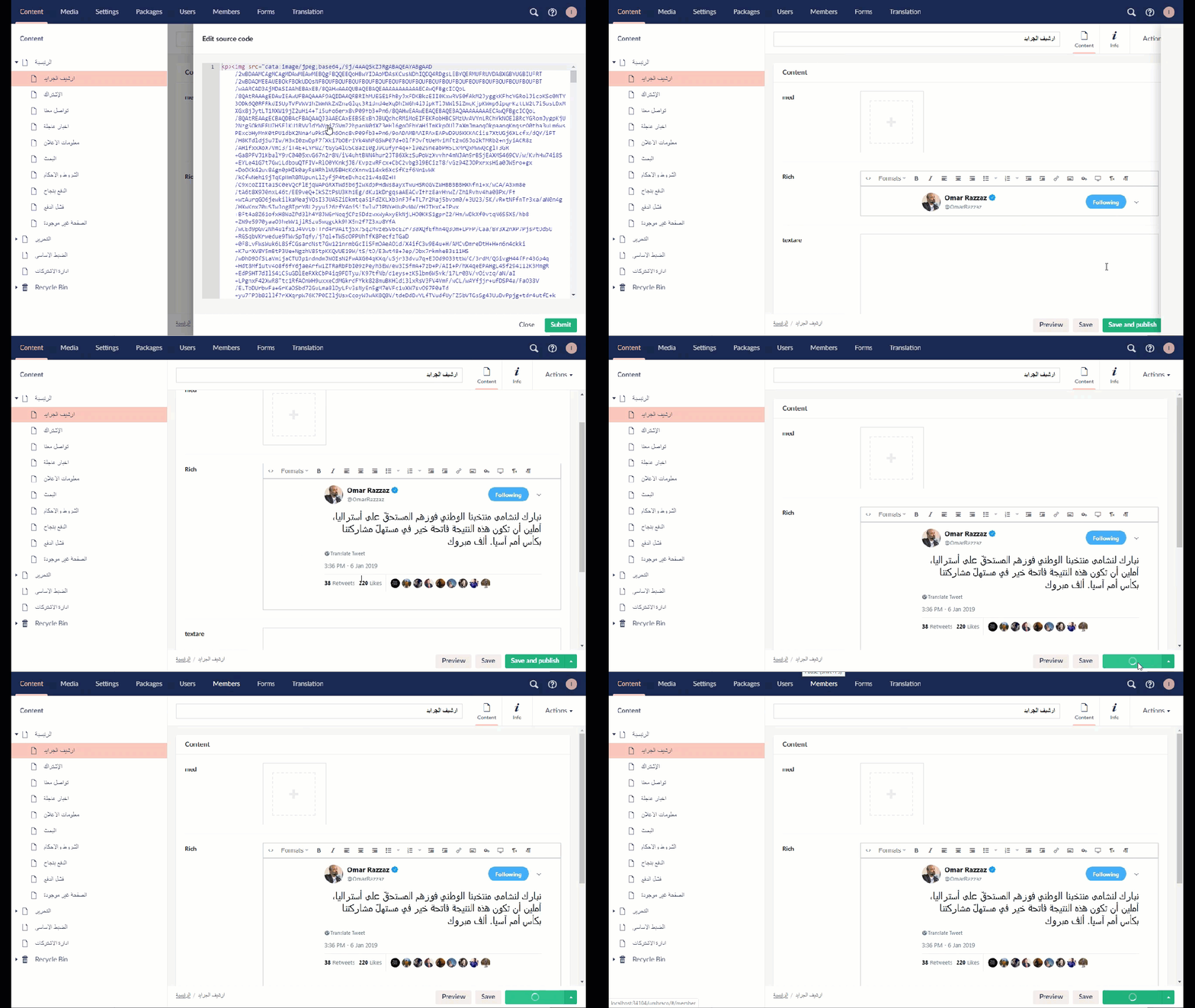
Expected result
Saving & Publishing / Loading a node should be done quickly
Actual result
Long time to finish
 saifobeidat
All 13 comments
I've noticed previously that if a base64 image is embedded in the RTE, it can cause random CPU spikes. This can cause websites to become unresponsive. I'm guessing it's down to indexing. Once I identified this image was causing the problem, we removed it and the CPU spikes disappeared.
I'd recommend not adding base64 encoded images into the RTE editor for this reason, or making sure this issue is addressed too.
 garpunkal
on 24 Dec 2019
garpunkal
on 24 Dec 2019
I've noticed previously that if a base64 image is embedded in the RTE, it can cause random CPU spikes. This can cause websites to become unresponsive. I'm guessing it's down to indexing. Once I identified this image was causing the problem, we removed it and the CPU spikes disappeared.
I'd recommend not adding base64 encoded images into the RTE editor for this reason, or making sure this issue is addressed too.
Yes, I wouldn't add base64 images to my website, but I am migrating content form external DB, and it has a lot of records containing base64 images, so it's not easy to remove those images.
saifobeidat
on 24 Dec 2019
We don't specifically support base64 images in the RTE, and have seen this problem before when attempting to add them. we never investigated why this would create a CPU spike like this but we'd be happy if someone wanted to figure that one out.
 nul800sebastiaan
on 7 Jan 2020
nul800sebastiaan
on 7 Jan 2020
Hi @saifobeidat,
We're writing to let you know that we've added the Up For Grabs label to your issue. We feel that this issue is ideal to flag for a community member to work on it. Once flagged here, folk looking for issues to work on will know to look at yours. Of course, please feel free work on this yourself ;-). If there are any changes to this status, we'll be sure to let you know.
For more information about issues and states, have a look at this blog post
Thanks muchly, from your friendly PR team bot :-)
 umbrabot
on 7 Jan 2020
umbrabot
on 7 Jan 2020
I've also seen this happening on 7.15.3. My guess would be that serializing the data containing a large base64 string from/to JSON is the culprit.
 SteveVaneeckhout
on 22 Jan 2020
SteveVaneeckhout
on 22 Jan 2020
The delay seems to be the TemplateUtilities.ResolveImgPattern regex:
(<img[^>]*src=")([^"\?]*)([^"]*"[^>]*data-udi=")([^"]*)("[^>]*>)
Specifically, for an image with no data-udi attribute there'll be a lot of backtracking trying different places to split the src between the second and third groups. When the src is several thousand characters long, this becomes a nasty CPU spike.
Making this change to the regex seems to solve the problem, but I'd appreciate someone reassuring me that it does in fact match the same things as the existing one:
(<img[^>]*src=")([^"\?]*)((?:\?[^"]*)?"[^>]*data-udi=")([^"]*)("[^>]*>)
 stevemegson
on 22 Jan 2020
stevemegson
on 22 Jan 2020
I've noticed previously that if a base64 image is embedded in the RTE, it can cause random CPU spikes. This can cause websites to become unresponsive. I'm guessing it's down to indexing. Once I identified this image was causing the problem, we removed it and the CPU spikes disappeared.
I'd recommend not adding base64 encoded images into the RTE editor for this reason, or making sure this issue is addressed too.Yes, I wouldn't add base64 images to my website, but I am migrating content form external DB, and it has a lot of records containing base64 images, so it's not easy to remove those images.
I have the same issue. I am migrating data with base64 images.
The delay seems to be the
TemplateUtilities.ResolveImgPatternregex:(<img[^>]*src=")([^"\?]*)([^"]*"[^>]*data-udi=")([^"]*)("[^>]*>)Specifically, for an image with no
data-udiattribute there'll be a lot of backtracking trying different places to split thesrcbetween the second and third groups. When thesrcis several thousand characters long, this becomes a nasty CPU spike.Making this change to the regex seems to solve the problem, but I'd appreciate someone reassuring me that it does in fact match the same things as the existing one:
(<img[^>]*src=")([^"\?]*)((?:\?[^"]*)?"[^>]*data-udi=")([^"]*)("[^>]*>)
I can confirm that this regex is specifically the issue and the updated version fixes it. I still haven't verified that it doesn't break existing matching.
Not sure why we are using Regex to parse HTML in the first place since it is generally considered a bad practice.
 asmailov
on 24 Jan 2020
asmailov
on 24 Jan 2020
 JimBobSquarePants
on 26 Jan 2020
JimBobSquarePants
on 26 Jan 2020
@stevemegson I've verified that your new proposed Regex doesn't break existing logic and have created a pull request #7530 with some tests to ensure correct operation and performance of base64 image parsing.
asmailov
on 28 Jan 2020
nul800sebastiaan
on 29 Jan 2020
A colleague just discovered this in a site under development that we haven't got around to patch to 8.7 yet.
I just thought I'd stop by and share the following since y'all have been so nice and made it so I didn't have to write up an issue. 😁👍
H5YR
Now read this, whoever still thinks we should use Regex to parse HTML:
https://stackoverflow.com/a/1732454/937791
 lars-erik
on 29 Sep 2020
lars-erik
on 29 Sep 2020
For Umbraco 7 sites where it is not viable to upgrade to Umbraco 8, would it be possible to fix this? - or can anyone guide me, to the easiest path to a fix. Is it possible to override TemplateUtilities.ResolveImgPattern in some way (other than fixing it in the source).
BR
Thomas
 bildsoe
on 5 Nov 2020
bildsoe
on 5 Nov 2020
@bildsoe It is fixed for Umbraco 7. It will be in the next release but it's up to HQ to decide when that happens.
https://our.umbraco.com/download/releases/7157
SteveVaneeckhout
on 6 Nov 2020
Related issues
 junkin77
·
3Comments
junkin77
·
3Comments
 janvanhelvoort
·
4Comments
janvanhelvoort
·
4Comments
 robertjf
·
3Comments
robertjf
·
3Comments
 pralthom
·
3Comments
pralthom
·
3Comments
 0Neji
·
3Comments
0Neji
·
3Comments
Most helpful comment
A colleague just discovered this in a site under development that we haven't got around to patch to 8.7 yet.
I just thought I'd stop by and share the following since y'all have been so nice and made it so I didn't have to write up an issue. 😁👍
H5YR
Now read this, whoever still thinks we should use Regex to parse HTML:
https://stackoverflow.com/a/1732454/937791