Umbraco-cms: Content dropdown is showing when you hover your mouse under it
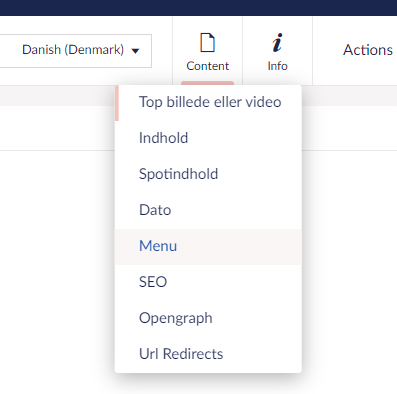
When upgraded to Umbraco 8.2.0, the Content dropdown begin to show when you hover under it. This makes it harder to edit content for users on smaller screens.
Reproduction
Go to the Content Tree Section and click on a document.
Hover here:

Then this show up:
 Emetico
All 4 comments
Ah yes, I can reproduce this, and it's especially visible when you have many groups there because the hover starts at the bottom already, where you have "Url Redirects" right now. Yikes!
We'll have to have a look.
 nul800sebastiaan
on 21 Oct 2019
nul800sebastiaan
on 21 Oct 2019
@nul800sebastiaan I think this has already been fixed in https://github.com/umbraco/Umbraco-CMS/pull/6433
It should probably be cherry picked to v8/8.2 branch as well.
but it seems it is a "feature" in v8.2.0 release.
Original issue:
https://github.com/umbraco/Umbraco-CMS/issues/6430
Another issue regarding this in v8.2.0 :)
https://github.com/umbraco/Umbraco-CMS/issues/6794
 bjarnef
on 21 Oct 2019
bjarnef
on 21 Oct 2019
Thanks @bjarnef! I knew rand a bell. Closing as a duplicate of https://github.com/umbraco/Umbraco-CMS/issues/6430 - the fix will be part of 8.2.1.
nul800sebastiaan
on 22 Oct 2019
I'm closing this one as this is fixed elsewhere - and have been cherrypicked to be included in the 8.2.1 patch.
 clausjensen
on 23 Oct 2019
clausjensen
on 23 Oct 2019
Related issues
 roeermose
·
27Comments
roeermose
·
27Comments
 kjac
·
28Comments
kjac
·
28Comments
 JoseMarcenaro
·
26Comments
JoseMarcenaro
·
26Comments
 deMD
·
55Comments
deMD
·
55Comments
 rsoeteman
·
28Comments
rsoeteman
·
28Comments
Most helpful comment
Thanks @bjarnef! I knew rand a bell. Closing as a duplicate of https://github.com/umbraco/Umbraco-CMS/issues/6430 - the fix will be part of 8.2.1.