Umbraco-cms: Media uploader in RTE doesn't select uploaded image
This issue was already submitted on 12th of September 2017 and we are still having problems with this issue in Umbraco version 7.10.5.
The previous bug submission can be found here:
https://issues.umbraco.org/issue/U4-10408
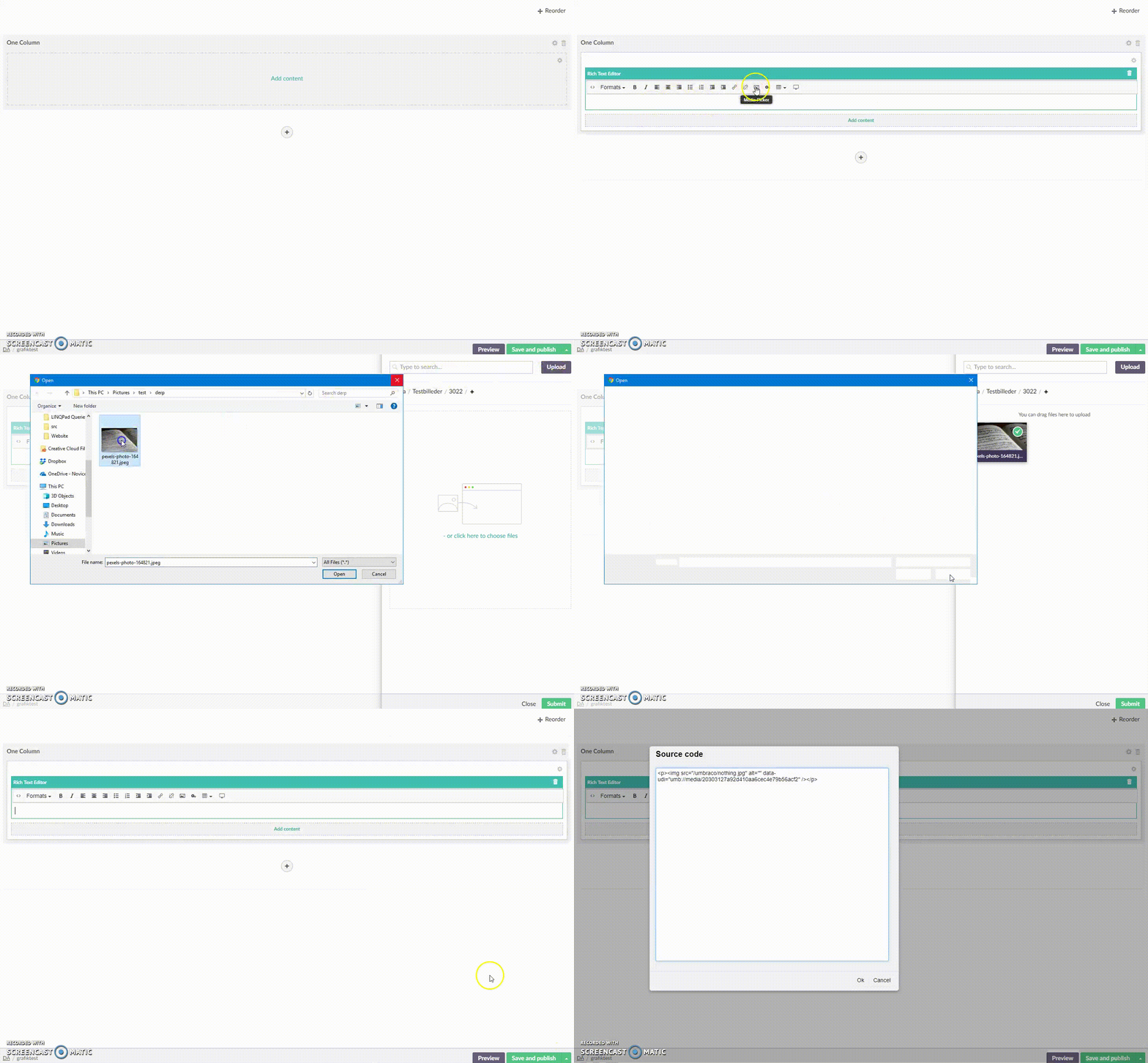
When I want to add a new image to the RTE I click on the Image Picker and upload a new image. The Image Picker indicates that the image is selected and when you click "Submit" it adds a "nothing.jpg" to the RTE.
If you upload a new image in the RTE Image Picker and then scroll to the uploaded image and select it again, then it will be added correctly.
 JorickDJ
All 8 comments
 nul800sebastiaan
on 3 Oct 2018
nul800sebastiaan
on 3 Oct 2018
@KimHolzmann @nul800sebastiaan I'm still seeing this happen in 7.12.4 :-s Also the browse dialog seems to pop up three times, seemingly unmotivated (although that might be an entirely different issue).
Any idea what is happening?
 jannikanker
on 1 May 2019
jannikanker
on 1 May 2019
This is still happening on a fresh install of 7.15.3
 KirschnerMatt
on 7 Oct 2019
KirschnerMatt
on 7 Oct 2019
Same here!
 enkelmedia
on 9 Oct 2019
enkelmedia
on 9 Oct 2019
One idea, at least is to ship the "nothing.jpg"-image so that the editors can see that something went wrong.
enkelmedia
on 9 Oct 2019
@nul800sebastiaan Might there be grounds for reopening this case? I know full well that I reported it using an older version than the fix, but people seem to still be experiencing it in the latest (v7) version :-/
jannikanker
on 9 Oct 2019
Create a new issue for it please, whatever was fixed in this PR is what this issue is marking, apparently there's something else / additional wrong or it wasn't fixed properly. We can't re-open issues that have a release tag on them. :)
nul800sebastiaan
on 9 Oct 2019
I don't see that a new issue was created for this so I'll go ahead and do it myself.
KirschnerMatt
on 16 Oct 2019
Related issues
 Frost117
·
4Comments
Frost117
·
4Comments
 0Neji
·
3Comments
0Neji
·
3Comments
 janvanhelvoort
·
4Comments
janvanhelvoort
·
4Comments
 sofietoft
·
3Comments
sofietoft
·
3Comments
 pralthom
·
3Comments
pralthom
·
3Comments