Ultisnips: [Feature-request] Implement choices
Would be useful if this kind of syntax and interaction is supported.
Found it in TextMate manual, ${«int»|«choice 1»,…,«choice n»|} .
For example:
color: ${1|red,green,blue|}
And a demo in VSCode:

 hikerpig
All 31 comments
Try this:
global !p
def complete(base, matches):
    matches = [m for m in matches if m != '']
    if base:
        matches = [m[len(base):] for m in matches if m.startswith(base)]
    if not matches:
        return ''
    elif len(matches) == 1:
        return matches[0]
    else:
        return '[' + ' | '.join(matches) + ']'
endglobal

snippet cc "color property" bm
color: $1`!p snip.rv = complete(t[1], ['red', 'green', 'blue'])`
$0
endsnippet
For more info, see :h UltiSnips-python and/or watch this video.
If you have other usage questions, visit vi.stackexchange.com, and tag your question with plugin-ultisnips.
 lacygoill
on 18 Jan 2020
lacygoill
on 18 Jan 2020
I thought about supporting this syntax before. While @lacygoill implementation actually gives you the exact feature, it seems a common enough use case to me that might make sense to actually support it inside of the engine. The proposed syntax also does not clash with any already existing one, so it should be rather easy to actually pull this in.
What do you think, @lacygoill ?
 SirVer
on 18 Jan 2020
SirVer
on 18 Jan 2020
I think it would be a worthy addition, because the current way of implementing this feature can lead to an unexpected motion of the cursor (when you nest a tabstop inside another one).
Consider this snippet:
global !p
def complete(base, matches):
    matches = [m for m in matches if m != '']
    if base:
        matches = [m[len(base):] for m in matches if m.startswith(base)]
    if not matches:
        return ''
    elif len(matches) == 1:
        return matches[0]
    else:
        return '[' + ' | '.join(matches) + ']'
endglobal

snippet test ""
foo ${1:bar$2`!p snip.rv = complete(t[2], ['a', 'b', 'c'])` baz}
endsnippet
Insert test, then press the key to expand the snippet; you get this:
foo bar[a | b | c] baz
    ^^^^^^^^^^^^^^^^^^
    selected
Now press the key to jump to the second tabstop; the cursor jumps right before the opening square bracket:
foo bar|[a | b | c] baz
       ^
Finally, press a to select the a match in the list; you get this:
foo bara baz
Which is correct and expected; what is not expected is the cursor jumping 3 characters forward.
It went from here:
foo bara| baz
        ^
To there:
foo bara ba|z
           ^
The number of characters and the direction of the jump is variable; for example, if you add 4 spaces in front of test, and repeat the same experiment, then this time the cursor jumps 11 characters backward.
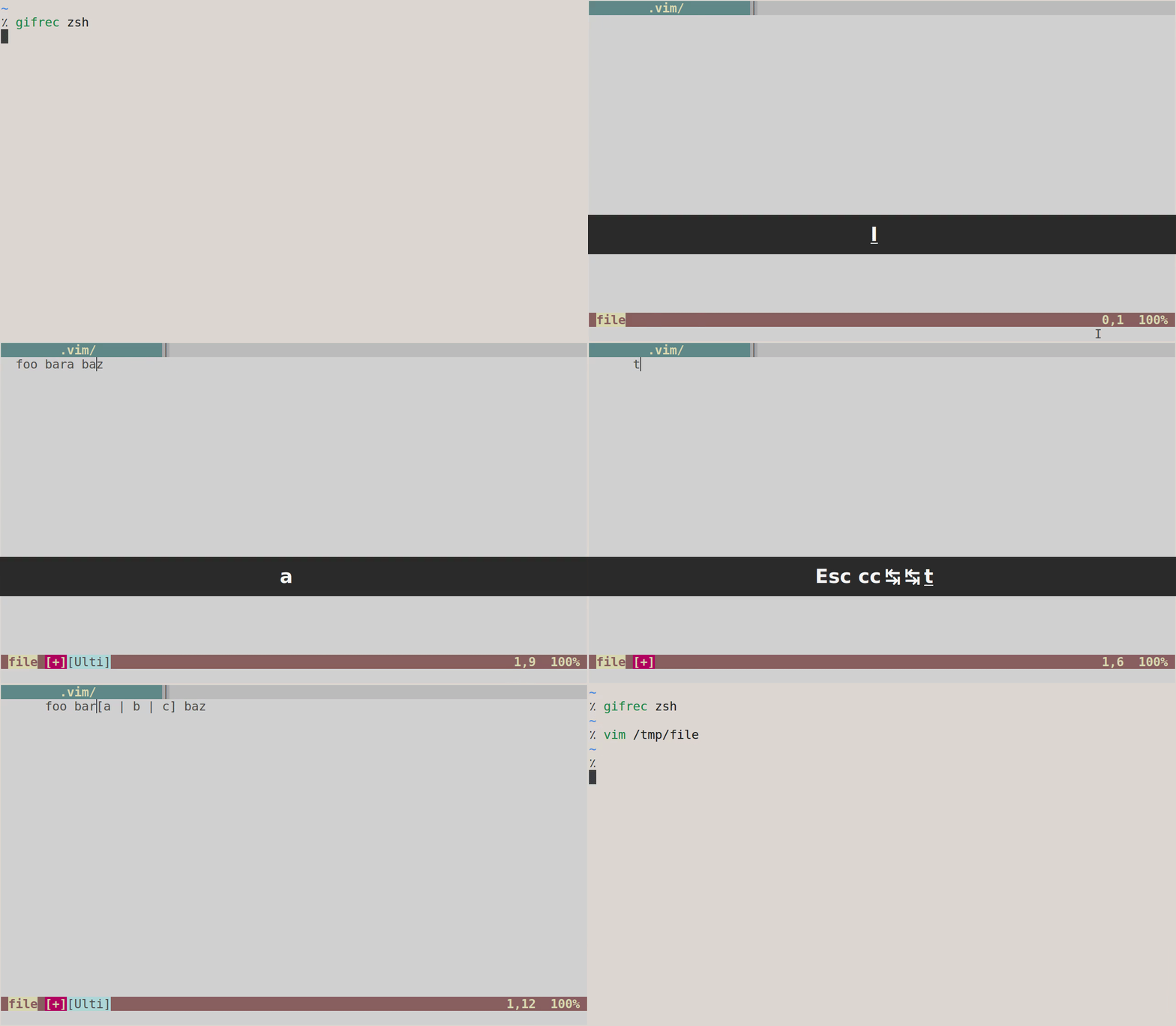
lacygoill
on 18 Jan 2020
I did a little improvement in https://github.com/honza/vim-snippets/pull/1168.
Some use cases can be found here.
It's not perfect though. If we could have built-in choices syntax and implementation, that will really cheer me up.
 ashfinal
on 19 Jan 2020
ashfinal
on 19 Jan 2020
If anybody is interested in working on this, I'd be enthusiastic about a tested patch!
SirVer
on 25 Jan 2020
I think the parsing part is not difficult, but I'm not quite familiar with vim's plugin ui api.
Is there a reference of example for the dropdown menu like UI component in vim ? Or maybe we can use a easymotion like interface for selection ?
hikerpig
on 26 Jan 2020
A simple and probably naive approach would be to invoke complete():
let s:matches = ['red', 'green', 'blue']
function s:complete_words() abort
    call complete(col('.') - len(matchstr(getline('.')[:col('.')-2], '\S\+$')), s:matches)
    return ''
endfunction
inoremap <silent> <f5> <c-r>=<sid>complete_words()<cr>
If you press F5, Vim should open a popup menu containing the matches red, green and blue.
It may start the completion from a wrong position when invoked while writing a match containing whitespace...
lacygoill
on 26 Jan 2020
I have added the parsing and setup Choices text object. here are the commits
But still don't have a clue about integrating selection UI with ultisnips text object evaluation.
I tried what @lacygoill mentioned, vim native complete(), but it seems to be interrupted by ultisnips evaluation, the completion dropdown just flash out.
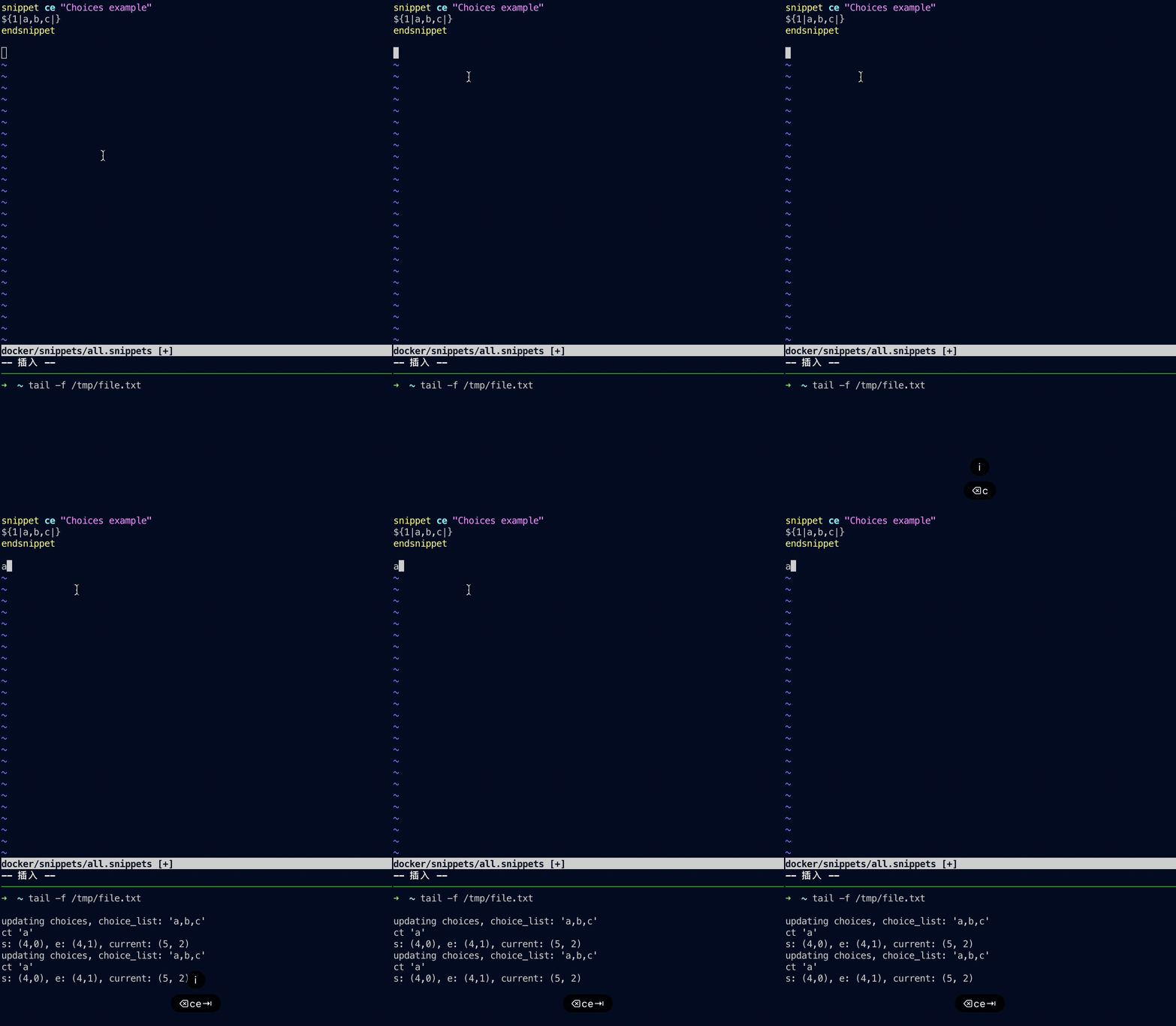
I am considering using quickfix window for selection UI. Is it a bad idea ?
hikerpig
on 27 Jan 2020
I am considering using quickfix window for selection UI. Is it a bad idea ?
I don't think the quickfix window is a good fit; it alters the stack of quickfix lists and the window layout.
The location window would be slightly better, but the best UI is Vim's own popup menu (the pum).
I tried what @lacygoill mentioned, vim native complete(), but it seems to be interrupted by ultisnips evaluation, the completion dropdown just flash out.
I think you made a mistake on this line:
vim_helper.eval('complete(col("." - %s), %r)' % (len(self._initial_text), self.choice_list))
                                 ^^^^^^
The negative offset should be outside col():
vim_helper.eval('complete(col(".") - %s, %r)' % (len(self._initial_text), self.choice_list))
                                  ^^^^^
But you are right, even like this the pum does not stay open.
Maybe UltiSnips does something later which causes the pum to close...
In any case, it stays open if you delay the invocation of complete() with a timer:
vim_helper.eval('timer_start(0, {-> mode() is# "i" && complete(col(".") - %s, %r)})' % (len(self._initial_text), self.choice_list))
But it looks like a hack; it would probably be better to evaluate complete() later, without a timer.
I can't help further, as I don't know Python nor UltiSnips internals.
Edit: complete() could also be delayed via a one-shot autocmd listening to SafeState:
vim_helper.command('au SafeState * ++once if mode() is# "i" | call complete(col(".") - %s, %r) | endif' % (len(self._initial_text), self.choice_list))
But it requires a recent Vim.
lacygoill
on 27 Jan 2020
UltiSnips moves the cursor using normal mode commands, I guess that they interfere with the completion window. My suggestion would be to go with a completion inline, similar to how it is implemented in vim-snippets complete macro.
there is a whole rabid hole here about integrating with the various completion engines out there too (deoplete, ycm and so on).
SirVer
on 27 Jan 2020
I've implemented a text-based inline selection, don't require vim's new fancy features.
I think the term 'popup' in vim is releated to gui interface, like the nav menu or some contextmenu when you clicked right mouse button, and before vim 8.2's floating window, there is no easy way of customizing a popup menu. Correct me if I'm mistaken.
Anyway, current implementation looks like this:
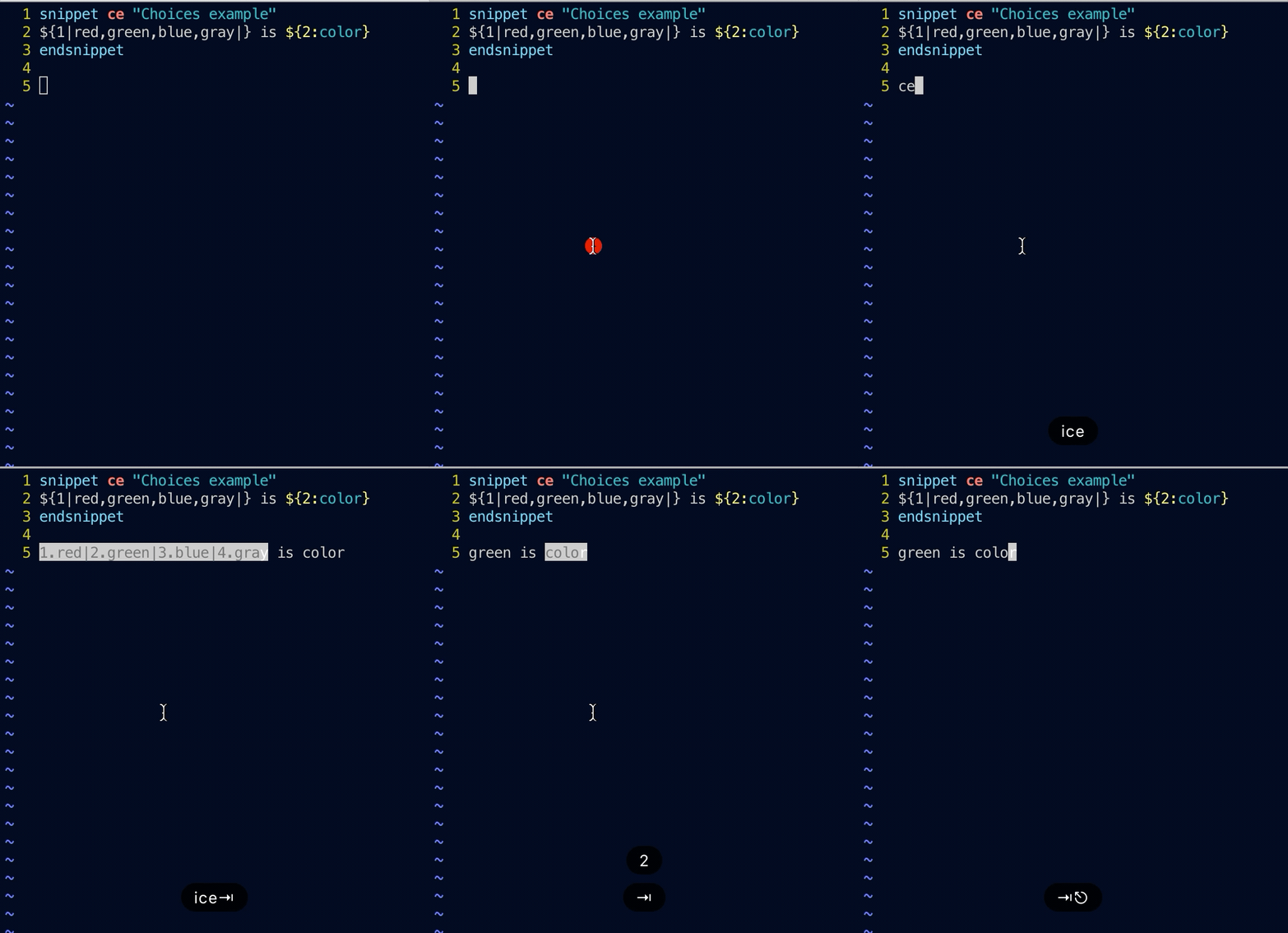
But I think altering text while inputting is kind of hacky and error prone (myself failed to find an elegant way to do this 😢).
Also considering create a readonly scratch buffer for selection (like Denite?), would that be to costly?
hikerpig
on 28 Jan 2020
Also considering create a readonly scratch buffer for selection (like Denite?), would that be to costly?
I think there is the danger that we'd need to provide more and more completion features over time, which is feature creep I'd like to avoid. I.e. I do not want UltiSnips to become a deoplete competitor.
I think your solution is good and instead of improving upon it, we should try to provide hooks so that completer engines can be hooked in as an alternative. I.e. users should be able to inject a python or vimL function that is used instead of our naive completer workflow. Can you spent some brain cycles on how that could look?
SirVer
on 28 Jan 2020
Also, I forgot to send this earlier, but UltiSnips already asks selections from Users in case of ambiguity with :UltiSnipsEdit. The code is here: https://github.com/SirVer/ultisnips/blob/96026a4df27899b9e4029dd3b2977ad2ed819caf/pythonx/UltiSnips/snippet_manager.py#L31, it uses Vim's inputlist to ask for a selection.
SirVer
on 28 Jan 2020
The pum has been overloaded by various async completion engines. Basically, before entering choices snippets we need to disable these completion engines first, then enable them again, that brings lots of trouble. I'm afraid inline completion may be our best shot before Vim have feature like "namespaced" popup menu or something else.
As for providing hooks, I think it's a good idea. We can expose UltiSnips's current status, including whether it is running, what trigger word, which tabstop, so completion engines's UltiSnips source can retrieve corresponding choices, and give the source top priority, or completely disable other sources except for UltiSnips source. It will need good design.
ashfinal
on 29 Jan 2020
I've tried calling vim's 'inputlist()', but found it too heavy for this completion, forcing user to another buffer while inputting is kind of annoying.
I would like this choice list to be a suggestion instead of compulsory selection.
I improved the inline selection solution a little bit, and I think this is enough for me.
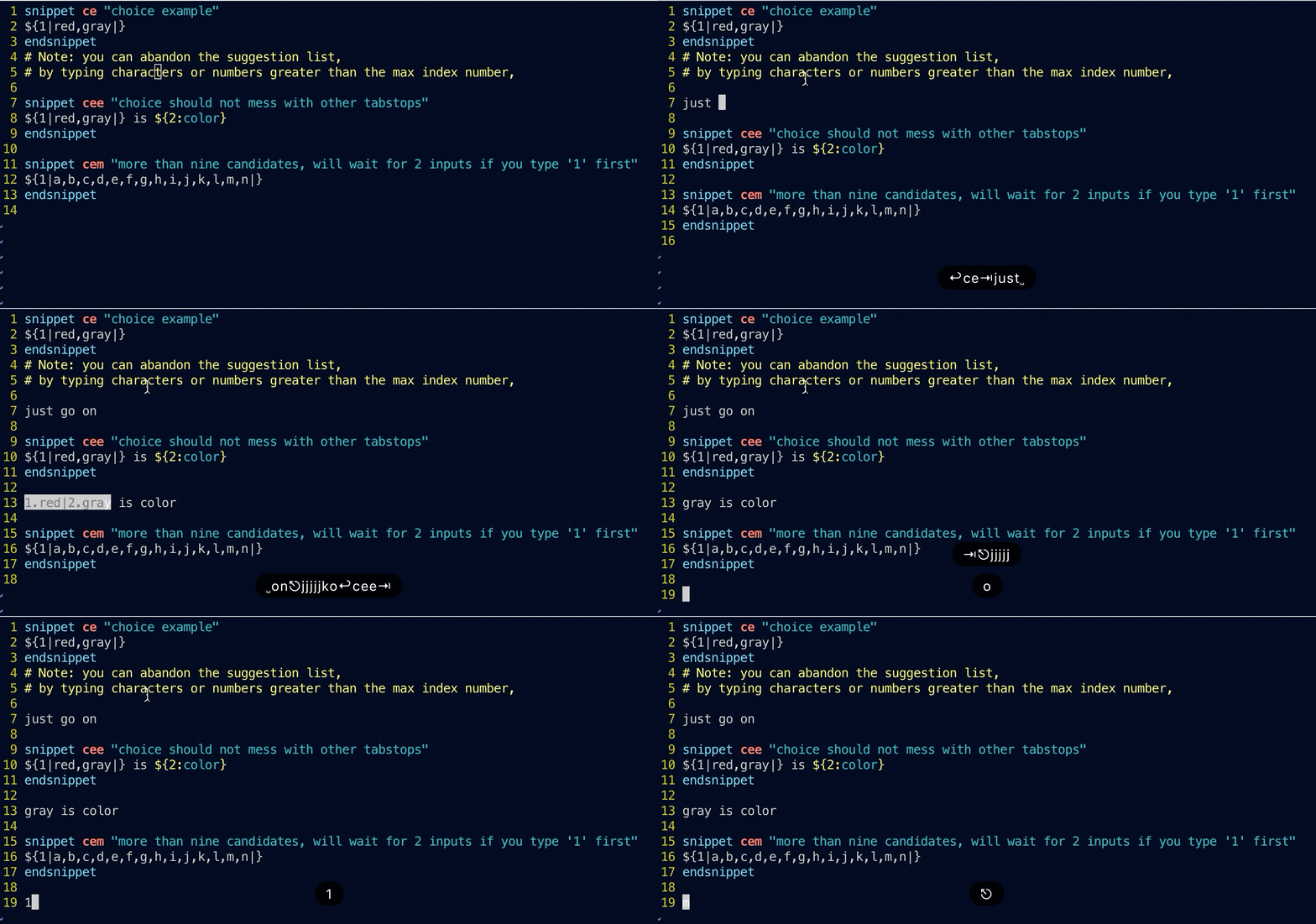
As for exposing hooks, I'm afraid it's beyond my ability, since it requires more knowledge on ultisnips and vim script. If current solution looks good to you, I would like to create a PR and add some tests for it.
hikerpig
on 30 Jan 2020
+1 for going with your current UI. Please add some tests and open a PR, looking forward to reviewing!
SirVer
on 31 Jan 2020
Wow I just noticed ultisnips already has the choice feature. The document didn't mention this completely. Any chance to update the docs?
 0x7FFFFFFFFFFFFFFF
on 12 May 2020
0x7FFFFFFFFFFFFFFF
on 12 May 2020
@yangshuairocks That is on me. I said I would write the docs, but my new job didn't give me a ton of time lately, that is why it was not written yet.
SirVer
on 13 May 2020
@SirVer I added this new feature to the doc. Could you review the pull request when you get a chance?
0x7FFFFFFFFFFFFFFF
on 13 May 2020
Hi, how to escape , comma when using choices?
snippet q
${1:result} = nn.${2|fun1(,fun2(param1\, ,fun3(param1\, param2\, |}prarm_end)
endsnippet
Does ultisnips support it for now? Didn't found it in doc.
Thanks in advance!
 roachsinai
on 22 Jul 2020
roachsinai
on 22 Jul 2020
And if the choice is more than ten like 1,...,11, the first one can't show when input 1 as 1 and 11 has same prefix.
roachsinai
on 23 Jul 2020
And if the choice is more than ten like
1,...,11, the first one can't show when input1as1and11has same prefix.
@roachsinai Could you provide a buggy example? I tested the code below and can input j .
snippet alpha
${1|a,b,c,d,e,f,g,h,i,j,k,m,n|}
endsnippet
@hikerpig input j works, but input 1 not work.

Input 10 got j, if want to got a must input a as input 1 returan a number 1.
roachsinai
on 23 Jul 2020
@roachsinai I see. I will look into it and open a bugfix PR then, might take several days. Thank you for your feedback. 😃
hikerpig
on 23 Jul 2020
Great!
What's more, 🤩
@hikerpig is there a plan for escape comma you contributors, as it could enable different fucntion(with different parameters) as snippet choices. And as ultisnips use , to split choices, it will be better to support escape , same with bash support escape space.
roachsinai
on 23 Jul 2020
@roachsinai Yeah I see your example above 👍, will keep that in mind as well.
hikerpig
on 23 Jul 2020
@hikerpig waohhh! Thanks!
roachsinai
on 23 Jul 2020
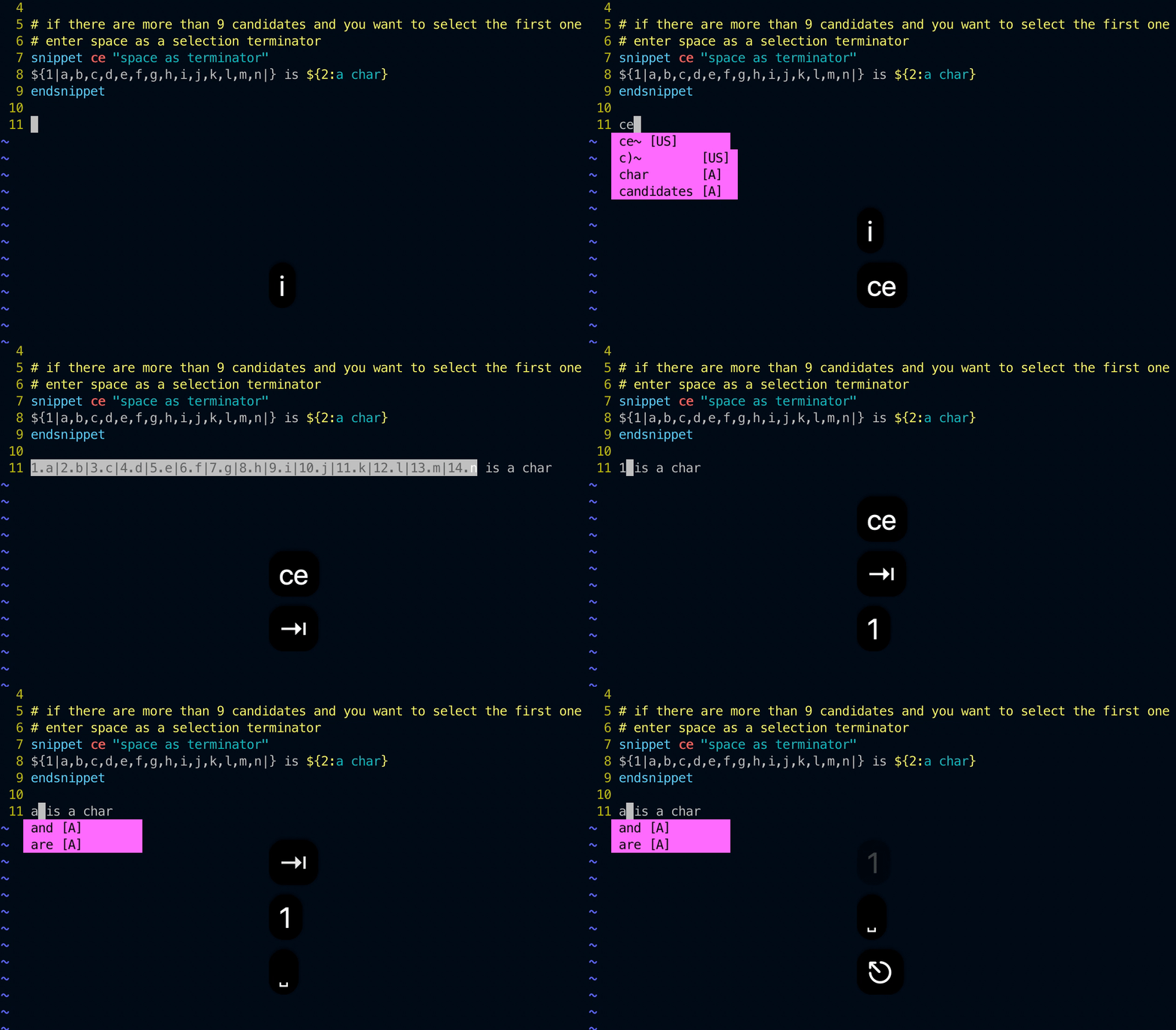
@roachsinai I came up with a solution that uses space as the selection terminator. So we can type 1 to select the first one and 11 to select the eleventh one.
It pretty much covers my usual cases. Is it feasible for you guys ?
hikerpig
on 28 Jul 2020
@roachsinai I came up with a solution that uses space as the selection terminator. So we can type
1to select the first one and11to select the eleventh one.
It pretty much covers my usual cases. Is it feasible for you guys ?
Yes, sure! Thanks!
roachsinai
on 28 Jul 2020
Hi, how to escape
,comma when using choices?snippet q ${1:result} = nn.${2|fun1(,fun2(param1\, ,fun3(param1\, param2\, |}prarm_end) endsnippetDoes ultisnips support it for now? Didn't found it in doc.
Thanks in advance!
Hi @hikerpig I think it's only related to ChoicesToken when escape comma is needed. So maybe no need to support escape comma for all Token. Just start to reading related code, but very new to lexer...
roachsinai
on 5 Sep 2020
I'v add several lines arround
self.choice_list = choices_text.split(",")
to
        choices_text = choices_text.replace("\,", "\__")
        self.choice_list = choices_text.split(",")
        for idx, choice in enumerate(self.choice_list):
            self.choice_list[idx] = self.choice_list[idx].replace("\__", ",")
        choices_text = choices_text.replace("\__", ",")
But the code above not support change parameters in function:

If tab to select next and change parameter is enabled will be great.
roachsinai
on 5 Sep 2020
Related issues
 blackode
·
5Comments
blackode
·
5Comments
 raorm
·
4Comments
raorm
·
4Comments
 zuntik
·
7Comments
zuntik
·
7Comments
 kirillbobyrev
·
4Comments
kirillbobyrev
·
4Comments
 codybuell
·
4Comments
codybuell
·
4Comments
Most helpful comment
I've tried calling vim's 'inputlist()', but found it too heavy for this completion, forcing user to another buffer while inputting is kind of annoying.
I would like this choice list to be a suggestion instead of compulsory selection.
I improved the inline selection solution a little bit, and I think this is enough for me.
As for exposing hooks, I'm afraid it's beyond my ability, since it requires more knowledge on ultisnips and vim script. If current solution looks good to you, I would like to create a PR and add some tests for it.