Ultisnips: Latex snippets only work with .latex extension, not .tex
Expected behavior:
Snippets working in files with .tex extension, as it is the most popular extension for latex files.
 zuntik
All 7 comments
Can't reproduce:
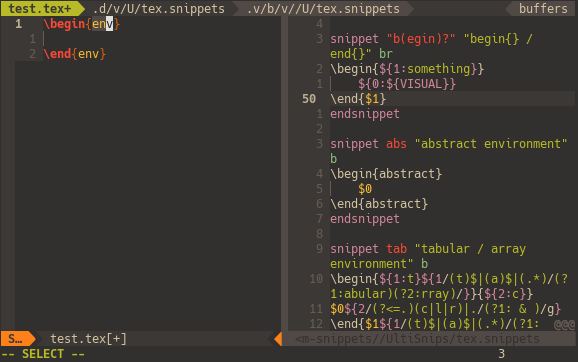
Everything works in .tex just fine.
Seems like duplicate of #824. I will reopen it if your problem is different.
 andreyorst
on 14 Apr 2018
andreyorst
on 14 Apr 2018
I don't know why they are working:
Here's some stuff from my vimrc:
Plug 'honza/vim-snippets'
Plug 'SirVer/ultisnips'
"ultisnips
let g:UltiSnipsExpandTrigger='<c-j>'
let g:UltiSnipsJumpForwardTrigger='<c-j>'
let g:UltiSnipsJumpBackwardTrigger="<c-k>"
zuntik
on 14 Apr 2018
Did you read my explanations about tex filetype and plaintex filetype in #824 ?
Run :setf tex and try to expand begin stippet.
andreyorst
on 14 Apr 2018
I've read it but didn't understand very well, I added the line
let g:UltiSnipsSnippetDirectories=[$HOME.'/.vim/bundle/vim-snippets/UltiSnips']
But it didn't seem to do the trick.
:setf tex worked on the .tex file.
zuntik
on 14 Apr 2018
Please read the documentation. You need paragraph 3.3 Snippet Search Path.
I added the line
let g:UltiSnipsSnippetDirectories=[$HOME.'/.vim/bundle/vim-snippets/UltiSnips']
This doesn't make sence to ultisnips, as it already knows where to look for snippets provided with vim-snippets plugin. But this is not related to your problem.
If you open empty .tex file it's filetype wil be plaintex. Wich means that Ultisnips will look for snippets for this filetype, an there is no snippets for this filetype in vim-snippets plugin. If your .tex file contains preamble, vim sets tex filetype, and UltiSnips searches for tex snippets. If you open empty .latex file, vim sets tex filetype, and your snippets are working here too.
andreyorst
on 14 Apr 2018
Thanks,
I added the line
let g:tex_flavor = "latex"
to my vimrc and it worked.
I don't know if it is the ideal solution. I don't know what a preamble is but for now, I'm satisfied.
zuntik
on 14 Apr 2018
Please read the documentation. You need paragraph
3.3 Snippet Search Path.I added the line
let g:UltiSnipsSnippetDirectories=[$HOME.'/.vim/bundle/vim-snippets/UltiSnips']This doesn't make sence to ultisnips, as it already knows where to look for snippets provided with
vim-snippetsplugin. But this is not related to your problem.If you open empty
.texfile it's filetype wil beplaintex. Wich means that Ultisnips will look for snippets for this filetype, an there is no snippets for this filetype invim-snippetsplugin. If your.texfile contains preamble, vim setstexfiletype, and UltiSnips searches for tex snippets. If you open empty.latexfile, vim setstexfiletype, and your snippets are working here too.
So what preamble should I add to mark a filetype I wanna use?
 alclol
on 20 Apr 2019
alclol
on 20 Apr 2019
Related issues
 MikeDacre
·
3Comments
MikeDacre
·
3Comments
 lx93uv
·
6Comments
lx93uv
·
6Comments
 jonathf
·
6Comments
jonathf
·
6Comments
 kirillbobyrev
·
4Comments
kirillbobyrev
·
4Comments
 vanabel
·
7Comments
vanabel
·
7Comments
Most helpful comment
Thanks,
I added the line
let g:tex_flavor = "latex"to my vimrc and it worked.
I don't know if it is the ideal solution. I don't know what a preamble is but for now, I'm satisfied.