Ui: Invalid prop `style` of type `number` supplied to `Styled(ListView)`, expected `object`.
 infacq
All 14 comments
Could you please share your code? @infacq?
 SoHotSoup
on 28 Sep 2016
SoHotSoup
on 28 Sep 2016
import React from 'react'
import { Actions as NavigationActions } from 'react-native-router-flux'
import { connect } from 'react-redux'
import API from '../Services/Api'
import { ListView, GridRow, Card, View, Subtitle, Image, Title, Button, Text, Screen, Caption, TouchableOpacity } from '@shoutem/ui'
import Icon from 'react-native-vector-icons/FontAwesome'
// Styles
import styles from './Styles/PresentationScreenStyle'
// API buttons here:
const endpoints = [
{ endpoint: 'getNewArrival', args: [''] }
]
class PresentationScreen extends React.Component {
constructor (props) {
super(props)
this.state = {
dataSource: []
}
this.api = API.create()
this._renderRow = this._renderRow.bind(this)
}
_renderRow (kuepangs) {
const cardViews = kuepangs.map(rowData => {
return (
<TouchableOpacity key={rowData.pr_id} onPress={() => { NavigationActions.usageExamples({data: rowData}) }}>
<Card>
<Image styleName="medium-wide" source={{ uri: 'http://shoutem.github.io/img/ui-toolkit/examples/image-3.png' }}/>
<View styleName="content">
<Subtitle>{rowData.pr_display_name}</Subtitle>
<View styleName="horizontal v-center space-between">
<Caption>{rowData.pr_model}</Caption>
<Button styleName="tight clear"><Icon name="star-o" /></Button>
</View>
</View>
</Card>
</TouchableOpacity>
)
})
return (
<GridRow columns={2}>
{cardViews}
</GridRow>
)
}
componentDidMount () {
endpoints.map((endpoint) => this.tryEndpoint(endpoint))
}
tryEndpoint (apiEndpoint) {
const { endpoint, args = [''] } = apiEndpoint
this.api[endpoint].apply(this, args).then((result) => {
this.setState({
dataSource: result.data
})
})
}
renderKuepang(List) {
const groupedList = GridRow.groupByRows(List, 2,
(item) => (item ? 2 : 1)
)
return (
<ListView style={ styles.listContent } data={ groupedList } renderRow={ this._renderRow } />
)
}
render () {
return (
<Screen style={{ marginTop: 50 }}>
{this.renderKuepang(this.state.dataSource)}
</Screen>
)
}
}
export default PresentationScreen
+1 I´m facing this same issue, seems like the index based IDs created by StyleSheet.create are not compatible with the components.
 jtanori
on 29 Sep 2016
jtanori
on 29 Sep 2016
@jtanori It could be that, because passed style is merged with one from theme.js. Could you, please, verify that? Please try to pass style as plain object and then style created by StyleSheet.create...
Also, @infacq can I ask you to rename style you are trying to pass to ListView, because ListView internally has style with the same name, and that may be the issue why style isn't merged well...
Thank you guys!
SoHotSoup
on 29 Sep 2016
@SoHotSoup passing a plain object as style does in fact work as expected, the issue only occurs when using StyleSheet.create, not sure if it is possible to use StyleSheetRegistry outside the StyleSheet module and grab styles by id if the component receives an int in the style attribute.
I´ll try digging up a bit more but so far using plain objects is working.
jtanori
on 29 Sep 2016
Thank you, I have an idea of what might cause this...
SoHotSoup
on 29 Sep 2016
@SoHotSoup I did rename but still no luck. Same error hit me
infacq
on 29 Sep 2016
If you want a quick workaround to this until it's fixed, StyleSheet.flatten will return an object that @shoutem/ui can use.
i.e. instead of using styles.listContent about, you can do:
const styles_listContent = StyleSheet.flatten(styles.listContent);

return (
  <View style={ styles_listContent } />
);
 notjosh
on 30 Sep 2016
notjosh
on 30 Sep 2016
@infacq Would that be enough good solution to you?
SoHotSoup
on 1 Oct 2016
yeah thanks @SoHotSoup. It helps
infacq
on 2 Oct 2016
I have the same issue and StyleSheet.flatten doesn't make it work.
 ningo-agilityio
on 20 Apr 2017
ningo-agilityio
on 20 Apr 2017
It worked for me thanks @notjosh
 kartikeygupta-tudip
on 6 May 2017
kartikeygupta-tudip
on 6 May 2017
It worked for me too . thanks @notjosh
 sunny635533
on 28 Jul 2017
sunny635533
on 28 Jul 2017
You can remove specific styling from StyleSheet.create() for components are using from Shoutem
I created view based on Shoutem Components (Text,Button,View and etc...)
So my styling file like this one:
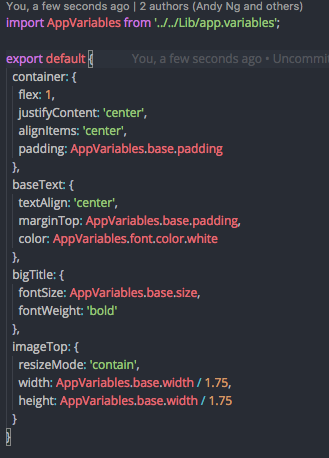
It seems Shoutem only accept styling from object not number.
 andyngdz
on 20 Jan 2018
andyngdz
on 20 Jan 2018
Related issues
 mypark
·
8Comments
mypark
·
8Comments
 shukerullah
·
9Comments
shukerullah
·
9Comments
 kreshnikalidema
·
5Comments
kreshnikalidema
·
5Comments
 ghost
·
8Comments
ghost
·
8Comments
 alejandronanez
·
9Comments
alejandronanez
·
9Comments
Most helpful comment
If you want a quick workaround to this until it's fixed,
StyleSheet.flattenwill return an object that@shoutem/uican use.i.e. instead of using
styles.listContentabout, you can do: