Ui: Invariant Violation: requireNativeComponent: "BVLinearGradient" was not found in the UIManager.
Hi, attempting to use LinearGradient as so:
import {LinearGradient} from '@shoutem/ui'
...
render() { return (
       <LinearGradient colors={['#4c669f', '#3b5998', '#192f6a']} style={{flex: 1}}></LinearGradient>
)}
...
This is the error I get at react-native run-android:
Invariant Violation: requireNativeComponent: "BVLinearGradient" was not found in the UIManager.
I have tried npm uninstall react-native-linear-gradient & npm install react-native-linear-gradient & react-native link etc. with no success'?
Can anyone provide me with some assistance?
Thanks!
 ghost
ghost
All 8 comments
@visagegod I just hit this error too, after upgrading my version of RN and of react-native-linear-gradient.
It seems the link command isn't working properly, and you need to install it manually - particularly the Link Binary With Libraries part.
 mrtomhoward
on 22 Oct 2018
mrtomhoward
on 22 Oct 2018
My god! I have the same question.
 lygrn
on 26 Oct 2018
lygrn
on 26 Oct 2018
anyone, please solve this error :(
 Miko2x
on 28 Oct 2018
Miko2x
on 28 Oct 2018
Hey, guys, have you solved this problem, and I have. The 'BVLinearGradient' was lost at reactNative
 KouSyurei
on 30 Oct 2018
KouSyurei
on 30 Oct 2018
271/5000
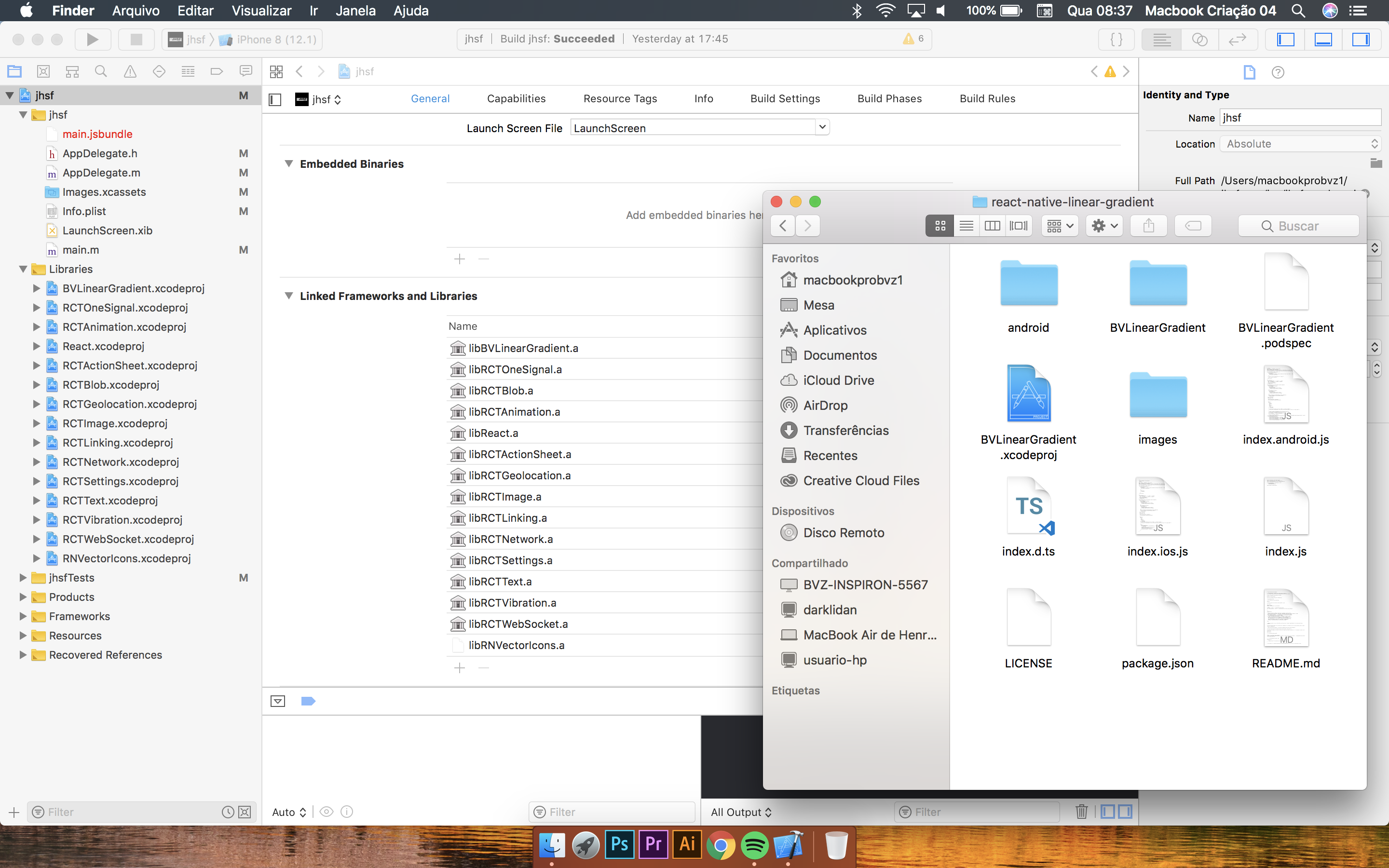
Just add "BVLinearGradient" in xcode libs.
You can drag the BVLinearGradient.xcodeproj file from the node_modules / react-native-linear-gradient for your project libraries in xcode and then add the lib in General> Linked Frameworks and Libraries.
 indiorlei
on 16 Jan 2019
indiorlei
on 16 Jan 2019
Closing issue because noone should be using shoutem/ui, very out of date library and looks like no dev activity
ghost
on 16 Jan 2019
All I had to do is run the command "react-native run-ios" again to fix the issue.
 rafaelbpa
on 3 Aug 2019
rafaelbpa
on 3 Aug 2019
after all that just try to run "react-native run-android" again
 tanvirbhatti
on 21 Oct 2019
tanvirbhatti
on 21 Oct 2019
Related issues
 mypark
·
8Comments
mypark
·
8Comments
 arudrakalyan
·
9Comments
arudrakalyan
·
9Comments
 kreshnikalidema
·
5Comments
kreshnikalidema
·
5Comments
 JulianKingman
·
4Comments
JulianKingman
·
4Comments
 alejandronanez
·
9Comments
alejandronanez
·
9Comments
Most helpful comment
271/5000
Just add "BVLinearGradient" in xcode libs.
You can drag the BVLinearGradient.xcodeproj file from the node_modules / react-native-linear-gradient for your project libraries in xcode and then add the lib in General> Linked Frameworks and Libraries.