@TimB87 @olivereisenhut @khanhas @moses-bowman @jcklpe @TobiasDev @LaLaGhost @GitBiker @alanaasmaa @TuRDMaN @thatKaran @chantisnake @WonaBee @cosimochellini @maku @mkkeck @lampenlampen @SplittyDev
Hey, all of you! The last months I was working hard on a total rewrite of Ueli. I have a working Beta version and I want to share it with you so you can test it and give me some feedback. Maybe some issues or feature requests you had were resolved too? :)
Download the portable beta here:
- Windows: https://www.dropbox.com/s/ffshoxghxw2il27/ueli-8.0.0-beta-portable.zip?dl=0
- macOS: https://www.dropbox.com/s/v1iicjnm74ix00n/ueli-8.0.0-beta-portable-mac.zip?dl=0
If you don't want to be in this thread leave a comment and I'll remove you from this thread.
Thank you all for your support and your constant feedback!
8.0.0
What is new?
General
- Multilanguage (currently only English and German but if there is someone translating the whole app to another language it should be no problem)
- Your current config won't be compatible with the new version
- User can't modify config file location. Configuration is stored in the user's
AppDatafolder on Windows and~/Library/ApplicationSupportfolder on macOS - Async code execution
- Supports executing 3rd party binaries or fetching data from the internet
- UI should not be blocked anymore
New Plugins
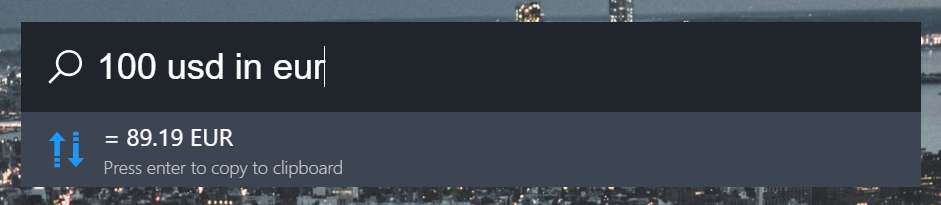
Currency Converter
Convert currencies with up to date exchange rates like this:
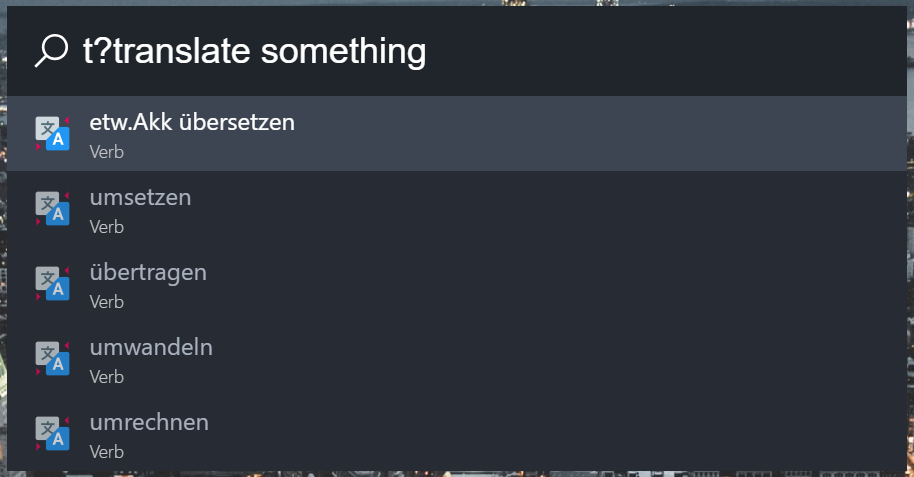
Translation
Translate words or short sentences. Available languages: English, German, Spanish, Frensh, Portugese
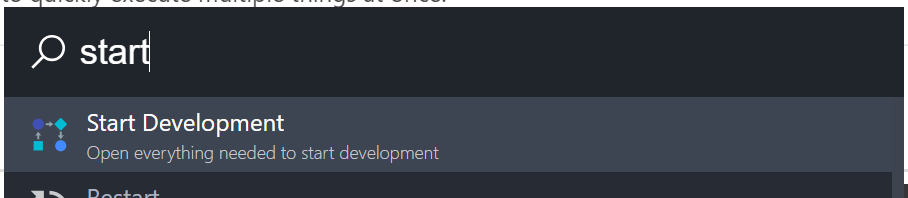
Workflow
A workflow is similar to a shortcut, but can contain multiple execution steps. You can trigger multiple stuff with just a keyword. For example search for "Start development" and then let ueli open up a file, execute a commandline tool, open up a webpage or a program.
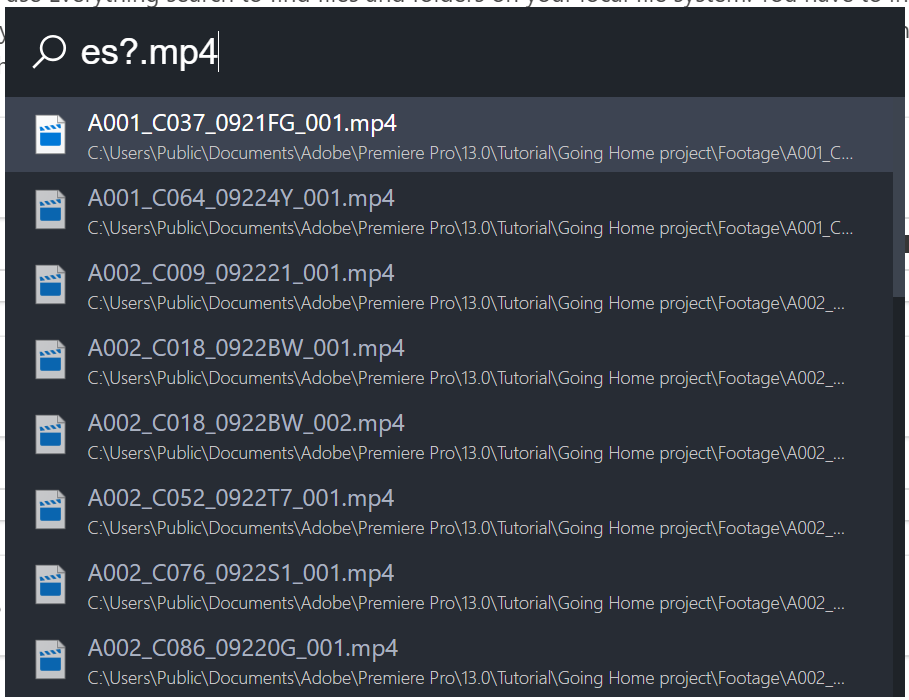
Everything (Windows only)
Use voidtools everthing to search your computer globally.
mdfind (macOS only)
Use macOS' build-in tools to search your computer globally.
Settings

- The whole settings window has been redesigned. Open the settings with Ctrli (Windows) or Cmd, (macOS)
- You can now change the color theme from the settings window. You can also export/import color themes
- Everything should be more user-friendly
What is currently missing and will be added to the final 8.0.0 version
- Support for mouse interaction
- Installer + auto updater
- Operating system settings
- Search result numbers
- More color themes
 oliverschwendener
All 30 comments
Hey @oliverschwendener ,
first of all: this looks like a great update and I am very curious to try it out! I just don't use my Win10 a lot lately so this time will be limited, so don't expect much feedback from my side. But if there is something up, I'll get back to you on this issue here (I try to avoid the slack account if you don't mind).
Best regards
 TimB87
on 2 May 2019
TimB87
on 2 May 2019
This looks great! I'm looking forward to trying out the translation stuff
 jcklpe
on 3 May 2019
jcklpe
on 3 May 2019
This looks amazing, can't wait to try it out! (Will be first on Monday since I'm currently on vacation)
 TobiasDev
on 3 May 2019
TobiasDev
on 3 May 2019
super excited to be able to contribute to this project!
 cosimochellini
on 3 May 2019
cosimochellini
on 3 May 2019
Hi @oliverschwendener ,
I just took a longer look at the new Beta version and I have some thoughts/bug/QoL changes (I'm not sure if you want extra tickets for these so I'm posting them here and you can decide if you want to split them into tickets):
General:
- Settings desperately needs a dark theme ;)
- The problem in #83 seems to be fixed in this version so yay
- "File Path" choice needs to be able to actually choose files and not just folders, i.e. in the "Workflow" section you can choose "File Path" and choose a folder but it's either not possible or not very obvious on how to choose a file in that folder
- Activating a Plugin needs to be more obvious, I figured it out after a couple of minutes of searching (maybe a little exaggeration ;) )
- Maybe an option of looking at the log file in the settings would be good, I had some trouble getting the "everything" search to run and the error message was just "See log file for more information" and didn't really know where the log files would be located
- The revert button could also be interpreted as a "Refresh" button, so some kind of popup to show what it actually does or a confirm dialog "Do you really want to revert everything to default settings?" would be ideal
Commandline:
- Opens the generic cmd.exe, would it be possible to change this? As I'm using Cmder and like it way more then the normal cmd
Translation:
- Having to choose the language in the settings page is pretty restrictive. Would it be possible to change the search prefix to do that? So the default search I can choose in the settings but if I want a quick translation I can do something like
t?en-es SEARCHTERMand it changes the search for this one to English to Spanish
Websearch:
- Icon URLs, here it should be possible to get the Favicon from the site itself isn't it? Instead of having to search either the source code or the internet for the icon.
- What does the priority actually do?
- Minor thing: trimming the first whitespace would be neat. Because (just for neatness) I do the following:
g? SEARCHTERMinstead ofg?SEARCHTERMand while in most cases it doesn't matter that there is a leading whitespace, it's possible that it could
Workflows:
- This feature is really great :)
- But see above with choosing Applications, I'm getting around this by doing:
C: && cd "C:\Program Files (x86)\Mozilla Thunderbird\" && thunderbird.exe(I'm not 100% if I have to do it this way but it works so ¯\_(ツ)_/¯ )
Everything:
- It's not 100% obvious that even though the ES command interface is in a folder that Everything needs to be running in the background (but maybe that is just me, as I have never used the command interface before)
- The path to the es.exe seems to need quotes in order to work, i.e.
"C:\Program Files\Everything\es.exe"and not justC:\Program Files\Everything\es.exe
I think for the most part that's it for the moment. I'll write some more thoughts/changes/bugs in here (as I don't plan on using Slack in my private life as well ;) ) when I have some.
 WonaBee
on 4 May 2019
WonaBee
on 4 May 2019
Hi @oliverschwendener,
Before with ueli 7, fallback searches immediately appear whenever I type something:
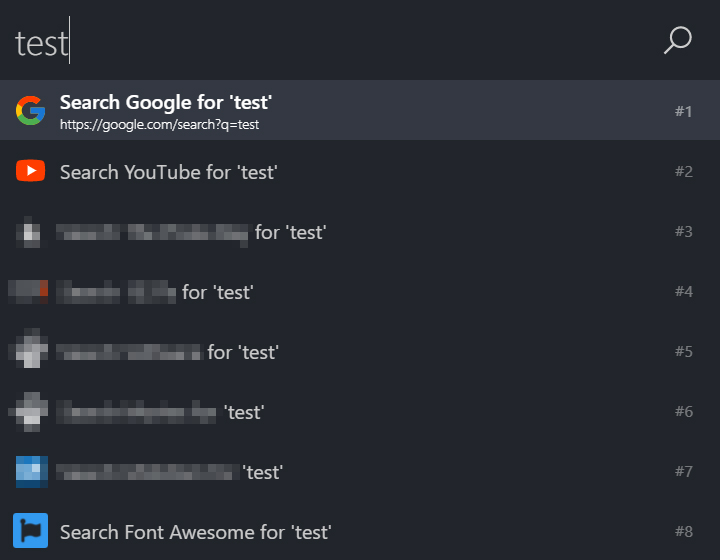
With ueli 8, built-in setting(s) appear which I can't seem to find where to disable:

Fallback searches are working well, though built-in settings are prioritized when short search terms are typed in:
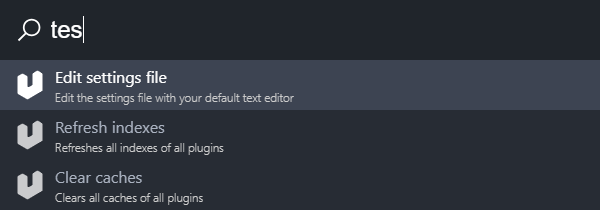
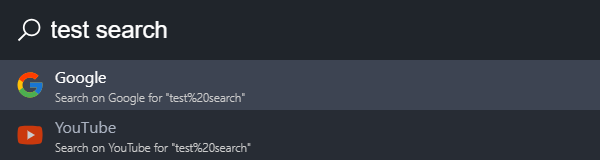
Another thing is that I can't seem to type f within the search bar. Tested it on another PC and had the same issue.
 moses-bowman
on 5 May 2019
moses-bowman
on 5 May 2019
I also have the issues that I can't type f. I thought it was my PC, but I have tried it on three different ones now, without success.
TobiasDev
on 6 May 2019
Two things I noticed:
- When you press enter when wanting to open one of my own shortcuts it UELI blinks once and then it disappears first after 1-2 seconds rather than as soon as I hit enter.
- When creating shortcuts it is a bit weird that I can only choose a folder and not an EXE or something like that. The work-around for this is too add the folder and then just write the exe you want to use after that. It works, but it feels a bit strange.
TobiasDev
on 6 May 2019
- I also have the issues that I can't type f. I use FIN keyboard but i event tried to change language.
- Sometimes when i press ALT+SPACE the ueli won't get focus.
- I agree that Everything needs more info how to get it work. Maybe even release version with everything included.
- Sometimes enter does not work also, or ueli somewhat freezes.
I will post more when i have more time.
 alanaasmaa
on 6 May 2019
alanaasmaa
on 6 May 2019
Started using the version 8 today and it's doing great so far! Real big improvements to the settings ui!
jcklpe
on 7 May 2019
FYI: The bug which prevented pressing the letter f should be fixed now.
oliverschwendener
on 7 May 2019
I have a weird issue. On my work PC I can see all icons when typing "Firefox" or anything. However, on my home PC no icons (except the ones I have added myself) works.
TobiasDev
on 9 May 2019
I have a weird issue. On my work PC I can see all icons when typing "Firefox" or anything. However, on my home PC no icons (except the ones I have added myself) works.
Thanks for your feedback! Apparently you are not the only one who has this problem. I have to look into this.
oliverschwendener
on 9 May 2019
I have two new things I've noticed.
- When using system commands like Shutdown, could you please add back the confirmation box? I was searching for a program and it gave me shutdown at the top and I didn't think about it before hitting enter. This resulted in my PC shutting off. :D I mean it was my fault, but I liked in the old version of the app, that I had to hit enter twice. Once to do the command and a second to confirm it.
- It seems like the restart command now turns off the PC, it doesn't restart it. At least the two times I used it, it didn't work.
TobiasDev
on 10 May 2019
@TobiasDev
I have two new things I've noticed.
- When using system commands like Shutdown, could you please add back the confirmation box? I was searching for a program and it gave me shutdown at the top and I didn't think about it before hitting enter. This resulted in my PC shutting off. :D I mean it was my fault, but I liked in the old version of the app, that I had to hit enter twice. Once to do the command and a second to confirm it.
- It seems like the restart command now turns off the PC, it doesn't restart it. At least the two times I used it, it didn't work.
This is something that is missing in the beta currently but will be added in the final version.
I have a weird issue. On my work PC I can see all icons when typing "Firefox" or anything. However, on my home PC no icons (except the ones I have added myself) works.
I updated the beta version in my dropbox link. Can you download the new version and check again if the problem with the icons occurs?
oliverschwendener
on 11 May 2019
It seems like the icons aren´t back. But maybe I need to reset it somehow?
UPDATE:
Seems fixed now! Maybe it needed to cache it or such,
TobiasDev
on 11 May 2019
Can also confirm, that with the newest version on Dropbox, that icons now show up for me and the ability to write the letter "F" is also there!
WonaBee
on 15 May 2019
Can also confirm, that with the newest version on Dropbox, that icons now show up for me and the ability to write the letter "F" is also there!
But now I noticed that the flashing of #83 is back. Confirmed by setting the Rescan value to 1 when "Application Search" is active, turning "Application Search" off causes the flashing to stop.
WonaBee
on 15 May 2019
I really like the program, but would love to have it in spanish, and there are only options in english and danish. Is there a file to translate the options, menus, etc?
At least that way could customize my version.
 llkiriell
on 25 Jun 2019
llkiriell
on 25 Jun 2019
I noticed yesterday that "Restart" and "Lock" both works as shutdown. So it seems there is a bug. :)
TobiasDev
on 26 Jun 2019
@TobiasDev ooops, thanks!
oliverschwendener
on 26 Jun 2019
Looks really nice! Thank you for having a window for the settings panel. Here is some feedback:
Hot Key
I always use CTRL + Shift + Space for these kind of apps, because the new setting is a drop-down with predefined options I can't use this combination anymore. Also no need to show Cmd and Option on Windows.
Option to force re-scan from tray icon
I miss this option from Launchy.
Buggy fade in animation when opening
For some reason it always flickers a lot when I open it, I know it's trying to fade in but it never seems to work well on my machine. An option to avoid the animation and just open would be nice.
Change toggle icon for plugins
I would prefer a "switch button" instead of an "on/off" button. It just doesn't click with me that it's meant to be enable and disable.
Bing as an additional web search engine
Prefix: b?
URL: https://www.bing.com/search?q={{query}}
Logo: https://cdn.svgporn.com/logos/bing.svg
Persistent text
I'd like an option to see this happening #117
Don't close on blur option
Right now as soon as you click away or lose focus from the app, it closes. I like to use the calculator and leave it open while I do a few other tasks. Can we please have this option? I also miss this option from Launchy.
Thanks I'd be happy to help with localization!
 neojp
on 9 Jul 2019
neojp
on 9 Jul 2019
@neojp Thanks for your extensive feedback, I really appreciate it! I'll make separate issues for each of the suggestions you made, so others can bring in their ideas and I can better keep track of the stuff that has to be done.
oliverschwendener
on 9 Jul 2019
Would be cool to support Windows applications (Store, Terminal, Mail, …):
powershell.exe -noprofile "Get-AppxPackage | ConvertTo-Json"
But this is not trivial.
 mrmlnc
on 16 Jul 2019
mrmlnc
on 16 Jul 2019
@mrmlnc Please open up a separate issue for this, thanks :)
oliverschwendener
on 16 Jul 2019
Loving this dev version! FYI I've downloaded and built the most recent dev branch.
One thing: I've been trying to change the Hot Key to Caps Lock + Space, but can't seem to get anything to take. Specifying CapsLock doesn't change anything, and ueli still responds to Alt + Space
```
"generalOptions": {
"autostart": true,
"clearCachesOnExit": false,
"hideMainWindowOnBlur": true,
"hotKey": {
"key": "Space",
"modifier": "CapsLock"
},
"language": "English",
"logExecution": true,
"persistentUserInput": false,
"rememberWindowPosition": false,
"rescanEnabled": true,
"rescanIntervalInSeconds": 300,
"showAlwaysOnPrimaryDisplay": false,
"showTrayIcon": true
},
 kensoldink
on 23 Jul 2019
kensoldink
on 23 Jul 2019
@kensoldink Nice to hear! :) Did you just modify the JSON file? Or did you change the settings from the GUI?
oliverschwendener
on 23 Jul 2019
@kensoldink As I noticed here: Capslock+Space is not possible because Capslock is not a modifier.
oliverschwendener
on 23 Jul 2019
@oliverschwendener Yeah, I noticed Capslock wasn't accessible via the GUI, so I tried directly modifying the config JSON. Makes complete sense why Capslock + Space won't work since Capslock isn't a modifier. Changed it to Ctrl + Space and things are great.
Been loving the dev version by the way; the shortcuts and workflows are a gamechanger for me as I have fairly predictable activities in powershell (have never been able to execute powershell scripts in master) that I can now activate quickly and quietly. Thank you!
kensoldink
on 24 Jul 2019
Version v8.0.0 is now released.
oliverschwendener
on 13 Aug 2019
Related issues
 GovindKrishnan
·
3Comments
TobiasDev
·
7Comments
moses-bowman
·
3Comments
oliverschwendener
·
3Comments
TobiasDev
·
4Comments
GovindKrishnan
·
3Comments
TobiasDev
·
7Comments
moses-bowman
·
3Comments
oliverschwendener
·
3Comments
TobiasDev
·
4Comments
Most helpful comment
Version v8.0.0 is now released.