Ueli: Simple folder search seems to not be working in 8.1.2
I updated this morning to the latest version of UELI and in this version I can't see any folders when I type the name of them (same name that I used to type to find them). I tried re-starting the plugin but it didn't help.
 TobiasDev
All 7 comments
Can you show me the simple folder search settings you've made in the settings window?
 oliverschwendener
on 17 Sep 2019
oliverschwendener
on 17 Sep 2019
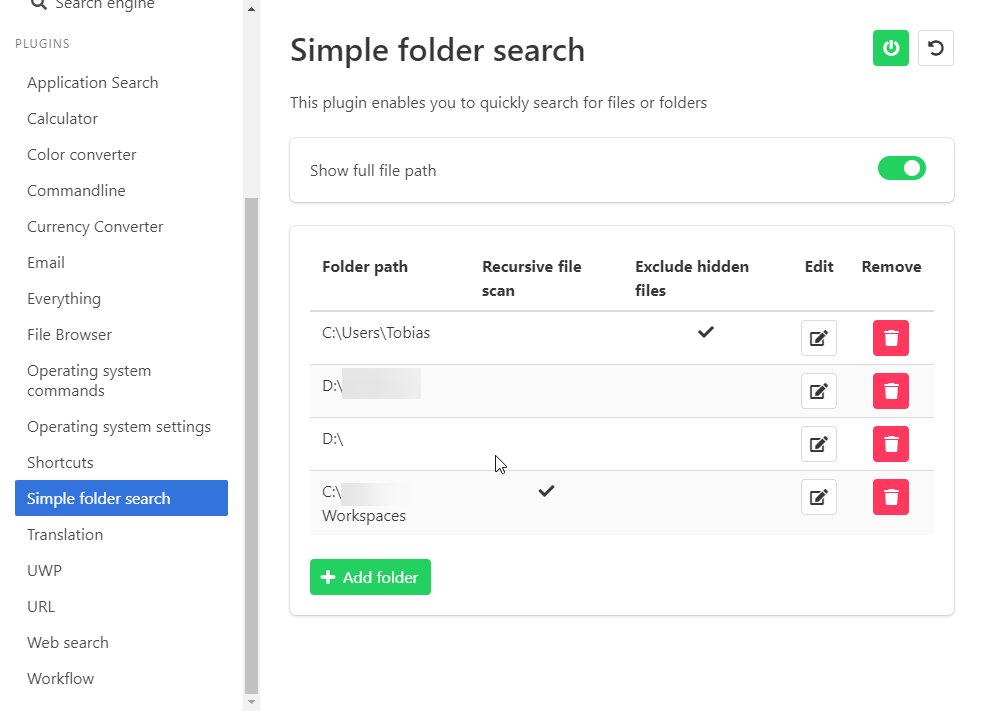
TobiasDev
on 17 Sep 2019
Is there a hint in the debug log?
Here is how you open the debug log:

oliverschwendener
on 17 Sep 2019
Will check, sorry for the late reply
TobiasDev
on 22 Sep 2019
I can't see anything about folders in the error log. The only error I see is this "2019-09-17T13:28:20.516Z error: stdout maxBuffer length exceeded", which I assume has nothing to do with folders?
TobiasDev
on 22 Sep 2019
This is exactly the issue. I'm looking into it asap!
oliverschwendener
on 22 Sep 2019
Added a fix for this (included in the next release). The problem was that your file search tries to index alot of files (probably because one of your folders is searched recursively). I added a limit of 1000 files which fixed this issue but probably leads to files and folders which can't be found anymore. I suggest not using the recursive file scan too often. If you have big folders to be searched I suggest using the everything plugin.
oliverschwendener
on 22 Sep 2019
Related issues
 thatKaran
·
5Comments
thatKaran
·
5Comments
 cosimochellini
·
5Comments
cosimochellini
·
5Comments
 xXKeyleXx
·
4Comments
xXKeyleXx
·
4Comments
 pbuw
·
5Comments
oliverschwendener
·
3Comments
pbuw
·
5Comments
oliverschwendener
·
3Comments