Ueli: Calculation is slightly off
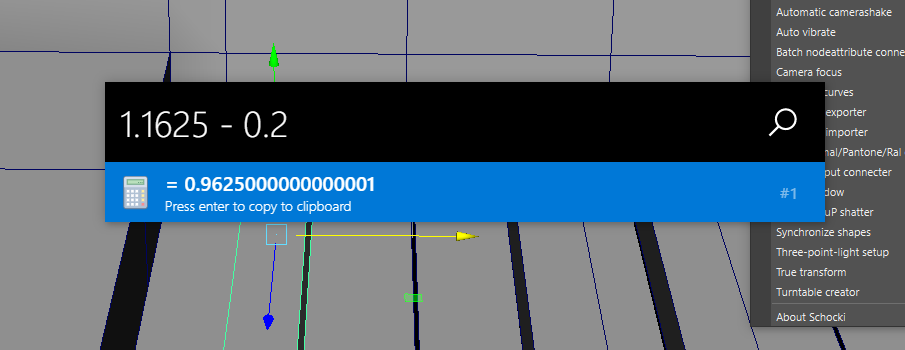
When you type '1.1625 - 0.2' its result is '0.9625000000000001'. It the only issue I had with calculations so far.
Screenshot:
 LalaGhost
All 5 comments
Actually this has to do with JavaScript having serious issues when doing math with decimals.
For example see here:
- https://stackoverflow.com/questions/5037839/avoiding-problems-with-javascripts-weird-decimal-calculations#answer-5037927
- http://adripofjavascript.com/blog/drips/avoiding-problems-with-decimal-math-in-javascript.html
- https://hackernoon.com/understanding-the-problem-javascript-maths-2119d85dad2a
I have to look into this to find a solution. Thank you for your feedback!
 oliverschwendener
on 6 Jan 2019
oliverschwendener
on 6 Jan 2019
Fortunately, MathJS supports BigNumber, which has better precision and eliminated JS number's problems.
We can change to BigNumber by set:
math.config({
    number: "BigNumber",
});
http://mathjs.org/docs/core/configuration.html
CalculatorInputValidator's constructor might be a good place to place this.
 khanhas
on 20 Jan 2019
khanhas
on 20 Jan 2019
Fixed this issue with the help of @khanhas, thank you for your help! The fix will be shipped with the next release.
oliverschwendener
on 20 Jan 2019
Mathjs instance we using in both CalculatorInputValidator and Searcher are the same one so you only need to set config once.
You also might want to change precision field in config since default value is really long, 64.
khanhas
on 20 Jan 2019
New version released: https://github.com/oliverschwendener/ueli/releases/v7.2.2
oliverschwendener
on 23 Jan 2019
Related issues
 FroyoXSG
·
6Comments
FroyoXSG
·
6Comments
 moses-bowman
·
3Comments
moses-bowman
·
3Comments
 thatKaran
·
5Comments
thatKaran
·
5Comments
 nevara
·
7Comments
nevara
·
7Comments
 TobiasDev
·
7Comments
TobiasDev
·
7Comments