Ueli: crash when doing a google search
i enter g?something :


seem like it has something todo with _rights_ .
os: windows 10
browser: chrome
thanks for any help
 michabbb
All 24 comments
Where did you install ueli?
 oliverschwendener
on 13 Jul 2018
oliverschwendener
on 13 Jul 2018
the installer saved it to C:\Program Files\ueli
michabbb
on 13 Jul 2018
What happens if you open Command Prompt and execute the following command?
start "" "https://google.com/search?q=test"
first i get this:

and the cmd shows me: Zugriff verweigert
michabbb
on 13 Jul 2018
the funny thing is, i remeber the first day of using ueli, it worked. in the meantime i got a windows update and maybe chrome too, i don´t know. so it´s very strange that this stopped working.
michabbb
on 13 Jul 2018
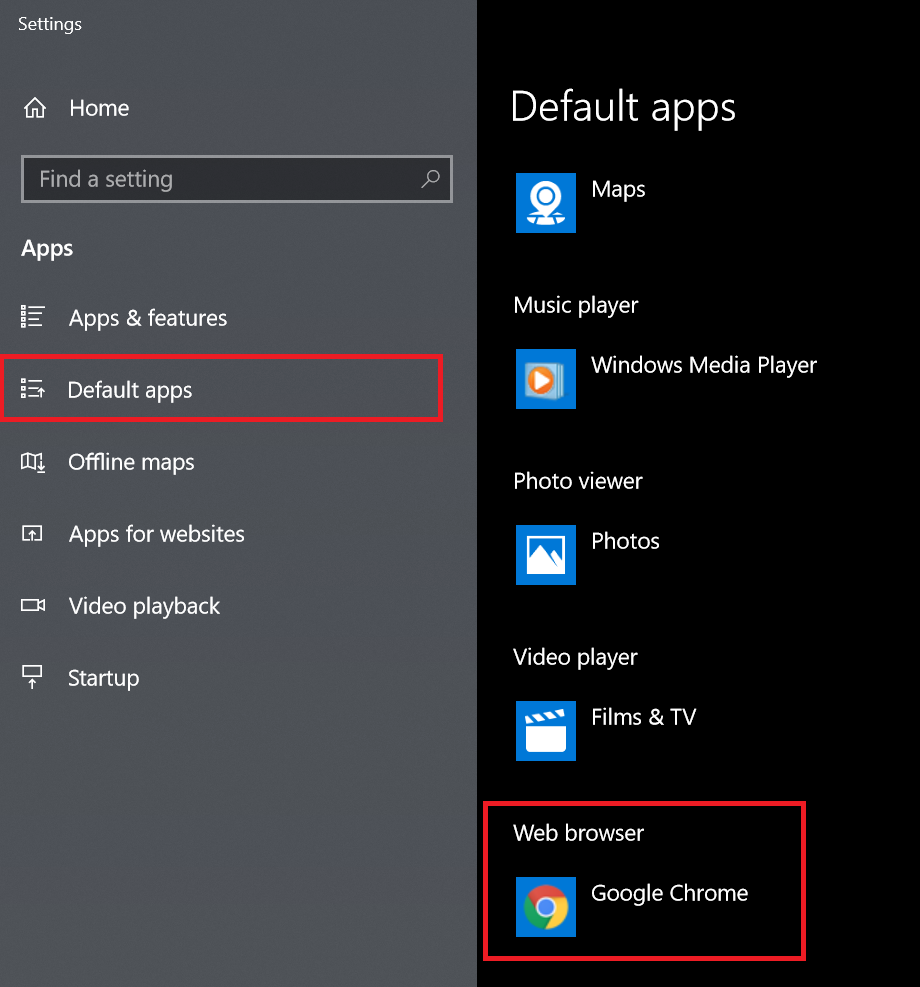
Do you have a default browser defined in the Windows settings?
oliverschwendener
on 13 Jul 2018
yes i have, it looks the same: i use chrome
michabbb
on 14 Jul 2018
Ok never mind.
The problem seems to be on operating system level and not in ueli. You should be able to open up a web page from the command line with the command I mentioned before. This is how ueli opens up web pages with your default browser.
oliverschwendener
on 15 Jul 2018
What happens if you change your default browser?
oliverschwendener
on 15 Jul 2018
when i switch to edge, it´s working. back to chrome: same error. stupid... i guess i have to google a bit 😕
btw.. same error even the cmd is started as admin.....
michabbb
on 15 Jul 2018
Then I guess it has something to do with your chrome installation
oliverschwendener
on 15 Jul 2018
but: this is working: explorer "http://google.com" without any problems 🤔 and even it says "explorer", the default browser is used here.
michabbb
on 15 Jul 2018
don´t know if it has something todo with it:
i am using a insider build of win10: Version 1803 (Build 17692.1004)
michabbb
on 15 Jul 2018
Can you downgrade?
oliverschwendener
on 17 Jul 2018
@oliverschwendener guess i can, but why should i change my OS because of _THIS_ ? 😏 the next WIN update will come, insider build or not. so at the end, i cannot stay the rest of my life at an older version only because i want a search working with ueli, hopefully u understand this 😏 maybe explorer is working for you and all others, too - i don´t know - if yes, i might be worth a change - that´s up 2 you.
anyway, thank you very much taking time to debug this 🙏
michabbb
on 17 Jul 2018
Of course I don't expect you to stay on an old version of Windows only to be able to google with ueli:) Nevertheless I consider this issue as closed now because I suspect it only affects the insider build.
oliverschwendener
on 17 Jul 2018
@oliverschwendener do you see any problems changing
start "" "https://google.com/search?q=test"
to
explorer "https://google.com/search?q=test"
❓
michabbb
on 17 Jul 2018
Hmm maybe this is the proper way to open up web pages/files/folders. I think I will change this in the next release. Thank you for your research!
oliverschwendener
on 19 Jul 2018
What happens if you execute following command in cmd:
start explorer "https://google.com/search?q=test"
?
oliverschwendener
on 19 Jul 2018
works 😏
michabbb
on 19 Jul 2018
Allright, then this is the way :)
oliverschwendener
on 19 Jul 2018
@michabbb What happens if you execute this command from cmd:
powershell -Command "& {[Diagnostics.Process]::Start('https://google.com/search?q=test')}"
Do you still get this error?
oliverschwendener
on 2 Dec 2019
the issue is closed for me since a long time, I actually don't use ueli any longer for Google search, but I can try....
michabbb
on 2 Dec 2019
@oliverschwendener your command is working. but anyway.. with your latest version i don´t have any problems (so far).
michabbb
on 3 Dec 2019
Related issues
 xXKeyleXx
·
4Comments
xXKeyleXx
·
4Comments
 LalaGhost
·
5Comments
LalaGhost
·
5Comments
 cosimochellini
·
5Comments
cosimochellini
·
5Comments
 moses-bowman
·
3Comments
moses-bowman
·
3Comments
 amrbashir
·
5Comments
amrbashir
·
5Comments