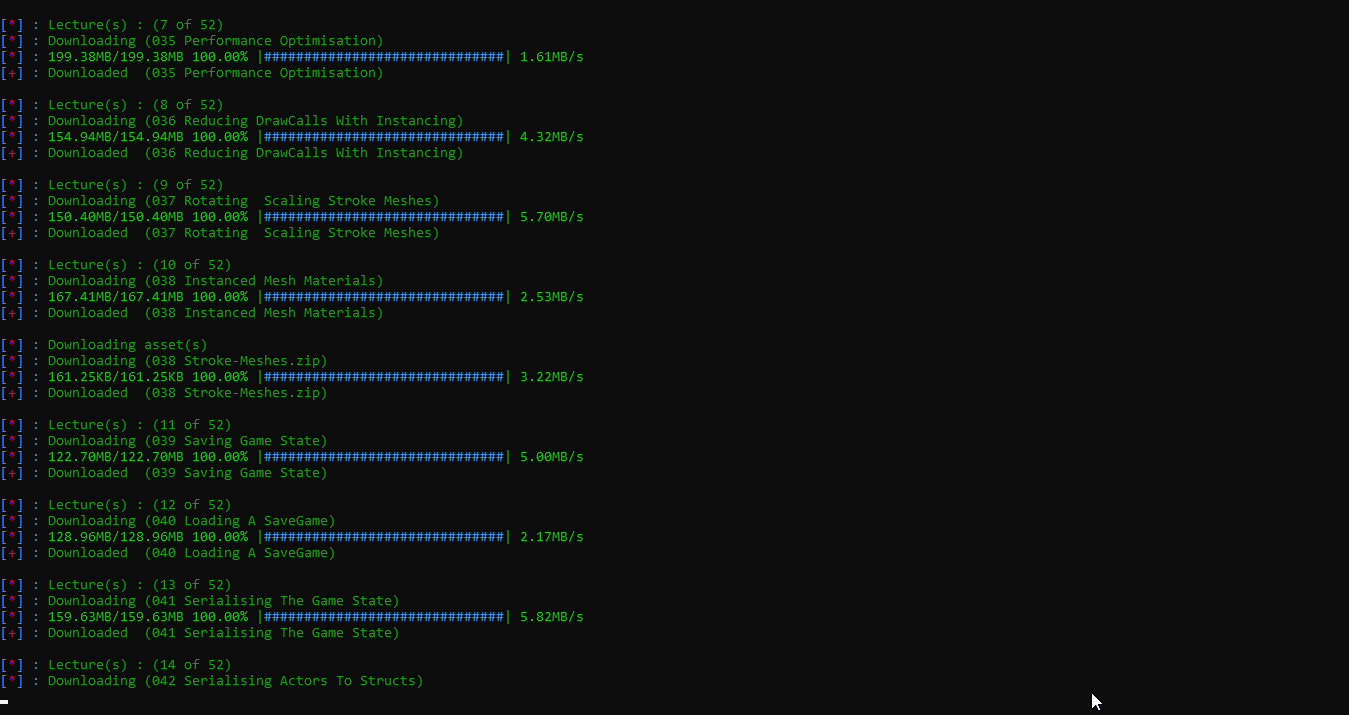
After i start the download, it stops after some time.
 Puyodead1
All 8 comments
@Puyodead1 https://github.com/r0oth3x49/udemy-dl#issue-reporting-guideline
A good bug report shouldn't leave others needing to chase you up for more information. Please try to be as detailed as possible in your report. What is your environment? What was the course url? What steps will reproduce the issue? What OS experience the problem? All these details will help to fix any potential bugs as soon as possible.
Can you provide more detail?
 brandongalbraith
on 10 Jul 2019
brandongalbraith
on 10 Jul 2019
Enviroment: Windows 10 x64 1903, Python 3.7.3
Course URLS: https://www.udemy.com/unrealvr/, https://www.udemy.com/unrealcourse/
Command Used: python udemy-dl.py
Steps:
- Start a download
- Wait for a little bit
- check back and the downloads appear to hang
- use taskmanager to kill the python process (under Windows Command Processor)
- run the command again
Puyodead1
on 10 Jul 2019
i will try to reproduce & fix ASAP hopefully this weekend .
 r0oth3x49
on 11 Jul 2019
r0oth3x49
on 11 Jul 2019
this might be due to windows bugged terminal, try disabling quick edit mode and insert mode from its settings
 notdevagya
on 18 Jul 2019
notdevagya
on 18 Jul 2019
this might be due to windows bugged terminal, try disabling quick edit mode and insert mode from its settings
Okay, i'll try this
Puyodead1
on 23 Jul 2019
I have using this application with win 7 and course url is https://www.udemy.com/machine-safety-leadership/
command : udemy-dl.py https://www.udemy.com/machine-safety-leadership/
but the problem was some lectures do not downloaded fully. it keep jumping to next lecture while the current still not completed, sometimes at 10% percentage while others 80%...etc
other cases also complete lectures.
the internet connection is stable no losses.
I tried to start again but it check files name existence so it assume the lecture is fully downloaded while this is not the case as explained above.
I tried to get links only using your software then I used another like IDM or Jdwnloader but the problem is files names is randomly characters.
I appreciate your efforts well and hope to solve this small issue.
 salytwo
on 29 Jul 2019
salytwo
on 29 Jul 2019
I have using this application with win 7 and course url is https://www.udemy.com/machine-safety-leadership/
command : udemy-dl.py https://www.udemy.com/machine-safety-leadership/
but the problem was some lectures do not downloaded fully. it keep jumping to next lecture while the current still not completed, sometimes at 10% percentage while others 80%...etc
other cases also complete lectures.
the internet connection is stable no losses.
I tried to start again but it check files name existence so it assume the lecture is fully downloaded while this is not the case as explained above.I tried to get links only using your software then I used another like IDM or Jdwnloader but the problem is files names is randomly characters.
I appreciate your efforts well and hope to solve this small issue.
+1, I have the same issue that some lectures do not downloaded fully and stoped sometimes.
 jiaqiang125
on 9 Aug 2019
jiaqiang125
on 9 Aug 2019
hi, i am having the same issues. it seems that if there are "hickups" on the internet connection, this is handled badly .. sometimes the download get stuck, other times i get stack traces and the process stops. for me it happens only at the videos, never at subtitles.
i am using linux mint 19 and not windows.
i can attach stack traces when i run the next downloads.
 wkremser
on 9 Sep 2019
wkremser
on 9 Sep 2019
Related issues
 EnoqueEsteves
·
7Comments
EnoqueEsteves
·
7Comments
 mynameismaxz
·
6Comments
mynameismaxz
·
6Comments
 monstermorphic
·
4Comments
monstermorphic
·
4Comments
 casoleGiovanni
·
4Comments
casoleGiovanni
·
4Comments
 vipksmosar
·
6Comments
vipksmosar
·
6Comments
Most helpful comment
i will try to reproduce & fix ASAP hopefully this weekend .