Describe the issue
The browser search function does not work properly in some filter lists.
Steps for anyone to reproduce the issue
- Install uBlock 1.15.11b6 besides the stable version
- Open the uBlock-filter list in the stable version and search for "Fingerprint2"
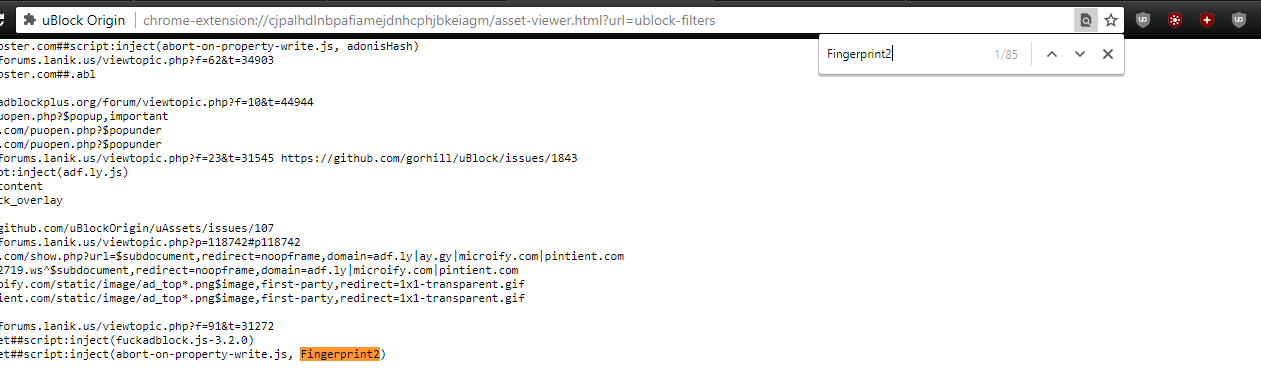
I get 85 hits. - Open the uBlock-filter list in the dev version and search for "Fingerprint2"
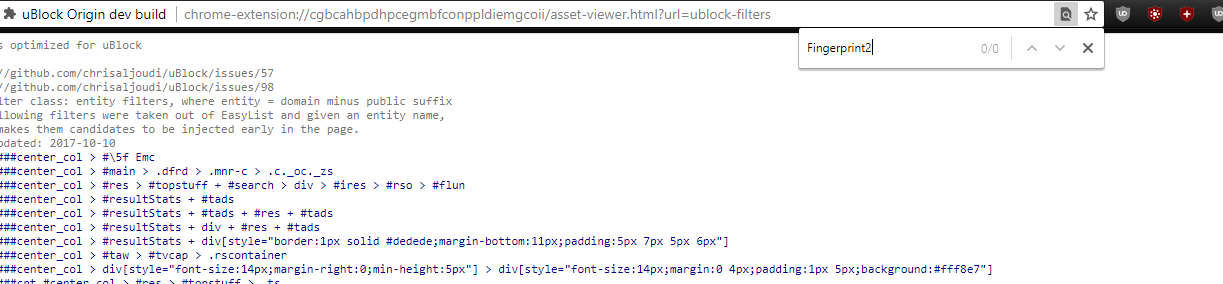
I get zero hits.
Your settings
- OS/version: Windows 10
- Browser/version: Chrome 64
 okiehsch
All 9 comments
Make sure to focus the text area before pressing Ctrl+F so CodeMirror's search bar appears instead of browser one.
CodeMirror will only render lines that are visible because otherwise it kills performance.

Personally I still like Ace better
 jspenguin2017
on 2 Mar 2018
jspenguin2017
on 2 Mar 2018
Thanks, so if you have 85 hits you can use Ctrl-G and Shift-Ctrl-G to go through them all, but this is not ideal for the average user in my opinion.
okiehsch
on 3 Mar 2018
It'll be less ideal if EasyList takes 9 seconds to render.
jspenguin2017
on 3 Mar 2018
EasyList renders basically instantly on my end.
okiehsch
on 3 Mar 2018
In the stable version?
jspenguin2017
on 3 Mar 2018
Yeah, I was about to edit my comment, I misunderstood your meaning.
okiehsch
on 3 Mar 2018
I will see what I can do to improve the search widget -- the default one from the library is rather bare.
 gorhill
on 3 Mar 2018
gorhill
on 3 Mar 2018
Just wanted to mention this in case anyone runs into this problem:
If you're running macOS, Firefox 58 and and have privacy.resistFingerprinting set to true, Code Mirror's search widget won't appear even if you focus on the text area.
I assume it's due to the OS getting spoofed and the usage of cmd keys instead of ctrl (same problem that was occurring with GitHub's text editor, Google Docs and others). Firefox 59 no longer spoofs the operating system, and the search widget works fine there with RFP on.
https://bugzilla.mozilla.org/show_bug.cgi?id=1404608
https://bugzilla.mozilla.org/show_bug.cgi?id=1405810
 overdodactyl
on 3 Mar 2018
overdodactyl
on 3 Mar 2018
I added a sticky search widget at the top of codemirror editor, this way whichever search feature is used should become obvious. The browser's own find-in-page feature is not suitable for codemirror editors.
Advantages of the codemirror's own search widget:
- supports regex (use
/.../) - scrollbar annotations work on both chromium and firefox.
this is a customized version of the stock codemirror search widget, to deal properly with ctrl-f and related shortcuts, and to modify the behavior to better suit the usage in uBO.
gorhill
on 5 Mar 2018
Related issues
 UnicornVariant
·
3Comments
UnicornVariant
·
3Comments
 ghost
·
3Comments
ghost
·
3Comments
 GitHubBlow
·
4Comments
gorhill
·
3Comments
GitHubBlow
·
4Comments
gorhill
·
3Comments
 RoxKilly
·
4Comments
RoxKilly
·
4Comments
Most helpful comment
Thanks, so if you have 85 hits you can use
Ctrl-GandShift-Ctrl-Gto go through them all, but this is not ideal for the average user in my opinion.