Ublock: Pushing to cloud storage fails silently: no hint is provided about the failure
Describe the issue
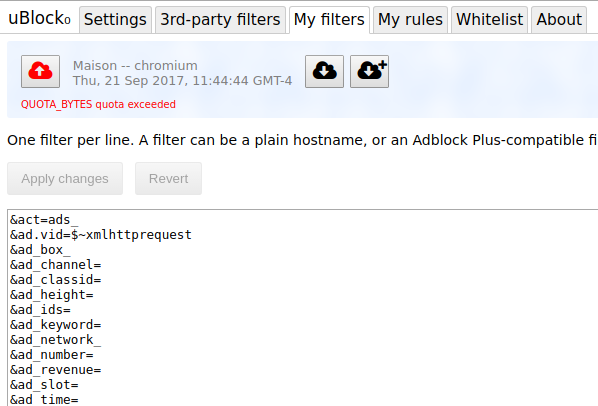
I'm not sure, but this looks like a sync limit(?) (I'm not sure, how to name that) in custom rules (and also in 3rd-party filters lists, custom filters and whitelist) :/
One or more specific URLs where the issue occurs
uBlock Origin settings > My rules (or 3rd-party filters/My filters/My whitelist)
Screenshot in which the issue can be seen

Not a screenshot, but video-like (GIF actually, because AVI file is too large for GitHub :/) file to better explain (video-like file recorded around 27 March 2016 at 23:57 [23:57 in Poland]).
For those, who don't see the date because of pixels on the GIF (yeah, I know, I need a new GPU, because my actual will die soon), the date is 27 March 2016 at 22:50:51 CEST
Steps for anyone to reproduce the issue
- Open uBlock Origin settings,
- Enable cloud syncing,
- Go to "My rules" section, import
my dynamic rules settings and don't change it in the extension (but before doing that, YOU MUST BACKUP ALL YOUR SETTINGS!), - Try to export to the cloud on Chrome (
I'm not sure how with Firefox :P#Update: Everything is fine on Firefox).
Your settings
| Disabled | Enabled |
| --- | --- |
| Hide placeholders | Show blocked elements on uBO's icon |
| Don't display tooltips | Enable context menu |
| Color-blind friendly | Enable cloud syncing |
| Disable pre-downloading | Enable advanced features |
| Don't track clicked links | Prevent IP address leaking in WebRTC |
| Disable cosmetic filtering | Block remote fonts |
| Disable large media (with default amount) | |
(#Update: About settings listed above in the table, it changed a bit, I mean I have enabled "Hide placeholders" and "Disable pre-downloading")
- Browser/version: Newest stable Chrome for Windows XP – 49.0.2623.108 (#Update: But also on newest 64-bit Chrome on Windows 10 Anniversary Update),
- uBlock Origin version: Newest avalaible from Chrome Web Store – 1.10.4.
Your filter lists
All uBlock Origin's and default filters lists + all ads filters lists + all privacy filters lists + all malware filters lists + all social filters lists + all multifunctional filters lists + all CHN, KOR & RUS filters lists + CZE, DEU, FRA, HUN, JPN & POL filters lists.
(#Update: It changed a bit now, but actually I have more filters lists enabled not less, similar with my custom filters lists).
Your custom filters (if any)

The two of three blurried positions is the HTTP version of two default filters lists in uBlock Origin (because I'm on XP and Chrome doesn't support old security protocols like SSL3). About the third one – I have it for safety, because maybe one day that filters list will be back (I can't find the newest mirror of it :/) and I disabled that filter. I had it for safety (and I still I have it :P), but looks like the author of that filters has returned with his filters and he's still doing them (the old address was http://bidgewalbelp.neocities.org/filters.txt and the new is https://satterly.neocities.org/filters.txt).
 Piter432
All 12 comments
Look in the uBO's dev console:

 gorhill
on 28 Mar 2016
gorhill
on 28 Mar 2016
Hmm, strange. No errors. Maybe one of the Chrome's flags has an influence on it? :/
Piter432
on 28 Mar 2016
Okay, now I can tell something more about this.
- I tried to reset flags in chrome://flags – it didn't help
- I checked many times using uBO's dev console – no errors or warnings, which is strange
- It looks like that sync limit(?) is also on 3rd-party filters lists, user filters and whitelist, because I can't export to the cloud, when there're too many data in the uBO to sync (if you know what I mean :P) [currently, I can export to the cloud user filters and whitelist, because there's not too many data in this sections, if I named it correctly]
Any ideas? Or maybe it's not the uBO's/Chrome's extensions' problem, but the Chrome's problem itself?
Piter432
on 7 Apr 2016
I plan to add code to relay error message of failed sync attempts to the UI.
gorhill
on 12 Apr 2016
Well, I think it's safe to assume that there is some kind of limitation for Chrome's sync feature.
Have you looked here? : chrome://sync-internals
Maybe there is something of use..
 Hrxn
on 12 Apr 2016
Hrxn
on 12 Apr 2016
@Hrxn: I just looked there, but... there's so many info there :P
Piter432
on 12 Apr 2016
How the work going on this, @gorhill?
Piter432
on 4 May 2016
I did no work on this. I will try to remember to do something about this for the next release.
gorhill
on 4 May 2016
Okay, I'm not sure what you did with this, @gorhill, but looks like it's uBO bug in Chrome or Chrome's bug or Chrome's limitation. I'm using now Windows 10 Pro with Anniversary Update. Of course the OS is 64-bit, but the bug(?) still occurs and I don't know what to do 😕
Update:
Of course I have the newest stable Chrome, which is also 64-bit and I'm running browser as an administrator (the third one I'm doing just in case).
Piter432
on 26 Dec 2016
Any news on this, @gorhill?
Piter432
on 6 Apr 2017
Strange, I've updated my Windows 10 from Anniversary Update to Creators Update (I skip that update made some problems to my PC) and... I can now synchronize settings of 3rd-party filters lists (I'm 100% sure that before installing Creators Update I couldn't do that). However, after “resetting” “My rules” to almost default one and start configuring it (the uBO's “My rules” tab) from the beginning, I've imported my old file with saved “My rules” section settings and... these settings in this tab couldn't be synchronized.
WHAT THE HELL? XDDDD
Piter432
on 16 Apr 2017
gorhill
on 21 Sep 2017
Related issues
 RoxKilly
·
4Comments
RoxKilly
·
4Comments
 FuglyLookingGuy
·
3Comments
FuglyLookingGuy
·
3Comments
 pfofi
·
4Comments
pfofi
·
4Comments
 butonic
·
3Comments
butonic
·
3Comments
 thebigsmileXD
·
3Comments
thebigsmileXD
·
3Comments