We have a programm with a normal client and a web client.
In the normal client you can create an svg and I load the data to the web client like this
loadData('WebserviceSvg/getSvg', undefined, param, function(svgdata) {
       if (svgdata) {
         $scope.svgImage= 'data:' + "image/svg+xml" + ';base64,' + svgdata;
       } else {
         $scope.svgImage= null;
       }
}
Now I want to show this in my html page
I creanted a div
<div id="svgImage"></div>
and my js looks like this
       var elem = document.getElementById('svgImage');
       var two = new Two().appendTo(elem);
       var group = two.load($scope.svgImage, function(svg) {
         svg.center(); // I center the object's shapes
         svg.translation.set(two.width / 2, two.height / 2); // move to the center of the canvas
       });
       two.update();
Console shows no error but I can't see the svg
A html element that looks like this
<img id="svgImage" ng-src="{{ svgImage }}" class="centerImage"/>
will perfectly show the imgage
Any help is appreciated.
End goal is to show a svg that we can zoom and click on the different elements
 TheGaMERCaTDev
All 14 comments
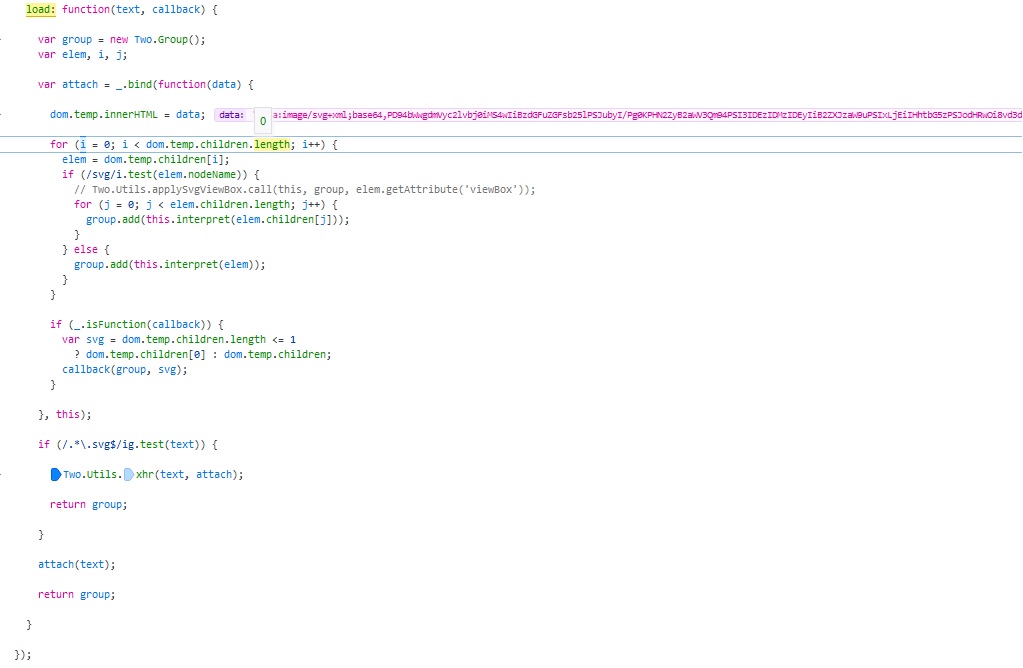
Picture of how it recievs the data
I also tried to give the .svg file as a url to the webservice which delivers it into the lib but no sucess either :/
$scope.svgImage= $rootScope.getUrlWithSesson('https://localhost:8443' + Basis.Kernel.kommunication.getWSKontext() + 'WebserviceSvg/getSvgDownload?objektId=' + id);
TheGaMERCaTDev
on 16 Dec 2020
Thanks for your post. It's kind of hard to tell with only snippets of code / information. Have you tried adding the loaded svg to the scene? E.g:
var group = two.load('path/to/file.svg');
two.add(group);
???
 jonobr1
on 16 Dec 2020
jonobr1
on 16 Dec 2020
Thanks for your anwser.
I think my problem is that I get the .svg image though a Webservice (I load it from our database so the URL doesn't end with .svg) which means the regex doesn't register it as a url and ignores it
TheGaMERCaTDev
on 16 Dec 2020
I try to explain the current workflow a bit:
Step 1: I get the .svg file as bytearray from our database
Step 2: I enocde the bytes with Base64 to a string to send it to my js file
Step 3: I recieve the string and add context in ('data:' + "image/svg+xml" + ';base64,' + dataString)
Now I want this String to be transfomred into a visible SVG so I can for example later change the color of some lines.
Whould it be better to create a URL which allows me to download the .svg file (which whould look like this: https://localhost:8443/ws/WebserviceSvg/getSvgDownload?objektId=15432") or do you have any other suggestions?
TheGaMERCaTDev
on 16 Dec 2020
Ah, I see. Unfortunately, there is no federated way in Two.js to handle base64 encoded SVG strings. But, you can turn this string into a DOM element and then invoke two.interpret to use it in a Two.js scene like so:
Two.Utils.xhr("https://localhost:8443/ws/WebserviceSvg/getSvgDownload?objektId=15432", interpret);

function interpret(resp) {
  var group = two.load(resp.replace('data:"image/svg+xml";', '')/*, callbackFunction */);
  two.add(group);
}
The problem is that you're setting innerHTML to the base64-encoded URI:
dom.temp.innerHTML = data;
You need to decode the URI first:
dom.temp.innerHTML = atob(data.replace('data:"image/svg+xml";', ''));
 adroitwhiz
on 17 Dec 2020
adroitwhiz
on 17 Dec 2020
Ah, I see. Unfortunately, there is no federated way in Two.js to handle base64 encoded SVG strings. But, you can turn this string into a DOM element and then invoke
two.interpretto use it in a Two.js scene like so:Two.Utils.xhr("https://localhost:8443/ws/WebserviceSvg/getSvgDownload?objektId=15432", interpret); function interpret(resp) { var group = two.load(resp.replace('data:"image/svg+xml";', '')/*, callbackFunction */); two.add(group); }
Thanks for the reply! That did the trick for me.
If you could answer me one last question I whould be really happy:
I Have an canvas now with the centered svg file and I can zoom and pan.
Sadly the text it should normally contain are empty. Do I need to do something special to make them visible? If I open the .svg through firefox normally it shows me the texts
TheGaMERCaTDev
on 17 Dec 2020
Hmmm, like it's a <text /> element in your SVG file? It should be interpreted by Two.js. Any chance you can share an example SVG file for me to poke around?
jonobr1
on 17 Dec 2020
Sure
Here (need to upload it through google drive) is a very basic .svg file with some text in the center (you can see it if you open it through the browser)
Sadly I can't see the text if I open it through Two.js
Current code looks like this
var elem = document.getElementById('svgImage');
     var parentWidth = elem.clientWidth;
     var parentHeight = elem.clientHeight - 4;

     if (!$scope.two){
       $scope.two = new Two({autostart: true, height: parentHeight, width: parentWidth}).appendTo(elem);
     }

     $scope.loadSVG= true;

     Two.Utils.xhr($rootScope.ladeDateiUrl(Basis.Kernel.kommunikation.getWSKontext() + 'WebserviceCAD/getCADZeichnungAlsURL?objektId=' + id), function (resp) {
       $scope.loadSVG= false;
       $scope.group = $scope.two.load(resp, function(svg) {
         svg.center(); // I center the object's shapes
         svg.translation.set($scope.two.width / 2, $scope.two.height / 2); // move to the center of the canvas
       });
       var scale1 = $scope.two.width / $scope.group.getBoundingClientRect().width;
       var scale2 = $scope.two.height / $scope.group.getBoundingClientRect().height;
       $scope.group.scale = scale1 > scale2 ? scale2 - 0.5 : scale1 - 0.5;
       $scope.two.add($scope.group);
     });

     $scope.mouse = {
         current: new Two.Vector(),
         previous: new Two.Vector()
       };

     $scope.two.renderer.domElement.addEventListener('mousewheel', onMouseWheel, false);
     $scope.two.renderer.domElement.addEventListener('DOMMouseScroll', onMouseWheel, false);
     $scope.two.renderer.domElement.addEventListener('mousedown', mousedown, false);
These work for me if you use the latest dev branch from this repository. If you're using NPM you can call
npm install git+https://github.com/jonobr1/two.js.git
Ahh, that was the problem. I used the version from the two.js webside (probably the realese version from feb?) and not the dev one.
Again, thank you very much for your lib, for your help and your time!
TheGaMERCaTDev
on 18 Dec 2020
@jonobr1 Can I ask you one last question?
The SVG (text and lines) turns blurry when I zoom or pen it. After like 5-15 secs (or clicking on another element) it looks good again. I tried to call the update and renderer function but nothing helped, any Ideas how to fix it?
Here is how it looks after moving

TheGaMERCaTDev
on 18 Dec 2020
This is the code for scrolling
   /**
    * Hört auf das Mousewheel Scrollen
    */
   $scope.onMouseWheel = onMouseWheel;
   function onMouseWheel(e) {

     var delta = Math.max(-1, Math.min(1, (e.wheelDelta || -e.detail)));
     console.log(e.wheelDelta || -e.detail);

     if ($scope.group.scale + delta < 0){
       return;
     }

     $scope.group.scale += delta;
   }
After the scale function I tried this but it didn't help sadly
     setTimeout(function(){
       $scope.two.update();
       $rootScope.$safeApply($scope);
     }, 100);
Glad that things have been improved overall. There are a lot of improvements on the dev branch since the latest stable release.
Since you call the autostart: true parameter when instantiating Two.js, you shouldn't need to call two.update anywhere further. Also, I find it odd that it's blurry because you're rendering with the SVG renderer as well. It's not like these are images that you're scaling, they are <text /> elements. So, I'm not sure why that would be happening at all.
jonobr1
on 18 Dec 2020
Related issues
 jinspiration
·
4Comments
jinspiration
·
4Comments
 PranjalVyas1507
·
4Comments
PranjalVyas1507
·
4Comments
 mariomeraz
·
6Comments
mariomeraz
·
6Comments
 adamdburton
·
6Comments
adamdburton
·
6Comments
 trusktr
·
8Comments
trusktr
·
8Comments