This may be just me having a messy head, but I really can't find how to import an external SVG onto my two scene.
The url of my SVG file is https://s3.eu-central-1.amazonaws.com/besports-files/images/platform/pixels/Chest.svg.
I'm looking to integrate this with React, so any extra help that way would be worth a ton!
 Neglexis
All 7 comments
If you wanna have Two.js do the xhr request then:
two.load('https://s3.eu-central-1.amazonaws.com/besports-files/images/platform/pixels/Chest.svg', function(svg) {

  // svg is a Two.Group that has all the children
  svg.center(); // I center the object's shapes
  svg.translation.set(two.width / 2, two.height / 2); // move to the center of the canvas

});
If you already have the SVG as a DOM element. Then you ucan use:
var svg = two.interpret(domElement);
Hope this helps!
 jonobr1
on 8 Feb 2018
jonobr1
on 8 Feb 2018
Hmm, I tried both approaches, but none seem to really do the trick:
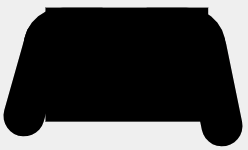
two.loadgets me a fully black svg and doesn't take into account the svg's rx and ry values.
two.interpretalso doesn't account for rx and ry values
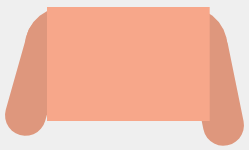
For completeness' sake, I'm using a slightly different svg (https://s3.eu-central-1.amazonaws.com/besports-files/images/platform/pixels/asset.svg).
Any idea what's going wrong?
Neglexis
on 8 Feb 2018
Are you exporting from Adobe Illustrator? If so you need to change your settings so that your SVG outputs "Presentation Attributes" instead of "Style Elements" here:
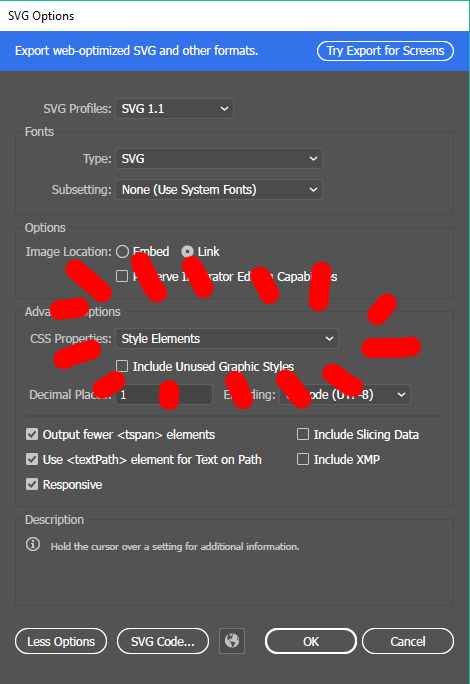
This will ensure the fill, stroke, etc. styles are interpretted correctly.
I need to update Two.js to handle the rx and ry properties for rounded corners. I'll add that right now.
jonobr1
on 8 Feb 2018
This commit enables the ability to read rx and ry properties from an SVG element in Two.load and Two.interpret: https://github.com/jonobr1/two.js/commit/10165d48b35c45c5e7fcdda86c5f4a31b389805c
If you use the latest builds on the dev branch it will correctly render the paths form. You'll still need to modify your SVG so that the colors aren't applied through a style attribute, but directly as fill, stroke, etc. as defined in the W3C spec. Thanks for reporting!
jonobr1
on 8 Feb 2018
Can confirm the dev branch works, thanks for the lightning fast fix @jonobr1!
Neglexis
on 9 Feb 2018
I have this:
<script>
    window.onload = (event) => {
        var type = /(canvas|webgl)/.test(url.type) ? url.type : 'svg';
        var two = new Two({
            type: Two.Types[type],
            fullscreen: true,
            autostart: true
        }).appendTo(document.body);

        two.load('test011.svg', function (svg) {
            // svg is a Two.Group that has all the children
            svg.center(); // I center the object's shapes
            svg.translation.set(two.width / 2, two.height / 2); // move to the center of the canvas
        });
    };
</script>
and nothing was shown. There was no error on the console. Any idea?
Thanks,
 txtl
on 17 Sep 2020
txtl
on 17 Sep 2020
This could be a number of issues unrelated to the actual loading of the SVG.
First, the way you've described this script tag is that you'll have to make sure it's in the <head /> otherwise the onload event may not get fired.
Second, you need Two.js as well as URL.js for this to run. You can circumvent the second dependency by simply setting var type = 'svg'; or var type = 'canvas';.
Third, you need to make sure that the SVG loaded. In the callback placing a console.log to confirm if loaded will work fine.
Fourth, you need to add the svg to the instance of Two. You can do that by adding the line two.add(svg);. This is a change in the current version of the code (that Two doesn't automatically add loaded svg's to itself), because I think it's better to let the developer decide what they want to do with it.
Hope this helps! In the future please post this as a new issue.
jonobr1
on 17 Sep 2020
Related issues
 jinspiration
·
4Comments
jinspiration
·
4Comments
 Sudhanshu4122
·
6Comments
Sudhanshu4122
·
6Comments
 anderspitman
·
4Comments
anderspitman
·
4Comments
 narisuzu
·
7Comments
narisuzu
·
7Comments
 trusktr
·
8Comments
trusktr
·
8Comments
Most helpful comment
Are you exporting from Adobe Illustrator? If so you need to change your settings so that your SVG outputs "Presentation Attributes" instead of "Style Elements" here:
This will ensure the fill, stroke, etc. styles are interpretted correctly.
I need to update Two.js to handle the
rxandryproperties for rounded corners. I'll add that right now.