Twint: [QUESTION] Invalid Date format
Issue Template
Command Ran
                c = twint.Config()
        c.Username = username
        c.Search = word
        c.Media = True
        c.Since = "2019-10-19 20:30:15"
        c.Store_json = True
        out = twint.run.Search(c)
Description of Issue
When I run the code above with
c.Since = "2019-10-19 20:30:15"
I get the error message ValueError: unconverted data remains: 20:30:15
But when I run the same code with
c.Since = "2019-10-19"
I get the error message ValueError: Invalid format string
What is the correct format?
Environment Details
Anaconda on Windows 10, Python 3.7.3
 stephanedebove
All 22 comments
Hi @stephanedebove may you update the pip package and retry please?
 pielco11
on 20 Oct 2019
pielco11
on 20 Oct 2019
With a simple pip install --user --upgrade -e git+https://github.com/twintproject/twint.git@origin/master#egg=twint ?
In this case it’s done, I have twint 2.1.5 and still getting the error.
stephanedebove
on 20 Oct 2019
Quite strange, maybe you are not importing Twint from the right folder. May you re-run that command and then run
import twint
print(twint.__version__)
please?
You should get 2.1.6, if so, the correct module is being imported
pielco11
on 21 Oct 2019
Hi,
I upgraded pip and then twint again and I’m now running twint 2.1.6
But I’m still getting the same two ValueError messages when I try to use c.Since
stephanedebove
on 21 Oct 2019
That's really strange; this is what I'm having
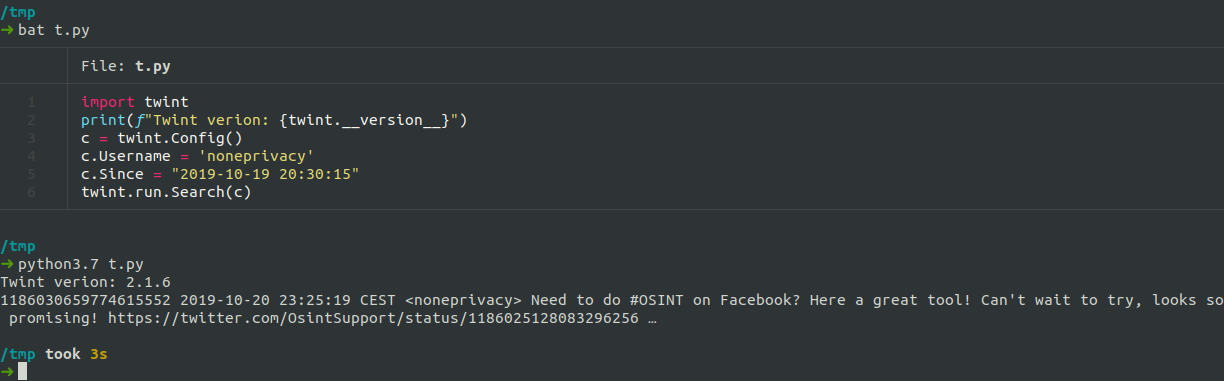
pielco11
on 21 Oct 2019
I’ve run the exact same code and I’m getting this

So I guess it’s either due somehow to my usage of Anaconda or to some kind of mix-up between Python 2 and 3. For instance, if I try to run my script with python3 and not python, it exits immediately without outputting any message.
stephanedebove
on 21 Oct 2019
Hmm, OK, which version of python are you running? May you try my script with python3 (3.6 at least)?
import twint
print(f"Twint verion: {twint.__version__}")
c = twint.Config()
c.Username = 'noneprivacy'
c.Since = "2019-10-19 20:30:15"
twint.run.Search(c)
I’ve just run this:
import twint
import sys
print(sys.version)

print(f"Twint verion: {twint.__version__}")
c = twint.Config()
c.Username = 'noneprivacy'
c.Since = "2019-10-19 20:30:15"
twint.run.Search(c)
and it still gives me this:
(base) C:\Users\Stephane\Documents\download_tweets>python t.py
3.7.3 (default, Apr 24 2019, 15:29:51) [MSC v.1915 64 bit (AMD64)]
Twint verion: 2.1.6
Traceback (most recent call last):
  File "C:\Users\Stephane\MiniConda3\lib\site-packages\twint\url.py", line 15, in _formatDate
    return datetime.datetime.strptime(date, "%Y-%m-%d %H:%M:%S").strftime('%s')
ValueError: Invalid format string
At this point I think that's a compatibility issue with Windows
pielco11
on 21 Oct 2019
I've just updated twint and ran into this issue. Running python 3.7.4 on Windows, calling via twint CLI.
My AHK code that was working until now:
NewestConfirmedTweet := epoch(GetID_NewestTweet(pathtoDB,,attachment),"tweet","human")
FormatTime,FSince,%NewestConfirmedTweet%,yyyy-MM-dd
RunWait,twint -u "%username%" --since %FSince% --database "%pathtoDB%" ,, min
Note the last parameter of the second line.
The issue cropped up between 2.1.2 and 2.1.6, which I jumped directly to.
I also confirm the issue occurs with --before.
 Qriist
on 21 Oct 2019
Qriist
on 21 Oct 2019
I’ve run the exact same code and I’m getting this
So I guess it’s either due somehow to my usage of Anaconda or to some kind of mix-up between Python 2 and 3. For instance, if I try to run my script with python3 and not python, it exits immediately without outputting any message.
it's the problem with python on Windows OS,i've tried on both Windows and Ubuntu,the same wrong with you,but it's no problem on Ubuntu
 Nixitsumi
on 22 Oct 2019
Nixitsumi
on 22 Oct 2019
I dont think it is any one thing in the environment flavor. I am running basic Python on an older OS; that's about as far different as you can get.
@pielco11 is likely correct in that this issue is an incompatibility with windows, though I don't know enough about python to easily track down the issue.
@Nixitsumi i can't change my workstation, but i see you run Win10. Try running twint on some flavor of linux via the windows subsystem. Hell, try them all. Keep good notes. Let's see what works and what doesn't.
Qriist
on 22 Oct 2019
Having the same issue. Running on windows 10, python 3.7.3, pip up to date and twint 2.1.6.
 kf-dehhaniy
on 22 Oct 2019
kf-dehhaniy
on 22 Oct 2019
A work around is to incorporate the max_id and since_id: into the search fields. Here are my AHK functions that I've previously made for myself. They should be easy enough to convert to your prefered script language.
epoch(inputvalue,inputtype,returntype) {
    ;inputtype and returnype options: human, unix, tweet
    return epoch_%inputtype%2%returntype%(inputvalue)
}

epoch_human2unix(humanTime) {
    humanTime -= 1970, s ;current epoch time
    return humanTime
}

epoch_human2tweet(humanTime){
    unix := epoch_human2unix(humanTime)
    tweet := epoch_unix2tweet(unix)
    return tweet
}

epoch_unix2Human(unixTimestamp) {
    returnDate := 19700101000000
    returnDate += SubStr(unixtimestamp,1,10), s ;extracts first 10 digits
    return returnDate
}

epoch_unix2tweet(time) {
    return ((time - 1288834974657) << 22)
}

epoch_tweet2human(tweet) {
    unix := epoch_tweet2unix(tweet)
    return epoch_unix2human(unix)
}

epoch_tweet2unix(tweet_id) {
    return ((tweet_id >> 22) + 1288834974657) ;converts tweet ID to epoch
}
Having the same issue. Running on windows 10, python 3.7.3, pip up to date and twint 2.1.6.
windows datetime.strftime() is't suport '%s' argument!
You can change url.py line 15 and line 17 use timestamp()
this my code
str(datetime.datetime.strptime(date, "%Y-%m-%d").timestamp()).split('.')[0]
 WaWaKing
on 19 Nov 2019
WaWaKing
on 19 Nov 2019
I had the same issue on Windows with Python 3.7 and Twint 2.17.
I noticed the main issue is datetime since I get the same error while using datetime package. Though I couldn't find datetime among the packages that twint is directly dependent on I see the following message in the error:
File "C:\Program Files\Python37\lib\_strptime.py", line 362, in _strptime
 pbabvey
on 26 Nov 2019
pbabvey
on 26 Nov 2019
Having the same issue. Running on windows 10, python 3.7.3, pip up to date and twint 2.1.6.
windows datetime.strftime() is't suport '%s' argument!
You can change url.py line 15 and line 17 use timestamp()
this my code
str(datetime.datetime.strptime(date, "%Y-%m-%d").timestamp()).split('.')[0]
Would you explain more? Do we need to change the code url.py ?
pbabvey
on 26 Nov 2019
I am facing issue on windows 10. Is there any solution to fix strftime() function invalid formating issue?
 nazimakber
on 2 Jan 2020
nazimakber
on 2 Jan 2020
@pbabvey @nazimakber @WaWaKing
The current status of the function is this one
https://github.com/twintproject/twint/blob/0f19841b0f2e6456094c6c85b89faf8a0e82f7b1/twint/url.py#L15-L21
So you should not get that error; please upgrade your local package and retry
pielco11
on 3 Jan 2020
The current status of the function is this one
ok!thanks!
WaWaKing
on 3 Jan 2020
@pielco11 we have written code on Mac-OS and I am updating code on Windows but we will deploy on Linux machine. So will I need to change code on production machine too? IT will be redundant of work.
nazimakber
on 3 Jan 2020
@nazimakber You have to update the package in the machine which you use to fetch the tweets
pielco11
on 4 Jan 2020
Related issues
 anderl80
·
3Comments
anderl80
·
3Comments
 dmuth
·
4Comments
dmuth
·
4Comments
 PatricioAlvarado
·
4Comments
PatricioAlvarado
·
4Comments
 philuchansky
·
3Comments
philuchansky
·
3Comments
 edsu
·
3Comments
edsu
·
3Comments
Most helpful comment
I dont think it is any one thing in the environment flavor. I am running basic Python on an older OS; that's about as far different as you can get.
@pielco11 is likely correct in that this issue is an incompatibility with windows, though I don't know enough about python to easily track down the issue.
@Nixitsumi i can't change my workstation, but i see you run Win10. Try running twint on some flavor of linux via the windows subsystem. Hell, try them all. Keep good notes. Let's see what works and what doesn't.
https://docs.microsoft.com/en-us/windows/wsl/install-win10