Twint: REQUEST: search tweets with several keywords
import twint
c = twint.Config()
c.Search = "vanilla" or "chocolate"
c.Format = "{tweet}"
twint.run.Search(c)
Hello I have been using twint to webscrape tweets and I think is a great module. However, there is one feature I think is missing or might be missing from the wiki commands. I would like to search for tweets containing one or more of several keywords. Right now if you include several keywords Twint only outputs tweets containing all of the keywords. I would like to run a code like the one above and have twint output all the tweets containing the word vanilla, chocolate or both of them instead of only tweets containg both of them.
I use the latest version of twint on a jupyter notebook on module mode. I have read the wikia several times and I don't see anyway to run a code with this type of search.
 PatricioAlvarado
All 4 comments
It should be possible to retrieve these tweets like this :
c.search = "vanilla OR chocolate"
 hpiedcoq
on 22 Sep 2018
hpiedcoq
on 22 Sep 2018
Full text search is different from keyword search.
Example of full text search:
c.Search = "full text search" could return a tweet with "this is a text, not full, but useful for a search"
Example of keyword search:
c.Search = "\"keyword search\"" could return a tweet with "this tweet is useful for a keyword search" and not return a tweet with "this tweet is useful for a search, but it does not have keyword that we want"
 pielco11
on 23 Sep 2018
pielco11
on 23 Sep 2018
Anyway, as @hpiedcoq correctly said, this is what you should do:
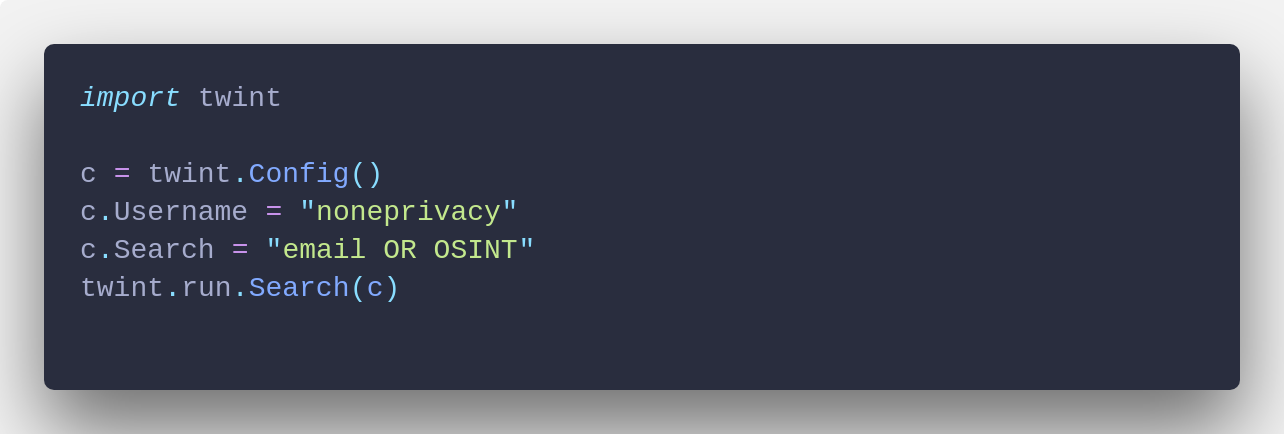
And this is an example of what you can get:

pielco11
on 23 Sep 2018
Hi @pielco11,
Could you answer me a question?
I want to get tweets that contain any of the following keywords: "Burger King", "Domino´s Pizza" or "Pizza Hut".
Then I need: c.Search = "\"Burger King\"" or c.Search = "\"Domino´s Pizza\"" or c.Search = "\"Pizza Hut\"".
How these three searches are joined by or? Because
c.Search = "\"Burger King OR Domino´s Pizza OR Pizza Hut\"" is not correct.
Thank you!
 maria-mh07
on 17 Nov 2020
maria-mh07
on 17 Nov 2020
Related issues
 kgoderis
·
4Comments
kgoderis
·
4Comments
 nachotp
·
3Comments
nachotp
·
3Comments
 pushshift
·
3Comments
pushshift
·
3Comments
 evoke0
·
3Comments
evoke0
·
3Comments
 Nestor75
·
3Comments
Nestor75
·
3Comments
Most helpful comment
Anyway, as @hpiedcoq correctly said, this is what you should do:
And this is an example of what you can get:
