Twindle: Documentation: How to sync the main repo and own repo in GitHub.
To sync the main repo and own repo,
- pointing to the main repo and pull from it, for that create a new remote in local for pointing the main repo .
git remote add upstream https://github.com/twindle-co/twindle.git - To download all the changes and commits from main Repo.
git fetch upstream - The current branch will be updated to reflect the merge.
git merge upstream/main - push the changes to own repository.
git push origin main
 praveen2896
All 14 comments
Great, @praveen2896 thanks for documenting this! @Sheetal777 or anyone else could verify?
 johnjacobkenny
on 14 Oct 2020
johnjacobkenny
on 14 Oct 2020
You have two options
- On your Git in VS Code, click on the three dot option and click push/pull
OR - In your terminal do this 'git push' or 'git pull'
Pull will get the latest changes from GitHub
And push will send your latest changes to GitHub
 thunder-coding
on 14 Oct 2020
thunder-coding
on 14 Oct 2020
@thunder-coding Could you collaborate on making sure this is a step by step explanation so that a newbie can understand? The discussion is about how to keep the forked repo in sync before creating PRs. This will be synced up with the wiki once it is done!
johnjacobkenny
on 14 Oct 2020
https://github.com/twindle-co/twindle/pull/8#issuecomment-708329032 may also be helpful
johnjacobkenny
on 14 Oct 2020
AzureAD+SwatiAnandRao@LAPTOP-MJRBVINQ MINGW64 ~/Desktop/GIT/twindle (main)
$ git push origin main
*remote: Permission to twindle-co/twindle.git denied to SwatiRaoDataEnthusiast.
fatal: unable to access 'https://github.com/twindle-co/twindle/': The requested
URL returned error: 403*
I am getting above error when I am trying to push into origin?
 SwatiRaoDataEnthusiast
on 15 Oct 2020
SwatiRaoDataEnthusiast
on 15 Oct 2020
@SwatiRaoDataEnthusiast
You are making a commit directly to main repo. You have to first commit to your forked repo then you can make a PR from Github to the main repo.
I have attached some snaps below.
Here you can see my origin is my forked repo link. You can check your's by running git remote -v.

Then after making changes you can run git status commands to check what changes you have made.
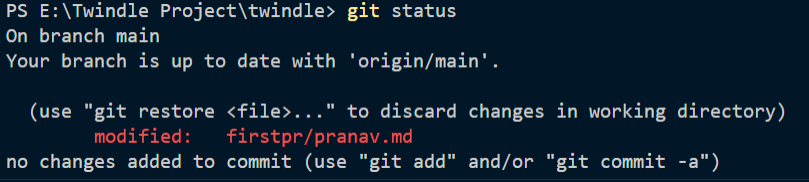
Here you can see I have made some changes in 'pranav.md' file.
So to push these changes to my forked repo I can run these commands.
git add .git commit -m "Updated pranav.md"git push -u origin main

Now they will be reflected to my forked repo.

Now you can make a PR.
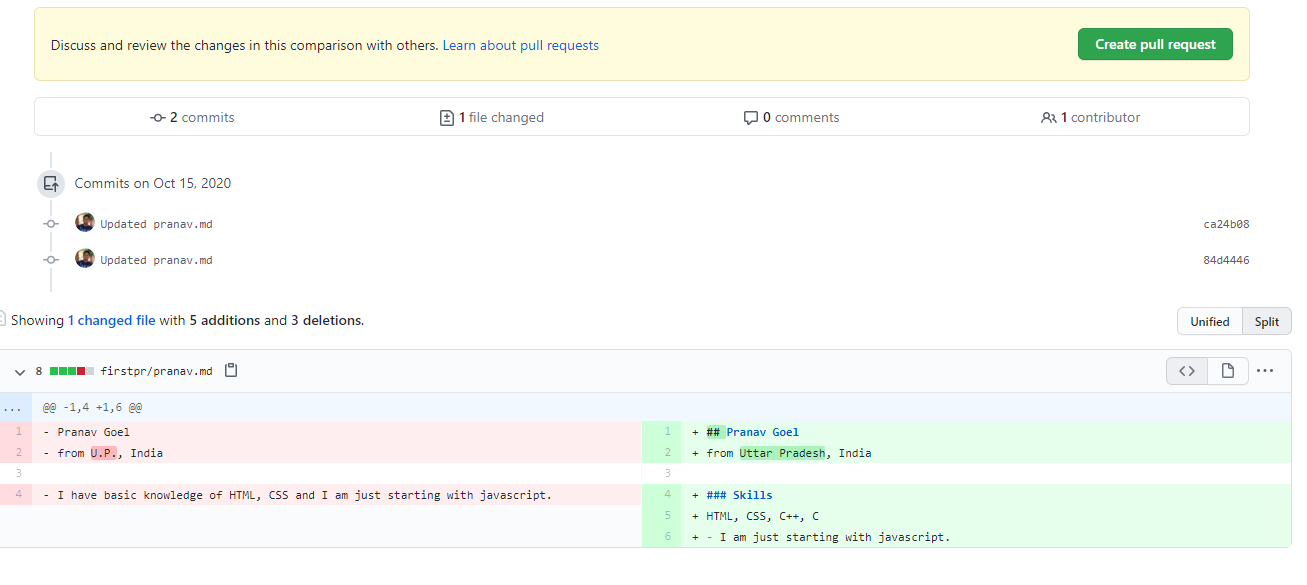
 pranavgoel29
on 15 Oct 2020
pranavgoel29
on 15 Oct 2020
@johnjacobkenny Please pin this issue, as it is hard to find it now.
pranavgoel29
on 17 Oct 2020
Could someone follow up on getting this into FAQ on a priority
johnjacobkenny
on 17 Oct 2020
@SwatiRaoDataEnthusiast
You are making a commit directly to main repo. You have to first commit to your forked repo then you can make a PR from Github to the main repo.
I have attached some snaps below.
Here you can see my origin is my forked repo link. You can check your's by running
git remote -v.
Then after making changes you can run
git statuscommands to check what changes you have made.
Here you can see I have made some changes in 'pranav.md' file.
So to push these changes to my forked repo I can run these commands.
git add .git commit -m "Updated pranav.md"git push -u origin main
Now they will be reflected to my forked repo.
Now you can make a PR.
Just to add onto what @pranavgoel29 has said, you can change the path for origin using
git remote set-url origin _your forked repo url here_
 MumbiGachomba04
on 17 Oct 2020
MumbiGachomba04
on 17 Oct 2020
@MumbiGachomba04 next time you can use the "Quote reply" option in the menu for any comment
johnjacobkenny
on 17 Oct 2020
It should be closed?
 proful
on 26 Oct 2020
proful
on 26 Oct 2020
450 if anyone picks up can close both issues
johnjacobkenny
on 26 Oct 2020
@johnjacobkenny documentation related thing can be moved to appropriate file under docs & this issue can be closed.
proful
on 29 Oct 2020
I'll close this since there is another issue to add it to docs #450
johnjacobkenny
on 29 Oct 2020
Related issues
 piratelicorne
·
7Comments
proful
·
5Comments
piratelicorne
·
7Comments
proful
·
5Comments
 tusharkandpal
·
3Comments
proful
·
4Comments
proful
·
4Comments
tusharkandpal
·
3Comments
proful
·
4Comments
proful
·
4Comments
Most helpful comment
You have two options
OR
Pull will get the latest changes from GitHub
And push will send your latest changes to GitHub