Twilio-video.js: Start a recording using twilio-video SDK
Hello,
I am trying to implement video recording feature in my application, that uses the twilio-video JavaScript SDK.
I came across the recording documentation on the Twilio website, which mentions,
To turn on Recording in a Group Room, set the
RecordParticipantsOnConnectproperty to true when creating the Room.
However, I am using Twilio's video-quickstart-js project as a template, and I don't understand where I'd be setting that parameter to start the recording. The obvious place to use the above parameter seems like the connect method, using the connectOptions object. But, I checked the twilio-video's typings file, and it doesn't mention any recording related parameter.
Here's my back-end C# code that fetches the token. I don't see any way to use the RecordParticipantsOnConnect property here, either.
    // For a given client, fetches the Twilio token
    public static string FetchTokenForClient(string clientID)
    {
        HashSet<IGrant> grants = FetchGrantsForToken();

        // Create an Access Token generator
        var token = new Token(AccountSid, ApiKeySid, ApiKeySecret, identity: clientID, grants: grants);

        // Serialize the token as a JSON Web Token
        string tokenJWT = token.ToJwt();

        return tokenJWT;
    }
Then, I came across #664, where @manjeshbhargav mentions:
If you want to record on the client side, the Video SDK does not have any support for that, but you should be able to achieve it in your application using the MediaRecorder API.
I don't understand this (and this is just my lack of understanding of Twilio's video architecture), but what's the difference between recording on the client side, vs recording on the server side? Wouldn't the recording be initiated on the client side, like you do on Microsoft Teams, by clicking a button (which could in turn be making an API call to the back-end to actually start the recording)?
I tried the solution provided in #664, but I get this error on attempting to start recording.
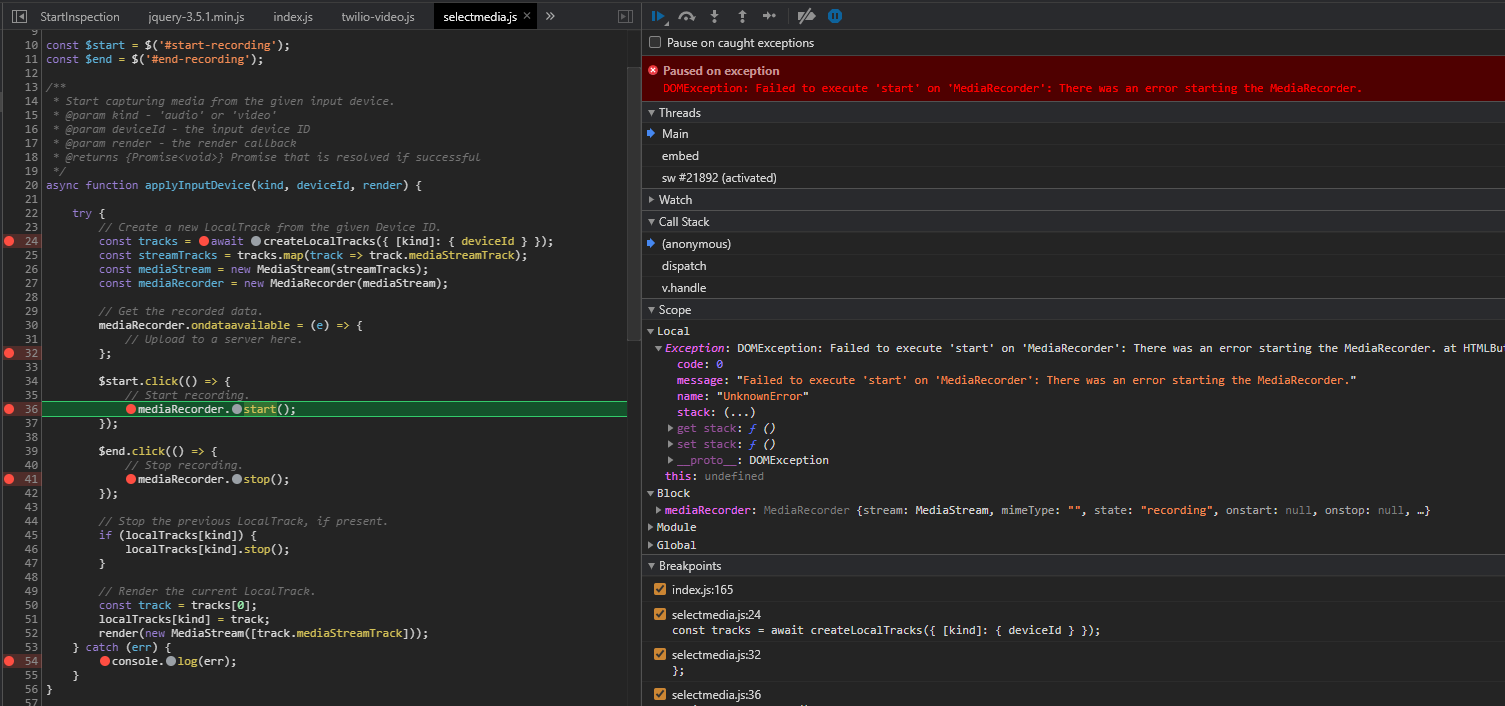
Am I missing something?
To summarize, I would like to record the video sessions. How would I go about this? Any help is really appreciated.
Thank you,
Akshay
 akshayKhot
All 8 comments
Hi @akshayKhot ,
Thanks for writing in with your question. The recordParticipantsOnConnect is a property you specify while creating a Group or Small Group Room using the REST API from your back-end application. Once you enable Room recordings, you can later access them using the Recordings and Compositions API.
I had suggested the MediaRecorder API for client side recordings for Peer-to-Peer Rooms, where media does not flow through Twilio's media servers.
Please let me know if this helps.
Thanks,
Manjesh Malavalli
JSDK Team
 manjeshbhargav
on 27 Jul 2020
manjeshbhargav
on 27 Jul 2020
Hi @manjeshbhargav,
Thanks for getting back.
Here's what my current code roughly looks like, which is based on the quick-start example. It fetches a token from the server and uses the JavaScript API to create a room:
const connectOptions = {...}

const token = fetchTokenFromServer();

const room = await connect(token, connectOptions);
Now, how would I change the code to create a room on the backend and join that room, so I can use the above parameter to start the recording?
Also, I got a JavaScript error when calling the start() method on the MediaRecorder (see the screenshot above). Do you know what would cause this issue? I can't find anything useful online, either on SO or Twilio documentation.
Is it possible to provide a simple, working example that starts a recording using the MediaRecorder, which works with the Twilio-JavaScript SDK, possibly based on the quickstart examples?
Thanks,
Akshay
akshayKhot
on 28 Jul 2020
Hi @akshayKhot ,
This link that I provided in the previous comment has an example of how to create a Room with recording enabled in your C# back-end.
I'm not sure why you are getting the start error in MediaRecorder. But, doing this will not be necessary once you enable recording in the Room.
Thanks,
Manjesh Malavalli
JSDK Team
manjeshbhargav
on 28 Jul 2020
Hi @manjeshbhargav,
I just came across this tutorial from Twilio, which helped me implement the recordings using the MediaRecorder api on the client side. The error was probably caused by the way I was using the streams.
A big thanks to @philnash for writing such easy to understand tutorial :)
This issue can be closed.
Regards,
Akshay
akshayKhot
on 28 Jul 2020
Hi @philnash @manjeshbhargav
Though I was able to record my local audio and video using the above tutorial, how can I record the remote participant's audio and video, during a call? Is that even possible?
This is the code I am using to get the MediaStream, which will be passed to the MediaRecorder.
const stream = await navigator.mediaDevices.getUserMedia({
        audio: true,
        video: true
});

const recorder = new MediaRecorder(stream, { type: mimeType });
How can I access the remote participant's stream so that I can record it?
Thanks,
Akshay
akshayKhot
on 28 Jul 2020
I've not used the MediaRecorder to record a remote stream, but I would imagine that you would need to collect the raw mediaStreamTracks from the remote participant's tracks and bundle them into a MediaStream that you could then hand to the MediaRecorder.
In the very simplest case, this would look like this:
const mediaTracks = participant.tracks.
  filter(track => track.kind === 'video' || track.kind === 'audio').
  map(trackPublication => trackPublication.track.mediaStreamTrack);
const remoteStream = new MediaStream(mediaTracks);
const recorder = new MediaRecorder(remoteStream);
However you would need to deal with the asynchronous nature of track publications and track subscriptions. You would also have to consider tracks being unpublished from the stream and new ones being published.
Hope that helps though.
 philnash
on 28 Jul 2020
philnash
on 28 Jul 2020
Hi @philnash,
That worked!!
The only change I had to make in the above code was to get the track publications as an array first, as participant.tracks is a map, preventing the filter() call. For example:
let trackPublications = Array.from(participant.tracks.values());
const mediaStreamTracks = trackPublications.
            filter(tp => tp.kind === 'video' || tp.kind === 'audio').
            map(tp => tp.track.mediaStreamTrack);
const remoteStream = new MediaStream(mediaStreamTracks);
But that's a minor detail. Your example solved my problem. I was able to manage all the other details of async and track subscriptions by following the quick-start examples.
Just wanted to mention that I really appreciate the code examples, sample projects and quality of support Twilio provides to the developers. A big thanks once again, @philnash. :)
Regards,
Akshay
akshayKhot
on 28 Jul 2020
Hi @akshayKhot ,
I'm glad that you got unblocked. I'll close this issue now. Please feel free to open a new one if you have any other issues or questions.
Thanks,
Manjesh Malavalli
JSDK Team
manjeshbhargav
on 28 Jul 2020
Related issues
 lmatheus
·
5Comments
lmatheus
·
5Comments
 anand-io
·
4Comments
anand-io
·
4Comments
 antonlive
·
5Comments
antonlive
·
5Comments
 julien-l
·
4Comments
julien-l
·
4Comments
 himichaelroberts
·
3Comments
himichaelroberts
·
3Comments