Twilio-video.js: 2.0.1 crashing on Chrome iOS
- [x] I have verified that the issue occurs with the latest twilio-video.js release and is not marked as a known issue in the CHANGELOG.md.
- [x] I reviewed the Common Issues and open GitHub issues and verified that this report represents a potentially new issue.
- [x] I verified that the Quickstart application works in my environment.
- [x] I am not sharing any Personally Identifiable Information (PII)
or sensitive account information (API keys, credentials, etc.) when reporting this issue.
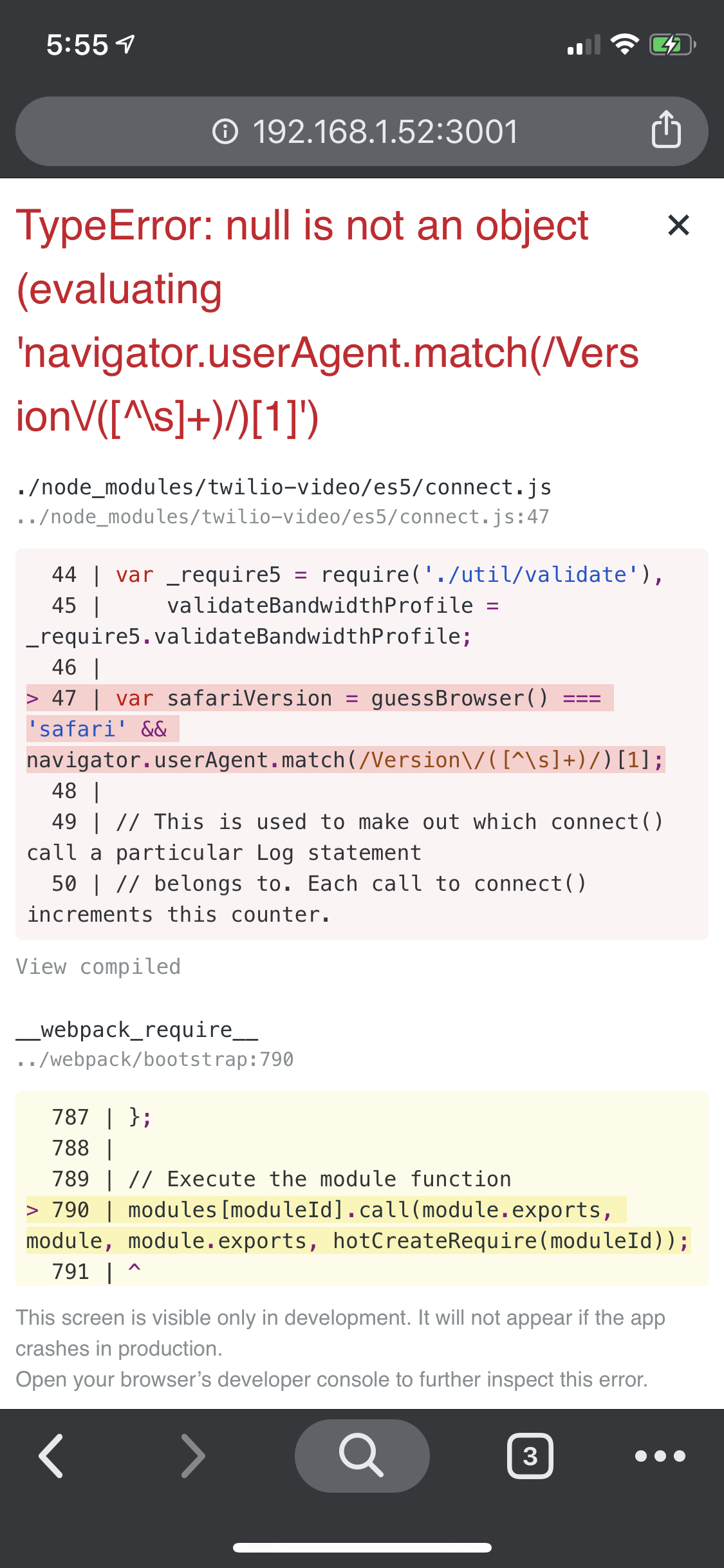
Thanks for the work on this library - it's been a pleasure to use so far. We're experiencing an issue on Chrome iOS with 2.0.1. Looks like it's related to the new browser detection logic added in https://github.com/twilio/twilio-video.js/commit/5c1b33ccb448801fdfe2a0320551cb343dfd3a8d#diff-90df8a4fdd65da9a7dabb2c41927a14dR39. Let me know if I can provide any other details!
``
Expected behavior:
twilio-video doesn't immediately crash the page on load on Chrome iOS
Actual behavior:
twilio-video immediately crashes the page on load on Chrome iOS
Software versions:
- [x] Browser(s): Chrome
- [x] Operating System: iOS
- [x] twilio-video.js: 2.0.1
- [x] Third-party libraries (e.g., Angular, React, etc.): React 16
 kylealwyn
All 15 comments
Bumping this, was about to post the same error effecting my whole site, not just the component.
A few extra notes:
- Error also pops up in Firefox browser on iOS, but not on Safari or Edge in iOS
- Switch the site to show desktop site, it will load the whole site as expected
- Removing the import statement in my React component for 'twilio-video' will allow app to load as expected
 douglasrcjames
on 30 Jan 2020
douglasrcjames
on 30 Jan 2020
Hi @douglasrcjames ,
Thanks for writing in with your issue. I'm sorry that you're being blocked by this. To start off, can you please share the navigator.userAgent string that you see for Chrome iOS?
Thanks,
Manjesh Malavalli
JSDK Team
 manjeshbhargav
on 30 Jan 2020
manjeshbhargav
on 30 Jan 2020
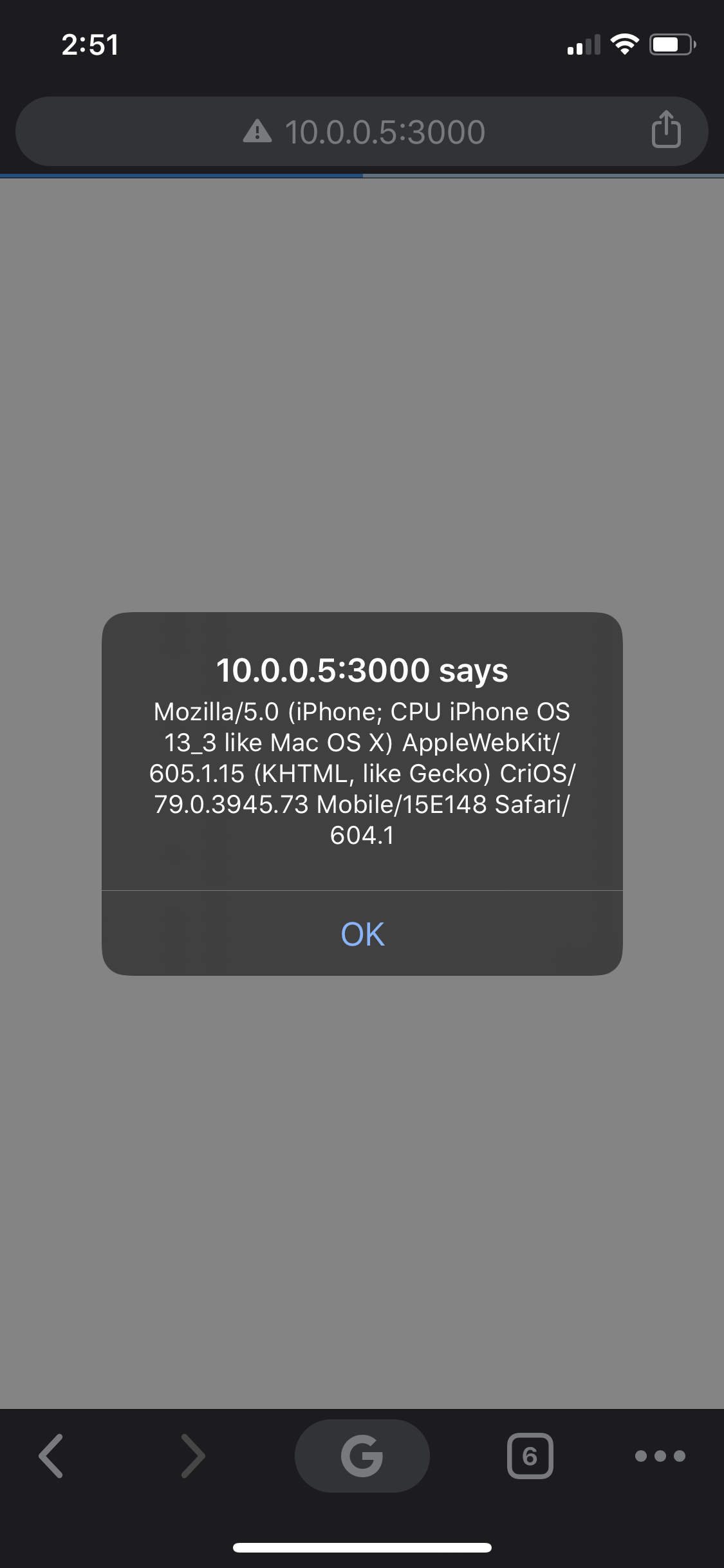
douglasrcjames
on 30 Jan 2020
Hi @kylealwyn ,
Currently, we do not support Chrome and Firefox on iOS since they don't support WebRTC. Here is the table of browsers and platforms that are supported. I would recommend that you check for the boolean Video.isSupported to be true before using the SDK APIs.
I'm going to close this issue since we are talking about an unsupported browser. Please feel free to comment here if you need more clarification.
Thanks,
manjeshbhargav
on 31 Jan 2020
Sorry, but how do I test for Video.isSupported before importing 'twilio-video'? The difference of working and not working is the line import Video from 'twilio-video';. If I include that import into a component deep in my app, the whole app won't run.
Do I need to conditionally import twilio-video with require() in my VideoRoom.js component?
douglasrcjames
on 31 Jan 2020
@manjeshbhargav I understand core functionality isn’t supported on Chrome iOS but, as @douglasrcjames mentioned, we should be able to import the package without crashing the browser and to use the method you suggested. This is top level code that is executed immediately and is broken. Please consider re-opening.
kylealwyn
on 31 Jan 2020
@manjeshbhargav this issue has still not been resolved and don't want it getting lost in the mix since this is preventing me from pushing updates to my live code base.
douglasrcjames
on 4 Feb 2020
Hi @douglasrcjames ,
I have filed an internal ticket to address this. Please watch this space for updates. Once again, I apologize for any inconvenience this may have caused you.
Thanks,
Manjesh Malavalli
JSDK Team
manjeshbhargav
on 4 Feb 2020
@manjeshbhargav thanks for reopening and keeping this on your radar. I'll keep my eye on this post.
douglasrcjames
on 4 Feb 2020
Thanks for the updates on this, It took us a while to track the app wide mobile browser crash back to this library. I understand that some browsers are not supported, but it does seem like a stretch for simply importing this library to throw an error. This update is also keeping us from pushing production changes, I would appreciate if this could be merged in.
 pat-schoeps
on 15 Feb 2020
pat-schoeps
on 15 Feb 2020
@manjeshbhargav can we get some updates on the status of this please
douglasrcjames
on 18 Feb 2020
I found a workaround by just testing before importing, here's the snippet:
let Video = null;
var winNav = window.navigator;
var isIOSChrome = winNav.userAgent.match("CriOS");
const isIOSFirefox = winNav.userAgent.match("FxiOS");

if(isIOSChrome) {
    console.log("User is iOS Chrome.")
} else if(isIOSFirefox){
    console.log("User is iOS Firefox.")
} else {
    console.log("requiring ('twilio-video');")
    Video = require('twilio-video');
}
I still think that the Twilio API shouldn't just crash your whole app on importing Video!
douglasrcjames
on 23 Feb 2020
@douglasrcjames ,
The fix for this issue is available in v2.2.0. I'm closing this issue. Please try the new release and let us know if it fixes the iOS crash for you.
Thanks,
Manjesh Malavalli
JSDK Team
manjeshbhargav
on 23 Feb 2020
Fixed it for us - thanks @manjeshbhargav!
kylealwyn
on 23 Feb 2020
thank you @manjeshbhargav for getting this in.
pat-schoeps
on 10 Mar 2020
Related issues
 vincentwoo
·
4Comments
vincentwoo
·
4Comments
 vsrboth
·
3Comments
vsrboth
·
3Comments
 antonlive
·
5Comments
antonlive
·
5Comments
 paulbrie
·
3Comments
paulbrie
·
3Comments
 tapannathvani
·
5Comments
tapannathvani
·
5Comments
Most helpful comment
@douglasrcjames ,
The fix for this issue is available in v2.2.0. I'm closing this issue. Please try the new release and let us know if it fixes the iOS crash for you.
Thanks,
Manjesh Malavalli
JSDK Team