Tutanota: [android] Connect notification gets stuck
Reported for some users after 3.67.3 update.
Please send logs via Settings->About->Send logs if you encounter it.
 charlag
All 29 comments
One way it may get stack is when there's no sse data
charlag
on 8 Feb 2020
More precisely, it was getting stuck because we do observe() on LiveData in PushNotificationService and it was not working while observeForever() worked. It may have something to do with lifecycles.
In one of the user reports it can be seen that the SSEClient was looping without SSE data for some time but then eventually there was database update and the connection was started/service stopped.
charlag
on 10 Feb 2020
Is it the same issue as shown in this picture?
I'm trying to send logs in the mobile app but not sure who to address to.
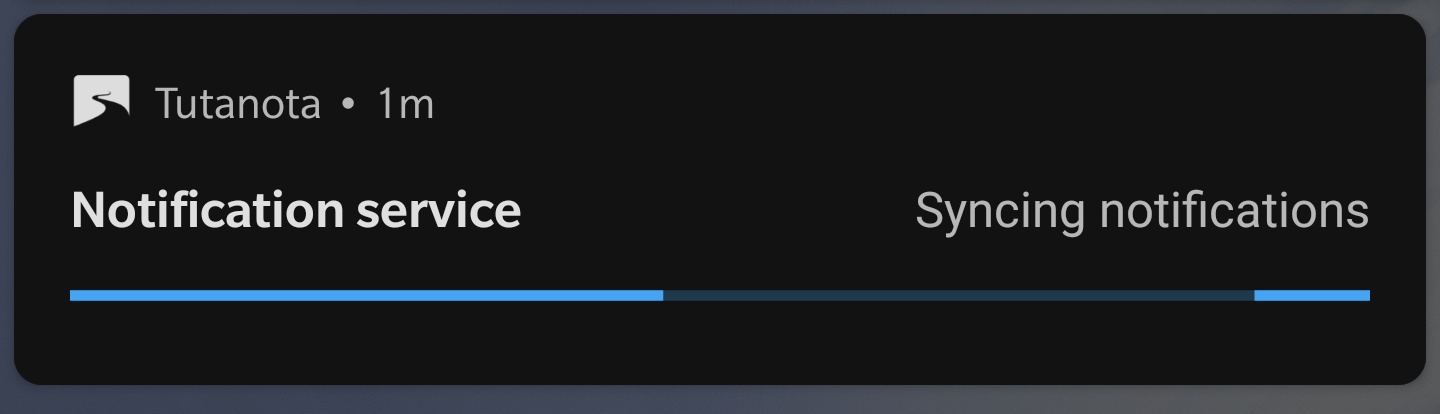
 phath9
on 10 Feb 2020
phath9
on 10 Feb 2020
Yes, this is it
Settings->About->Send logs. It could help us a lot.
charlag
on 10 Feb 2020
Yes, this is it
Settings->About->Send logs. It could help us a lot.
Thanks but who should I send this to? The recipient address is blank.
phath9
on 10 Feb 2020
charlag
on 10 Feb 2020
Just read this thread and I have sent my logs to the mentioned emailaddress also.
 Peppeo
on 11 Feb 2020
Peppeo
on 11 Feb 2020
Is it the same issue as shown in this picture?
I'm trying to send logs in the mobile app but not sure who to address to.
Saw this on 3.66.5 some times while or after using
flight mode. Android 9, Sony. About > Logs started clean on update to recent version?
 philblue1
on 12 Feb 2020
philblue1
on 12 Feb 2020
Not sure what you are trying to say, we are interested in the version 3.67.3, send logs if it happens to you with that version
charlag
on 12 Feb 2020
I like to say this bug is older cause I saw it several times in 3.66.5. If this is not important nevermind.
philblue1
on 12 Feb 2020
That's a different bug with similar cause I believe but thanks
charlag
on 12 Feb 2020
For one of the logs we see a lot of
Error during sending EventType: TYPE_WINDOW_CONTENT_CHANGED; EventTime: 56580094; PackageName: de.tutao.tutanota; MovementGranularity: 0; Action: 0 [ ClassName: android.view.View
 android.os.DeadObjectException: Transaction failed on small parcel; remote process probably died
 at android.os.BinderProxy.transactNative(Native Method)
...
It's not clear if it's the cause but it might be. We enabled multiprocess Room invalidation and it binds to a separate process. According to the https://stackoverflow.com/questions/45432647/android-throw-deadobjectexception-with-log-transaction-failed-on-small-parcel it might happen if the buffer is full. It shouldn't be the case for us because there's not much data stored or sent but it might be.
On the other hand, it's AccessiblityService so it shouldnt be related to Room
charlag
on 12 Feb 2020
Got useful log now:
02-13 16:15:19.969  7589  7589 D SSEstorage: Migrating SSE to the database
02-13 16:15:20.137  7589  7625 D LooperThread: LooperThread is started
02-13 16:15:20.137  7589  7625 D SSE     : Starting SSE connection
02-13 16:15:20.137  7589  7625 D SSE     : sse info not available skip reconnect
02-13 16:15:20.150  7589  7589 D PushNotificationService: Starting foreground
02-13 16:15:20.166  7589  7589 D NetworkObserver: Network is UP
02-13 16:15:20.166  7589  7589 D SSE     : ConnectionRef not available, schedule connect because of network state change
02-13 16:15:20.167  7589  7625 D SSE     : Starting SSE connection
02-13 16:15:20.167  7589  7625 D SSE     : sse info not available skip reconnect
02-13 16:15:20.175  7589  7589 D PushNotificationService: onStartJob
02-13 16:17:01.848  7604  7604 D MainActivity: App started
02-13 16:17:01.890  7604  7604 W System.err: SLF4J: Failed to load class "org.slf4j.impl.StaticLoggerBinder".
02-13 16:17:01.890  7604  7604 W System.err: SLF4J: Defaulting to no-operation (NOP) logger implementation
02-13 16:17:01.891  7604  7604 W System.err: SLF4J: See http://www.slf4j.org/codes.html#StaticLoggerBinder for further details.
02-13 16:17:01.899  7589  7589 D PushNotificationService: Received onStartCommand, sender: MainActivity#setupPushNotifications
02-13 16:17:01.899  7589  7589 D PushNotificationService: The job is finished
02-13 16:17:01.903  7589  7589 D PushNotificationService: sse storage updated 5
02-13 16:17:01.905  7589  7589 D SSE     : old sseInfo: null new sseInfo: SseInfo{pushIdentifier='...', userIds=[....], sseOrigin='https://mail.tutanota.com'}
02-13 16:17:01.905  7589  7589 D SSE     : ConnectionRef not available, schedule connect
02-13 16:17:01.906  7589  7625 D SSE     : Starting SSE connection
02-13 16:17:01.906  7589  7589 D PushNotificationService: onStartJob
- When there's no data (yet), it doesn't stop foreground notification
- When there was a migration, there was no update (maybe it's related to observing with lifecycle)
charlag
on 13 Feb 2020
One way I've noticed that makes it happen, is to go into an airplane mode.
It happened again last night. Just sending the logs.
 MisterY
on 14 Feb 2020
MisterY
on 14 Feb 2020
Thanks to the user report there seem to be a reliable way to reproduce it:
- Go to airplane
- Close tutanota (swipe away)
- (service restarts)
- Notification gets stuck
charlag
on 17 Feb 2020
Still getting some reports even with the new version, maybe it's something with LIfecycle. We could replace observe() with observeForever() in PushNotificationService which shouldn't hurt anyway.
If people in this thread could confirm that it gets/doesn't get stuck in the 3.67.6 it would be extremely helpful.
charlag
on 21 Feb 2020
It still gets stuck while there is a good internet connection. I sent logs.
 yochananmarqos
on 22 Feb 2020
yochananmarqos
on 22 Feb 2020
Same here. On a different device, while connected to WiFi, I logged in, read the email, then closed all apps from the Recent Apps.
Soon thereafter the notification appeared and hung.
It disappeared when I disconnected from the network, presumably due to the latest changes which check for the network state. Logs sent from that device.
MisterY
on 27 Feb 2020
Yeah, I'm pretty sure that this is a screwup with lifecycle (because of sse info not available skip reconnect) but I really don't want to fix it blindly.
If I will create a test version with more logging, would someone in this thread who can reproduce it try it out?
charlag
on 27 Feb 2020
@charlag, I can try to reproduce reliably on that device and then install the test version and repeat the repro steps.
The device is a tablet which only has a WiFi network interface. Not sure if that affects something but the notification no longer shows up on the phone under any circumstances now.
MisterY
on 27 Feb 2020
It hasn't been happening anymore to me since updating to 3.67.7
yochananmarqos
on 27 Feb 2020
I've made a small change (659e8e78684e613381990c67a6df3150c7d50fa9) and built with increased version number. I would really appreciate if you gave feedback on whether it helps or not.
If it doesn't, I have another idea but this is a smaller change,
charlag
on 27 Feb 2020
Hi, @charlag, this seems to work well so far.
I've had two interesting situations since yesterday:
- on the tablet with the regular app, while still in the airplane mode, I started Tutanota and the log-in screen appeared. The notification appeared right away and was stuck. After turning the WiFi on and connecting to the network, the notification disappeared. After installing the test version, I could not get notifications while either online or offline. I've tried a few scenarios, both closing and not closing the apps before re-opening, with and without network. There was no hung notification with this version.
- I've moved SIM card from the phone to another device and got a hung notification on the phone, as well. The phone was not in the airplane mode but had neither WiFi nor the data connection. So I installed this test version there and also tried a few different scenarios and could not get the hung notification, either.
I'm keeping this version on both devices for now and will report if anything different happens. I would give a green light for this change.
MisterY
on 28 Feb 2020
@MisterY thanks a lot of testing this out!
May I ask you to clarify what this line means?
After installing the test version, I could not get notifications while either online or offline
does it mean that notifications still worked like expected?
charlag
on 28 Feb 2020
Sorry, I meant there was no hung notification any more, during whatever I tried (turning networks on/off, closing apps or just switching, etc.). But do note that I still don't have a 100% reliable test scenario and the way to confirm it. Will therefore continue to use this version and see if the hung notification appears in any of the situations with/out different network types.
And, yes, I do get regular new mail notifications when connected to network.
MisterY
on 28 Feb 2020
@MisterY we might publish a beta release with this fix, thanks a lot for trying it out
charlag
on 28 Feb 2020
@MisterY hi again. Can you confirm that it is fixed with the patched version? If that's the case, we could roll it out for everyone.
charlag
on 2 Mar 2020
Hi, @charlag. I have not seen hung notifications so far and I'm using that version on three devices, two of which are mostly disconnected. My gut feeling would be that it is worth publishing and trying out with a larger user base.
MisterY
on 2 Mar 2020
There are still some reports that it's getting stuck
charlag
on 5 Mar 2020
Related issues
 chirhonul
·
3Comments
chirhonul
·
3Comments
 RickyM7
·
4Comments
RickyM7
·
4Comments
 armhub
·
5Comments
armhub
·
3Comments
armhub
·
5Comments
armhub
·
3Comments
 geocfu
·
4Comments
geocfu
·
4Comments