Turicreate: Wrapping dylib into a framework
Unfortunately wrapping libRecommender.dylib into a framework doesn't seem to help with the App Store delivery error:
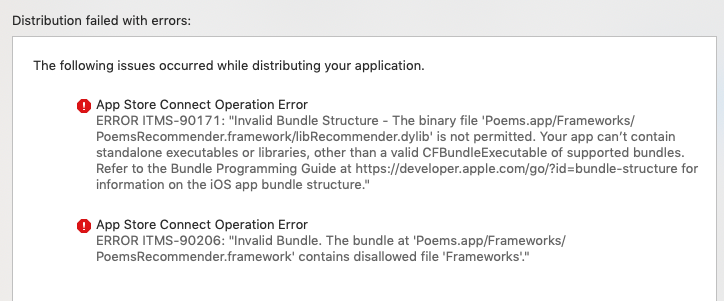

Does anyone else experience this issue?
 Davvie
All 11 comments
This is related to #2050.
@Davvie - Are you following the directions from our User Guide? Specifically, are you following the instructions from the section which begins "If your project will be submitted to the App Store"?
 TobyRoseman
on 13 Jan 2020
TobyRoseman
on 13 Jan 2020
@TobyRoseman Yes, I am. I guess I've tried all possible combinations with and without the libAudioPreprocessing.dylib in my framework.
Could you kindly provide an empty sample project with dylibs hooked up the right way? It would help a lot to find the problem in my configuration.
Davvie
on 16 Jan 2020
@Davvie Can you share your project so we can take a look? Also, are you using the libRecommender, the libAudioPreprocessing, or both? If both, is there a chance that you've correctly configured one framework but not the other?
 syoutsey
on 17 Jan 2020
syoutsey
on 17 Jan 2020
@syoutsey I'm only using libRecommender so I didn't include libAudioPreprocessing in my first attempts. Should I include it anyway?
Here is an empty project I created with the project configuration similar to mine: https://www.dropbox.com/s/0hl19wnm15g668q/RecommenderSample.zip?dl=0
If you could take a look at it I'd be really grateful
Davvie
on 19 Jan 2020
@Davvie Can you share your project so we can take a look? Also, are you using the
libRecommender, thelibAudioPreprocessing, or both? If both, is there a chance that you've correctly configured one framework but not the other?
Hi! I'm having the same issue, can't submit my app to the App Store :(
@davvie checked out your link, I have the same setup
could u help? @syoutsey
 FamilGadzhiev
on 28 Jan 2020
FamilGadzhiev
on 28 Jan 2020
After many attempts I gave up trying to wrap the dylib into a framework and tried to include source files from this folder manually.
Still no success though, now the Suggestions class can not be found. Am I missing something? :(
FamilGadzhiev
on 3 Feb 2020
Update: I finally managed to submit a build!
The trick was selecting "Objective-C" as a language when creating the framework target
Davvie
on 4 Feb 2020
Hi, I guess I haven't solved the issue even though the submission passed successfully. The app crashes on launch because the library can't be found in the configuration I made in the end.
I emailed the developer technical support, and they said that "there is no supported way to take a pre-build .dylib file and package it as a framework".
@TobyRoseman @syoutsey Is there any other way I can import the recommender library other than the dylib? In case of the sound classifier I can just drag and drop the .h and .m files from the 'src/deployment' folder.
Davvie
on 27 Feb 2020
We are exploring another option in #3023.
TobyRoseman
on 28 Feb 2020
Sounds great, thank you! Looking forward to it
Davvie
on 3 Mar 2020
I emailed the developer technical support, and they said that "there is no supported way to take a pre-build .dylib file and package it as a framework".
Hi @Davvie
sorry for the stupid question. But does it mean that is not possible to use a .dylib inside an iOS application in any way? I mean, for iOS apps that goes to the App Store / TestFlight?
From the section "Embedded .dylib Files" of the documentation here
Apple Documentation
I know that I cannot use directly a .dylib file into an app, but I have to wrap it into a target framework.
But the developer support tells you that there is no supported way to do it.
I'm a little confused
Thank you
 davidesoldan
on 31 Mar 2020
davidesoldan
on 31 Mar 2020
Related issues
 HincaTseng
·
6Comments
HincaTseng
·
6Comments
 MaximBazarov
·
5Comments
MaximBazarov
·
5Comments
 sakrist
·
6Comments
sakrist
·
6Comments
 HelloWorldYyx
·
3Comments
HelloWorldYyx
·
3Comments
 johnyquest7
·
6Comments
johnyquest7
·
6Comments
Most helpful comment
Update: I finally managed to submit a build!
The trick was selecting "Objective-C" as a language when creating the framework target