Turicreate: Fatal error when trying to create turicreate model in kaggle kernel
In my public kaggle kernel https://www.kaggle.com/johnyquest/turicreate-breast-cancer-prediction , I tried to create a turicreate model but it failed.
Turicreate was imported without any error and data was split successfully. But model creation failed.
Following was the error message
[ERROR] turicreate.toolkits._main: Toolkit error: LOG_FATAL encountered
---------------------------------------------------------------------------
ToolkitError                              Traceback (most recent call last)
<ipython-input-5-936b1b023b76> in <module>()
----> 1 model = tc.classifier.create(train_data, target='class',features = ['thickness', 'size','shape','adhesion','single','nuclei','chromatin','nucleoli','mitosis'])

/opt/conda/lib/python3.6/site-packages/turicreate/toolkits/classifier/_classifier.py in create(dataset, target, features, validation_set, verbose)
    101             model_selector = _turicreate.extensions._classifier_available_models,
    102             features = features, validation_set = validation_set, verbose =
--> 103             verbose)

/opt/conda/lib/python3.6/site-packages/turicreate/toolkits/_supervised_learning.py in create_classification_with_model_selector(dataset, target, model_selector, features, validation_set, verbose)
    542
    543         # Fit each of the available models
--> 544         m = create_selected(model_name, dataset, target, features, validation_set, verbose)
    545         models[model_name] = m
    546

/opt/conda/lib/python3.6/site-packages/turicreate/toolkits/_supervised_learning.py in create_selected(selected_model_name, dataset, target, features, validation_set, verbose)
    597         features=features,
    598         validation_set=validation_set,
--> 599         verbose=verbose)
    600
    601     # Return the model

/opt/conda/lib/python3.6/site-packages/turicreate/toolkits/_supervised_learning.py in create(dataset, target, model_name, features, validation_set, distributed, verbose, seed, **kwargs)
    396
    397     ret = _turicreate.toolkits._main.run("supervised_learning_train",
--> 398                                        options, verbose)
    399     model = SupervisedLearningModel(ret['model'], model_name)
    400

/opt/conda/lib/python3.6/site-packages/turicreate/toolkits/_main.py in run(toolkit_name, options, verbose, show_progress)
     82         return params
     83     else:
---> 84         raise ToolkitError(str(message))

ToolkitError: LOG_FATAL encountered
 johnyquest7
All 6 comments
Hi @johnyquest7 - I've downloaded your data, and after exporting it as a csv, your code works for me. Is this issue happening reliably?
 TobyRoseman
on 19 Mar 2018
TobyRoseman
on 19 Mar 2018
@TobyRoseman my kernel is public. Try forking it and run it. The data worked fine on my local machine, but it did not work in kaggle kernel. It could be a compatibility issue with the kaggle kernel.
https://www.kaggle.com/johnyquest/turicreate-breast-cancer-prediction
when you run the notebook, you can see that the model goes through boosted decision tree algorithm and then throws the error.
johnyquest7
on 20 Mar 2018
@johnyquest7 - kaggle kernel is not working at all for me. However since you're only hitting this issue on kaggle kernel, I believe I know what is going on.
turicreate needs a location on disk to write temporary files. I believe the default for that location is not writable in kaggle kernel. When I set my location to an unwritable path, I get the exact same behavior you're seeing on kaggle kernel.
Please try doing the following right after you have imported turicreate:
tc.config.set_runtime_config('TURI_CACHE_FILE_LOCATIONS', '<writable-path>')
Where <writable-path> is a path where you have write permissions. Either relative or absolute paths work here.
Please give that a try and let us know if it works. If it does work, let's keep this issue open till we have a better error message in place.
TobyRoseman
on 22 Mar 2018
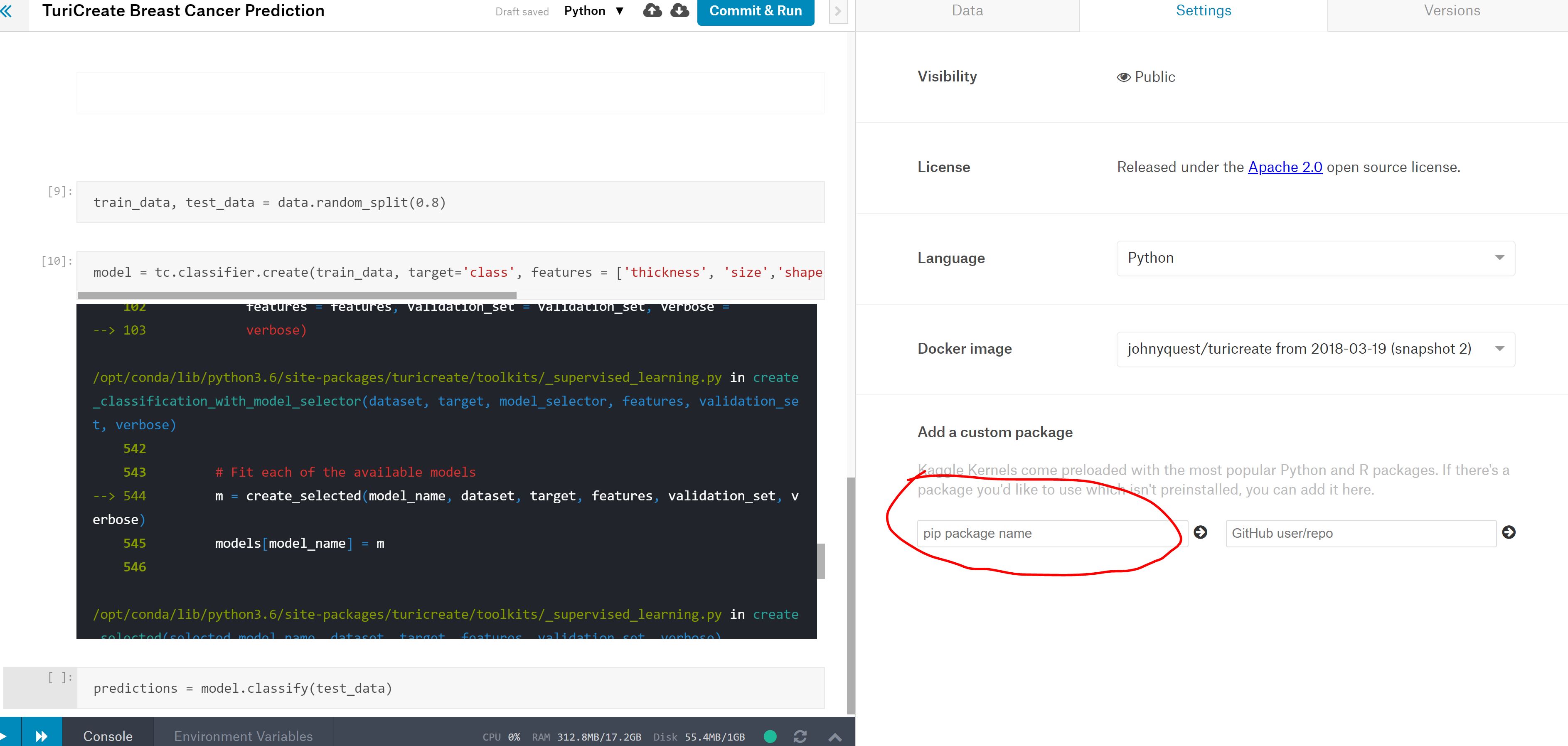
@TobyRoseman At first kaggle kernel did not work for me either. But, then I installed TuriCreate using the settings. I tried your solution and it did not work. Maybe I am doing something wrong / my output directory is not accessible. . I have updated the code. Can you try it again. I installed TuriCreate using the following method.
johnyquest7
on 24 Mar 2018
@TobyRoseman You are right. It was an issue with accessing a writable directory. So after importing TuriCreate, I added the following code and it worked fine!
! mkdir temp
tc.config.set_runtime_config('TURI_CACHE_FILE_LOCATIONS', 'temp')
johnyquest7
on 24 Mar 2018
@johnyquest7 - Thanks for letting us know that was the issue. I'll make sure we have a better error message for this case in our next release.
TobyRoseman
on 26 Mar 2018
Related issues
 HelloWorldYyx
·
3Comments
HelloWorldYyx
·
3Comments
 MaximBazarov
·
5Comments
MaximBazarov
·
5Comments
 bobdillon48
·
4Comments
bobdillon48
·
4Comments
 tagy
·
5Comments
johnyquest7
·
5Comments
tagy
·
5Comments
johnyquest7
·
5Comments
Most helpful comment
@johnyquest7 - kaggle kernel is not working at all for me. However since you're only hitting this issue on kaggle kernel, I believe I know what is going on.
turicreate needs a location on disk to write temporary files. I believe the default for that location is not writable in kaggle kernel. When I set my location to an unwritable path, I get the exact same behavior you're seeing on kaggle kernel.
Please try doing the following right after you have imported turicreate:
tc.config.set_runtime_config('TURI_CACHE_FILE_LOCATIONS', '<writable-path>')Where
<writable-path>is a path where you have write permissions. Either relative or absolute paths work here.Please give that a try and let us know if it works. If it does work, let's keep this issue open till we have a better error message in place.