Turicreate: Unable to import turicreate in Jupyter Notebook
Hi,
I am following the step in the installation of turicreate ("pip install -U turicreate") and after successful installation, I tried the first line of code "import turicreate as tc" in Jupyter Notebook and it fails with the following error :
ImportError Traceback (most recent call last)
----> 1 import turicreate as tc
ImportError: No module named turicreate
Can you advise how to avoid this error? Thank you.
 samaujs
All 25 comments
@samaujs - looks like your pip and your jupyter notebook are using different python environments. If you are following our standard install instructions, you need to make sure that you are running jupyter notebook from the same virtual environment where you installed turicreate.
 TobyRoseman
on 29 Jul 2018
TobyRoseman
on 29 Jul 2018
@samaujs as mentioned in the previous answer it could be due to using different python environment . I ran in to this initially. My notebook was configured to start in python 3. I switched the kernel to python 2 and it worked.
 johnyquest7
on 29 Jul 2018
johnyquest7
on 29 Jul 2018
Try
pip list or
conda list
at your command prompt and see if turicreate is listed
johnyquest7
on 29 Jul 2018
I am following "standard install instructions" after jupyter notebook is installed somtime ago; using python 2.7 and invoke "jupyter notebook" in the virtual environment.
When attempting "pip list" in the virtual environment, the "turicreate 4.3.2" can be found but not at the console with the same commmand. Do I have to re-install jupyter notebook in the virtual environment or there is an environment setting that can be made to rectify the problem? Thank you.
samaujs
on 30 Jul 2018
I create a Docker container to support Jupyter with TC and works perfectly for me. I can share my Dockerfile settings if it may help for you. Just have a look, maybe you can find something useful:
FROM jupyter/base-notebook
USER root
RUN apt-get update && apt-get install -y --no-install-recommends apt-utils
RUN apt-get update && apt-get install -y libblas-dev liblapack-dev
RUN chown -R jovyan /home
USER jovyan
RUN pip install --upgrade pip
RUN pip install requests==2.18.4
RUN pip install numpy==1.14.5
RUN pip install turicreate==5.0b2
RUN jupyter notebook --generate-config -y
 cianiandreadev
on 30 Jul 2018
cianiandreadev
on 30 Jul 2018
Another tip of ensuring that pip and jupyter operate on the same underlying python, call both explicitly through the python command:
python -m pip install turicreate
python -m jupyter notebook
 gustavla
on 30 Jul 2018
gustavla
on 30 Jul 2018
@samaujs To answer your question, yes, you will need to (re-)install Jupyter Notebook in the same virtual environment as Turi Create.
 znation
on 30 Jul 2018
znation
on 30 Jul 2018
Or you can install anaconda to the same virtual environment to get the most popular packages in one go.
$ curl -O https://repo.continuum.io/archive/Anaconda3-5.0.1-Linux-x86_64.sh
followed by
$ bash Anaconda3-5.0.1-Linux-x86_64.sh
in your virtual environment prompt
johnyquest7
on 31 Jul 2018
**Thanks guys; I tried to install Jupyter Notebook in the virtual environment (venv) with "python -m pip install jupyter". When I create the first line "import turicreate as tc", are the following warnings alright to proceed:
/Volumes/BACKUP2018/VirtualEnv/TuriCreate/venv/lib/python2.7/site-packages/pandas/_libs/__init__.py:4: RuntimeWarning: numpy.dtype size changed, may indicate binary incompatibility. Expected 96, got 88
from .tslib import iNaT, NaT, Timestamp, Timedelta, OutOfBoundsDatetime
/Volumes/BACKUP2018/VirtualEnv/TuriCreate/venv/lib/python2.7/site-packages/pandas/__init__.py:26: RuntimeWarning: numpy.dtype size changed, may indicate binary incompatibility. Expected 96, got 88
from pandas._libs import (hashtable as _hashtable,
/Volumes/BACKUP2018/VirtualEnv/TuriCreate/venv/lib/python2.7/site-packages/pandas/core/dtypes/common.py:6: RuntimeWarning: numpy.dtype size changed, may indicate binary incompatibility. Expected 96, got 88
from pandas._libs import algos, lib
/Volumes/BACKUP2018/VirtualEnv/TuriCreate/venv/lib/python2.7/site-packages/pandas/core/util/hashing.py:7: RuntimeWarning: numpy.dtype size changed, may indicate binary incompatibility. Expected 96, got 88
from pandas._libs import hashing, tslib
/Volumes/BACKUP2018/VirtualEnv/TuriCreate/venv/lib/python2.7/site-packages/pandas/core/indexes/base.py:7: RuntimeWarning: numpy.dtype size changed, may indicate binary incompatibility. Expected 96, got 88
from pandas._libs import (lib, index as libindex, tslib as libts,
/Volumes/BACKUP2018/VirtualEnv/TuriCreate/venv/lib/python2.7/site-packages/pandas/tseries/offsets.py:21: RuntimeWarning: numpy.dtype size changed, may indicate binary incompatibility. Expected 96, got 88
import pandas._libs.tslibs.offsets as liboffsets
/Volumes/BACKUP2018/VirtualEnv/TuriCreate/venv/lib/python2.7/site-packages/pandas/core/ops.py:16: RuntimeWarning: numpy.dtype size changed, may indicate binary incompatibility. Expected 96, got 88
from pandas._libs import algos as libalgos, ops as libops
/Volumes/BACKUP2018/VirtualEnv/TuriCreate/venv/lib/python2.7/site-packages/pandas/core/indexes/interval.py:32: RuntimeWarning: numpy.dtype size changed, may indicate binary incompatibility. Expected 96, got 88
from pandas._libs.interval import (
/Volumes/BACKUP2018/VirtualEnv/TuriCreate/venv/lib/python2.7/site-packages/pandas/core/internals.py:14: RuntimeWarning: numpy.dtype size changed, may indicate binary incompatibility. Expected 96, got 88
from pandas._libs import internals as libinternals
/Volumes/BACKUP2018/VirtualEnv/TuriCreate/venv/lib/python2.7/site-packages/pandas/core/sparse/array.py:33: RuntimeWarning: numpy.dtype size changed, may indicate binary incompatibility. Expected 96, got 88
import pandas._libs.sparse as splib
/Volumes/BACKUP2018/VirtualEnv/TuriCreate/venv/lib/python2.7/site-packages/pandas/core/window.py:36: RuntimeWarning: numpy.dtype size changed, may indicate binary incompatibility. Expected 96, got 88
import pandas._libs.window as _window
/Volumes/BACKUP2018/VirtualEnv/TuriCreate/venv/lib/python2.7/site-packages/pandas/core/groupby/groupby.py:68: RuntimeWarning: numpy.dtype size changed, may indicate binary incompatibility. Expected 96, got 88
from pandas._libs import (lib, reduction,
/Volumes/BACKUP2018/VirtualEnv/TuriCreate/venv/lib/python2.7/site-packages/pandas/core/reshape/reshape.py:30: RuntimeWarning: numpy.dtype size changed, may indicate binary incompatibility. Expected 96, got 88
from pandas._libs import algos as _algos, reshape as _reshape
/Volumes/BACKUP2018/VirtualEnv/TuriCreate/venv/lib/python2.7/site-packages/pandas/io/parsers.py:45: RuntimeWarning: numpy.dtype size changed, may indicate binary incompatibility. Expected 96, got 88
import pandas._libs.parsers as parsers
/Volumes/BACKUP2018/VirtualEnv/TuriCreate/venv/lib/python2.7/site-packages/pandas/io/pytables.py:50: RuntimeWarning: numpy.dtype size changed, may indicate binary incompatibility. Expected 96, got 88
from pandas._libs import algos, lib, writers as libwriters
samaujs
on 31 Jul 2018
These are just warnings and should not prevent you to use TC. Have a look to this question here. Maybe can be useful for you.
cianiandreadev
on 31 Jul 2018
I am running python 2.7 and realised the following errors when " pip install -U turicreate" is carried out in the virtual environment:
_**mxnet 1.1.0.post0 has requirement numpy<1.15.0,>=1.8.2, but you'll have numpy 1.15.0 which is incompatible.
mxnet 1.1.0.post0 has requirement requests<2.19.0,>=2.18.4, but you'll have requests 2.19.1 which is incompatible.**_
How can the above problems be resolved? Thanks.
samaujs
on 31 Jul 2018
@samaujs have a look to my dockerfile. Maybe it helps.
cianiandreadev
on 31 Jul 2018
I have uninstalled "requests" and "numpy" in the virtual environment and install them again with the provided versions (extracted from your docker information) and it works without errors. Thanks.
samaujs
on 31 Jul 2018
Hello, I encountered the same issue and need your help.
I have the Turicreate installed in ABC directory, i checked it through pip list.
In the ABC directory, i have jupyter installed too.
But when i go to Jupyter notebook I couldn't import turicreate with the error message: No module named 'turicreate'.
 ok-kewei
on 29 Dec 2018
ok-kewei
on 29 Dec 2018
@ok-kewei you might be using the wrong kernel. Turicreate might have been installed under python 2. Try pip3 install turicreate or change your kernel
johnyquest7
on 29 Dec 2018
@johnyquest7 Thanks for your reply. I don't know which step i missed out.
I managed to install turicreate successfully in Ubuntu virtual environment.

However, when i opened Jupyter to import Turicreate, it said ModuleNotFound. I installed Jupyter in the virtual environment.


Can any kind soul help me please..
ok-kewei
on 30 Dec 2018
Can you try !pip3 install Turicreate in a jupyter notebook cell and try to import it after that cell
johnyquest7
on 31 Dec 2018
Is your kernel set to python 3?
johnyquest7
on 31 Dec 2018
Can you try
!pip3 install Turicreatein a jupyter notebook cell and try to import it after that cell
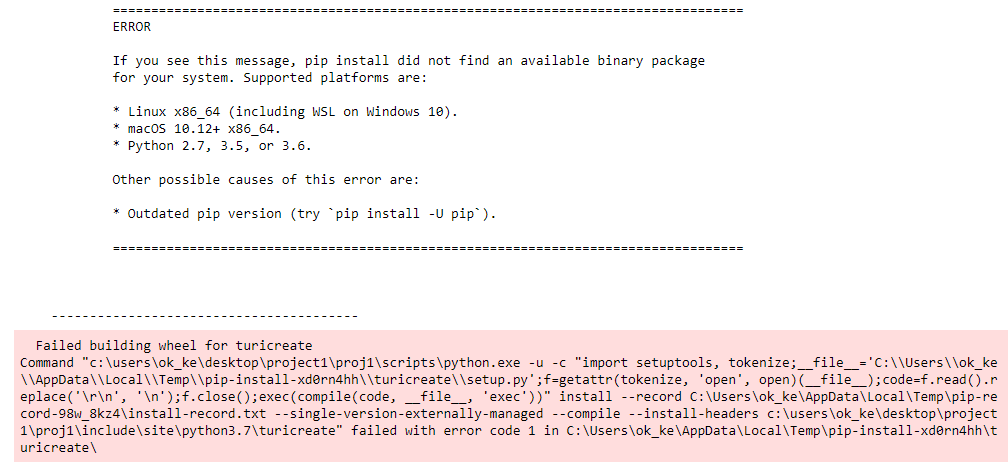
Here is the error i got
ok-kewei
on 31 Dec 2018
make sure you have installed turicreate and jupyter notebook inside virtual environment with same python version
 sutkarsh-s
on 14 Jun 2020
sutkarsh-s
on 14 Jun 2020
i tried installing turicreate on windows 8. but i was not able to do it.i tried using both anconda and pip can anyone help me out
 Gnaneswri
on 21 Jul 2020
Gnaneswri
on 21 Jul 2020
@Gnaneswri - Windows 8 is not supported. With WSL (Ubuntu 18) you should be able to use TuriCreate on Windows 10.
TobyRoseman
on 22 Jul 2020
Another tip of ensuring that pip and jupyter operate on the same underlying python, call both explicitly through the python command:
python -m pip install turicreate
python -m jupyter notebook
That was my issue. I have created virtual environment and installed there only turicreate. When I was invoking jupyter in this folder, with active environment, the actual application was run from the main installation folder (not from the environment), probably due to fallback. Without any information about this I wasn't able to find the root cause easily. Explicit installation (python -m jupyter notebook) in active environment helped, though.
 Mlokos
on 24 Jul 2020
Mlokos
on 24 Jul 2020
I successfully installed turicreate in virtual environment but when I tried to import it in jupyter notebook it is showing "no module found". But when I ran "!pip3 install turicreate" in notebook it is showing all requirements satisfied. I cannot understand what is the problem. Pls help!
 rajdeep-ghosh
on 27 Jul 2020
rajdeep-ghosh
on 27 Jul 2020
I successfully installed turicreate in virtual environment but when I tried to import it in jupyter notebook it is showing "no module found". But when I ran "!pip3 install turicreate" in notebook it is showing all requirements satisfied. I cannot understand what is the problem. Pls help!
You may be installing it for a different Python version. Rather than !pip3 install turicreate, trying running !pip install turicreate (no 3) in your notebook.
TobyRoseman
on 28 Jul 2020
Related issues
 Rhutus
·
3Comments
Rhutus
·
3Comments
 HincaTseng
·
6Comments
johnyquest7
·
6Comments
johnyquest7
·
5Comments
HincaTseng
·
6Comments
johnyquest7
·
6Comments
johnyquest7
·
5Comments
 hoytak
·
3Comments
hoytak
·
3Comments
Most helpful comment
Another tip of ensuring that pip and jupyter operate on the same underlying python, call both explicitly through the python command: