Turbolinks: Google analytics best practice?
First off, absolutely loving this library. Its fantastic and works amazingly.
Second: Client wants google analytics. Anyone have any best practices there? Should I just put it in a
document.addEventListener("turbolinks:load", function() {});
function? Would that work?
If the answer is that its not really going to work with Turbolinks, I'm willing to accept that. Just wondering if anyone is using it successfully right now.
 gregblass
All 17 comments
Actually since you can't run ruby in your application.js file, and I need to only load it in production, and turbolinks beta 4 now evaluates script tags, I think simply placing it before the closing body tag will work. And I'm assuming it will get triggered on every page load, like I want?
...
<% if Rails.env == "production" %>
<script>
[google analytics javascript]
</script>
<% end %>
</body>
You could technically have a script in the head of your layout file that conditionally sets a JavaScript global variable and use that to decide whether or not to run the Google Analytics code in your application.js file although it is a bit of a hack (you have to make sure that the variable that you set is in a script tag that loads before your application.js file and you have to make sure that you don't accidently override that variable in any JavaScript code that runs after it). For example in the head of your app/views/layout/application.html.erb file you could add:
...
<% if Rails.env.production? %>
<script> var USE_GOOGLE_ANALYTICS = true; </script>
<% end %>
<%= javascript_include_tag 'application' %>
...
and then in your application.js file just do something like:
...
if (USE_GOOGLE_ANALYTICS != null && USE_GOOGLE_ANALYTICS) {
[google analytics javascript]
}
This would probably work (you would have to make Google Analytics work on each page navigation though). Personally I wouldn't do this, I just put the Google analytics code (Universal analytics) as provided by Google (minus the line: ga('send', 'pageview')) in the head of my layout file (app/views/layout/application.html.erb) and then placed the following at the end of the body in my layout file:
<script>
if (typeof(ga) === "function")
ga('send', 'pageview', (location.pathname + location.search));
console.info("Navigated to: " + location.pathname + location.search);
</script>
If you put the entire Google analytics code in the body of your layout file, you should be fine as well (although it'll be slower).
It probably is a better practice to use a library like autotrack which is written by Google and mentioned in their docs but you would have to make it work with Turbolinks (unless somebody already has).
 preetpalS
on 16 Apr 2016
preetpalS
on 16 Apr 2016
Thanks for the kind words, Greg!
You should be able to initialize the analytics JS and create a tracker using a <script> tag in the <head>:
<head>
  ...
  <% if Rails.env.production? %>
    <script>
      (function(i,s,o,g,r,a,m){i['GoogleAnalyticsObject']=r;i[r]=i[r]||function(){
      (i[r].q=i[r].q||[]).push(arguments)},i[r].l=1*new Date();a=s.createElement(o),
      m=s.getElementsByTagName(o)[0];a.async=1;a.src=g;m.parentNode.insertBefore(a,m)
      })(window,document,'script','https://www.google-analytics.com/analytics.js','ga');

      ga("create", "UA-XXXXX-Y", "auto");
    </script>
  <% end %>
</head>
Then, listen for turbolinks:load to track pageviews. You can access the visited URL via event.data.url and send it along:
document.addEventListener "turbolinks:load", (event) ->
  if typeof ga is "function"
    ga("set", "location", event.data.url)
    ga("send", "pageview")
Note that we ensure ga() is indeed a function before we call it. It won't exist if the analytics <script> was excluded by the environment.
Full disclosure: I haven't tested this very thoroughly, but it seems to be working for me. Let me know how it goes!
 packagethief
on 16 Apr 2016
packagethief
on 16 Apr 2016
@packagethief
Thanks for the tip on ensuring that ga is actually a function prior to calling it. I would be careful about using event.data.url for the visited URL though. The Google Analytics Docs doc state that the third argument to ga (path in docs) should begin with '/'. event.data.url returns the full url (e.g. http://example.com/).
preetpalS
on 16 Apr 2016
Nice catch @preetpalS. Probably better to set the location field instead. I've updated the snippet above.
packagethief
on 16 Apr 2016
Thanks guys!
gregblass
on 20 Apr 2016
@gregblass how about putting this on a Wiki page?
 swrobel
on 18 Aug 2016
swrobel
on 18 Aug 2016
Thanks you all.
At the moment I'm using
coffee:
  if typeof ga is 'function'
    ga 'send', 'pageview', location.pathname
just before the </body> to track pageviews from browsers without turbolinks compatibility
 tagliala
on 14 Dec 2016
tagliala
on 14 Dec 2016
After upgrading from turbolinks (2.5.3) to turbolinks (5.0.1), and jquery-rails (4.1.0) to jquery-rails (4.2.1) this code has stopped working for me:
$(document).on 'turbolinks:load', (event) ->
  if typeof ga is "function"
    ga("set", "location", event.data.url)
    ga("send", "pageview")
The structure of the event object is now different. I've changed to the following code which seems to be working:
$(document).on 'turbolinks:load', (event) ->
  if typeof ga is "function"
    ga("set", "location", location.pathname)
    ga("send", "pageview")
* UPDATE * I reverted to before the upgrade of the mentioned gems and I am still having the same issue where the event.data object is null.
 cameronbourgeois
on 8 Jul 2017
cameronbourgeois
on 8 Jul 2017
@cameronbourgeois, since the event in this case is a jQuery event, you'll need to use event.originalEvent to access the native event.
packagethief
on 10 Jul 2017
Since this is one of the primary results for "google analytics turbolinks" here's the solution if you need to pass in extra arguments to analytics via ERB, which you can't do easily if it's compiled in a separate js file.
If you try to use the solutions in this thread in the head or body, you'll be sending increasingly repeating analytics events every page load (one on the first page load, twice on the second page load, etc.) because turbolinks:load will resubscribe to the event, and you'll have multiple handlers.
The easiest thing to do is to take the Google Analytics out of the head and put it in the body in a script tag. It will get reloaded by Turbolinks every page automatically. You don't have to do anything else.
<head><!-- no google analytics --></head>
<body>
  <!-- content content content -->
  <script>
    <!-- analytics ERB current_user stuff here -->
    ga('something', current_user)
  </script>
</body>
 bbugh
on 23 May 2018
bbugh
on 23 May 2018
Just landed here as interested in implementing Turbolinks into an application, but it’s currently using Google Analytics.
What do we do about the new gtag.js flavour of Google Analytics, which says:
Copy and paste this code as the first item into the
<HEAD>of every web page that you want to track.
Do we put this in the <head>? Or ignore Google’s suggestion and put it in the <body> so that it is re-evaluated on each page load? Or include the library once in the <head> but disable page tracking, and manually track a page view when each page is loaded by Turbolinks?
 martinbean
on 24 Jul 2018
martinbean
on 24 Jul 2018
Accordingly to https://developers.google.com/analytics/devguides/collection/gtagjs/pages
you use the config command to send a pageview. What we need is to call it on turbolinks:pageload and supply current page location:
https://gist.github.com/DimaSamodurov/127c39244d0b411bfb474a8102a83497
 DimaSamodurov
on 13 Sep 2018
DimaSamodurov
on 13 Sep 2018
To use google analytics' gtag, which is the newer version of ga.js with Rails 5.x and turbolinks:
document.addEventListener('turbolinks:load', function(event){
  if(typeof(gtag) == 'function'){
    gtag('config', 'UA-1234567-YOUR-TRACKING-CODE-HERE', {
      'page_title' : event.target.title,
      'page_path': event.data.url.replace(window.location.protocol + "//" + window.location.hostname, "")
    });
  }
})
Put this js code in your application.js file (or link it from there), and it works. Make sure the standard gtag init code is listed first in the
tag of your application.html.erb file (i.e. before the application.js link) spnkr
on 3 Feb 2019
spnkr
on 3 Feb 2019
@spnkr Thanks for this! To flesh out those instructions, this is what I did exactly:
In the <head> of my layout file, before including application.js, I added
/ https://github.com/turbolinks/turbolinks/issues/73#issuecomment-460028854
/ https://developers.google.com/gtagjs/devguide/snippet
script async=true src="https://www.googletagmanager.com/gtag/js?id=#{ENV["GOOGLE_ANALYTICS_ID"]}"
javascript:
  window.dataLayer = window.dataLayer || [];
  function gtag() { dataLayer.push(arguments); }
  gtag("js", new Date());
This is Slim syntax, but you can probably guess the corresponding HTML. ENV["GOOGLE_ANALYTICS_ID"] is my ID from Google like "UA-12345678-1". You could just hard-code it if you prefer, of course, but then analytics may be reported in non-production as well if you don't take other steps to prevent it.
Then my app/assets/javascripts/application.js does
//= require google_analytics
And app/assets/javascripts/google_analytics.js.erb (note the .erb) does
// https://github.com/turbolinks/turbolinks/issues/73#issuecomment-460028854
document.addEventListener("turbolinks:load", function(event) {
  if(typeof(gtag) == "function") {
    gtag("config", "<%= ENV["GOOGLE_ANALYTICS_ID"] %>", {
      "page_title": event.target.title,
      "page_path": event.data.url.replace(window.location.protocol + "//" + window.location.hostname + (location.port && ":" + location.port), ""),
    });
  }
});
Note that I added handling of location.port so I could confirm it working when running the app on localhost:3000.
I confirmed it works by looking at Google Analytics' "Real-Time Reports" and verifying it changed as I navigated the site.
 henrik
on 27 Apr 2019
henrik
on 27 Apr 2019
I placed the following code before my closing body tag:
<script>
  document.addEventListener("turbolinks:load", function(event) {
    console.log('hi');
    if (typeof ga === "function") {
      ga("set", "location", event.data.url);
      ga("send", "pageview");
    }
  });
</script>
I added the console.log as a dirty way to check that the script is being executed. But it appears that it's running multiple times per link click.
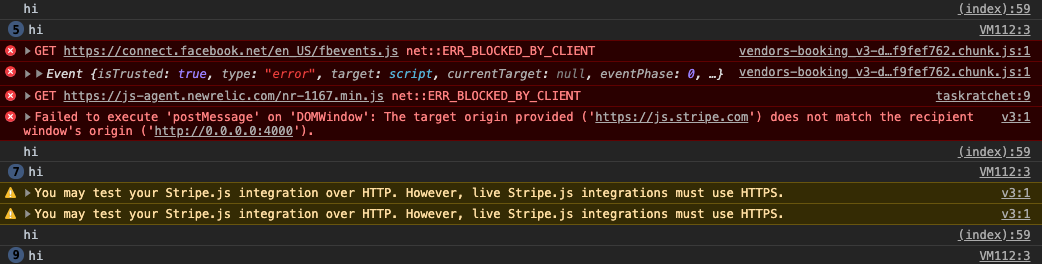
Why would this be happening?
 narthur
on 21 Feb 2020
narthur
on 21 Feb 2020
@narthur Adding this code on on multiple pages will add multiple listeners. Unlike traditional full page loads, event listeners are not removed between Turbolinks page loads, so they'll accumulate. Here's what's happening:
- First page loads and
turbolinks:loadlistener is added turbolinks:loadis triggered and first event handler is called- Second page loads and another
turbolinks:loadlistener is added turbolinks:loadis triggered and both the first and second event handlers are called- and so on…
In this case, you probably don't need the turbolinks:load listener, or you may wish to include this code in the <head> as others have suggested.
 domchristie
on 21 Feb 2020
domchristie
on 21 Feb 2020
Related issues
 coffeebite
·
29Comments
coffeebite
·
29Comments
 tadiou
·
42Comments
tadiou
·
42Comments
 kochka
·
14Comments
kochka
·
14Comments
 pmaojo
·
15Comments
pmaojo
·
15Comments
 lalusaud
·
13Comments
lalusaud
·
13Comments
Most helpful comment
Thanks for the kind words, Greg!
You should be able to initialize the analytics JS and create a tracker using a
<script>tag in the<head>:Then, listen for
turbolinks:loadto track pageviews. You can access the visited URL viaevent.data.urland send it along:Note that we ensure
ga()is indeed a function before we call it. It won't exist if the analytics<script>was excluded by the environment.Full disclosure: I haven't tested this very thoroughly, but it seems to be working for me. Let me know how it goes!