Tui.image-editor: Drawings move on save.
Version
3.2.0
Development Environment
MacOS 10.14.1 (18B75)
Chrome Version 70.0.3538.102 (Official Build) (64-bit)
Current Behavior
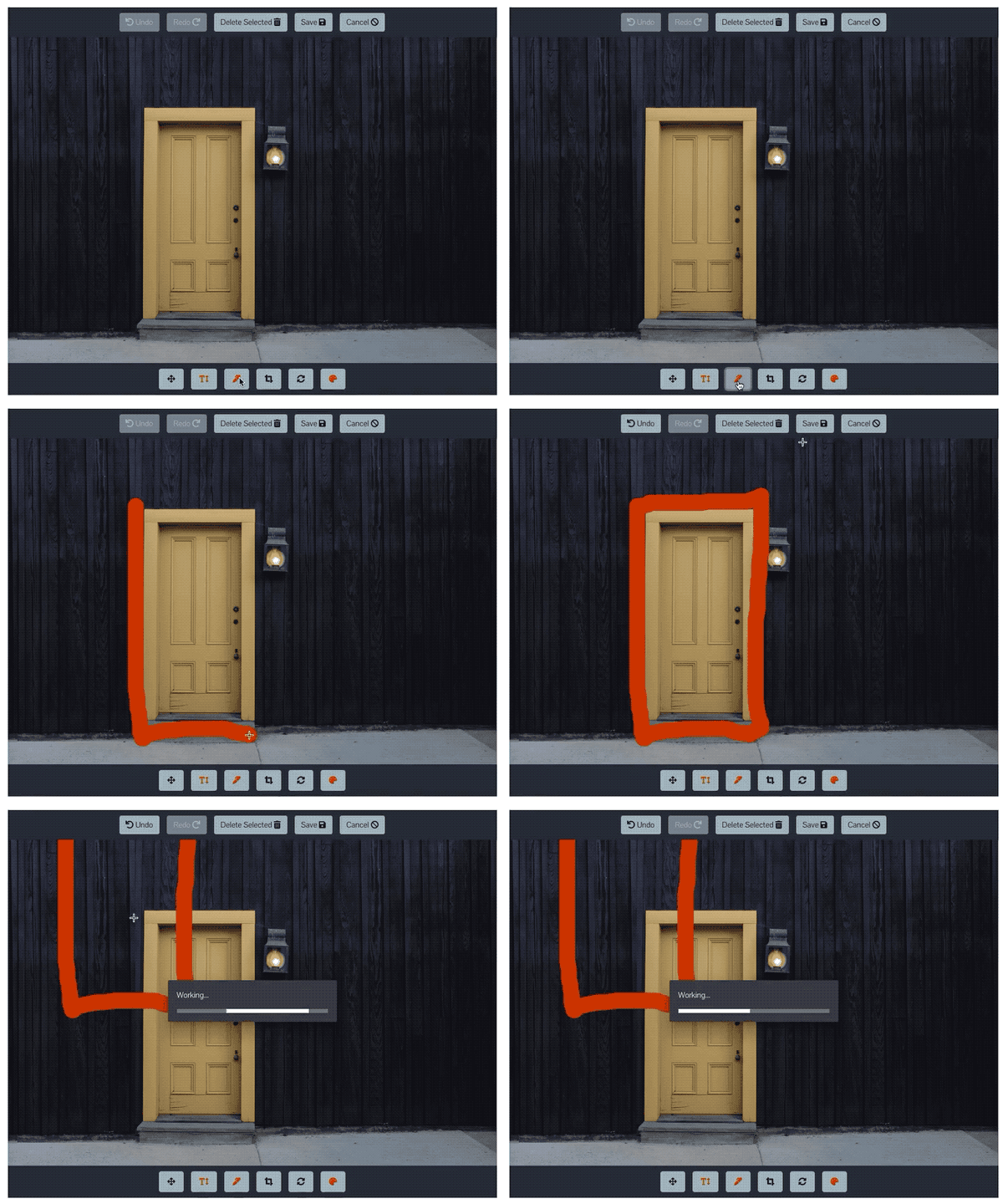
After drawing a line on the image, and manually saving, the drawn item jumps position on the image and saves in the wrong spot.
Expected Behavior
Image should save all items in place.
 humblecoder
All 7 comments
This is amazingly weird. Has no one else encountered this issue? I'm simply using toDataURL() and the editor decides that any drawings get shifted on save. What could be causing this? I don't make any changes to the image before or during save, so what liberties is the library taking? 🤔
humblecoder
on 3 Dec 2018
I encountered this issue, you need to resize the editor with the current canvas width and height, you can use imageEditor.ui.resizeEditor. To get the current size, you can use this imageEditor.getCanvasSize();
 solomon0918
on 4 Dec 2018
solomon0918
on 4 Dec 2018
@solomon0918 I'm drawing my own editor so I already have to "resize" the canvas to show on display. I'm not understanding why I need to resize again before save. Also, not to be obtuse, but would you mind providing a more explicit example of the steps involved and at what point I perform the resize? Thanks.
humblecoder
on 5 Dec 2018
You need to resize the editor after the image loaded, if i am not mistaken when canvas loads the image it is not resizing the editor/canvas to the image size so when you save/download the image, the shapes/drawings will automatically be place on the default size of the canvas. For example, the drawing you drew have this position "top: 100, left: 100", but if the canvas is not the same size of the image, when you try to reload that drawing, it'll be place on the far off and not the same position you drew it.
solomon0918
on 5 Dec 2018
@solomon0918 here are quick and dirty versions of the technique I'm using to resize:
redrawCanvas(){
  let tui = document.getElementById('tui-image-editor')
  let myDimensions = this.calculateAspectRatioFit(
    this.EditorInstance._graphics.canvasImage.width,
    this.EditorInstance._graphics.canvasImage.height,
    Math.max(document.documentElement.clientWidth, window.innerWidth || 0),
    Math.max(document.documentElement.clientHeight, window.innerHeight || 0) * 0.75
  )

  this.resizeCanvas(myDimensions.height,myDimensions.width)
}

----------------

calculateAspectRatioFit(srcWidth, srcHeight, maxWidth, maxHeight) {
  var ratio = Math.min(maxWidth / srcWidth, maxHeight / srcHeight);
  return { width: srcWidth*ratio, height: srcHeight*ratio };
}

----------------

resizeCanvas(height,width){
  let container = document.getElementsByClassName('tui-image-editor-canvas-container')
  container[0].style.height = height + 'px'
  container[0].style.width = width + 'px'
  container[0].style['margin-left'] = 'auto'
  container[0].style['margin-right'] = 'auto'
}
FYI, attempting to call imageEditor.ui.resizeEditor results in a calling resizeEditor on undefined, despite the fact that my ImageEditor instance is defined. Apparently though, there is no UI object off the ImageEditor. I'm not loading the native UI. I'm drawing all the controls myself and calling the API as per example 2 🤔 Also FYI, I've been looking at this for way too long so of I'm missing something obvious, do feel free to point it out.
UPDATE:
It appears that adding this.EditorInstance.resizeCanvasDimension({width:width,height:height}) at the top of resizeCanvas resolves the issue. 🤔
humblecoder
on 6 Dec 2018
@solomon0918
This solution is not working for me,
And I got same issue.
I checked your example.
https://nhn.github.io/tui.image-editor/latest/tutorial-example01-includeUi
But it is also not working.
Let me know the solution for this issue.
 superdev0505
on 9 Oct 2019
superdev0505
on 9 Oct 2019
The same here
 sergeizhukov
on 15 Nov 2019
sergeizhukov
on 15 Nov 2019
Related issues
 zhaoyuhang1033
·
3Comments
zhaoyuhang1033
·
3Comments
 ganesh-500
·
5Comments
ganesh-500
·
5Comments
 hzeeli
·
5Comments
hzeeli
·
5Comments
 taimaiduc
·
3Comments
taimaiduc
·
3Comments
 samirph
·
3Comments
samirph
·
3Comments
Most helpful comment
This is amazingly weird. Has no one else encountered this issue? I'm simply using
toDataURL()and the editor decides that any drawings get shifted on save. What could be causing this? I don't make any changes to the image before or duringsave, so what liberties is the library taking? 🤔