Tui.editor: How to have a "write view" only ?
Hello, it's possible to have a view where you can write only text ?
I would like to have 3 views :
- Markdown (write + preview)
- WYSIWYG (editable preview)
- Write (juste write texte) -> but i don't know how
An idea please ?
Thanks
 OscarLeclerc
All 7 comments
Currently there is two mode as you said.
 bdevg
on 19 Aug 2020
bdevg
on 19 Aug 2020
Yes but do you know if I can change easily the source code to have a third mode ?
OscarLeclerc
on 19 Aug 2020
@OscarLeclerc As @bdevg bdevg said, the Editor currently only offers 2 modes (Markdown, WYSIWYG). But I have a question. As you said, do you want the text mode only feature to hide only the preview area in markdown mode? Or do you only want to use the Markdown editor?
 seonim-ryu
on 21 Aug 2020
seonim-ryu
on 21 Aug 2020
Thanks for your answer @seonim-ryu .
I would like to have the 2 modes (Markdown, WYSIWYG) and one more mode where the preview area is hide in markdown mode yes.
I give you the context, I work on a project where we have an editor an we use TUI Editor.
Actually we use the previewStyle 'tab'
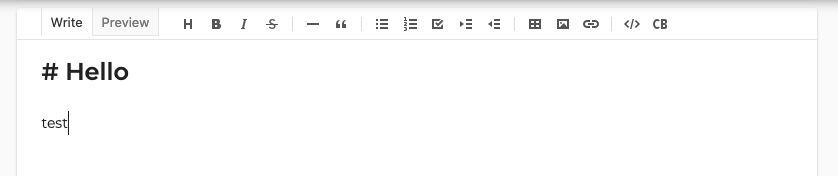
So we have one view where you can write the text and the other is the preview.
I have to edit the editor and try to have 3 modes (Markdown, WYSIWYG and the other).
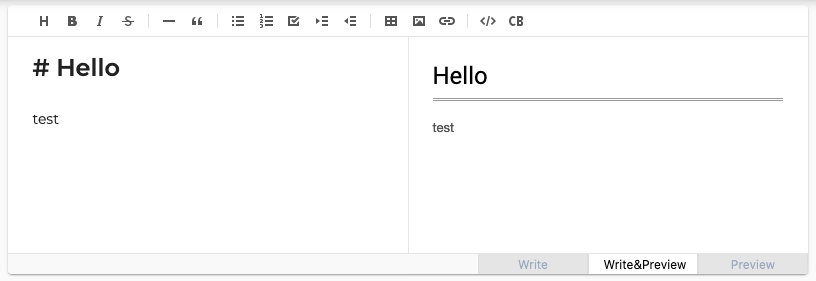
Button Write&Preview = Markdown
Button Preview = WYSIWYG
Button Write = Markdown without preview
In short, the view write that I want matches with the view Write of previewStyle 'tab'
Idk if you understand me well, i'm not bilingual. thanks for your help !
OscarLeclerc
on 21 Aug 2020
@OscarLeclerc I got it! The 3 switch buttons at the bottom of the Editor will be explained by thinking that you implemented it yourself.
First, you need to turn off the mode switch button when creating an instance in the Editor.
const editor = new Editor({
  // ...
  hideModeSwitch: true
});
And the 3 buttons you made are handled by giving your own style. Then, whenever you click each button, you can call the editor's API and make it the mode you want. Note that when you click the first button, you should hide the preview button in the tab with CSS (.te-markdown-tab-section .te-tab).
- Button 1 : Write
editor.changeMode(‘markdown’);
editor.changePreviewStyle(‘tab’);
```css
.te-markdown-tab-section .te-tab {
display: none;
}
* Button 2 : Write&Preview
```js
editor.changeMode(‘markdown’);
editor.changePreviewStyle('vertical');
- Button 3 : Preview
editor.changeMode('wysiwyg');
Could you please check if this is the function you are trying to implement?
seonim-ryu
on 26 Aug 2020
Thanks @seonim-ryu ! It's goood ! I change few things but I have my 3 modes so it's good, thank you !
OscarLeclerc
on 26 Aug 2020
@OscarLeclerc Thank you for checking. I think the problem is solved, so I'll close this issue.
seonim-ryu
on 27 Aug 2020
Related issues
 gincheong
·
4Comments
gincheong
·
4Comments
 Rorke76753
·
4Comments
Rorke76753
·
4Comments
 nilhave
·
3Comments
nilhave
·
3Comments
 oguera
·
3Comments
oguera
·
3Comments
 hrvoj3e
·
3Comments
hrvoj3e
·
3Comments
Most helpful comment
@OscarLeclerc I got it! The 3 switch buttons at the bottom of the Editor will be explained by thinking that you implemented it yourself.
First, you need to turn off the mode switch button when creating an instance in the Editor.
And the 3 buttons you made are handled by giving your own style. Then, whenever you click each button, you can call the editor's API and make it the mode you want. Note that when you click the first button, you should hide the preview button in the tab with CSS (
.te-markdown-tab-section .te-tab).```css
.te-markdown-tab-section .te-tab {
display: none;
}
Could you please check if this is the function you are trying to implement?