Tui.editor: After switching to WYSIWYG and then back to Markdown mode, the newline is missing after <br> tag
Describe the bug
After switching to WYSIWYG and then back to Markdown mode, the newline is missing after <br>.
If you have table, <br> and after that you have h2 then after switching to WYSIWYG and then back to Markdown mode, the h2 header is inside the table.
To Reproduce
- Use this markdown:
**Right aligned columns**

| Option | Description |
| -----: | ----------: |
| data | path to data files to supply the data that will be passed into templates. |
| engine | engine to be used for processing templates. Handlebars is the default. |
| ext | extension to be used for dest files. |
| test | [wefwef](ewf) |
<br>

## Links
- Switch to WYSIWYG mode
- Switch back to Markdown mode
Expected behavior
Newline after the
tag should not be removed.
Screenshots
Before switching to WYSIWYG
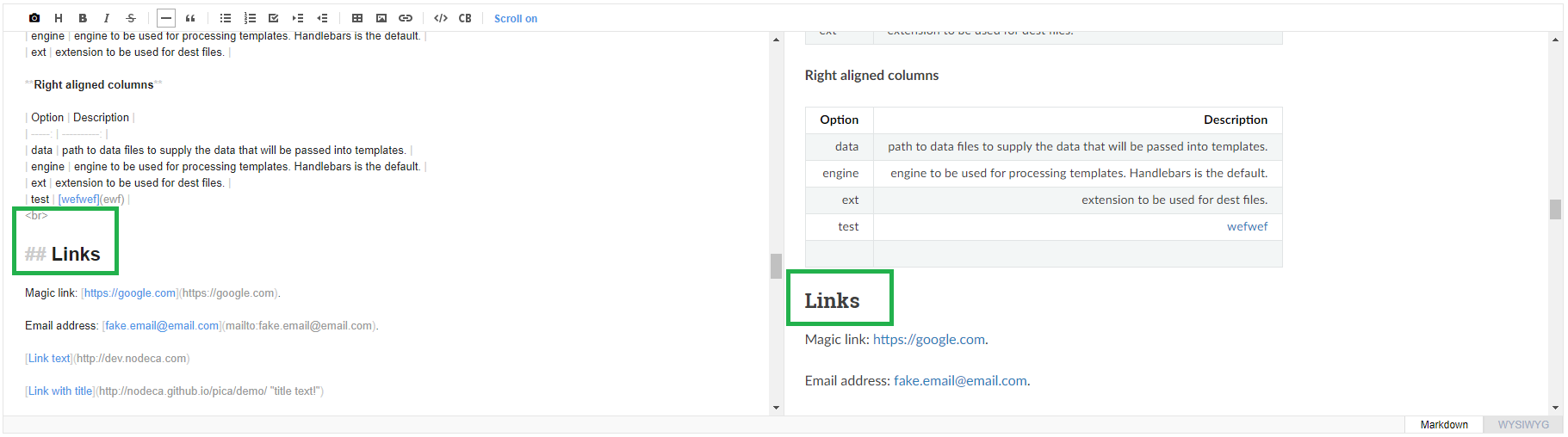
After switching to WYSIWYG and then back to Markdown

Environment:
- Windows 10 64-bit
- Google Chrome 83.0.4103.116
- ToastUI editor 2.1.2, 2.2.0, 2.3.0
 mistris
All 2 comments
@mistris When I check the issues below, it seems to be a problem using the renderer instead of the Editor.
This issue seems to be because parsing is broken when there is <br> in the renderer you are using. When using the renderer used in the Editor, <br> is parsed normally. I hope you can share me some code or example pages to check.
 seonim-ryu
on 31 Jul 2020
seonim-ryu
on 31 Jul 2020
@seonim-ryu just go to https://nhn.github.io/tui.editor/latest/tutorial-example01-editor-basic and insert this markdown:
111
<br>
<br>
<br>
222
and then switch to wysiwyg mode and back.
The code will be changed to:
111
222
 trentmon
on 6 Aug 2020
trentmon
on 6 Aug 2020
Related issues
 dioscuroi
·
3Comments
dioscuroi
·
3Comments
 nilhave
·
3Comments
nilhave
·
3Comments
 kelvinkoko
·
3Comments
kelvinkoko
·
3Comments
 hrvoj3e
·
3Comments
hrvoj3e
·
3Comments
 koliyo
·
4Comments
koliyo
·
4Comments
Most helpful comment
@seonim-ryu just go to https://nhn.github.io/tui.editor/latest/tutorial-example01-editor-basic and insert this markdown:
111
<br>
<br>
<br>
222
and then switch to wysiwyg mode and back.
The code will be changed to:
111
222