Tsparticles: Help undestanding particles.number
Since I can't find docs for particles.number I've tried experimenting with the demo editor to figure out the settings. I've enabled the "More" > "Toggle Stats" option to see the current particle number. Unfortunately I still can't seem to understand the config options.
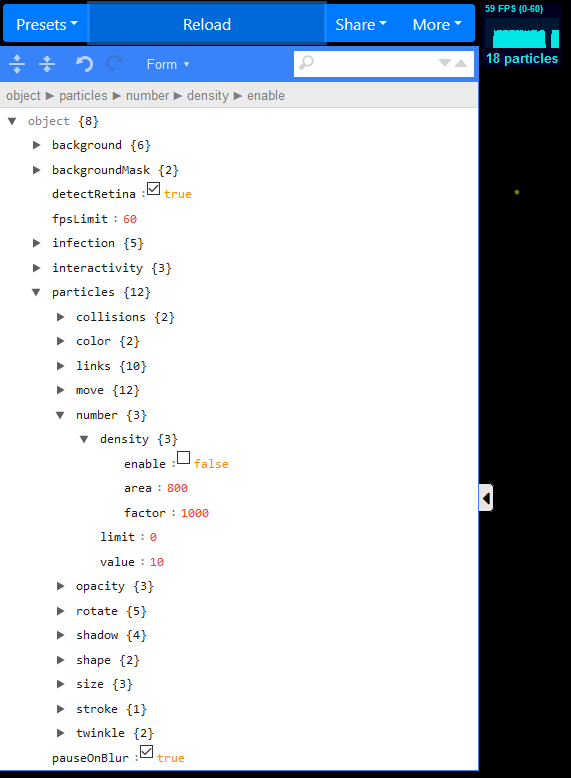
Why does the following config render 18 particles on the screen (according to the stats box)? My expectation is 10 rendered particles.
"number": {
  "density": {
    "enable": false,
    "area": 800,
    "factor": 1000
  },
  "limit": 0,
  "value": 10
}
Why does the following config render 2 particles on the screen (according to the stats box)? My expectation is 1 rendered particle.
"number": {
  "density": {
    "enable": false,
    "area": 800,
    "factor": 1000
  },
  "limit": 1,
  "value": 10
}
What is the unit of density.area. Is it the number of particles per 800x800 pixels?
What does the density.factor mean?
 hidarikani
All 2 comments
Issue-Label Bot is automatically applying the label question to this issue, with a confidence of 0.67. Please mark this comment with :thumbsup: or :thumbsdown: to give our bot feedback!
Links: app homepage, dashboard and code for this bot.
![issue-label-bot[bot] picture](https://avatars2.githubusercontent.com/in/27079?v=4&s=40) issue-label-bot[bot]
on 10 Sep 2020
issue-label-bot[bot]
on 10 Sep 2020
Hi @hidarikani,
Those values are used in the formula used here
this.density = (canvas.width * canvas.height) / (densityOptions.factor * pxRatio * densityOptions.area);

// this.density will be multiplied with the particles.number value
This formula is inherited from particles.js changing a hard coded value with a customizable factor.
Disabling the density should use only the value for the count, if it’s not it’s a bug I need to investigate
 matteobruni
on 10 Sep 2020
matteobruni
on 10 Sep 2020
Related issues
matteobruni
·
6Comments
 microraptor
·
3Comments
matteobruni
·
5Comments
microraptor
·
3Comments
matteobruni
·
5Comments
 adammesa
·
4Comments
adammesa
·
4Comments
 nikse
·
4Comments
nikse
·
4Comments
Most helpful comment
Issue-Label Bot is automatically applying the label
questionto this issue, with a confidence of 0.67. Please mark this comment with :thumbsup: or :thumbsdown: to give our bot feedback!Links: app homepage, dashboard and code for this bot.